1. Киришүү
Бул колдонмодо сиздин түзмөгүңүздү орнотуу, иштетүү жана техникалык тейлөө боюнча кеңири көрсөтмөлөр берилген Sharper Image SBT2015BK Volta Bluetooth Sound System Base. This sound system is designed to enhance your audio experience for television, music, and other media, featuring integrated Bluetooth wireless technology, a built-in subwoofer, and an FM radio. It also serves as a stable platform for most flat-panel televisions up to 55 inches or 110 pounds.
2. Коопсуздук боюнча маанилүү маалымат
Бул продуктуну колдонуудан мурун бардык коопсуздук эскертүүлөрүн жана көрсөтмөлөрүн кунт коюп окуп чыгыңыз. Келечекте колдонуу үчүн бул колдонмону сактап коюңуз.
- Электр шок коркунучу: Түзмөктү ачпаңыз. Ичинде колдонуучу тейлей турган тетиктер жок. Бардык тейлөө иштерин квалификациялуу тейлөө кызматкерлерине тапшырыңыз.
- Суу жана ным: Бул шайманды жамгырга же нымга тийгизбеңиз. Ваза сыяктуу суюктуктар толтурулган нерселерди аппараттын үстүнө койбоңуз.
- Жылуулук: Радиаторлор, жылуулук регистрлери, мештер же башка аппараттар (анын ичинде) сыяктуу жылуулук булактарынын жанына орнотпоңуз ampкөтөргүчтөр) жылуулукту пайда кылуучу.
- Вентиляция: Туура желдетүүнү камсыз кылыңыз. Эч кандай желдетүүчү тешиктерди жаап албаңыз.
- Кубат булагы: Use only the power supply specified by the manufacturer.
- Тазалоо: Кургак чүпүрөк менен гана тазалаңыз.
- Жайгашкан жери: Ensure the unit is placed on a stable, level surface. Do not overload the unit with a TV exceeding 55 inches or 110 pounds.
3. Пакеттин мазмуну
Төмөндө тизмеленген нерселердин баары пакетиңизге камтылганын текшериңиз:
- Sharper Image Volta Bluetooth Sound System Base (SBT2015BK)
- Алыстан башкаруу
- AC кубат адаптери
- RCA Audio Cable (Red/White)
- 3.5 мм көмөкчү аудио кабель
- Колдонуучунун Колдонмосу (бул документ)
4. Продукт бүтүп калдыview
Familiarize yourself with the components and controls of your sound system base.
Алдыңкы панелдин башкаруу элементтери жана дисплей
The front panel features an LED display and backlit buttons for easy navigation and status indication.
- Кубат баскычы: Агрегатты күйгүзөт же өчүрөт.
- Режим баскычы: Cycles through input modes (Bluetooth, AUX, FM Radio).
- Үнүн төмөндөтүү (-): Үнүн азайтат.
- Үнүн жогорулатуу (+): Үнүн көбөйтөт.
- LED дисплей: Учурдагы режимди, үн деңгээлин жана FM жыштыгын көрсөтөт.
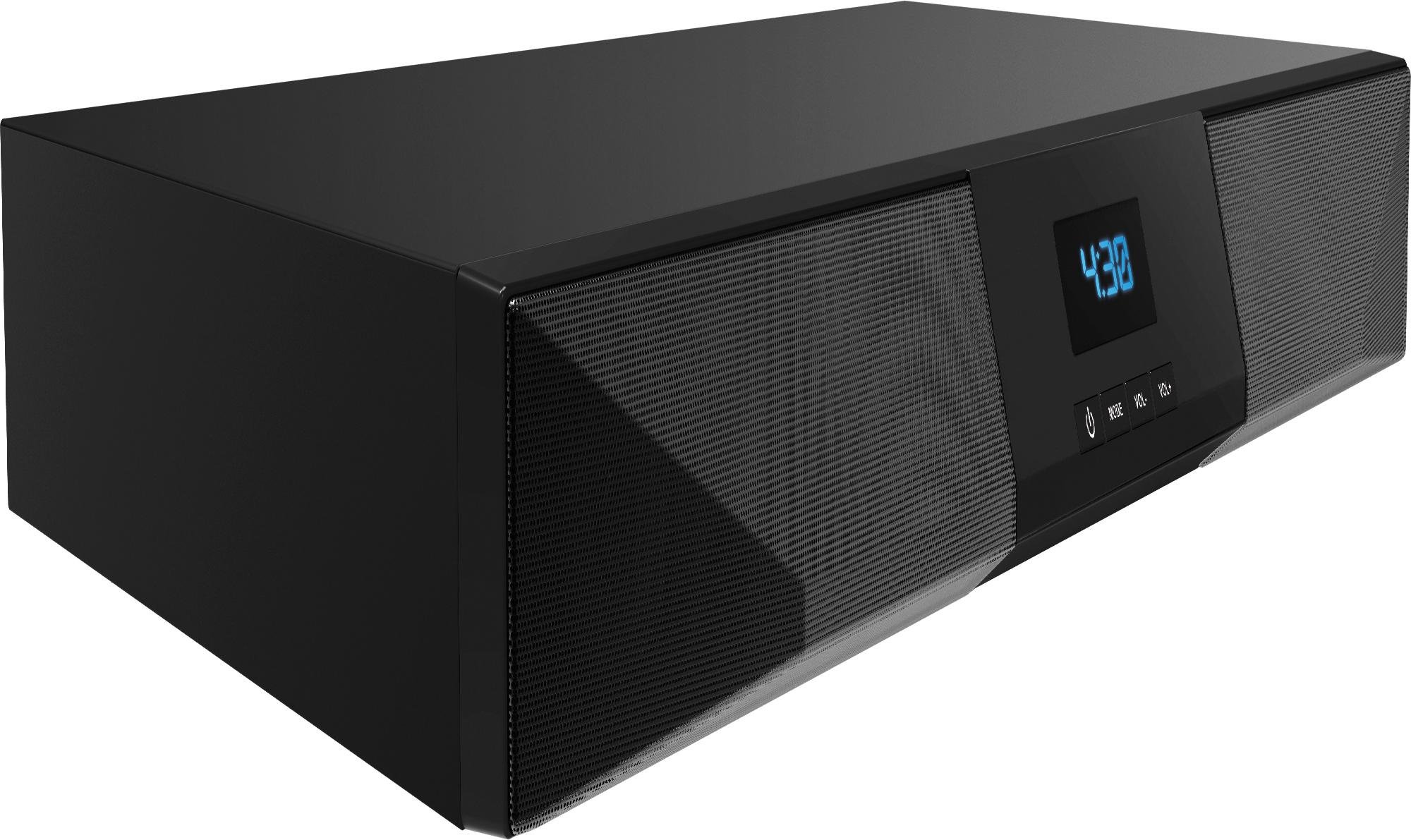
Сүрөт 1: Алдыңкы view of the Sharper Image SBT2015BK Volta Bluetooth Sound System Base, showing the LED display and control buttons.
Арткы панелдик байланыштар
The rear panel provides various ports for connecting external audio sources and power.
- AUX IN (RCA L/R): For connecting devices using RCA cables.
- СЫЗЫК КИРГИЗҮҮ (3.5 мм): For connecting devices using a 3.5mm auxiliary cable.
- DC 12V === 2A: AC адаптер үчүн кубат киргизүү.
- POWER которуштуруу: Агрегаттын негизги өчүргүч.
Видео 1: Бүттүview of the Sharper Image SBT2015BK Volta Bluetooth Sound System Base, demonstrating unboxing, front panel controls, and rear panel connections. This video highlights the product's features and ease of setup.
5. Орнотуу
Follow these steps for initial setup of your sound system base.
5.1 Орнотуу
- Place the sound system base on a stable, flat surface.
- If using as a TV stand, carefully place your flat-panel TV on top of the sound system base. Ensure the TV's weight and size do not exceed the maximum supported limits (up to 55 inches or 110 pounds).
- Желдетүү үчүн түзүлүштүн айланасында жетиштүү орун бар экенине ынаныңыз.
5.2 Кубат туташтыруу
- AC кубат адаптерин туташтырыңыз DC 12V === 2А input port on the rear of the sound system base.
- Plug the other end of the AC power adapter into a standard wall outlet.
- Flip the КҮЧ switch on the rear panel to the "ON" position. The LED display on the front panel should illuminate.
5.3 Audio Connections (Optional)
You can connect external audio devices using either RCA or 3.5mm auxiliary cables.
- RCA туташуу: Connect one end of the RCA audio cable (red and white plugs) to the AUX IN (R/L) ports on the sound system base. Connect the other end to the corresponding audio output ports on your TV or other audio device.
- 3.5mm Auxiliary Connection: Connect one end of the 3.5mm auxiliary audio cable to the LINE IN port on the sound system base. Connect the other end to the headphone jack or auxiliary output of your audio device.
6. Иштөө нускамалары
Learn how to use the various functions of your sound system base.
6.1 Күйгүзүү/өчүрүү
- Бөлүктү күйгүзүү үчүн, басыңыз Кубат баскычы (⏻) on the front panel or the remote control.
- To turn the unit off (standby mode), press the Кубат баскычы (⏻) again. The display will show "STANDBY" or similar.
- For complete power off, use the КҮЧ switch on the rear panel. Note that turning off the main power switch may reset volume levels.
6.2 Режимди тандоо
басыңыз РЕЖИМ button on the front panel or remote control to cycle through the available input modes:
- Bluetooth (BL): Зымсыз аудио агымы үчүн.
- AUX (LINE): For RCA or 3.5mm auxiliary input.
- FM Radio (FM): FM радиостанцияларын угуу үчүн.
6.3 Bluetooth жупташтыруу
- Turn on the sound system base and select Bluetooth (BL) колдонуу режими РЕЖИМ button. The display will show "BL" and a blinking Bluetooth icon, indicating it's in pairing mode.
- Мобилдик түзмөгүңүздө Bluetooth'ду иштетиңиз (смартфон, планшет ж.б.).
- Издөө available Bluetooth devices and select "SBT2015BK" from the list.
- Once paired, the Bluetooth icon on the display will stop blinking, and you can begin streaming audio wirelessly.
6.4 AUX киргизүүнү колдонуу
- Аудио аспабыңызды туташтырыңыз AUX IN (RCA) or LINE IN (3.5mm) port on the rear panel.
- басыңыз РЕЖИМ button until "LINE" appears on the display.
- Туташкан түзмөгүңүздөн аудио ойнотуңуз.
6.5 FM радиосун колдонуу
- басыңыз РЕЖИМ баскычын дисплейде "FM" пайда болгонго чейин басыңыз.
- Use the remote control to scan for stations or manually tune to your desired frequency.
- The display will show the current FM frequency.
6.6 Үндү башкаруу
Үнүн колдонуп, үнүн жөндөңүз VOL- жана VOL+ buttons on the front panel or the remote control. The current volume level will be shown on the LED display.
7. Техникалык тейлөө
Proper care and maintenance will ensure the longevity of your sound system base.
- Тазалоо: Аппаратты жумшак, кургак чүпүрөк менен сүртүңүз. Суюк тазалоочу каражаттарды же аэрозоль чачыраткычтарын колдонбоңуз.
- Вентиляция: Вентиляция тешиктерин чаңдан жана таштандылардан тазалаңыз.
- Сактагыч: Эгер аппаратты узак убакытка сактасаңыз, аны розеткадан ажыратып, салкын, кургак жерде сактаңыз.
8. Кыйынчылыктарды
Эгер көйгөйлөргө туш болсоңуз, төмөнкү жалпы көйгөйлөрдү жана чечимдерди караңыз:
| Көйгөй | Мүмкүн себеп | Чечим |
|---|---|---|
| Күч жок | Power adapter not connected; Rear power switch off; Outlet not working. | Ensure power adapter is securely connected. Flip the rear КҮЧ switch to ON. Test the outlet with another device. |
| Үн жок | Incorrect input mode; Volume too low; Audio cable not connected properly; Device volume too low. | Басыңыз РЕЖИМ to select the correct input. Increase volume on the sound system and connected device. Check audio cable connections. |
| Bluetooth жупташкан жок | Not in Bluetooth mode; Device too far; Device already paired to another unit. | Бирдиктин бар экенин текшериңиз Bluetooth (BL) mode. Move device closer to the sound system. Disconnect from other Bluetooth devices. |
| FM радио статикалык | Алсыз сигнал; Интерференция. | Adjust the unit's position to improve reception. Try scanning for other stations. |
| Пульт иштебей жатат | Batteries dead; Obstruction between remote and unit; Remote not pointed at IR sensor. | Replace remote batteries. Remove any obstructions. Point the remote directly at the IR sensor on the front panel. |
9. Техникалык шарттар
- Модел: SBT2015BK
- Бренд: Айкыныраак сүрөт
- Динамик түрү: Subwoofer (Built-in)
- Көлөмдүү үн каналынын конфигурациясы: 2.1
- Динамиктин максималдуу чыгаруу күчү: 110 Ватт
- Зымсыз байланыш технологиясы: Bluetooth
- Аудио киргизүү: RCA (L/R), 3.5mm Auxiliary
- Өзгөчөлүктөр: FM Radio, TV Stand Functionality
- Max TV Size/Weight: Up to 55 inches / 110 pounds
- Кубат булагы: Corded Electric (DC 12V === 2A)
- Башкаруу ыкмасы: Remote, On-unit buttons
- Продукциянын өлчөмдөрү: 23.5 x 14.5 x 3 дюйм
- Элемент Салмагы: 10 фунт
- Түсү: Кара
10. Кепилдик жана колдоо
For warranty information or technical support, please refer to the warranty card included in your package or visit the official Sharper Image webсайт. Агрегатты өзүңүз оңдоого аракет кылбаңыз, анткени бул сиздин гарантияңызды жокко чыгарышы мүмкүн.
Өндүрүүчү: Түштүк телеком


