1. Киришүү
This manual provides detailed instructions for the setup, operation, and maintenance of your Technoline WS 6760 Radio-Controlled Weather Station. Please read this manual thoroughly before using the device to ensure correct operation and to maximize its features. The WS 6760 offers comprehensive weather data including indoor and outdoor temperature and humidity, atmospheric pressure, weather forecasts, and a radio-controlled clock with additional astronomical information.
2. Коопсуздук маалыматы
- Do not expose the main unit or sensor to extreme temperatures, direct sunlight, or moisture.
- Аппаратты жерге түшүрүүдөн же катуу таасирлерден сактаныңыз.
- Агрегатты өз алдынча бөлүүгө же оңдоого аракет кылбаңыз. Бардык тейлөөлөрдү квалификациялуу кызматкерлерге тапшырыңыз.
- Колдонулган батарейкаларды жергиликтүү эрежелерге ылайык таштаңыз.
- Аппаратты балдар жетпеген жерде сактаңыз.
3. Пакеттин мазмуну
Сураныч, бардык буюмдар бар экенин жана жакшы абалда экендигин текшериңиз:
- Technoline WS 6760 Main Weather Station Unit
- TX70DTH Wireless Outdoor Sensor
- Instruction Manual
4. Продукт бүтүп калдыview
4.1 Негизги блок
The main unit features a large LCD display showing various weather parameters and time information. It is designed for tabletop placement.

4.1-сүрөт: Technoline WS 6760 Main Unit and TX70DTH Outdoor Sensor. This image shows the primary display unit alongside its wireless outdoor sensor, illustrating their relative sizes and designs.

4.2-сүрөт: Деталдаштырылган view of the WS 6760 main unit's display, showing various data points such as time, date, indoor/outdoor temperature and humidity, atmospheric pressure history, and weather forecast icons.
4.2 Wireless Outdoor Sensor (TX70DTH)
The TX70DTH sensor measures outdoor temperature and humidity and transmits data wirelessly to the main unit. It features a small display for local readings.

4.3-сүрөт: The TX70DTH outdoor sensor shown mounted on a brick wall, demonstrating a typical installation scenario. The sensor displays its current temperature and humidity readings.

4.4-сүрөт: A standalone view of the TX70DTH outdoor sensor, highlighting its compact design and integrated display for temperature and humidity.
5. Орнотуу
5.1 Батареяны орнотуу
- Негизги блок: Open the battery compartment cover on the back of the main unit. Insert 2 x AA batteries, observing the correct polarity (+/-). Close the cover.
- Тышкы сенсор: Open the battery compartment cover on the back of the TX70DTH sensor. Insert 2 x AA batteries, observing the correct polarity (+/-). Close the cover.
Note: Always replace all batteries at the same time. Use high-quality alkaline batteries for optimal performance.
5.2 Сенсорду жупташтыруу
After inserting batteries into both units, the main unit will automatically attempt to connect with the outdoor sensor. This process may take a few minutes. Ensure the sensor is within range of the main unit (typically up to 30 meters in open air).
- If the outdoor temperature/humidity does not appear, press the "SEARCH" button on the main unit to initiate a manual search for the sensor.
- The sensor has a channel switch (1, 2, 3). Ensure the main unit is set to the same channel as the sensor if you are using multiple sensors or experiencing interference.
5.3 Initial Time and Date Setup
The WS 6760 is equipped with a radio-controlled clock (DCF-77). Upon initial power-up, it will automatically search for the DCF signal to set the time and date. This process can take several hours depending on your location and signal strength.
- Place the main unit near a window for better signal reception.
- Once the signal is received, the time, date, and day of the week will be automatically set. A signal icon will appear on the display.
- You can manually set the time and date if the radio signal is unavailable or if you prefer manual adjustment. Refer to Section 6.1 for manual settings.
- Adjust the time zone offset (± 12 hours) if your location is not in the standard DCF time zone.
6. Иштөө нускамалары
6.1 Убакытты жана датаны көрсөтүү
- 12/24 саат форматы: Press the "MODE" button to toggle between 12-hour and 24-hour time display.
- Убакытты кол менен орнотуу: If the radio signal is not received, hold the "MODE" button to enter manual time setting mode. Use the "UP" and "DOWN" buttons to adjust values and "MODE" to confirm.
- Weekday Language: The weekday can be displayed in 7 different languages. Access this setting via the manual time setting mode.
6.2 Температура жана нымдуулук
The station displays both indoor and outdoor temperature and humidity. The outdoor readings are received from the TX70DTH sensor.
- MIN/MAX Memory: Press the "MIN/MAX" button to view the minimum and maximum recorded indoor/outdoor temperature and humidity values. Press again to clear.
- Тренди дисплей: Arrows next to the temperature and humidity readings indicate rising, stable, or falling trends.
- Комфорт индикатору: An icon indicates the indoor comfort level based on temperature and humidity.
- Үшүк жөнүндө эскертүү: An alarm icon will appear when the outdoor temperature approaches freezing point.
6.3 Atmospheric Pressure and Weather Forecast
The station measures atmospheric pressure and uses this data to predict future weather conditions.
- басым дисплей: The current atmospheric pressure is displayed, often in hPa.
- 12-Hour History: A bar graph shows the atmospheric pressure trend over the last 12 hours, aiding in weather prediction.
- Аба ырайынын белгилери: Icons (e.g., sunny, partly cloudy, cloudy, rainy) predict the weather for the next 12-24 hours based on pressure changes.
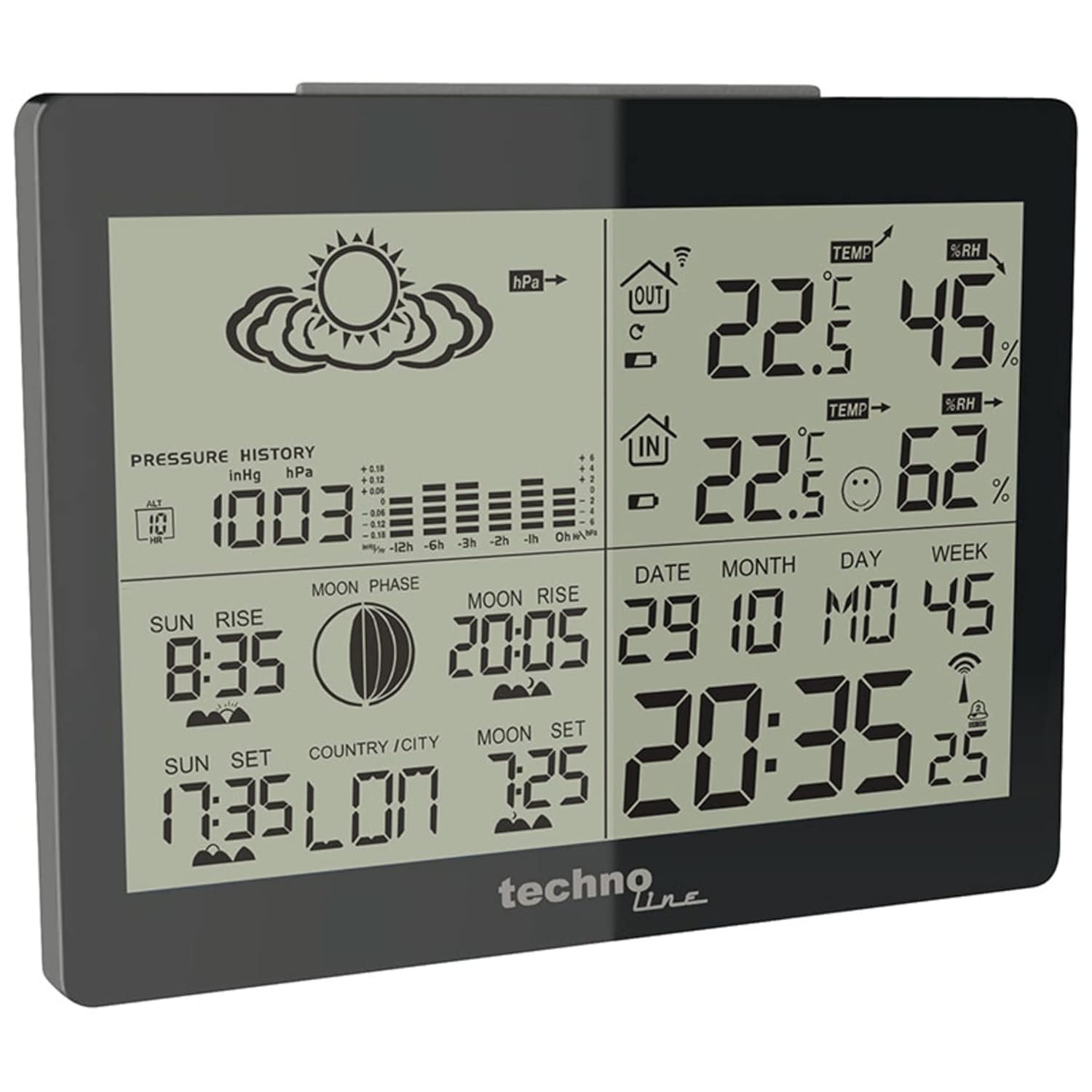
6.1-сүрөт: The main unit display highlighting the atmospheric pressure history graph and weather forecast icons, which predict future weather conditions.
6.4 Astronomical Data
The WS 6760 provides information related to celestial events.
- Күндүн чыгышы жана батышы: Displays the local sunrise and sunset times.
- Ай фазалары: An icon indicates the current phase of the moon.
- Moonrise and Moonset: Shows the local moonrise and moonset times.
6.5 Ойготкуч функциялары
The station includes two programmable alarms with a snooze function.
- Ойготкучтарды орнотуу: Press the "ALARM" button to cycle through Alarm 1, Alarm 2, and Alarm Off. Hold "ALARM" to enter setting mode for the selected alarm. Use "UP" and "DOWN" to adjust time and "ALARM" to confirm.
- Чырым Function: When an alarm sounds, press any button (except "ALARM") to activate the snooze function. The alarm will sound again after a few minutes.
6.6 Арткы жарык
The display features a blue backlight for improved visibility in low-light conditions.

6.2-сүрөт: The main unit display illuminated with its blue backlight, enhancing readability in dark environments.
- Press the "LIGHT" button (usually located on the top or side) to activate the backlight for a few seconds.
7. Техникалык тейлөө
- Тазалоо: Дисплейди сүртүңүз жана вasing жумшак менен, гamp кездеме. Абразивдүү тазалагычтарды же эриткичтерди колдонбоңуз.
- Батареяны алмаштыруу: Replace batteries in both the main unit and the outdoor sensor when the low battery indicator appears on the display. Always replace all batteries at once.
- Сенсордун жайгашуусу: Ensure the outdoor sensor is placed in a shaded, well-ventilated area, protected from direct rain and sunlight, to ensure accurate readings and prolong its lifespan.
8. Кыйынчылыктарды
| Көйгөй | Мүмкүн себеп | Чечим |
|---|---|---|
| Сырткы температура/нымдуулук көрсөткүчү жок. |
|
|
| Radio-controlled time not setting. |
|
|
| Сырткы көрсөткүчтөрдүн туура эмес көрсөтүлүшү. |
|
|
| Дисплей күңүрт же бош. |
|
|
9. Техникалык шарттар
- Модел: Technoline WS 6760
- Main Unit Dimensions (L x W x H): 145 x 45 x 110 мм
- Outdoor Sensor Dimensions (L x W x H): 60 x 99 x 24 мм
- Материал: Пластик
- Түсү: Кара
- Кубат булагы (Негизги блок): 2 x AA батарейкалар (киргизилген эмес)
- Кубат булагы (тышкы сенсор): 2 x AA батарейкалар (киргизилген эмес)
- Радио жыштык: 433 МГц
- Радио башкаруу: DCF-77 сигналы
- Температура диапазону (ички): 0°Cден +50°Cге чейин (32°F — 122°F) (Assumed, typical)
- Температура диапазону (тышкы): -20°Cден +60°Cге чейин (-4°F менен 140°F) (Assumed, typical)
- Нымдуулук диапазону (ички/тышкы): 20% - 95% RH (Assumed, typical)
- Өндүрүүчү: Технолайн
- Келип чыккан өлкө: Кытай
Note: Temperature and humidity ranges are typical for similar devices and may vary slightly.
10. Кепилдик жана колдоо
The Technoline WS 6760 Weather Station comes with a 2 жылдык кепилдик сатып алынган күндөн тартып өндүрүш кемчиликтерин жабуу. Кепилдик дооматтары үчүн сатып алганыңыздын далилин сактап коюңуз.
For technical support, troubleshooting assistance, or warranty inquiries, please contact your retailer or the manufacturer, Technoline, directly. Contact information can typically be found on the manufacturer's official webсайт же продукт таңгак.


