1. Киришүү
The Behringer U-PHORIA UMC204HD is a 2-input, 4-output USB 2.0 audio and MIDI interface designed for recording microphones, instruments, and line-level sources to a computer-based Digital Audio Workstation (DAW). It features Midas-designed microphone preamplifiers with +48V phantom power and supports audio resolution up to 24-Bit/192 kHz. This manual provides essential information for the proper installation, operation, and care of your UMC204HD.
2. Негизги өзгөчөлүктөрү
- 2x4 USB Audio/MIDI Interface: Provides two inputs and four outputs for flexible recording and playback.
- Midas-Designed Mic Preampжашагандар: Equipped with high-quality preamps for clear audio capture, including +48V phantom power for condenser microphones.
- 24-Bit/192 kHz Resolution: Supports high-fidelity audio recording and playback for professional results.
- USB 2.0 туташуусу: Ensures fast data transfer and compatibility with Mac and Windows computers.
- Analog Inserts: Two dedicated insert points for connecting external effects processors.
- MIDI I/O: Integrated MIDI input and output for connecting keyboards and other MIDI devices.
- Түздөн-түз мониторинг: Allows for zero-latency monitoring of input signals.

A graphic displaying '192 kHz', indicating the high-resolution audio capabilities of the interface.

A large Midas mixing console, representing the professional audio heritage and quality of the Midas-designed preamplifiers in the UMC204HD.
3. Орнотуу колдонмосу
3.1 Системалык талаптар
The UMC204HD is compatible with most modern computer systems. Ensure your operating system meets the following minimum requirements:
- Операция системасы: Windows (XP or higher), macOS (OS X 10.6.8 or higher).
- Аппараттык камсыздоо: Жеткиликтүү USB 2.0 порту.
3.2 Драйверди орнотуу
For optimal performance on Windows systems, it is recommended to install the latest ASIO drivers from the official Behringer website. For macOS, the UMC204HD typically operates as a class-compliant device, requiring no additional driver installation.
- Visit the Behringer support page for the UMC204HD.
- Download the latest drivers compatible with your operating system.
- Орнотууну аяктоо үчүн экрандагы нускамаларды аткарыңыз.
- Restart your computer after installation, if prompted.
3.3 Аппараттык байланыштар
Connect the UMC204HD to your computer using the provided USB cable. The unit is USB bus-powered, so no external power supply is required.
Front Panel Connections
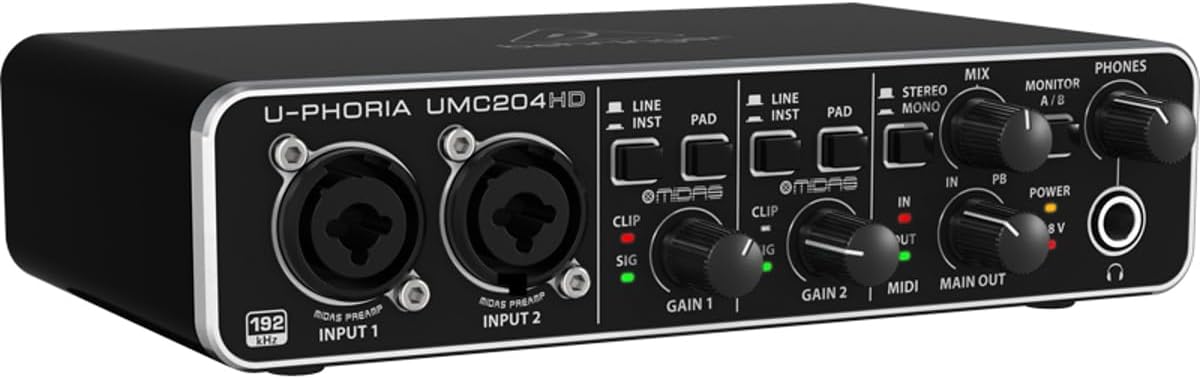
This image displays the front panel of the Behringer UMC204HD, showing the two XLR/TRS combo inputs, individual gain controls, Line/Inst and Pad switches, Clip/Sig indicators, Mix and Monitor A/B knobs, and the headphone output with its level control.
- INPUT 1 / INPUT 2 (XLR/TRS Combo Jacks): Connect microphones (XLR) or instruments/line-level sources (1/4" TRS/TS).
- LINE/INST которуу: Toggles input impedance for line-level or instrument-level signals.
- PAD которуу: Engages a -20 dB attenuation pad for high-level input signals.
- GAIN 1 / GAIN 2 туткалары: Ар бир канал үчүн киргизүү деңгээлин тууралаңыз.
- CLIP / SIG Indicators: SIG (green) indicates signal presence; CLIP (red) indicates input signal clipping.
- MIX баскычы: Blends the direct input signal (IN) with the computer playback signal (PB) for monitoring.
- MONITOR A/B Switch: Selects between playback outputs A (Main Out) and B (Playback Outputs 3/4) for headphone monitoring.
- ТЕЛЕФОНДАР баскычы: Кулакчындын чыгышынын үнүн тууралайт.
- PHONES Jack (1/4" TRS): Connect stereo headphones.
Арткы панелдик байланыштар

The rear panel of the Behringer UMC204HD is shown, featuring the USB port, MIDI In and Out ports, Playback Outputs (RCA), Main Out (TRS), two Insert jacks, and the +48V phantom power switch.
- USB порт: Интерфейсти компьютериңизге туташтырат.
- MIDI IN / MIDI OUT: Standard 5-pin DIN connectors for MIDI devices.
- PLAYBACK OUTPUTS 3 / 4 (RCA): Unbalanced stereo outputs for additional monitoring or routing.
- MAIN OUT 1 / 2 (1/4" TRS): Balanced stereo main outputs for connecting to studio monitors or a mixer.
- INSERTS 1 / 2 (1/4" TRS): Send/Return jacks for connecting external effects processors to input channels 1 and 2.
- +48V күйгүзүү/өчүрүү которгучу: Activates or deactivates phantom power for condenser microphones connected to the XLR inputs.
4. Операция
4.1 Күйгүзүү
The UMC204HD receives power directly from your computer via the USB connection. Ensure the USB cable is securely connected to both the interface and your computer.
4.2 Киргизүү деңгээлин тууралоо
Proper input level setting is crucial for recording quality.
- Connect your microphone or instrument to an input jack.
- If using a condenser microphone, activate the +48V phantom power switch on the rear panel.
- If connecting an instrument (e.g., guitar), press the LINE / INST switch for the corresponding channel. For high-output sources, engage the PAD которуу.
- While performing or speaking into the microphone, slowly turn the АЛУУ knob clockwise until the green SIG LED illuminates consistently. The red КЛИП LED should only flash occasionally during the loudest peaks. If the CLIP LED stays lit, reduce the GAIN.
4.3 Мониторинг
The MIX knob allows you to blend the direct input signal (IN) with the audio playback from your computer (PB). This provides zero-latency monitoring of your input signal, preventing delays that can occur when monitoring through software.
- бургула MIX knob towards IN to hear more of your live input.
- бургула MIX knob towards PB to hear more of your computer's playback.
- колдонуу МОНИТОР A/B switch to select which playback outputs are routed to the headphone jack.
4.4 Ойнотуу
Connect your studio monitors to the НЕГИЗГИ ЧЫГЫШ (1/4" TRS) jacks on the rear panel. Adjust the main output level within your DAW or operating system. For headphone monitoring, connect headphones to the front panel ТЕЛЕФОНДОР jack and adjust its volume with the ТЕЛЕФОНДОР баскыч.

A person wearing headphones smiles while working at a computer with an audio interface, demonstrating typical usage for recording or mixing.

A woman sings into a large diaphragm condenser microphone, illustrating the use of the UMC204HD for vocal recording.

A musician with a guitar sits in a home studio setup, demonstrating the use of the audio interface for recording instruments.
4.5 MIDI функциясы
The UMC204HD includes MIDI In and Out ports. Connect your MIDI controller or other MIDI devices to these ports. Your DAW software will recognize the UMC204HD as a MIDI interface, allowing you to send and receive MIDI data.
5. Техникалык тейлөө
To ensure the longevity and optimal performance of your UMC204HD, follow these maintenance guidelines:
- Тазалоо: Агрегаттын сыртын тазалоо үчүн жумшак, кургак чүпүрөктү колдонуңуз. Абразивдүү тазалагычтардан же эриткичтерден качыңыз.
- Сактагыч: Интерфейсти салкын, кургак жерде, күндүн түз тийген нурларынан жана өтө жогорку температурадан алыс сактаңыз.
- Колдонуу: Аппаратты түшүрүүдөн же катуу соккулардан сактаныңыз.
- Вентиляция: Ашыкча ысып кетүүнүн алдын алуу үчүн, түзмөктүн айланасында жетиштүү аба айланышын камсыз кылыңыз.
6. Кыйынчылыктарды
If you encounter issues with your UMC204HD, refer to the following common problems and solutions:
- No Power/Unit Not Recognized:
- Ensure the USB cable is securely connected to both the interface and your computer.
- Компьютериңиздеги башка USB портун колдонуп көрүңүз.
- Verify that the correct drivers are installed (Windows only).
- Башка USB кабели менен сынап көрүңүз.
- No Audio Input Signal:
- Check all cable connections from your microphone/instrument to the interface.
- камсыз кылуу АЛУУ knob for the respective channel is turned up.
- If using a condenser microphone, confirm that +48V phantom power is activated.
- экендигин текшериңиз LINE / INST switch is correctly set for your input source.
- Check your DAW's input settings to ensure the UMC204HD is selected and the correct input channel is armed.
- No Audio Output/Playback:
- Ensure your speakers or headphones are connected correctly and their volume is turned up.
- текшерүү ТЕЛЕФОНДОР knob for headphone volume.
- Verify that the UMC204HD is selected as the output device in your computer's sound settings and your DAW.
- тууралаңыз MIX knob to ensure you are hearing the playback (PB) signal.
- High Latency (Delay in Audio):
- Ensure you are using the dedicated ASIO drivers on Windows.
- Adjust the buffer size in your DAW's audio settings (lower buffer size reduces latency but requires more CPU).
- Utilize the direct monitoring feature with the MIX knob to monitor inputs with zero latency.
- Input Signal Clipping (Red CLIP LED Stays On):
- азайтыңыз АЛУУ knob for the affected channel.
- Кызыккан PAD switch if the input source is very loud.
7. Техникалык шарттар
| Өзгөчөлүк | Спецификация |
|---|---|
| Модель номери | UMC204HD |
| Каналдардын саны | 2 Киргизүү, 4 Чыгуу |
| Байланыш технологиясы | USB 2.0 |
| Audio Resolution | 24-бит/192 кГц |
| Preampаман калгандар | Midas-designed Mic Preamps |
| фантомдук күч | +48V |
| Аппараттык интерфейс | USB |
| Шайкеш түзмөктөр | Ноутбук, персоналдык компьютер |
| Колдоого алынган программалык камсыздоо | Avid Pro Tools, Ableton Live, Steinberg Cubase (and others) |
| Операция системасы | Windows, macOS |
| Элемент Салмагы | 1.37 фунт |
| Продукциянын өлчөмдөрү | 7.28 x 5.12 x 1.97 дюйм |
8. Кепилдик жана колдоо
For detailed warranty information, technical support, or service inquiries, please visit the official Behringer website or contact their customer support. You can also refer to the official Колдонуучунун колдонмосу (PDF) кошумча маалымат үчүн.


