Продукт бүттүview
The SteelSeries Stratus XL Wireless Gaming Controller is a full-sized, premium wireless controller designed for iOS devices and Mac. It offers a console-style gaming experience with broad compatibility across hundreds of iOS games. Key features include pressure-sensitive controls, precise dual analog triggers, LED notifications, and an extended battery life of over 40 hours.

Сүрөт: алдыңкы view of the SteelSeries Stratus XL Wireless Gaming Controller, showcasing анын эргономикалык дизайны жана баскычтардын жайгашуусу.
Негизги өзгөчөлүктөрү
- Pressure sensitive buttons for precise gaming control.
- Console-style left and right analog triggers.
- Bluetooth 2.1 + EDR for reliable wireless connectivity.
- Extended battery life of 40+ hours with 2 AA batteries (included).
- 4 LEDs to display player status during multiplayer gameplay.
- Dedicated On/Off Slider Switch to enhance battery life and a Dedicated Pairing Button.
- Console-like Form Factor: Comfort and ergonomics of a full-sized controller with standard console controls in familiar locations. Color-coded action buttons for easy identification.
- Multi-Device Compatibility: Requires iOS 7 or later on iPhone 6 / 6 Plus, iPhone 5 / 5S / 5C, iPad mini / mini with Retina Display, iPad Air, iPad 4th Gen, iPod Touch 5th Gen, Apple TV, and MAC with OSX.
Орнотуу колдонмосу
1. Кутудан чыгаруу жана алгачкы текшерүү
Carefully remove the SteelSeries Stratus XL controller from its packaging. Inspect the controller for any visible damage or missing components. Ensure all listed contents are present before proceeding.

Сүрөт: бурчтуу view of the controller, useful for initial inspection.
2. Батареяны орнотуу
The controller requires two AA batteries, which are included. Locate the battery compartment on the back of the controller. Open the compartment cover, insert the AA batteries according to the polarity indicators (+/-), and then close the cover securely.

Сүрөт: Арткы view of the controller with the battery compartment open, showing where to insert the AA batteries.
3. Түзмөктөр менен жупташтыруу
- Ensure your iOS device or Mac has Bluetooth enabled.
- Turn on the SteelSeries Stratus XL controller using the On/Off Slider Switch.
- Press and hold the dedicated Pairing Button on the controller until the LED indicators begin to flash, indicating it is in pairing mode.
- On your device, navigate to the Bluetooth settings and select "SteelSeries Stratus XL" from the list of available devices.
- Once connected, the LED indicators on the controller will stop flashing and remain solid, or indicate player status.

Image: Top-angled view of the controller, highlighting the central buttons including the pairing button.
Иштөө нускамалары
1. Күйгүзүү/өчүрүү
To power on the controller, slide the On/Off switch to the 'On' position. To power off, slide the switch to the 'Off' position. This helps conserve battery life when the controller is not in use.
2. Баскычтардын жайгашуусу жана функциялары
The Stratus XL features a standard console controller layout:
- D-Pad (багыттоочу такта): Located on the left, used for directional input.
- Сол жана оң аналогдук таякчалар: 360 градустук так кыймыл жана камераны башкаруу үчүн.
- Аракет баскычтары (A, B, X, Y): Color-coded buttons on the right for in-game actions.
- Left and Right Shoulder Buttons (L1, R1): Located on the top front edge.
- Left and Right Analog Triggers (L2, R2): Pressure-sensitive triggers on the underside of the front edge.
- Тыныгуу баскычы: Central button for pausing games or accessing menus.
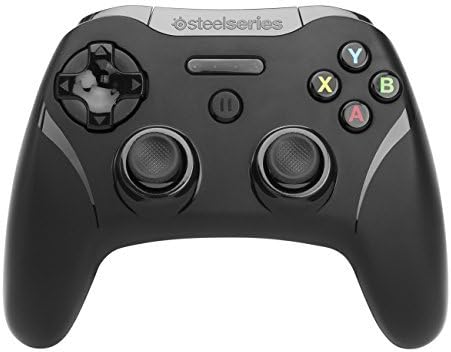
Сүрөт: деталдуу алдыңкы view of the controller, illustrating the placement of all buttons and analog sticks.
3. In-Game Control
Once paired, the controller will automatically be recognized by compatible games. Game-specific controls will vary, but the controller provides a familiar and intuitive input method for a wide range of titles. Refer to individual game settings for customization options.
Техникалык тейлөө
Тазалоо
Башкаргычты тазалоо үчүн жумшак, кургак чүпүрөктү колдонуңуз. Өжөр кир үчүн бир азampen the cloth with water or a mild, non-abrasive cleaner. Avoid using harsh chemicals or abrasive materials, as these can damage the controller's finish and internal components. Do not submerge the controller in water.
Сактагыч
Store the controller in a cool, dry place away from direct sunlight and extreme temperatures. If storing for an extended period, it is recommended to remove the AA batteries to prevent potential leakage and damage to the battery compartment.
Проблемаларды чечүү
Жалпы маселелер жана чечимдер
- Контроллер жупташкан жок:
- Ensure the controller is powered on and in pairing mode (LEDs flashing).
- Түзмөгүңүздө Bluetooth иштетилгенин текшериңиз.
- Контроллерди да, түзмөгүңүздү да өчүрүп-күйгүзүп көрүңүз.
- Check if the batteries are properly installed and have sufficient charge.
- Buttons unresponsive or input lag:
- Ensure the controller is fully charged or has fresh batteries.
- Move closer to your device to reduce potential interference.
- Disconnect and re-pair the controller.
- Check for any firmware updates for the controller (refer to SteelSeries support webсайт).
- Батарейканын кыска мөөнөтү:
- Ensure you are using high-quality AA batteries.
- Always turn off the controller using the On/Off switch when not in use.
Техникалык шарттар
| Атрибут | Нарк |
|---|---|
| Бренд | SteelSeries |
| Модель аты | reg |
| Элемент моделинин номери | 69026 |
| Аппараттык платформа | PC |
| Операция системасы | iOS, iOS 7 |
| Элемент Салмагы | 9.4 унция |
| Продукциянын өлчөмдөрү (LxWxH) | 4.33 x 5.9 x 2.45 дюйм |
| Түс | көк |
| Power Source | Батарея менен иштейт |
| Батареялар | 2 AA батарейка талап кылынат (кошулган) |
| Байланыш технологиясы | Bluetooth |
| Controller Type | Джойстик |
| Шайкеш түзмөктөр | iOS, Mac |
Кепилдик жана колдоо
This product comes with a manufacturer's warranty. For detailed information regarding warranty terms, coverage, and duration, please refer to the documentation included with your purchase or visit the official SteelSeries webсайт.
For further assistance, technical support, or to download the official user guide in PDF format, please visit the SteelSeries support page or refer to the following link:


