1. Киришүү
This manual provides essential information for the safe and efficient operation of your COTEC SP2000-224 Pure Sine Wave Inverter. This advanced inverter offers high efficiency and power density, featuring selectable output voltage and frequency, all housed within a robust aluminum casing. Please read this manual thoroughly before installation and use to ensure proper function and longevity of the device.
2. Коопсуздук маалыматы
Always observe the following safety precautions to prevent injury and damage to the inverter or connected equipment:
- Вентиляция: Инвертордун айланасында жетиштүү желдетүүнү камсыз кылыңыз. Вентиляция тешиктерин жаап албаңыз.
- Курчап турган чөйрө: Install the inverter in a dry, cool, and well-ventilated area, away from direct sunlight, heat sources, and flammable materials.
- Негиздөө: Properly ground the inverter chassis to prevent electrical shock.
- DC киргизүү: Connect the inverter only to a 24V DC battery bank. Ensure correct polarity (positive to positive, negative to negative). Reverse polarity will damage the unit.
- AC чыгаруу: Do not overload the inverter. Ensure the total wattage of connected AC devices does not exceed the inverter's rated output.
- Тейлөө: Do not attempt to open or service the inverter yourself. Refer all servicing to qualified personnel.
- Суу таасири: Keep the inverter away from water, rain, or excessive moisture.
3. Продукциянын өзгөчөлүктөрү
The COTEC SP2000-224 Inverter incorporates several advanced features for reliable power conversion:
- Сезимтал электроника үчүн таза синус толкунунун чыгышы.
- Power ON / OFF remote control capability via a dedicated green terminal.
- Full input and output isolation for enhanced safety.
- Temperature and load-controlled cooling fan for efficient heat dissipation.
- User-friendly interface with 3-color LED status indicators.
- Output frequency selectable between 50 Hz and 60 Hz via DIP switch.
- Чыгуу томtage selectable via DIP switch.
- Power saving mode adjustable via a variable resistor.
- Comprehensive input protection: Reverse Polarity (via fuse), Under Voltage, Over Voltage.
- Comprehensive output protection: Short Circuit, Overload, Over Temperature.
- Certifications: E13, UL, CE, FCC approved.
4. Орнотуу жана орнотуу
Туура орнотуу инвертордун иштеши жана коопсуздугу үчүн абдан маанилүү.
4.1 Физикалык орнотуу
Mount the inverter securely in a location that meets the safety requirements mentioned in Section 2. Ensure sufficient space around the unit for airflow.
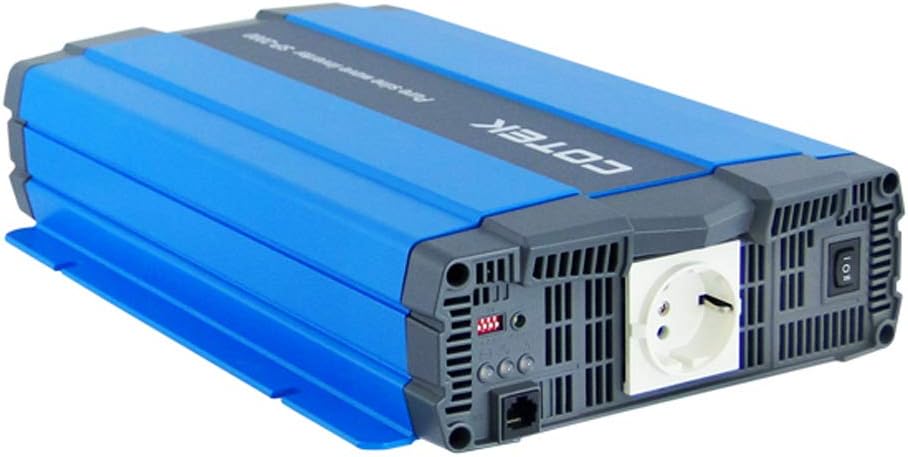
4.1-сүрөт: Бурчтуу view of the COTEC SP2000-224 Pure Sine Wave Inverter, showcasing its robust blue and gray casing.
4.2 DC Input Connection
Connect the inverter to a 24V DC battery bank using appropriate gauge cables. Ensure the positive (+) terminal of the inverter connects to the positive terminal of the battery, and the negative (-) terminal of the inverter connects to the negative terminal of the battery. Install an appropriate fuse or circuit breaker in the positive DC line close to the battery.

4.2-сүрөт: Арткы view of the inverter, highlighting the DC input terminals (red for positive, black for negative), the chassis ground screw, and the remote control terminal.
4.3 Chassis Ground Connection
Connect the chassis ground terminal (labeled 'CHASSIS GROUND') to a reliable earth ground point. This is a critical safety step.
4.4 AC Output and Controls
The inverter features a standard AC outlet and control switches on its front panel.

4.3-сүрөт: Фронт view of the inverter, displaying the AC output socket, the main power switch, LED indicators, and DIP switches for configuration.
4.5 DIP которуштуруу орнотуулары
The inverter features DIP switches for configuring output frequency and voltage. Refer to the specifications table (Section 7) or the product label for specific settings. Ensure the inverter is powered off before adjusting DIP switches.
- Чыгуу жыштыгы: Select 50 Hz or 60 Hz based on your regional requirements.
- Output Voltage: Керектүү AC чыгыш көлөмүн тандаңызtage (e.g., 230VAC for this model).
5. Иштөө нускамалары
5.1 Күйгүзүү/өчүрүү
After all connections are secure and verified, switch the main power button on the inverter to the 'ON' position. The LED indicators will illuminate to show the inverter's status. To power off, switch the button to 'OFF'. A remote control terminal is also available for external ON/OFF control.
5.2 LED көрсөткүчтөрү
The 3-color LED indicators provide visual feedback on the inverter's operational status and any potential faults. Consult the product documentation or the specifications table for a detailed explanation of each LED state.
5.3 Кубатты үнөмдөө режими
The power saving mode can be adjusted via a variable resistor. This feature helps reduce quiescent current draw when no load or a very light load is connected, conserving battery power.
5.4 Кондиционер жүктөрүн туташтыруу
Plug your AC appliances into the inverter's AC output socket. Ensure the total power consumption does not exceed the inverter's continuous power rating (2000W for this model). For inductive loads (e.g., motors, refrigerators), consider their surge power requirements, which can be significantly higher than their running power.
6. Техникалык тейлөө
Regular maintenance ensures optimal performance and extends the lifespan of your inverter.
- Тазалоо: Keep the inverter clean and free from dust. Use a dry cloth to wipe the exterior. Do not use liquid cleaners.
- Вентиляция: Periodically check that the cooling fan and ventilation openings are clear of obstructions.
- Байланыштары: Inspect all DC and AC connections regularly to ensure they are tight and free from corrosion. Loose connections can cause overheating and poor performance.
- Батареяны тейлөө: Follow the manufacturer's recommendations for your battery bank's maintenance.
7. Кыйынчылыктарды
If the inverter is not functioning correctly, refer to the following common issues and solutions:
- Чыгуу күчү жок:
- Check DC input connections and battery voltage.
- Verify the inverter's power switch is ON.
- Check for blown DC input fuses (if applicable).
- Ашыкча жүктөө көрсөткүчү:
- Инверторго туташкан жалпы жүктү азайтыңыз.
- Disconnect and reconnect the load to reset the inverter.
- Over Temperature Indication:
- Ensure adequate ventilation around the inverter.
- Check if the cooling fan is operating.
- Reduce the load if operating in a hot environment.
- Батарея үнү азtage Alarm/Shutdown:
- Батарея банкын кайра заряддаңыз.
- Check battery connections for looseness or corrosion.
For persistent issues, contact COTEC customer support.
8. Техникалык шарттар
The following table details the technical specifications for the COTEC SP2000 series, with specific values for the SP2000-224 model highlighted where applicable.

8.1-сүрөт: Detailed technical specifications for the COTEC SP-2000 series, including the SP2000-224 model.
| Өзгөчөлүк | Спецификация |
|---|---|
| Бренд | COTEK |
| Модель аты | SP2000 (SP2000-224 variant) |
| Номиналдуу кубаттуулук | 2000 Вт |
| Surge Power (1 Sec) | 4000 Вт |
| DC Input Voltage | 24VDC (Operating Range: 21.0-33.0VDC) |
| AC Output Voltage | 230VAC (selectable) |
| Чыгуу жыштыгы | 50/60 Гц (тандалган) |
| Output Waveform | Pure Sine Wave (THD<3% at nominal load) |
| Efficiency (Max) | 93% |
| Муздатуу | Temperature & load controlled fan |
| Иштөө температурасы | -20°Cден +40°Cге чейин |
| Сактоо температурасы | -30°Cден +70°Cге чейин |
| Өлчөмдөрү (W x Y x D) | 17.44 x 9.76 x 3.27 дюйм (443 x 248 x 83 мм) |
| Элемент Салмагы | 1 pounds (approximate, actual unit weight may vary) |
| Пакеттин өлчөмдөрү | 19 x 12 x 6 дюйм |
| Сертификаттар | E13, UL, CE, FCC approved |
8.1 Механикалык чиймелер
For detailed physical dimensions and mounting information, refer to the mechanical drawings below.
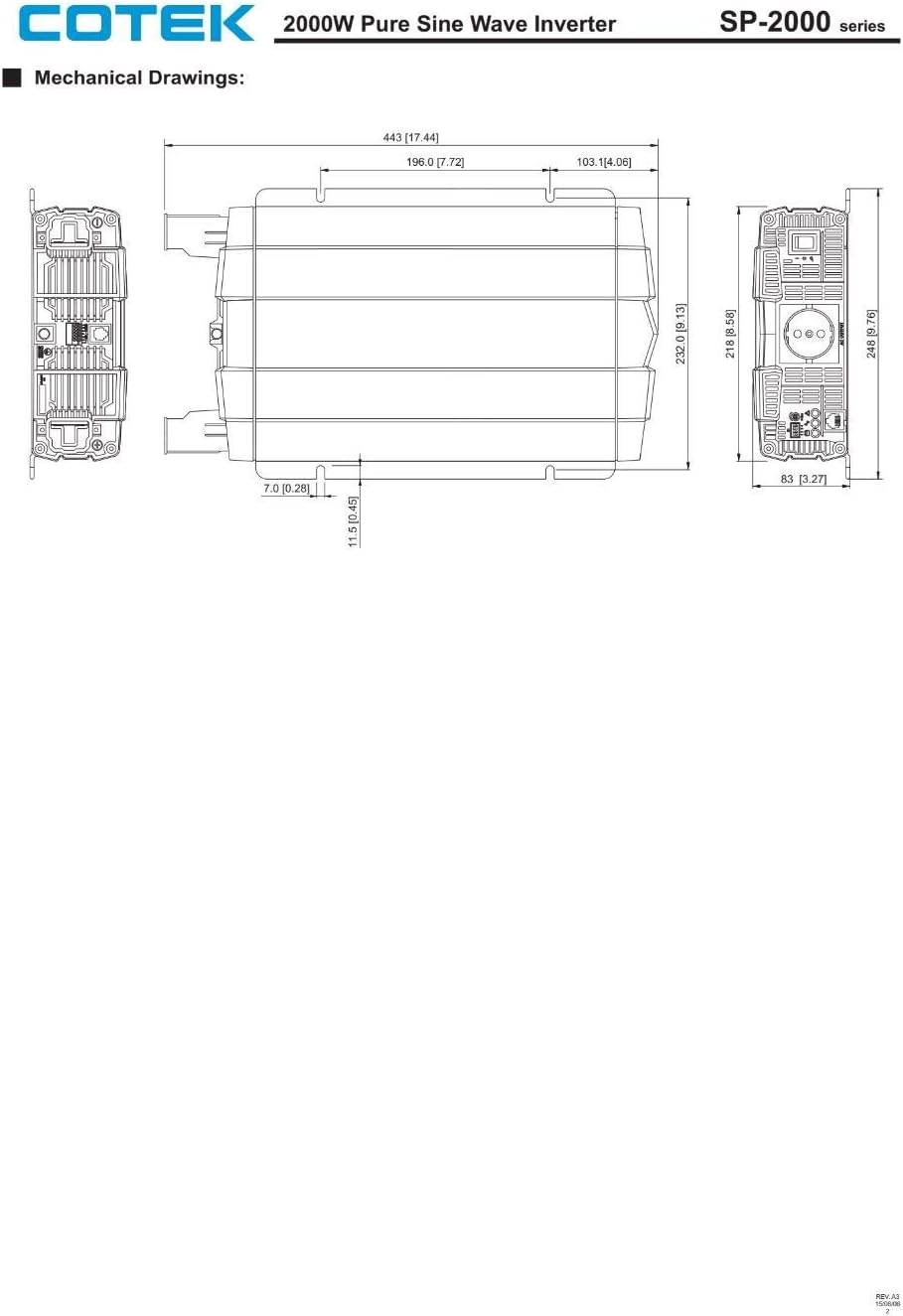
8.2-сүрөт: Mechanical drawings providing precise dimensions for installation planning.
9. Кепилдик жана колдоо
COTEC products are designed for reliability and performance. For warranty information, technical support, or service inquiries, please refer to the warranty card included with your product or visit the official COTEC webсайт. Сатып алуу квитанциясын кепилдик дооматтары үчүн сатып алуунун далили катары сактаңыз.


