1. Киришүү
The Aputure Amaran HR672S is a high-performance LED video light panel designed for professional photography and videography. Featuring a high Color Rendering Index (CRI) of 95+, it ensures accurate and vibrant color reproduction. This light panel operates at a fixed color temperature of 5500K, providing a daylight-balanced output. It includes a wireless remote control for convenient adjustments and can be powered by either an AC adapter or NP-F series batteries.
2. Коопсуздук маалыматы
- Do not operate the light panel with wet hands or in damp чөйрөлөр.
- электр менен жабдууну камсыз кылуу voltage matches the product's requirements (110-240V).
- Avoid direct eye exposure to the LED light, as it can cause discomfort or damage.
- Keep the light panel away from flammable materials.
- Do not disassemble or modify the product. Refer servicing to qualified personnel.
- Always use the provided power adapter and recommended batteries.
- Ашыкча ысып кетүүнүн алдын алуу үчүн иштөө учурунда туура желдетүүнү камсыз кылыңыз.
3. Пакеттин мазмуну
Төмөндө тизмеленген нерселердин баары пакетиңизге камтылганын текшериңиз:
- 1 x Aputure Amaran HR672S LED Light Panel
- 1 x зымсыз алыстан башкаруу
- 1 x Power Adapter (AC 110-240V to DC 15V)
- 1 x Light Bracket with 1/4 to 3/8 Screw
- 1 x White Diffusion Filter
- 1 x Orange Diffusion Filter
- 1 x Ташуу сумкасы
- 1 x Колдонуучунун колдонмосу (англисче)
- 2 x NP-F970 Batteries (if included in specific kit)
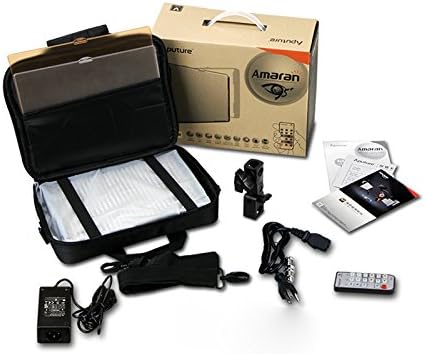
Image: All components included in the Aputure Amaran HR672S LED Video Light Panel package, neatly arranged.
4. Продукт бүтүп калдыview
4.1 Фронт View
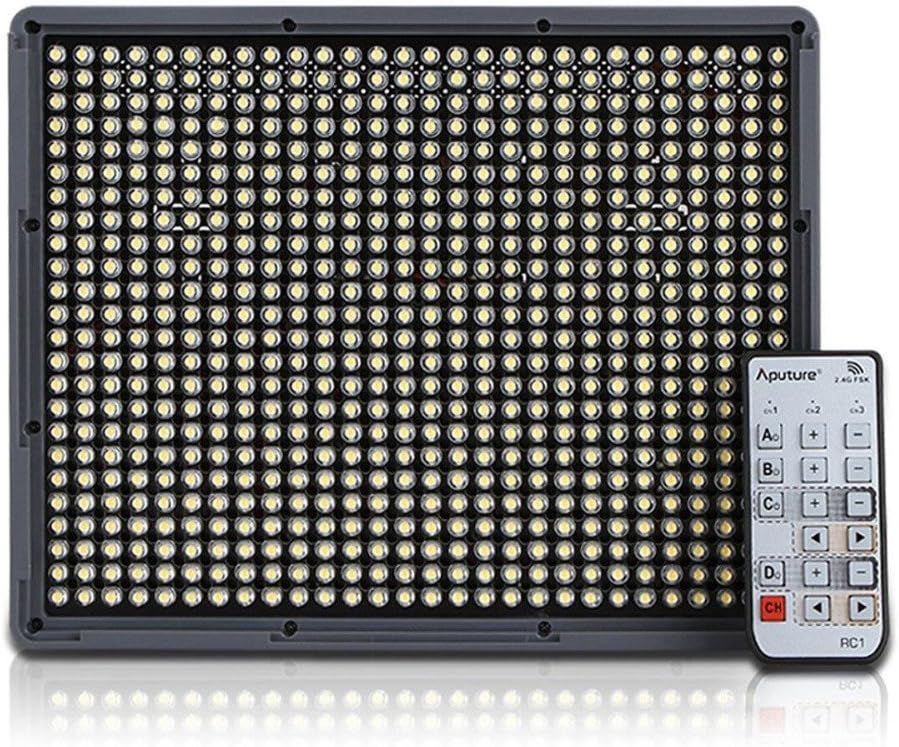
Image: The front face of the Aputure Amaran HR672S LED light panel, showing the array of 672 LED bulbs.
4.2 Back Panel Controls and Battery Slots

Image: The rear of the light panel, displaying the digital display, power switch, dimmer knob, channel/group buttons, and dual NP-F battery slots.
4.3 Diffusion Filter Installation

Image: A hand demonstrating the process of sliding a diffusion filter into the designated slot on the light panel.
5. Орнотуу
5.1 Жарык панелин орнотуу
- Attach the provided light bracket to the 1/4-inch screw thread at the bottom of the HR672S light panel.
- Secure the light bracket onto a standard light stand or tripod using the 1/4-inch or 3/8-inch screw adapter. Tighten securely.
- Adjust the angle of the light panel using the tilt mechanism on the bracket.
5.2 Жарык панелин күйгүзүү
The HR672S can be powered in two ways:
- AC кубаттуулугу: Connect the DC 15V power adapter to the DC input port on the back of the light panel. Plug the adapter into a suitable wall outlet (110-240V).
- Батарея кубаттуулугу: Insert two fully charged NP-F series batteries (e.g., NP-F970) into the battery slots on the back of the light panel. Ensure they click into place. The light will automatically draw power from the batteries when AC power is not connected or is interrupted.
5.3 Attaching Diffusion Filters
Slide either the white or orange diffusion filter into the grooves on the front of the light panel. The white filter provides softer light, while the orange filter can be used for color correction or creative effects.
6. Операция
6.1 Күйгүзүү/өчүрүү
Locate the power switch on the back of the light panel. Flip it to the 'ON' position to power on the device. Flip it to 'OFF' to power off.
6.2 Жарыктыкты жөндөө
Rotate the dimmer knob on the back panel to adjust the light intensity. The brightness level will be displayed on the digital screen.
6.3 Зымсыз алыстан башкаруу пультун колдонуу
The HR672S comes with a 2.4GHz wireless remote control for convenient operation.
- Setting Channels: Press the 'Channel' button on the light panel to cycle through available channels (1-3). Ensure the remote control is set to the same channel.
- Setting Groups: Press the 'Group' button on the light panel to assign it to a group (A, B, C, D). The remote control can then control lights assigned to specific groups or all groups simultaneously.
- Алыстан иштөө: Use the corresponding buttons on the remote to power on/off, adjust brightness, and select channels/groups.
6.4 Түс температурасы
The Aputure Amaran HR672S has a fixed color temperature of 5500K. No adjustment is needed or possible for color temperature on this model.
7. Техникалык тейлөө
- Тазалоо: Use a soft, dry cloth to clean the light panel. Do not use abrasive cleaners or solvents.
- Сактагыч: When not in use, store the light panel in its carrying bag in a cool, dry place, away from direct sunlight and moisture.
- Батареяга кам көрүү: If using batteries, remove them if the light will not be used for an extended period. Store batteries in a cool, dry place.
- Кабелдик текшерүү: Regularly inspect power cables and connections for any signs of damage. Replace damaged cables immediately.
8. Кыйынчылыктарды
| Көйгөй | Мүмкүн себеп | Чечим |
|---|---|---|
| Жарык күйбөйт | No power supply; Batteries depleted; Power switch off | Check AC adapter connection; Replace/recharge batteries; Ensure power switch is 'ON' |
| Пульт иштебей жатат | Incorrect channel/group; Remote battery depleted; Obstruction | Match channel/group on light and remote; Replace remote battery; Ensure clear line of sight |
| Жарык жылтылдайт | Unstable power; Faulty connection; Overheating | Ensure stable power source; Check all cable connections; Allow light to cool down |
| Light output is too harsh | No diffusion filter used | Attach the white diffusion filter to soften the light |
9. Техникалык шарттар
| Өзгөчөлүк | Деталь |
|---|---|
| Модел | Amaran HR672S |
| CRI | 95+ |
| Күч | 45 Вт |
| Beam Angle | 25 градус |
| Түс температурасы | 5500K |
| Power Input | AC 110-240V |
| Электр камсыздоо | DC 15V |
| Алыстан жыштык | 2.4 ГГц |
| Алыскы каналдар | 3 |
| Remote Groups | 4 (A/B/C/D) |
| Luminous Flux (0.5m) | 18800 люкс |
| Luminous Flux (1m) | 6040 люкс |
| Элемент Салмагы | 4 фунт (болжол менен 1.81 кг) |
| Пакеттин өлчөмдөрү | 10.9 x 8.8 x 4.8 дюйм (болжол менен 27.7 x 22.4 x 12.2 см) |
| Батареялар талап кылынат | 2 Lithium Ion (NP-F series) |
10. Кепилдик жана колдоо
Aputure products are covered by a limited warranty. For specific warranty terms and conditions, please refer to the warranty card included with your product or visit the official Aputure website. For technical support, troubleshooting assistance, or service inquiries, please contact Aputure customer support through their official channels.
Онлайн ресурстар:
- Official Aputure Webсайт: www.aputure.com
- Продукцияны колдоо барагы: Расмий сайтка кайрылыңыз website for specific product support pages.


