1. Introduction and Overview
The Sony MEX-N5300BT is a versatile car receiver designed to enhance your in-car audio experience. It features dual Bluetooth connectivity for hands-free calling and audio streaming, allowing you to connect two smartphones simultaneously. Enjoy your favorite music from CDs, USB devices, or streaming services with support for MP3, WMA, and FLAC files. The unit also includes an AM/FM tuner with RDS and customizable dual-zone variable color illumination to match your vehicle's interior.
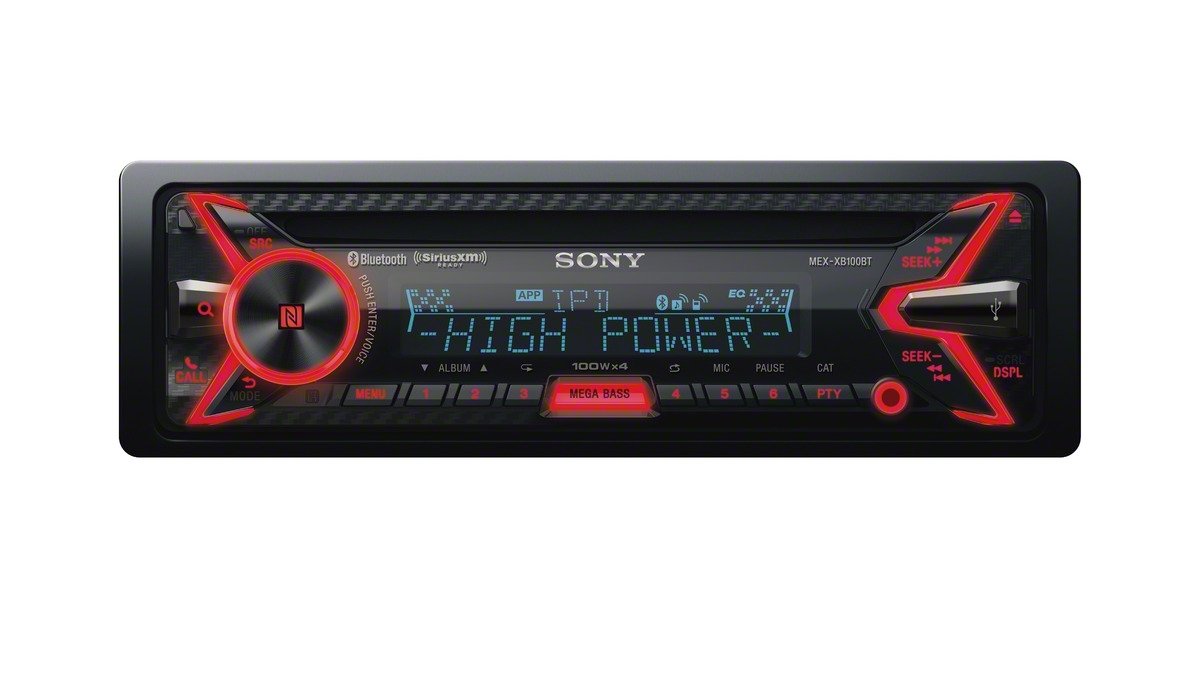
Сүрөт 1.1: Алдыңкы view of the Sony MEX-N5300BT car receiver with orange illumination, showcasing its display and controls.
Негизги өзгөчөлүктөрү:
- Эки Bluetooth байланышы: Connect two smartphones simultaneously for hands-free calls and audio streaming.
- Жогорку кубаттуулугу: Камтылган amplifier delivers enhanced audio performance.
- Ар тараптуу медиа ойнотуу: Supports CDs, CD-Rs, CD-RWs, and digital files (MP3, WMA, FLAC) via USB.
- AM/FM Tuner with RDS: Access a wide range of radio stations with Radio Data System information.
- Ыңгайлаштырылган жарыктандыруу: Dual-zone variable color illumination allows personalization of the display and button lighting.
- Смартфонду башкаруу: Compatible with the Sony SongPal app for advanced control and sound settings.
2. Орнотуу жана орнотуу
Proper installation is crucial for optimal performance and safety. It is highly recommended to have this unit installed by a qualified professional. Ensure your vehicle's battery is disconnected before beginning any wiring work.
2.1 Зымдарды туташтыруу
The receiver comes with an ISO connector for standard vehicle wiring. Connect the power, ground, speaker, and remote turn-on wires according to your vehicle's wiring diagram and the receiver's manual. Ensure all connections are secure and properly insulated.

2.1-сүрөт: Арткы view of the Sony MEX-N5300BT car receiver, illustrating the various wiring harnesses and RCA outputs for external ampкөтөргүчтөр же сабвуферлер.
2.2 Агрегатты монтаждоо
Install the receiver into your vehicle's dashboard using the provided mounting hardware and trim ring. Ensure the unit is securely fastened to prevent movement during driving.
2.3 Баштапкы кубаттуулук
After all connections are made and verified, reconnect your vehicle's battery. Turn on the ignition and then power on the receiver. Follow any on-screen prompts for initial setup, such as language selection or clock setting.
3. Иштөө нускамалары
3.1 Күйгүзүү/өчүрүү жана булак тандоо
басыңыз SRC button to turn the unit on or off. Repeatedly press SRC to cycle through available audio sources such as Tuner, CD, USB, Bluetooth Audio, and AUX.
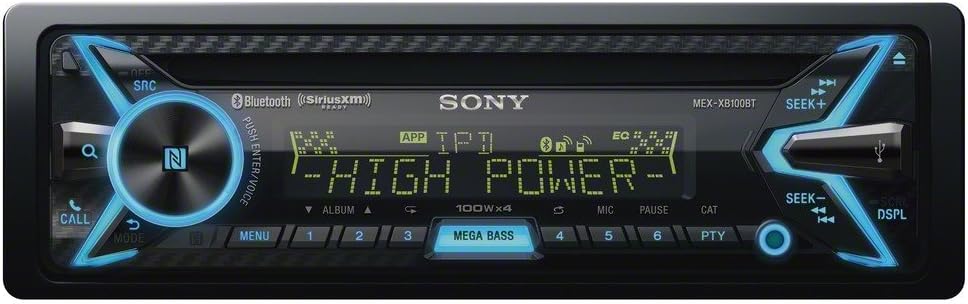
Figure 3.1: The Sony MEX-N5300BT car receiver displaying blue illumination, showing the main control knob and source selection buttons.
3.2 Bluetooth Pairing and Functions
To pair a device, ensure Bluetooth is enabled on your smartphone and on the receiver. Select 'Bluetooth' as the source and follow the pairing instructions on the receiver's display. The MEX-N5300BT supports dual Bluetooth, allowing two phones to be connected simultaneously for hands-free calling and audio streaming (A2DP). Use the ЧАЛ button for call management.
3.3 CD/USB ойнотуу
Insert a CD into the disc slot for playback. Connect a USB device to the front USB port to play digital audio files. The unit supports MP3, WMA, and FLAC formats. Use the SEEK+ жана Издөө - buttons to navigate tracks or folders.
3.4 AM/FM радиосу
Select 'Tuner' as the source. Use the SEEK+ жана Издөө - buttons to tune into radio stations. The Radio Data System (RDS) provides additional information such as station name and program type where available.
3.5 Sound Settings and Equalizer
басыңыз МЕНЮ button to access sound settings. Adjust bass, treble, balance, and fader. The MEGA BASS button provides an instant bass boost. Further sound customization is available through the equalizer settings.
3.6 SongPal App Control
Download the Sony SongPal app (available on Google Play and the App Store) to your smartphone. Once connected via Bluetooth, the app allows you to control various receiver functions, stream music, adjust sound settings, and use voice commands directly from your phone.
Video 3.1: Official product video demonstrating the key features and functionalities of the Sony MEX-N5300BT car receiver, including dual Bluetooth connectivity, voice command, CD/MP3 playback, AM/FM radio, USB, AUX input, and Pandora integration.
4. Техникалык тейлөө
4.1 Агрегатты тазалоо
Wipe the front panel with a soft, dry cloth. For stubborn dirt, dampen the cloth with a mild detergent solution and wipe gently. Avoid using abrasive cleaners or solvents, as these can damage the finish.
4.2 CDге кам көрүү
Handle CDs by their edges to prevent fingerprints and scratches. Store CDs in their cases when not in use. If a CD is dirty, wipe it gently from the center outwards with a soft, lint-free cloth.
4.3 Жалпы кам көрүү
Аппаратты өтө жогорку температурага, күндүн түз тийген нурларына же ашыкча нымдуулукка дуушар кылбаңыз. Ашыкча ысып кетүүнүн алдын алуу үчүн аппараттын айланасында жакшы желдетүүнү камсыз кылыңыз.
5. Кыйынчылыктарды
If you encounter issues with your Sony MEX-N5300BT, refer to the following common troubleshooting steps:
- Кубат жок: Check all power connections, including the main power wire and ground. Verify that the vehicle's ignition is on and the fuse is not blown.
- Үн жок: Ensure the volume is not muted or set too low. Check speaker connections and verify that the correct audio source is selected.
- Bluetooth туташуу маселелери: Ensure Bluetooth is enabled on both the receiver and your smartphone. Delete previous pairings and attempt to re-pair the devices. Move the smartphone closer to the receiver.
- Дискти ойнотуудагы каталар: Ensure the CD is clean and free of scratches. Try a different CD to rule out disc-specific issues.
- USB түзмөгү таанылган жок: Ensure the USB device is formatted correctly (e.g., FAT32) and contains supported audio fileс. Башка USB түзмөгүн колдонуп көрүңүз.
- Түзмөк тоңуп калат же иштебей калат: Perform a soft reset by pressing the reset button (usually a small pinhole) or by disconnecting the vehicle's battery for a few minutes. Check for available firmware updates on the Sony support website, as outdated firmware can sometimes cause operational issues.
If problems persist after attempting these steps, contact Sony customer support or a qualified service technician.
6. Техникалык шарттар
| Өзгөчөлүк | Спецификация |
|---|---|
| Элемент Салмагы | 2.86 фунт |
| Продукциянын өлчөмдөрү | 10.13 x 8.88 x 3.88 дюйм |
| Шасси өлчөмү | Single-DIN |
| Preamp Тtage | 5 вольт |
| Дисплей түрү | LCD |
| Wireless Remote | Ооба |
| Memory Card Slot | CD+RW, CD-R, MP3 |
| Медиа ойнотуу колдоого алынат | MP3/WMA/WAV/AAC/FLAC |
| Байланыш технологиясы | Bluetooth, USB |
| Controller Type | Android |
| Өзгөчө өзгөчөлүк | Bluetooth, Түстү өзгөртүү, Pandora, Sirius XM, Рулдун баскычтары |
| Шайкеш түзмөктөр | Смартфон, динамик, планшет |
| Туташтыргыч түрү | 3.5 мм уяча, USB |
| Аудио коддоо | Стерео |
| Аудио чыгаруу режими | Стерео |
| Көлөмдүү үн каналынын конфигурациясы | 4 канал |
| Түс | Кара |
7. Кутуда эмне бар
The following items are included with your Sony MEX-N5300BT car receiver:
- ISO туташтыргычы
- Trim Ring (Black)
8. Кепилдик жана колдоо
Бул продукт менен капталган 90 күндүк чектелген жабдык кепилдиги. For detailed terms and conditions, please refer to the warranty document. For further support, product registration, or to check for firmware updates, please visit the official Sony support webсайт.