1. Киришүү
This manual provides detailed instructions for the safe and effective operation of the MASTECH MS2026 AC Digital Clamp Meter. This device is a professional measuring instrument designed for electrical testing, offering capabilities for measuring AC/DC voltage, AC current, resistance, capacitance, frequency, diode checks, and continuity tests. Please read this manual thoroughly before use to ensure proper functionality and safety.
2. Коопсуздук маалыматы
Эскертүү: To avoid electric shock or personal injury, please read and understand all safety information before using this meter.
- Колдонуудан мурун эсептегичтин жакшы иштеп жатканын ар дайым текшериңиз.
- Баалангандан ашык колдонбоңузtage, эсептегичте белгиленгендей, терминалдардын ортосунда же кандайдыр бир терминал менен жердин ортосунда.
- Том менен иштөөдө этият болуңузtag30V AC RMS, 42V пик же 60V DC жогору. Бул томtagшок коркунучун жаратат.
- Do not use the meter if the test leads are damaged or if the meter appears damaged.
- Функцияларды өзгөртүүдөн мурун ар дайым сыноо өткөргүчтөрүн чынжырдан ажыратыңыз.
- When making current measurements, ensure the circuit is de-energized before connecting the clamp метр.
- Батареянын аз көрсөткүчү так көрсөткүчтөрдү камсыз кылуу үчүн дароо батареяны алмаштырыңыз.
- Жергиликтүү жана улуттук коопсуздук эрежелерин сактаңыз.
3. Продукциянын өзгөчөлүктөрү
- Large jaw size up to 40mm / 1.6 inches.
- 6000 count digital LCD display.
- Integrated work light and backlight for improved visibility.
- Чаралар AC/DC Voltage, AC Current, Resistance, Capacitance, Frequency, and Duty Cycle.
- Diode check and continuity test functions.
- MAX/MIN value recording, Data Hold, and Auto Power Off.
- Автоматтык түрдө аралыкты өлчөө мүмкүнчүлүгү.
- Бардык диапазондордо ашыкча жүктөмдөн коргоо.
- Батареянын төмөн көрсөткүчү.
4. Пакеттин мазмуну
- 1 x MASTECH MS2026 AC Digital Clamp Метр
- 1 x Сыноочу линиялар (Кызыл жана Кара)
- 1 x Англис колдонуучу колдонмо
- 1 x Ташуу кутусу
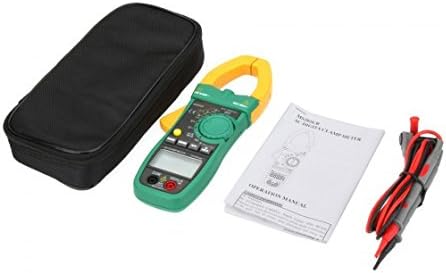
4.1-сүрөт: Contents of the MASTECH MS2026 package, including the clamp meter, test leads, user manual, and carrying case.
5. Орнотуу
5.1. Батареяны орнотуу
- Эсептегич өчүрүлгөнүн текшериңиз.
- Батарея уясынын капкагын эсептегичтин арткы жагында табыңыз.
- Батареянын капкагын бекиткен бурагычты(ларды) бошотуш үчүн бурагычты колдонуңуз.
- Батареянын капкагын алып салыңыз.
- Insert three (3) 1.5V AA batteries, observing the correct polarity (+ and -) as indicated inside the compartment.
- Батареянын капкагын ордуна коюңуз жана аны бурама(лар) менен бекитиңиз.

5.1-сүрөт: Open battery compartment showing the placement for three 1.5V AA batteries.
5.2. Сыноо линияларын туташтыруу
Том үчүнtage, resistance, capacitance, diode, and continuity measurements, connect the test leads as follows:
- Кызыл сыноо өткөргүчтү "VΩHz" киргизүү уячасына салыңыз.
- Insert the black test lead into the "COM" input jack.

5.2-сүрөт: The MASTECH MS2026 clamp meter with red and black test leads properly connected to the input jacks.
6. Иштөө нускамалары
The MASTECH MS2026 features a rotary switch for function selection and several buttons for additional features.

6.1-сүрөт: Деталдаштырылган view of the MASTECH MS2026's rotary switch, function buttons, and LCD display.
6.1. Күйгүзүү/өчүрүү
- Turn the rotary switch from "OFF" to any desired measurement function to power on the meter.
- Turn the rotary switch to "OFF" to power off the meter.
- The meter features an Auto Power Off function to conserve battery life.
6.2. Өзгөрмө токту өлчөө (Clamp)
- Turn the rotary switch to the "A~" position. Select the appropriate range (6/60/600/1000A) if not in auto-range.
- Press the jaw release trigger to open the clamp.
- Чынжырдын бир гана өткөргүчүн cl менен курчап алыңызamp жаактар. Жаактардын толугу менен жабык экенин текшериңиз.
- ЖК дисплейден AC учурдагы маанисин окуңуз.
6.3. AC/DC Voltage Өлчөө
- Сыноо өткөргүчтөрүн 5.2-бөлүмдө сүрөттөлгөндөй туташтырыңыз.
- Turn the rotary switch to "V~" for AC voltage or "V--" for DC voltage.
- Touch the test probes to the desired test points in the circuit.
- Томду окуңузtage дисплейдеги e мааниси.
6.4. Каршылык Өлчөө
- Сыноо өткөргүчтөрүн 5.2-бөлүмдө сүрөттөлгөндөй туташтырыңыз.
- Айлануучу которгучту "Ω" абалына буруңуз.
- Текшерилип жаткан чынжырдын токсуз экенин текшериңиз.
- Touch the test probes across the component or circuit where resistance is to be measured.
- ЖК дисплейдеги каршылыктын маанисин окуңуз.
6.5. Capacitance Measurement
- Сыноо өткөргүчтөрүн 5.2-бөлүмдө сүрөттөлгөндөй туташтырыңыз.
- Turn the rotary switch to the "F" (Capacitance) position.
- Сыноодон мурун конденсатордун толук зарядсыздангандыгын текшериңиз.
- Конденсатордун терминалдарынан тестирлөөчү зонддорго тийиңиз.
- ЖК дисплейдеги сыйымдуулуктун маанисин окуңуз.
6.6. Frequency Measurement
Frequency can be measured via the clamp or the test leads.
- Via Clamp: Turn the rotary switch to an AC current range (A~), then press the "Hz/%" button. Encircle a single conductor with the clamp.
- Via Test Leads: Connect the test leads as described in Section 5.2. Turn the rotary switch to the "Hz" position. Touch the test probes to the signal source.
Press the "Hz/%" button to toggle between frequency and duty cycle measurements.
6.7. Diode Check and Continuity Test
- Сыноо өткөргүчтөрүн 5.2-бөлүмдө сүрөттөлгөндөй туташтырыңыз.
- Turn the rotary switch to the "Diode/Continuity" position (often shared with Resistance).
- Press the "FUNC" button to toggle between Diode Check and Continuity Test.
- Диодду текшерүү: Touch the red probe to the anode and the black probe to the cathode of the diode. The display will show the forward voltage түшүрүңүз. Зонддорду тескери буруңуз; дисплейде жакшы диоддун болушу үчүн "OL" (Ачык цикл) көрсөтүлүшү керек.
- Үзгүлтүксүздүк тести: Touch the test probes across the circuit or component. If continuity exists (resistance below a certain threshold), the meter will emit an audible beep.
6.8. Атайын функциялар
- RANGE: Press this button to manually select the measurement range instead of auto-ranging. Press again to cycle through ranges or hold to return to auto-range.
- МАКС/МИН: Press to record the maximum or minimum reading during a measurement session. Press again to toggle between MAX, MIN, and current reading.
- КОЛДО: Дисплейдеги учурдагы көрсөткүчтү токтотуу үчүн басыңыз. Чыгаруу үчүн кайра басыңыз.
- Backlight/Work Light: The meter includes a backlight for the LCD and a work light for illuminating the measurement area.

6.2-сүрөт: The MASTECH MS2026 clamp meter's integrated work light illuminating a dark area, enhancing visibility during measurements.
7. Техникалык тейлөө
7.1. Тазалоо
Жарнама менен эсептегичти сүртүңүзamp кездеме жана жумшак жуугуч. Абразивдерди же эриткичтерди колдонбоңуз.
7.2. Батареяны алмаштыруу
When the low battery indicator appears on the display, replace the batteries as described in Section 5.1. Remove batteries if the meter is not used for an extended period.
7.3. Сактагычты алмаштыруу
Бул клamp meter typically does not have user-replaceable fuses for current measurement via the clamp. For other functions, if a fuse is present and needs replacement, it should be done by qualified personnel. Refer to the specifications for fuse type and rating if applicable.
8. Кыйынчылыктарды
| Көйгөй | Мүмкүн себеп | Чечим |
|---|---|---|
| Эсептегич күйбөйт. | Өлүк же туура эмес орнотулган батарейкалар. | Check battery polarity and replace batteries if necessary (refer to Section 5.1). |
| "OL" (Ашыкча жүктөө) көрсөтүлөт. | Өлчөө тандалган диапазондон же метрдин максималдуу сыйымдуулугунан ашып кетти. | Select a higher range or ensure the measurement is within the meter's specifications. |
| Туура эмес окуулар. | Low battery, incorrect function selected, or poor test lead connection. | Replace batteries, verify function selection, and ensure test leads are securely connected. |
| Үзгүлтүксүздүк сигналы жок. | Чынжырдын каршылыгы өтө жогору же үзгүлтүксүздүк функциясы тандалган эмес. | Ensure continuity function is active (press FUNC button) and check the circuit for breaks. |
9. Техникалык шарттар
| Өлчөө түрү | Диапазон | Тактык |
|---|---|---|
| AC Voltage | 6V / 60V / 600V | ±1.2% |
| DC Voltage | 600 мВ / 6 В / 60 В / 600 В | ±0.8% |
| AC тогу | 6A / 60A / 600A / 1000A | ±2.0% |
| Каршылык | 600Ω / 6kΩ / 60kΩ / 600kΩ / 6MΩ / 60MΩ | ±1.0% (600Ω to 6MΩ), ±5.0% (60MΩ) |
| Сыйымдуулук | 40nF / 400nF / 4µF / 40µF / 400µF / 4000µF | ±4.0% |
| Frequency (Clamp) | 0 ~ 1 кГц | ±1.5% |
| Frequency (Plug) | 0 ~ 10 МГц | ±0.5% |
Жалпы мүнөздөмөлөр
- Дисплей: 6000 саны LCD
- Жаак ачуу: 40 мм (1.6 дюйм) чейин
- Электр камсыздоо: 3 х 1.5 В АА батарейкалар
- Өлчөмдөрү: 225мм x 86мм x 33мм
- Продукт Салмагы: Болжол менен 320 г (0.7 фунт)
- Ашыкча жүктөн коргоо: Yes, on all ranges
- Авто өчүрүү: Ооба
- Батареянын төмөн көрсөткүчү: Ооба
- Коопсуздук рейтинги: CAT III 600V
10. Кепилдик жана колдоо
Information regarding product warranty and customer support was not available in the provided product data. Please refer to the product packaging or contact your point of purchase for details on warranty coverage and technical assistance.


