Introduction
The Logitech UE Boom is a 360-degree wireless Bluetooth speaker designed for portable audio. It features a durable, go-anywhere shape and is equipped with a water and stain resistant acoustic skin. This speaker allows for wireless music playback, phone calls, and can be paired with another UE Boom for stereo sound.

Сүрөт: алдыңкы view of the Logitech UE Boom Wireless Bluetooth Speaker in Northern Light color.
Негизги өзгөчөлүктөрү
- 360 градус үн: Бардык багыттар боюнча иммерсивдүү аудиону камсыз кылат.
- Портативдик дизайн: Versatile, cylindrical shape for easy transport.
- Water and Stain Resistant: Features a colorful acoustic skin with plasma coating for durability against water and stains.
- Зымсыз туташуу: Connects via Bluetooth from up to 50 feet away. Easy pairing via NFC for compatible devices.
- Эки эсе көбөйтүү функциясы: Wirelessly connect two UE BOOM speakers in stereo using the UE BOOM app for enhanced sound.
- Батареянын узак иштөө мөөнөтү: Rechargeable battery provides up to 15 hours of playback.
- Динамик: Integrated crystal-clear speakerphone for calls.
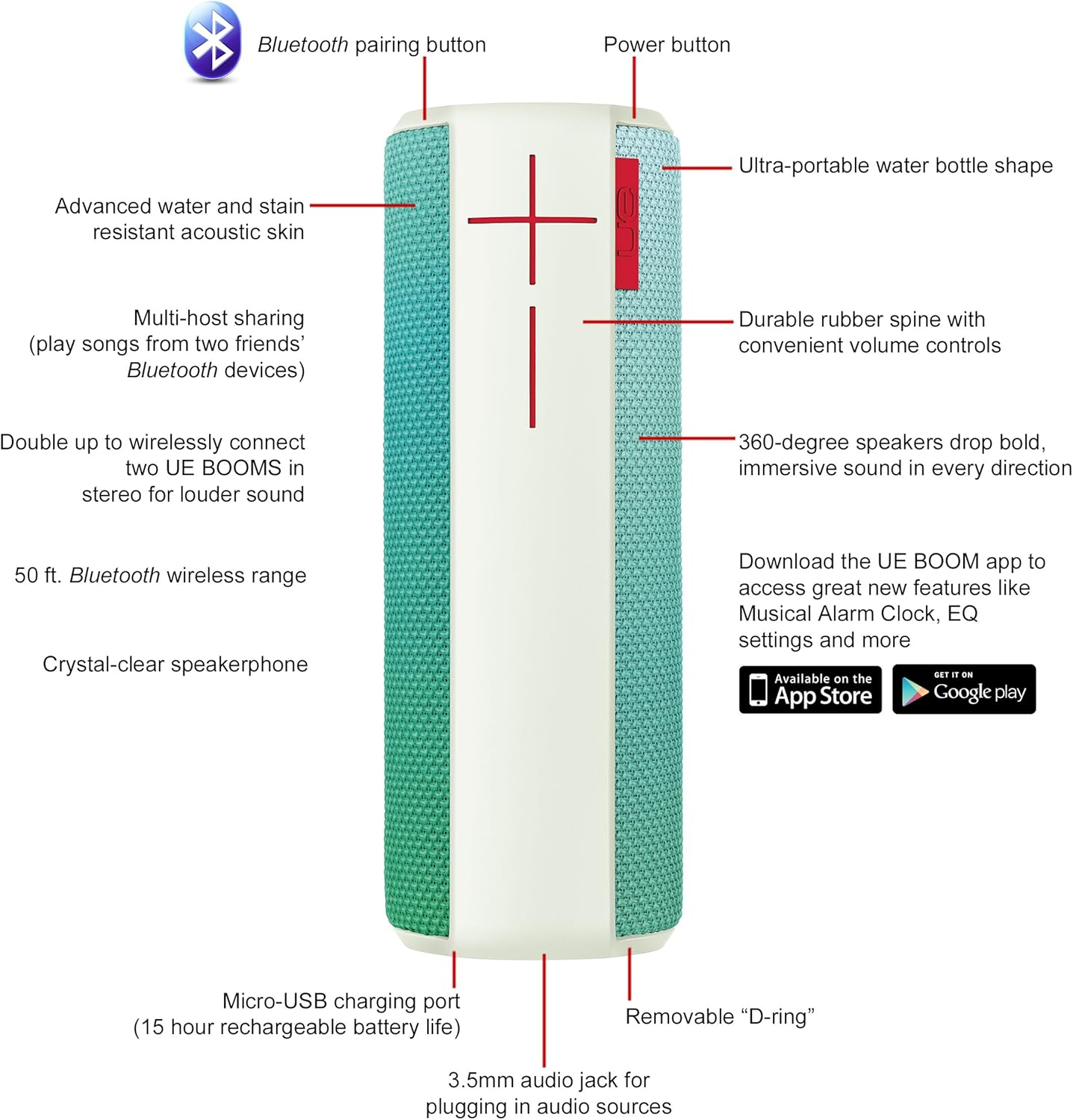
Image: Diagram highlighting key features and controls of the UE Boom speaker, including Bluetooth pairing button, power button, volume controls, micro-USB charging port, and 3.5mm audio jack.
Жайгашуу
Спикерди заряддоо
Before initial use, fully charge your UE Boom speaker. Connect the provided micro-USB cable to the charging port located at the bottom of the speaker and plug the other end into a USB power source. The speaker's battery provides approximately 15 hours of playback on a full charge.
Bluetooth Жупташтыруу
- Power on your UE Boom speaker by pressing the power button.
- Press and hold the Bluetooth pairing button (usually indicated by a Bluetooth icon) until you hear an audible tone and the LED indicator flashes rapidly.
- On your mobile device (smartphone or tablet), navigate to the Bluetooth settings.
- Select "UE Boom" from the list of available devices to pair.
- Once paired, you will hear a confirmation tone from the speaker.
NFC иштетилген түзмөктөр үчүн жөн гана тез жупташтыруу үчүн түзмөгүңүздү динамиктеги NFC аймагына таптап коюңуз.
Иштөө нускамалары
Негизги башкаруу элементтери
- Кубат баскычы: Located on the top of the speaker to turn it on or off.
- Көлөмдү көзөмөлдөө: Large '+' and '-' buttons on the side of the speaker adjust the volume.
- Bluetooth баскычы: Bluetooth жупташтыруу режимин баштайт.
UE BOOM колдонмосун колдонуу
Download the official UE BOOM app from your device's app store (available on App Store and Google Play) to unlock additional features:
- Musical Alarm Clock: Wake up to your favorite music.
- Алыстан жандыруу: Turn your speaker on/off from your device.
- EQ Орнотуулары: Үн про ыңгайлаштырыңызfile сиздин каалооңуз боюнча.
- Double Up: Connect two UE BOOM speakers for a stereo sound experience.
Динамик Функционалдык
When connected to a smartphone, the UE Boom can be used as a speakerphone. Incoming calls will be routed through the speaker, allowing for hands-free communication.
Техникалык тейлөө
The UE Boom speaker features a water and stain resistant acoustic skin. To clean, gently wipe the speaker with a damp cloth. Avoid using harsh chemicals or abrasive cleaners. Ensure all ports are dry before charging or connecting other devices.
Проблемаларды чечүү
- Кубат жок: Ensure the speaker is charged. Connect it to a power source using the micro-USB cable.
- Bluetooth аркылуу жупташтыруу мүмкүн эмес:
- Динамик жупташтыруу режиминде экенин текшериңиз (жаркыраган LED).
- Түзмөгүңүздө Bluetooth иштетилгенин текшериңиз.
- Түзмөгүңүздү динамикке жакыныраак жылдырыңыз (50 фут аралыкта).
- Түзмөктү жупташып, кайра жупташып көрүңүз.
- Көлөмү төмөн же бурмаланган үн:
- Динамиктин жана туташкан түзмөгүңүздүн үнүн тууралаңыз.
- Динамик толугу менен кубатталганын текшериңиз.
- Check for any obstructions around the speaker.
- Колдонмо туташпай жатат: Ensure the speaker is powered on and connected via Bluetooth to your device. Update the app to the latest version.
Продукт спецификациялары
| Модель аты | Logitech UE Boom Wireless Bluetooth Speaker |
| Модель номери | 980-001023 |
| Бренд | Logitech |
| Түс | Northern Light |
| Динамик түрү | Сыртта |
| Байланыш технологиясы | Bluetooth, зымсыз |
| Зымсыз диапазон | 50 фут (15.24 метр) чейин |
| Power Source | Батарея менен иштейт (1 литий-иондук батарейка камтылган) |
| Батареянын орточо иштөө мөөнөтү | 15 саат |
| Сууга туруктуулук деңгээли | Суу өткөрбөйт |
| Элемент Салмагы | 2.2 фунт |
| Продукциянын өлчөмдөрү (LxWxH) | 2.6 x 2.6 x 7.1 дюйм |
| Материал | Пластик |
| UPC | 097855112125 |
Расмий продукт Video
Видео: Бүттүview of the Logitech UE Boom speaker's features, including 360-degree sound, water resistance, wireless connectivity, and the ability to pair two speakers for louder sound. This video demonstrates the speaker's durability and portability in various environments.
Кепилдик жана колдоо
The Logitech UE Boom Wireless Bluetooth Speaker comes with a Limited Warranty. For specific warranty details, please refer to the documentation included with your product or visit the official Logitech webсайт.
For technical support or customer service, you may contact Logitech at: 646-454-3200.