Introduction
This manual provides comprehensive instructions for the setup, operation, and maintenance of your Clarity D702 Cordless Phone system. Designed for individuals with moderate hearing loss, this phone utilizes DECT 6.0 technology to deliver clear, interference-free communication. Please read this manual thoroughly before using your phone.
Пакеттин мазмуну
Пакетиңизде бардык буюмдар бар экенин текшериңиз:
- Clarity D702 Base Unit
- Clarity D702 Handset
- Clarity D702HS Expandable Handset (if included in your package)
- AC кубат адаптери
- Телефон линиясы
- Rechargeable Batteries (for handset)
- Колдонуучунун Колдонмосу (бул документ)
Жайгашуу
1. Батареяларды орнотуу
The handset requires 4 AA batteries (included). Ensure correct polarity when inserting the batteries into the handset's battery compartment.
2. Негизги блокту туташтыруу
- Телефон линиясынын шнурунун бир учун негизги блоктогу TEL LINE уячасына туташтырыңыз.
- Телефон линиясынын шнурунун экинчи учун дубалдагы телефон уячасына туташтырыңыз.
- AC кубат адаптерин базалык блоктогу POWER уячасына туташтырыңыз.
- AC кубат адаптерин стандарттуу электр розеткасына сайыңыз.
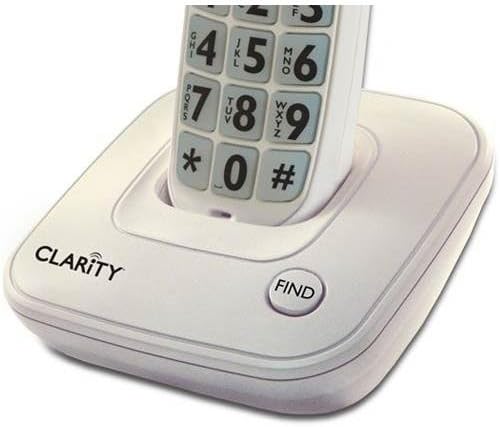 Image: The Clarity D702 cordless phone handset resting in its charging base. The base features the "CLARITY" brand logo and a "FIND" button. The handset displays large, easy-to-read numeric keypad buttons.
3. Телефонду заряддоо
Place the handset in the base unit. The charge indicator light on the handset should illuminate, indicating that it is charging. Allow the handset to charge for at least 12 hours before initial use to ensure optimal battery performance.
Иштөө нускамалары
Чакыруу
- Телефонду алыңыз же баскычты басыңыз СҮЙЛӨШҮҮ баскычы.
- Dial the desired phone number using the large, backlit keypad.
- басыңыз СҮЙЛӨШҮҮ button again or place the handset back in the base to end the call.
Чалууга жооп берүү
Телефон шыңгыраганда, телефонду алыңыз же басыңыз СҮЙЛӨШҮҮ баскычы.
Үндү жана Тонду тууралоо
During a call, use the volume control buttons on the side of the handset to adjust the listening volume. The phone offers four (4) tone settings to customize your listening experience. Refer to the handset's menu for tone adjustment options.
Динамикти колдонуу
Чалуу учурунда динамикти иштетүү үчүн, баскычын басыңыз СПИКЕР button. Press it again to return to handset mode.
Чалуучунун ID
The large font and high contrast caller ID screen displays incoming call information. The keypad and CID display also light up as a super bright visual ringer.
Finding a Lost Handset
Эгерде сиз телефонуңузду туура эмес жайгаштырсаңыз, баскычын басыңыз ТАБУУ button on the base unit. The handset will emit a paging tone.
Техникалык тейлөө
- Телефондун беттерин жумшак, d менен тазалаңызamp кездеме. Абразивдүү тазалагычтарды же эриткичтерди колдонбоңуз.
- Телефонду ашыкча нымдуулукка, тике күн нуруна же экстремалдык температурага тийгизүүдөн сактаңыз.
- Ensure the handset's charging contacts are clean for proper charging.
Проблемаларды чечүү
| Көйгөй | Мүмкүн себеп | Чечим |
|---|---|---|
| Терүү үнү жок | Телефон линиясы ажыратылган. | Телефон линиясынын шнурунун негизги блокко жана уячага бекем туташтырылганын текшериңиз. |
| Телефон заряддалбай жатат | Handset not properly seated in base; dirty charging contacts. | Reseat the handset in the base. Clean the charging contacts on both the handset and base with a dry cloth. |
| Үн сапаты начар / Статикалык | Башка электрондук түзүлүштөрдүн тоскоолдуктары; телефон базадан өтө алыс. | Move the base unit away from other electronic devices. Ensure the handset is within range of the base. |
| Handset not ringing | Ringer volume is off or set too low. | Adjust the ringer volume setting on the handset. |
Техникалык шарттар
- Модел: D702 + (1) D702HS
- Бренд: Ачыктык
- Өлчөмдөрү (негизги бирдиги): 9.1 x 7.7 x 5.8 дюйм
- Элемент Салмагы: 2.6 фунт
- Телефон түрү: Зымсыз
- Технология: DECT 6.0
- Кубат булагы: Электр зымдары
- Батареялар: 4 AA batteries (for handset)
- Түсү: Off-White
- Материал: Пластик
- Жооп берүү системасы: Санарип


