Introduction
This manual provides essential information for the safe and efficient use of your Sharp LC-48LE653U 48-Inch 1080p 60Hz Smart LED TV. Please read these instructions thoroughly before operating the television and retain them for future reference. This television offers reliable performance with AquoMotion 120 technology for smooth motion, reduced blur, and access to SmartCentral Apps for various streaming services. It features an ultra-narrow bezel, a sleek modern design, Wallpaper Mode, three HDMI inputs (including MHL support), and built-in 20W audio.
Кутуда эмне бар
Орнотууну улантуудан мурун бардык компоненттер бар экенин текшериңиз.
- Sharp LC-48LE653U 48-Inch Smart LED TV
- Алыстан башкаруу
- Телевизордук стенд
- AA Батарейки (2)
- Электр кабели
- Документтер (Ыкчам баштоо колдонмосу, Кепилдик карта)
Жайгашуу
1. Пакеттен чыгаруу жана жайгаштыруу
Carefully remove the television from its packaging. Place the TV on a stable, level surface or mount it on a wall using a compatible VESA mount (sold separately). Ensure adequate ventilation around the television.
2. Стендди бекитүү
If using the included stand, align the stand with the mounting holes on the bottom of the TV. Secure it with the provided screws. Refer to the diagram below for proper orientation.

Figure 1: Television with stand and dimensions (10.55"D x 42.56"W x 26.28"H).
3. Түзмөктөрдү туташтыруу
Connect your external devices (e.g., cable box, Blu-ray player, gaming console) to the appropriate ports on the back or side of the TV. The TV features 3 HDMI inputs (one with MHL support), 1 USB port, and component/composite video inputs.

Figure 2: Detail of TV input ports.
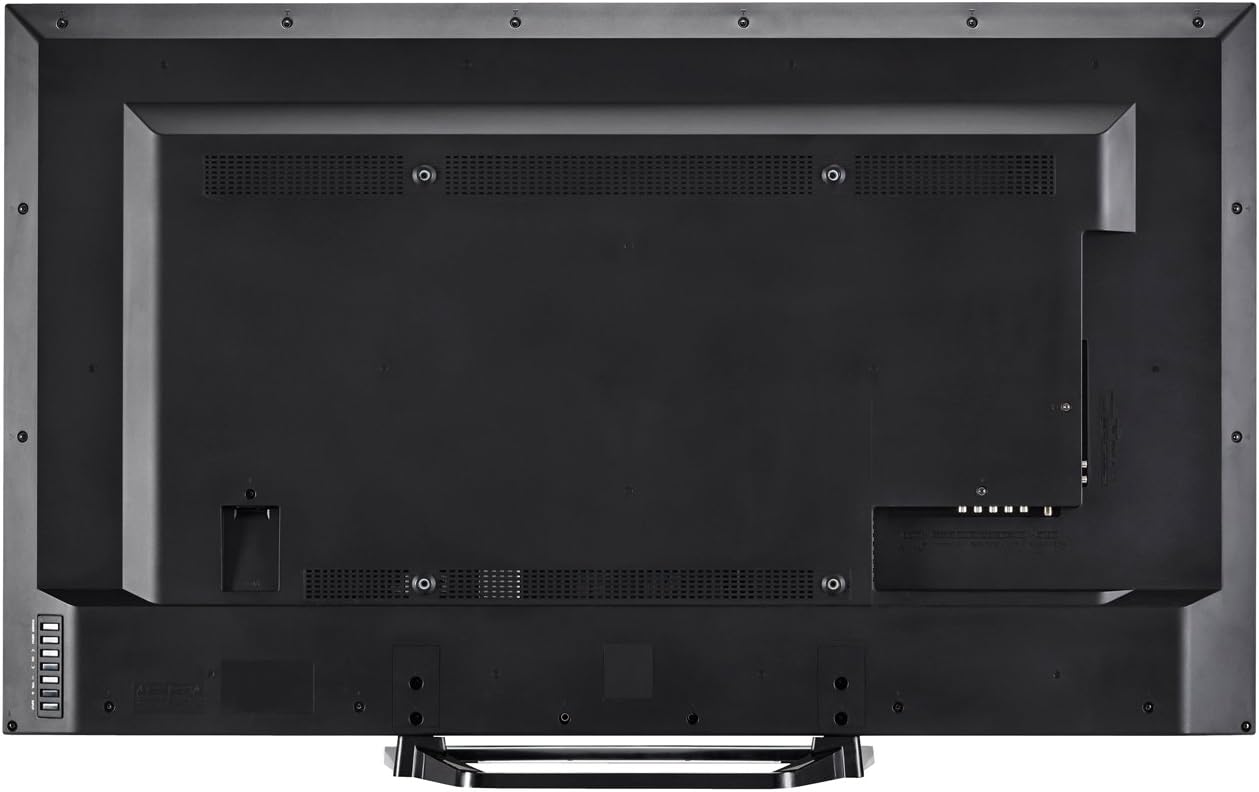
3-сүрөт: Арткы view of the television with all connections.
4. Power Connection
Plug the power cord into the TV's power input, then into a standard electrical outlet (110 VAC, 60 Hz).
5. Баштапкы күйгүзүү жана орнотуу устасы
Press the Power button on the TV or remote control. Follow the on-screen instructions to complete the initial setup, including language selection, network connection (Wi-Fi or Ethernet), and channel scanning.
Иштөө нускамалары
1. Алыстан башкаруу функциялары
The included remote control allows you to navigate menus, change channels, adjust volume, and access smart features. Insert the two AA batteries into the remote control, observing polarity.

4-сүрөт: Алыстан башкаруу пульту.
- Күч: Телевизорду күйгүзөт же өчүрөт.
- Киргизүү: Selects the input source (HDMI, Component, etc.).
- Көлөмү (+/-): Үн деңгээлин тууралайт.
- Канал (CH +/-): Каналдарды өзгөртөт.
- Акылдуу: Accesses SmartCentral Apps.
- Меню: Opens the main settings menu.
- Навигация баскычтары (Өйдө/Төмөн/Сол/Оң/Кирүү): Менюларды багыттоо жана тандоолорду ырастоо.
- Netflix, YouTube, Pandora, Vudu: Бул агымдык кызматтарга тез жетүү үчүн атайын баскычтар.
2. SmartCentral Apps
Your Sharp Smart LED TV comes with built-in Wi-Fi and SmartCentral Apps, providing access to popular streaming services and a web browser. Press the 'Smart' button on your remote or select the SmartCentral Apps icon from the home screen.

Figure 5: SmartCentral Apps Interface.
- Колдонмолорго кирүү: Use the navigation buttons on the remote to select and launch applications like Netflix, Hulu Plus, Pandora, Vudu, and YouTube.
- Web Браузер: Камтылганды колдонуңуз web жалпы интернетти серептөө үчүн браузер.
- Тармак туташуусу: Ensure your TV is connected to a stable internet connection via Wi-Fi or Ethernet for optimal Smart TV functionality.
3. Сүрөт жана үн орнотуулары
Access the TV's menu to customize picture and sound settings. Adjust brightness, contrast, color, and sharpness for picture quality. For audio, select sound modes or adjust bass/treble settings.
4. Wallpaper Mode
When the TV is turned off, Wallpaper Mode allows it to display virtually any image, transforming your TV into a large-format display for photos or artwork. Configure this feature through the TV's settings menu.
Техникалык тейлөө
1. Экранды тазалоо
Экранды жумшак, кургак, түксүз чүпүрөк менен акырын сүртүңүз. өжөр белгилери үчүн, жеңил гampчүпүрөккө суу же атайын экран тазалоочу каражат. Катуу химиялык заттардан же абразивдүү материалдардан алыс болуңуз.
2. Кабинетти тазалоо
Телевизордун корпусун жумшак, кургак чүпүрөк менен сүртүңүз. Суюк тазалоочу каражаттарды түздөн-түз корпуска колдонбоңуз.
3. Программалык камсыздоону жаңыртуу
Periodically check for software updates through the TV's settings menu to ensure optimal performance and access to the latest features. A stable internet connection is required for updates.
Проблемаларды чечүү
Эгерде сиз телевизоруңузда көйгөйлөргө туш болсоңуз, анда төмөнкү кеңири таралган чечимдерди караңыз:
- Кубат жок: Ensure the power cord is securely plugged into both the TV and the electrical outlet. Test the outlet with another device.
- Сүрөт/үн жок: Verify the correct input source is selected. Check all cable connections to external devices. If using an antenna, ensure it is properly connected and channels are scanned.
- No Sound (intermittent): If sound occasionally cuts out, try unplugging the TV from the power outlet for a few minutes, then plugging it back in. This can reset internal components.
- Сүрөттүн сапаты начар: Сүрөт жөндөөлөрүн тууралаңыз (жарыктык, контраст, тактык). Киргизүү булагы жогорку сапаттагы сигнал берип жатканын текшериңиз.
- Тармакка туташуу маселелери: Check your Wi-Fi router or Ethernet cable connection. Restart your router and the TV. Ensure Wi-Fi settings on the TV are correctly configured.
- Алыстан башкаруу иштебейт: Батареяларды алмаштырыңыз. Пульт менен сыналгынын IR сенсорунун ортосунда эч кандай тоскоолдуктар жок экенин текшериңиз.
For persistent issues, contact Sharp customer support.
Техникалык шарттар
| Өзгөчөлүк | Спецификация |
|---|---|
| Модель номери | LC-48LE653U |
| Screen Size | 48 дюйм |
| Дисплей технологиясы | LED арткы жарык менен LCD |
| Резолюция | 1080p (1920 x 1080) |
| Жаңыртуу ылдамдыгы | 60 Hz (AquoMotion 120) |
| Байланыш | Built-in Wi-Fi, Ethernet |
| HDMI порттору | 3 (one with MHL) |
| USB порттору | 1 |
| Колдоого алынган Интернет кызматтары | Hulu Plus, Netflix, Pandora, Vudu, YouTube |
| Аудио чыгаруу күчү | 20 Ватт |
| Продукциянын өлчөмдөрү (D x W x Y) | 10.55" x 42.56" x 26.28" |
| Элемент Салмагы | 21 фунт |
| Тtage | 110 VAC 60 Гц |
Кепилдик маалымат
This Sharp LC-48LE653U television is covered by a 1 жылдык чектелген кепилдик from the date of purchase. This warranty covers manufacturing defects in materials and workmanship under normal use. It does not cover damage caused by misuse, accidents, unauthorized modifications, or external causes. Please retain your proof of purchase for warranty claims.
Колдоо
For technical assistance, troubleshooting beyond this manual, or warranty service, please contact Sharp customer support. Refer to the contact information provided in your product documentation or visit the official Sharp webсайт.
Онлайн колдоо: www.sharpusa.com/support
Телефондук колдоо: Refer to your warranty card or Sharp's official webакыркы байланыш номерлери үчүн сайт.


