1. Киришүү
Thank you for choosing the Orion HCCA5000.1DSPLX High Performance Class-D Monoblock Ampкөтөргүч. Бул amplifier is engineered for exceptional power and sound quality in car audio systems, designed to drive low impedances with high output levels. This manual provides essential information for proper installation, operation, and maintenance to ensure optimal performance and longevity of your ampөмүрлүү.
2. Коопсуздук маалыматы
Сураныч, орнотуудан жана иштетүүдөн мурун бардык коопсуздук нускамаларын кылдат окуп чыгыңыз amplifier. Failure to follow these guidelines may result in injury or damage to the ampкөтөргүч же унаа.
- Кесиптик орнотуу сунушталат: Installation of car audio equipment can be complex. If you are unsure about any part of the installation process, seek assistance from a qualified professional.
- Электр энергиясын өчүрүү: Always disconnect the vehicle's battery negative terminal before starting any electrical work to prevent short circuits and electrical shock.
- Туура зымдар: Use appropriate gauge wiring for power, ground, and speaker connections as specified in this manual. Incorrect wiring can lead to overheating, fire, or damage to components.
- Вентиляция: камсыз кылуу amplifier is mounted in a location with adequate ventilation to prevent overheating. Do not block cooling fins or air vents.
- Нымдуулуктун таасири: орнотуудан качыңыз amplifier in locations where it may be exposed to moisture or excessive humidity.
- Коопсуз орнотуу: монтаждоо ampУнаа иштеп жатканда бошоп кетпеши үчүн, көтөргүчтү бекем орнотуңуз, анткени ал жаракат алууга же зыянга алып келиши мүмкүн.
- Угуу коргоо: Жогорку үн басымынын деңгээлине узак убакыт бою таасир этүү угуунун туруктуу бузулушуна алып келиши мүмкүн. Үн деңгээлин жөндөөдө этият болуңуз.
3. Продукциянын өзгөчөлүктөрү
The Orion HCCA5000.1DSPLX amplifier incorporates advanced features for superior audio performance and system protection:
- Жогорку кубаттуулугу: Delivers 5000W RMS, designed for competition-level sound pressure.
- Class-D Topology: Ensures high efficiency and powerful output with minimal heat generation.
- 1 Ohm Stable: Capable of driving low impedance loads for maximum power delivery to subwoofers.
- Төмөн өткөрүү чыпкасы (LPF): Adjustable 40Hz - 300Hz for precise subwoofer frequency control.
- Bass Boost Control: Төмөнкү жыштыктагы жоопту күчөтөт.
- MOSFET кубаттуулугу: Provides stable and efficient power delivery.
- Fault and Protection Monitoring: коргойт amplifier and connected components from electrical issues.
- Алыскы басс баскычы: Allows convenient adjustment of bass levels from the driver's seat.
4. Пакеттин мазмуну
Пакетте бардык буюмдар бар экенин текшериңиз:
- Orion HCCA5000.1DSPLX Monoblock Ampөмүрлүү
- Кабели бар алыстан башкаруу баскычы
- Колдонуучунун Колдонмосу (бул документ)
- Mounting Hardware (screws, etc.) - (Typically included, verify upon unboxing)
5. Орнотуу жана орнотуу
Туура орнотуу сиздин иштеши жана коопсуздугу үчүн абдан маанилүү болуп саналат ampкөтөргүч. Бул кадамдарды кылдаттык менен аткарыңыз.
5.1. Монтаждоо орду
Choose a mounting location that provides:
- Adequate ventilation for heat dissipation.
- Protection from moisture and direct sunlight.
- Secure attachment to a solid surface.
- Accessibility for wiring and adjustments.
Common locations include the trunk, under seats, or behind rear seats.
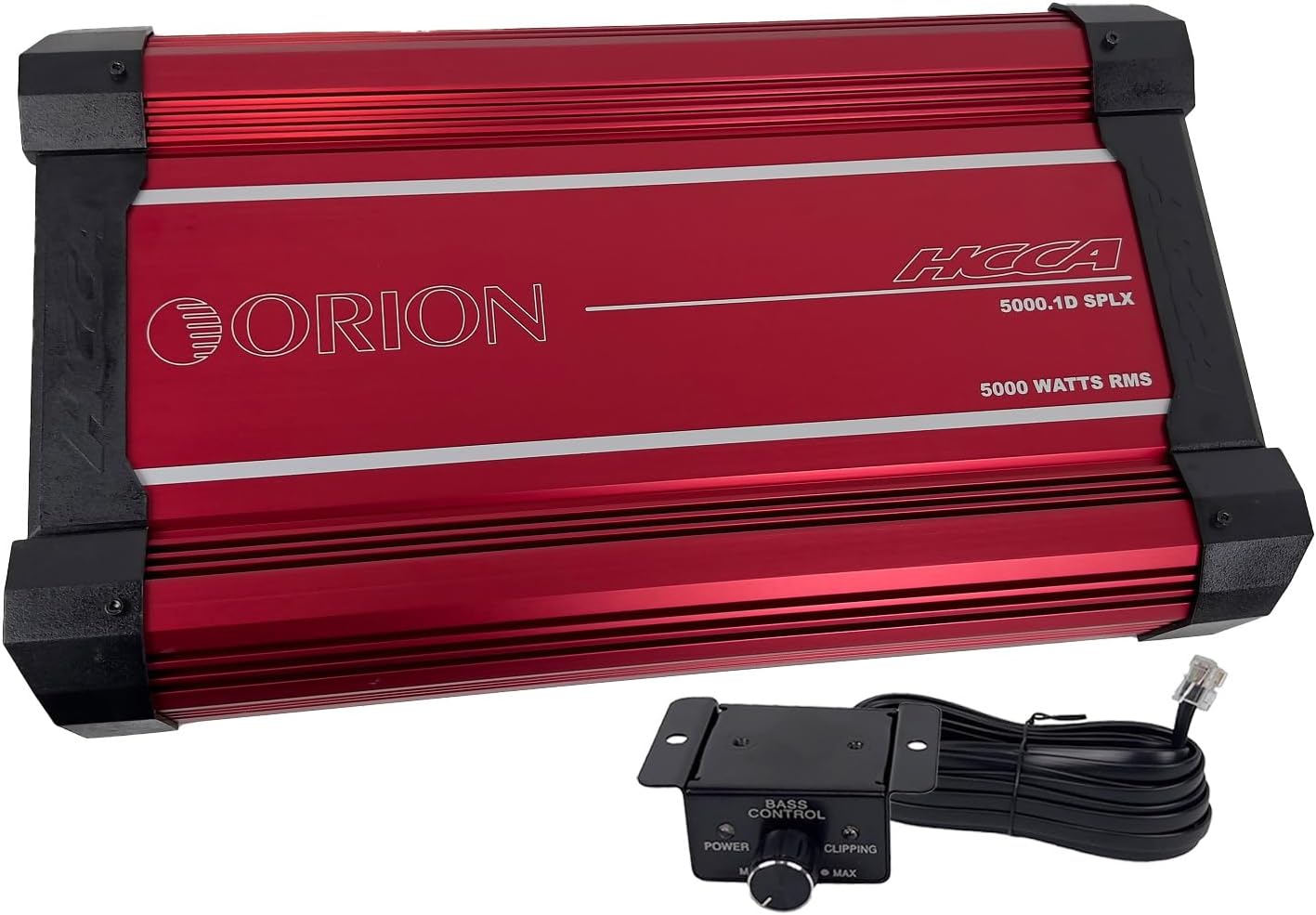
Бул сүрөт үстүн көрсөтөт view of the red Orion HCCA5000.1DSPLX amplifier along with its wired remote bass control knob. The amplifier features the "ORION" logo and "HCCA 5000.1D SPLX 5000 WATTS RMS" text. The remote knob has "BASS CONTROL" and "POWER" and "CLIPPING" indicators.
5.2. Зымдарды туташтыруу
Бардык байланыштар коопсуз жана туура изоляцияланганын текшериңиз.
5.2.1. Power and Ground Wiring
- Күч (B+): Connect a heavy-gauge power cable (e.g., 0-gauge or 4-gauge, depending on total system power requirements) directly from the positive terminal of the vehicle's battery to the amplifier's B+ terminal. Install an appropriate fuse holder (ANL or Mini-ANL) within 18 inches (45 cm) of the battery.
- Жер (GND): кубат кабели менен бирдей өлчөмдөгү оор өлчөмдүү жер кабелин туташтырыңыз amplifier's GND terminal to a clean, unpainted metal surface of the vehicle chassis. Ensure a solid electrical connection. The ground cable should be as short as possible, ideally less than 3 feet (1 meter).
- Алыстан (REM): Connect a smaller gauge wire (e.g., 18-gauge) from the ampкөтөргүчтүн REM терминалын башкы блоктун алыстан күйгүзүү чыгышына туташтырыңыз. Бул зым ampстерео телефонуңуз менен көтөргүчтү күйгүзүп жана өчүрүңүз.

This image shows the power and speaker connection side of the Orion HCCA5000.1DSPLX amplifier. Clearly visible are the large terminals labeled "POWER" for battery positive, ground, and remote, and "SPEAKERS" for connecting subwoofers.
5.2.2. Audio Input and Output
- RCA киргизүү: Сабвуферден RCA кабелдерин баш блогуңуздан алдын ала туташтырыңыз amplifier's RCA input terminals (L-CH Input, R-CH Input).
- RCA Output (Optional): If daisy-chaining multiple amplifiers, connect RCA cables from the amplifier's RCA output terminals (L-CH Output, R-CH Output) to the input of the next ampөмүрлүү.

This image displays the audio input and control panel side of the Orion HCCA5000.1DSPLX amplifier. It features RCA input and output jacks, along with various control knobs for gain, low pass filter, bass boost, and phase adjustment.
5.2.3. Speaker Connections
Сабвуфериңизди(лериңизди) туташтырыңыз amplifier's speaker terminals. Ensure the total impedance of the connected speakers is within the amplifier's stable operating range (1 Ohm minimum for this model).
- For a single subwoofer, connect its positive terminal to the ampкөтөргүчтүн оң колонка терминалы жана анын терс терминалы amplifier's negative speaker terminal.
- For multiple subwoofers, refer to a wiring diagram to achieve the desired impedance (series, parallel, or series-parallel).
5.3. Remote Bass Knob Connection
Connect the provided remote bass control knob to the "Remote Gain" port on the amplifier using the supplied cable. Mount the knob in a convenient location for easy access.

This image shows the remote bass control knob with its attached cable. The knob allows for convenient adjustment of bass levels and includes power and clipping indicator lights.
6. Иштөө нускамалары
Бир жолу amplifier is installed and wired, follow these steps to configure and operate it.
6.1. Баштапкы кубаттуулук
- Бардык байланыштардын туура жана коопсуз болушун камсыздаңыз.
- Пайдалуу башкарууну күйгүзүңүз amplifier to its minimum setting (fully counter-clockwise).
- Унаанын аккумуляторунун терс терминалын кайра туташтырыңыз.
- Башыңыздын бирдигин күйгүзүңүз. The amplifier should power on, indicated by its power LED.
6.2. Башкаруу элементтерин тууралоо
The amplifier features several controls to fine-tune its performance:
- Gain (Level): Бул көзөмөл дал келет ampliifier's кириш сезгичтиги чыгаруу voltage of your head unit. Start with the gain at minimum. Play a familiar track at about 75% of your head unit's maximum volume. Slowly increase the amplifier's gain until you hear distortion, then back off slightly. The remote bass knob also has a clipping indicator to assist in setting the gain.
- Төмөн өткөрүү чыпкасы (LPF): This filter allows only frequencies below the set point to pass through to the subwoofer. Adjust the LPF (40Hz - 300Hz) to blend the subwoofer's output seamlessly with your main speakers. A common starting point is 80Hz-100Hz.
- Бас жогорулатуу: This control provides an increase in output at a specific low frequency. Use sparingly, as excessive bass boost can lead to distortion and potential damage to subwoofers.
- Фаза: The phase control (0°/180°) helps to align the subwoofer's output with the main speakers. Experiment with both settings to find the one that provides the most impactful and coherent bass response.
7. Техникалык тейлөө
Үзгүлтүксүз техникалык тейлөө сиздин узак мөөнөттүү иштешиңизди жана оптималдуу иштешин камсыз кылат ampөмүрлүү.
- Тазалоо: Мезгил-мезгили менен тазалаңыз ampмуздатуучу аппараттын сыртын жумшак, кургак чүпүрөк менен сүртүңүз. Катуу химиялык заттарды же абразивдүү тазалоочу каражаттарды колдонбоңуз. Муздатуучу канатчалардын чаң жана таштандылардан тазаланганын текшериңиз.
- Туташуу текшерүүлөрү: Annually, inspect all power, ground, remote, and speaker connections for tightness and corrosion. Loose connections can cause power loss, overheating, or intermittent operation.
- Вентиляция: камсыз кылуу amplifier's mounting location remains clear of obstructions to maintain proper airflow.
8. Кыйынчылыктарды
Эгер сиз менен көйгөйлөр пайда болсо amplifier, consult the following table before contacting technical support.
| Көйгөй | Мүмкүн себеп | Чечим |
|---|---|---|
| Кубат жок / Ampкөтөргүч күйбөйт |
|
|
| Үн чыгышы жок |
|
|
| Distorted Sound |
|
|
| Amplifier Overheats / Goes into Protection |
|
|
9. Техникалык шарттар
Key technical specifications for the Orion HCCA5000.1DSPLX Monoblock Ampөмүр берүүчү:
| Өзгөчөлүк | Спецификация |
|---|---|
| Модель номери | HCCA5000.1D |
| Бренд | ОРИОН |
| Каналдардын саны | 1 (Моноблок) |
| Чыгуу күчү (RMS) | 5000 Ватт |
| Минималдуу туруктуу импеданс | 1 Ом |
| Frequency Response | 15Гц - 250Гц |
| Төмөн өтүү чыпкасы (LPF) | 40Гц - 300Гц |
| Тtage | 12 вольт (иштетүү) |
| Maximum Supply Voltage | 16 вольт |
| Өлчөмдөрү (L x W x Y) | 21.3 x 11.7 x 2.8 дюйм (541.02 мм x 297.18 мм x 71.12 мм) |
| Элемент Салмагы | 31.2 фунт |
| Материал | Aluminum, MOSFET |
| Монтаж түрү | Surface Mount |
| Иштөө температурасы | 660 градус (Note: This value seems unusually high and likely refers to a component's maximum junction temperature, not ambient operating temperature. Operate within reasonable vehicle interior temperatures.) |
| Сертификация | FCC |
10. Кепилдик жана колдоо
Orion products are designed for reliability and performance. For specific warranty terms and conditions, please refer to the warranty card included with your product or visit the official Orion Car Audio webсайт. Кепилдик дооматтар үчүн сатып алганыңыздын далилин сактаңыз.
For technical assistance, troubleshooting beyond this manual, or warranty inquiries, please contact Orion Car Audio customer support through their official channels. Contact information can typically be found on their webсайт же продукт таңгак.
Webсайт: www.orioncaraudio.com (Чыгampле шилтеме, чындыгын текшерүү webсайт)


