Introduction
This manual provides essential information for the proper use, maintenance, and care of your HAKKO T30-J Bent Solder Tip. The T30-J tip is designed for precision soldering applications, particularly suitable for drag soldering and working in narrow spaces. Adhering to these instructions will ensure optimal performance and longevity of your solder tip.

Figure 1: HAKKO T30-J Bent Solder Tip. This image displays the overall view of the HAKKO T30-J solder tip, highlighting its bent shape designed for specific soldering tasks.
Орнотуу жана орнотуу
Пакеттен чыгаруу
Carefully remove the HAKKO T30-J solder tip from its packaging. Inspect the tip for any visible damage before use.
Шайкештик
The HAKKO T30-J solder tip is specifically designed for use with the HAKKO FM-2032 Micro Soldering Iron. Ensure your soldering station and iron are compatible with T30 series tips for proper function and heat transfer.

Figure 2: HAKKO FM-2032 Micro Soldering Iron. This image illustrates the HAKKO FM-2032 Micro Soldering Iron, which is compatible with the T30 series solder tips, including the T30-J.
Installing the Solder Tip
- Ensure the soldering iron is powered off and cool.
- Carefully insert the T30-J tip into the designated slot on the HAKKO FM-2032 Micro Soldering Iron.
- Ensure the tip is securely seated to allow for proper heat transfer.
Иштөө нускамалары
Selecting the Correct Tip Shape and Size
The tip shape and size are critical for effective soldering. Consider the thermal capacity of the Printed Wiring Board (P.W.B.) and the electronic components. A wider contact area generally allows for more efficient heat transfer. Ensure the tip size is appropriate for the land diameter to prevent damage from overheating.
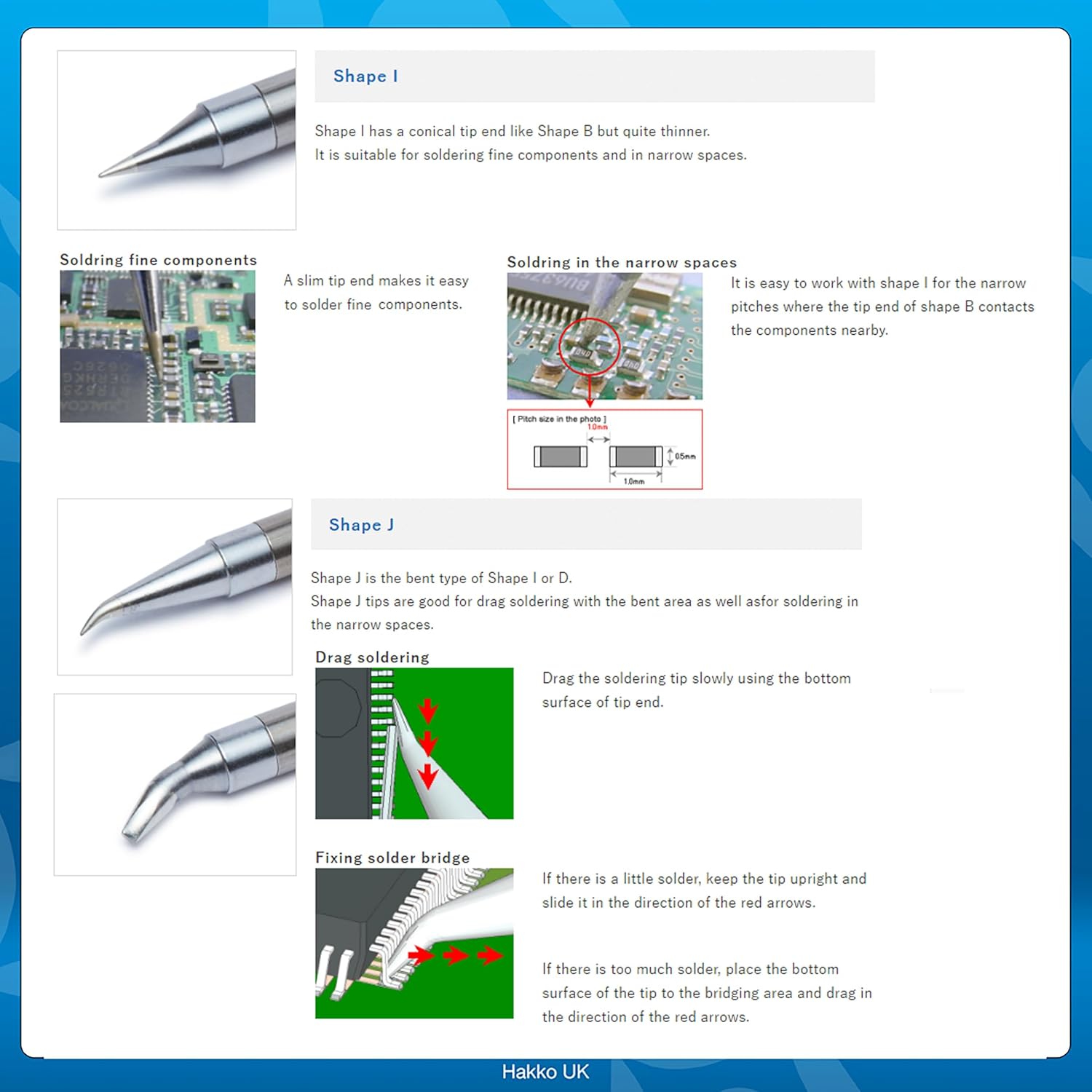
Figure 3: ашыкview of HAKKO Solder Tip Shapes. This image displays various tip shapes, including B, I, J, D, C, BC, BCM, K, and Special shapes, illustrating the diversity available for different soldering needs.

Figure 4: Heat Transfer Efficiency. This diagram illustrates how the contact area between the solder tip and the workpiece affects heat transfer. A larger contact area (left) results in great heat transfer, while too small (middle) or too large (right) can lead to poor heat transfer or damage.
Using the T30-J Bent Tip
The T30-J tip features a bent design, making it ideal for specific soldering techniques and challenging access points.

Figure 5: Close-up of T30-J Bent Tip. This image provides a detailed view of the bent tip, showcasing its precise angle for intricate soldering tasks.
- Drag Soldering: The bent shape of the T30-J is excellent for drag soldering. Lay down the end pad section and drag the tip slowly. Apply flux to leads and land pads before soldering to prevent bridging.
- Soldering in Narrow Spaces: The bent tip allows for easier access and manipulation in confined areas, such as soldering tiny chip parts (e.g., 0603 packages). Lay down the end pad section and put the tip to the board.
- Correcting Bridging:
- If the bridge amount is small, stand the tip on end and drag the tip slowly.
- If the bridge amount is large, lay down the end pad section and drag the tip slowly while putting the tip on the solder in the bridged section.

Figure 6: J Series Soldering Techniques. This image illustrates drag soldering, soldering tiny chip parts, and correcting solder bridges using the J series tips, including the T30-J.
Optional Nitrogen Soldering
For advanced applications, the T30 series tips can be used with nitrogen soldering setups, requiring an additional nozzle assembly. This can enhance soldering quality by preventing oxidation.

Figure 7: Nitrogen Soldering Nozzle Assembly. This image shows various nozzle assemblies (C5038, C5040, C5041) compatible with T30 series soldering tips for nitrogen soldering applications.
Техникалык тейлөө жана кам көрүү
Кеңеш тазалоо
Regular cleaning of your solder tip is crucial for maintaining its performance and extending its lifespan. Use a dedicated tip cleaner or a damp sponge to wipe off excess solder and oxidation during and after use.

Figure 8: Recommended Tip Cleaning Accessories. This image displays the HAKKO 599B Tip Cleaner, an essential accessory for maintaining the cleanliness and performance of your solder tips.
Сактагыч
When not in use, store the solder tip in a dry, clean environment. Using a tip holder can prevent damage and keep the tip organized.
Проблемаларды чечүү
This section addresses common issues you might encounter with your HAKKO T30-J solder tip.
| Маселе | Мүмкүн себеп | Чечим |
|---|---|---|
| Tip not heating properly | Poor contact with heating element; incorrect installation; faulty soldering iron. | Ensure tip is fully seated. Check soldering iron connection. Consult FM-2032 manual for iron troubleshooting. |
| Solder not wetting the tip | Tip oxidation; insufficient tinning; incorrect temperature. | Clean and re-tin the tip. Ensure proper soldering temperature is set on the station. |
| Tip wears out quickly | Excessive pressure; abrasive cleaning; high temperature settings. | Use light pressure. Use appropriate cleaning methods (e.g., brass wool). Verify temperature settings are suitable for the solder. |
Продукт спецификациялары
| Спецификация | Деталь |
|---|---|
| Модель номери | T30-J |
| Кеңеш түрү | ийилген |
| Өлчөмдөр | 0.07 in. x 0.11 in. (approximate working area) |
| Материал | Iron (tip material) |
| Түс | Black (handle/base) |
| Шайкештик | HAKKO FM-2032 Micro Soldering Iron |
| Элемент Салмагы | 3.22 г |
| Өндүрүүчү | AMERICAN HAKKO PRODUCTS INC |
Кепилдик жана колдоо
Кепилдик маалымат
HAKKO products are manufactured to high-quality standards. For specific warranty details regarding your T30-J solder tip, please refer to the warranty documentation provided with your HAKKO soldering station or visit the official HAKKO website. Solder tips are consumable items and their lifespan can vary based on usage and maintenance.
Кардарларды колдоо
For technical assistance, troubleshooting, or inquiries about your HAKKO T30-J solder tip, please contact HAKKO customer support through their official website or authorized distributors. Provide your product model number (T30-J) and any relevant purchase information when seeking support.


