Introduction
This manual provides comprehensive instructions for the setup, operation, maintenance, and troubleshooting of the Onset HOBO U20L-04 Water Level Data Logger. This device is designed for accurate and reliable measurement of water level in various environments.
The HOBO U20L-04 is a self-contained, submersible data logger capable of recording water level and temperature. It is ideal for monitoring water levels in wells, streams, lakes, wetlands, and tidal areas.
Продукт бүттүview
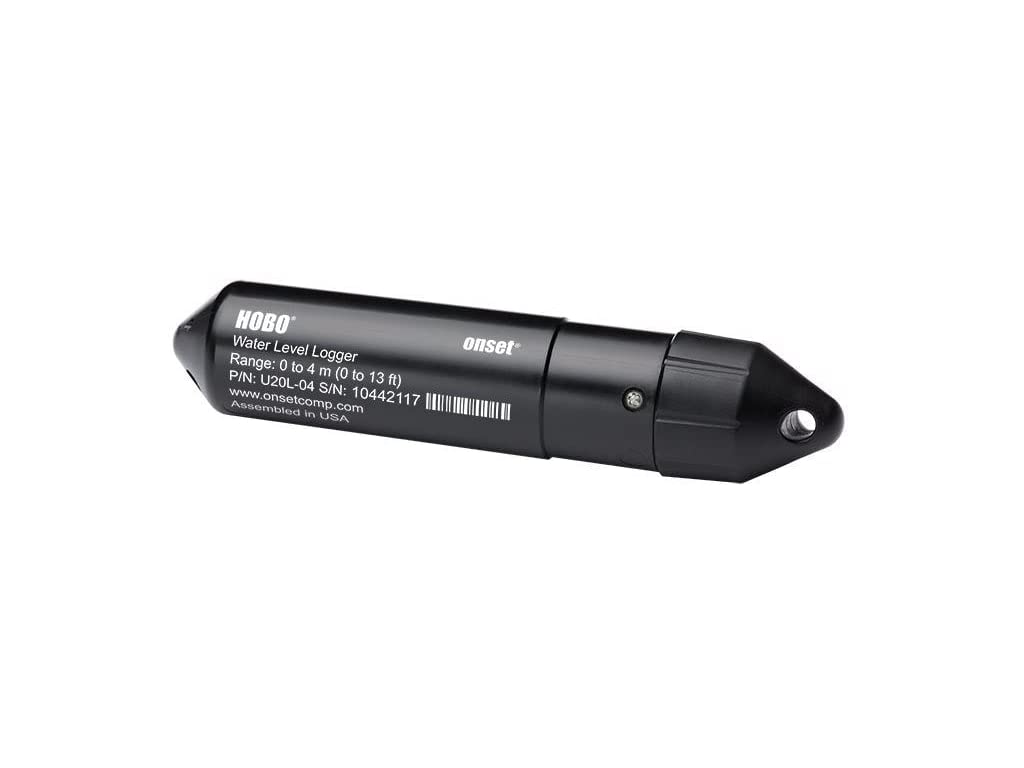
1-сүрөт: The HOBO U20L-04 Water Level Data Logger. This image shows the compact, cylindrical design of the logger, with the "HOBO Water Level Logger" and "Onset" branding visible, along with its part number (U20L-04) and serial number. The logger is black and designed for submersible use.
The HOBO U20L-04 is a robust, non-vented water level data logger. It measures water level (pressure) and temperature. The logger's range is 0 to 4 meters (0 to 13 feet) of water depth. It is constructed for durability in various aquatic environments.
Жайгашуу
1. Керектүү жабдуулар
- HOBO U20L-04 Water Level Data Logger
- HOBOware software (available from www.onsetcomp.com)
- HOBO U-DTW-1 Water Level Logger Shuttle or HOBO Base Station (U-DT-1)
- USB порту бар компьютер
2. Программалык камсыздоону орнотуу
- Download the latest version of HOBOware software from the Onset webсайт.
- Follow the on-screen instructions to install HOBOware on your computer.
- Connect the HOBO Base Station or Shuttle to your computer's USB port.
3. Logger Preparation
- Ensure the logger's O-rings are clean and free of debris.
- Apply a thin layer of silicone grease to the O-rings if necessary.
- Carefully screw the logger cap back on, ensuring a tight seal.
Иштөө нускамалары
1. Launching the Logger
- Connect the HOBO U20L-04 logger to the HOBO Base Station or Shuttle.
- Open HOBOware software.
- From the HOBOware menu, select Түзмөк > Ишке киргизүү.
- Configure the logging parameters, including:
- Logging Interval (e.g., 1 minute, 1 hour)
- Start Time (e.g., now, specific date/time)
- Stop Time (e.g., never, specific duration, specific date/time)
- Logging Mode (e.g., fixed interval, burst)
- Click Баштоо to launch the logger. The logger will begin recording data according to the configured settings.
2. Жайгаштыруу
Once launched, the logger is ready for deployment. Ensure the logger is securely fastened at the desired depth using a sturdy cable or rope attached to the eyelet at the top of the logger. Avoid deploying the logger in areas with strong currents or potential for physical damage.
For accurate water level measurements, it is crucial to also deploy a HOBO U20L-04 Barometric Pressure Data Logger (U20L-04-B) above the water surface to compensate for atmospheric pressure changes. This allows for true water level calculation.
3. Offloading Data
- Retrieve the logger from its deployment location.
- Connect the logger to the HOBO Base Station or Shuttle.
- Open HOBOware software.
- From the HOBOware menu, select Түзмөк > Окуу.
- Дайындарды сактаңыз file to your computer. The data can then be viewed, graphed, and exported within HOBOware.
Техникалык тейлөө
1. Тазалоо
- Regularly clean the logger body and sensor area with fresh water to remove any biofouling, sediment, or debris.
- Avoid using abrasive materials or harsh chemicals that could damage the logger's housing or sensor.
- Pay particular attention to the pressure sensor opening to ensure it remains clear.
2. O-Ring Inspection and Lubrication
- Before each deployment, inspect the O-rings for any signs of cracks, nicks, or wear. Replace damaged O-rings immediately.
- Apply a thin, even coat of silicone-based O-ring grease to the O-rings to maintain a watertight seal.
3. Батареяны алмаштыруу
The HOBO U20L-04 uses a non-replaceable internal battery designed for long-term use. If the battery life is depleted, the logger may need to be returned to Onset for service or replacement. Refer to the Onset website for battery life specifications and service options.
Проблемаларды чечүү
| Көйгөй | Мүмкүн себеп | Чечим |
|---|---|---|
| Logger not recognized by HOBOware |
|
|
| Inaccurate water level readings |
|
|
| Logger not launching |
|
|
Техникалык шарттар
| Параметр | Нарк |
|---|---|
| Модел | U20L-04 |
| Бренд | Башталышы |
| Water Level Range | 0ден 4 мге чейин (0дон 13 футка чейин) |
| Материал | Пластик |
| Түс | Кара |
| Элемент Салмагы | 6.4 унция (181.4 грамм) |
| Иштөө чөйрөсү | Таза жана туздуу суу |
| Эс | Approximately 42,000 measurements (water level and temperature) |
| Батареянын иштөө мөөнөтү | Typically 5 years (non-replaceable) |
| Ассамблеянын жайгашкан жери | АКШда чогулган |
Кепилдик маалымат
Onset provides a limited warranty for the HOBO U20L-04 Water Level Data Logger. For detailed warranty terms and conditions, please refer to the official Onset website or the documentation included with your purchase. Typically, the warranty covers defects in materials and workmanship under normal use.
Эскертүү: Уруксатсыз оңдоолор же өзгөртүүлөр продуктунун кепилдигин жокко чыгарышы мүмкүн.
Кардарларды колдоо
For technical assistance, product inquiries, or service requests, please contact Onset Customer Support:
- Webсайт: www.onsetcomp.com
- Электрондук почта: Refer to the "Contact Us" section on the Onset webсайт.
- Телефон: Refer to the "Contact Us" section on the Onset webаймактык телефон номерлери үчүн сайт.
When contacting support, please have your logger's model number (U20L-04) and serial number (if available) ready for faster assistance.


