1. Киришүү
This manual provides detailed instructions for the proper use and maintenance of your Hidizs AP100 High-Resolution Audio Player. Please read this manual thoroughly before operating the device to ensure optimal performance and longevity. The Hidizs AP100 is designed to deliver exceptional audio quality for a superior listening experience.
2. Продукт бүтүп калдыview
Familiarize yourself with the physical components and controls of your AP100 player.

2.1-сүрөт: Фронт view of the Hidizs AP100 High-Resolution Audio Player in white, displaying a music playback screen with track information and playback controls.

2.2-сүрөт: Жанаша view of the Hidizs AP100 in white and black, illustrating the available color options for the device.
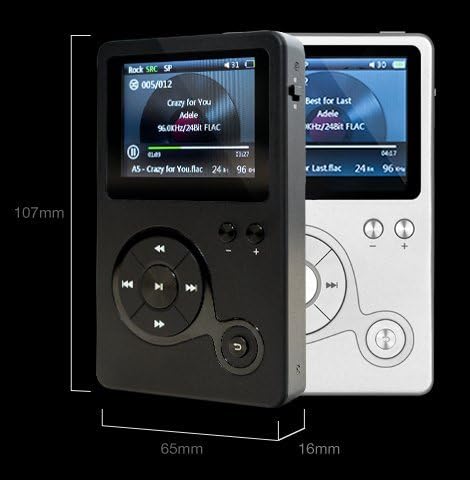
2.3-сүрөт: Physical dimensions of the Hidizs AP100 player, indicating a height of 107mm, width of 65mm, and thickness of 16mm.

2.4-сүрөт: Close-up of the bottom edge of the AP100, highlighting the Micro USB port for charging and data transfer, MicroSD card slot for expandable storage, Coaxial Input (COAX IN), and Coaxial Output (COAX OUT).

2.5-сүрөт: Close-up of the top edge of the AP100, showing the power switch, 3.5mm headphone output, 3.5mm line output, SRC (Sample Rate Converter) button, and EQ (Equalizer) button.
3. Орнотуу
3.1 Аппаратты заряддоо
Before first use, fully charge the AP100. Connect the included Micro USB cable to the Micro USB port on the bottom of the player and the other end to a USB power adapter (not included) or a computer's USB port. The charging indicator will illuminate during charging and turn off when complete.
3.2 MicroSD картасын салуу
The AP100 has 8GB of internal storage. To expand storage, insert a MicroSD card (up to 128GB, not included) into the MicroSD card slot on the bottom of the device. Ensure the card is inserted correctly until it clicks into place. To remove, gently push the card in until it springs out.
3.3 Музыканы өткөрүп берүү Files
Connect the AP100 to your computer using the Micro USB cable. The device will appear as a removable disk drive. You can then drag and drop your audio files (e.g., FLAC, WAV, MP3) into the internal storage or the MicroSD card folder. Disconnect safely after transfer.
3.4 Наушниктерди туташтыруу
Plug your headphones into the 3.5mm headphone output jack located on the top of the device. For connecting to an external amplifier or speaker system, use the 3.5mm line output jack.
4. Иштөө нускамалары
4.1 Күйгүзүү/өчүрүү
To power on the device, slide the power switch located on the top edge to the 'On' position. To power off, slide it back to the 'Off' position.
4.2 Негизги навигация
The AP100 features a circular navigation pad and dedicated buttons:
- Борбордук баскыч: Play/Pause, Select.
- Өйдө/Төмөн/Солго/Оңго жебелер: Navigate menus, skip tracks, fast forward/rewind.
- Үн баскычтары (+/-): Ойнотуу үнүн тууралоо.
- SRC Button: Cycles through Sample Rate Converter settings.
- EQ баскычы: Accesses equalizer presets and custom settings.
4.3 Музыка ойнотуу
- Navigate to the 'Music' or 'Browser' option from the main menu.
- Select your desired storage (internal or MicroSD card).
- Browse through folders, artists, albums, or tracks.
- Press the center button to select and play a track.
4.4 Үндү башкаруу
Use the dedicated '+' and '-' buttons on the front panel to increase or decrease the playback volume. Adjust to a comfortable listening level to prevent hearing damage.
4.5 Supported Audio Formats
The Hidizs AP100 supports a wide range of audio formats, including but not limited to: FLAC, WAV, MP3, APE, WMA, ALAC, and AAC.
5. Техникалык тейлөө
5.1 Тазалоо
Wipe the device with a soft, dry, lint-free cloth. Do not use liquid cleaners or abrasive materials, as they may damage the screen or casing.
5.2 Батареяга кам көрүү
Батареянын иштөө мөөнөтүн узартуу үчүн, батареянын зарядын тез-тез толук бошотуп туруудан алыс болуңуз. Эгер түзмөктү узак убакытка сактасаңыз, аны болжол менен 50% га чейин кубаттап, салкын, кургак жерде сактаңыз.
5.3 Программалык камсыздоо жаңыртуулары
Periodically check the official Hidizs website for firmware updates. Updates can improve performance, add features, or fix bugs. Follow the instructions provided with the update package carefully.
6. Кыйынчылыктарды
- Түзмөк күйгүзүлбөйт: Ensure the battery is charged. Connect to a power source and try again. Check the power switch position.
- Үн жок: Check headphone connection. Ensure volume is not set to zero. Test with different headphones. Verify the audio file бузулган эмес.
- Cannot read MicroSD card: Ensure the card is inserted correctly. Try reinserting the card. Format the card on a computer (backing up data first) and try again. Ensure the card capacity is supported (up to 128GB).
- Түзмөк токтоп калат же жооп бербей калат: Press and hold the power button for 10-15 seconds to force a restart. If the issue persists, perform a factory reset (refer to device settings, note this will erase all data).
- Files not appearing after transfer: камсыз кылуу files are in a supported format. Disconnect and reconnect the device to the computer. Refresh the music library on the player if an option is available.
7. Техникалык шарттар
| Өзгөчөлүк | Спецификация |
|---|---|
| Бренд | Hidizs |
| Модель номери | AP100 |
| Продукциянын өлчөмдөрү | 2.56 x 0.63 x 4.21 дюйм (65 x 16 x 107 мм) |
| Элемент Салмагы | 5 унция (0.31 фунт) |
| Internal Memory Storage | 8 ГБ |
| Кеңейтүүчү сактагыч | MicroSD card slot (up to 128 GB) |
| Screen Size | 2.4 дюйм |
| Байланыш технологиясы | Aux (3.5mm Headphone Out, 3.5mm Line Out, Coaxial In, Coaxial Out), Micro USB |
| Өзгөчө өзгөчөлүк | Hi-Res аудио ойнотуу |
| Колдоого алынган аудио форматтары | FLAC, WAV, MP3, APE, WMA, ALAC, AAC, etc. |
| Өндүрүүчү | Hidizs Technology Company Limited |
| Түс | Ак |
8. Кепилдик жана колдоо
For warranty information and technical support, please refer to the warranty card included with your product or visit the official Hidizs webсайт. Сатып алуу квитанциясын кепилдик дооматтары үчүн сатып алуунун далили катары сактаңыз.


