Introduction
The Cambridge Audio Azur 851N is a high-performance digital preamplifier and network player designed to deliver exceptional audio quality from various digital sources. It functions as a digital preamplifier, a network player for streaming audio, and a high-performance Digital-to-Analog Converter (DAC). This manual provides essential information for setting up, operating, and maintaining your Azur 851N.
Коопсуздук маалыматы
Please read all safety instructions before operating this unit. Keep this manual for future reference.
- Электр камсыздоо: Only use the power cable supplied with the unit. Ensure the voltage сиздин жергиликтүү электр камсыздооңузга дал келет.
- Вентиляция: Желдетүү тешиктерин жаппаңыз. Аба агымынын жакшы болушу үчүн түзмөктүн айланасында жетиштүү орун калтырыңыз.
- Нымдуулук: Агрегатты жамгырга, нымга, тамчылатууга же чачыратууга дуушар кылбаңыз. Ваза сыяктуу суюктуктар толтурулган нерселерди аппараттын үстүнө койбоңуз.
- Жылуулук: Радиаторлор, жылуулук регистрлери, мештер же башка аппараттар (анын ичинде) сыяктуу жылуулук булактарынын жанына койбоңуз. ampкөтөргүчтөр) жылуулукту пайда кылуучу.
- Тейлөө: Бул продуктту өзүңүз тейлөөгө аракет кылбаңыз. Бардык тейлөөнү квалификациялуу тейлөө кызматкерлерине тапшырыңыз.
Кутуда эмне бар
Carefully unpack your Azur 851N. The package should contain the following items:
- Azur 851N Network Player
- Электр кабели
- 3 x AAA батареялары
- Алыстан башкаруу
- Control Bus Cable
- Wi-Fi Dongle
Продукт бүттүview
The Azur 851N integrates multiple audio components into one unit, offering versatile connectivity and high-fidelity sound processing.
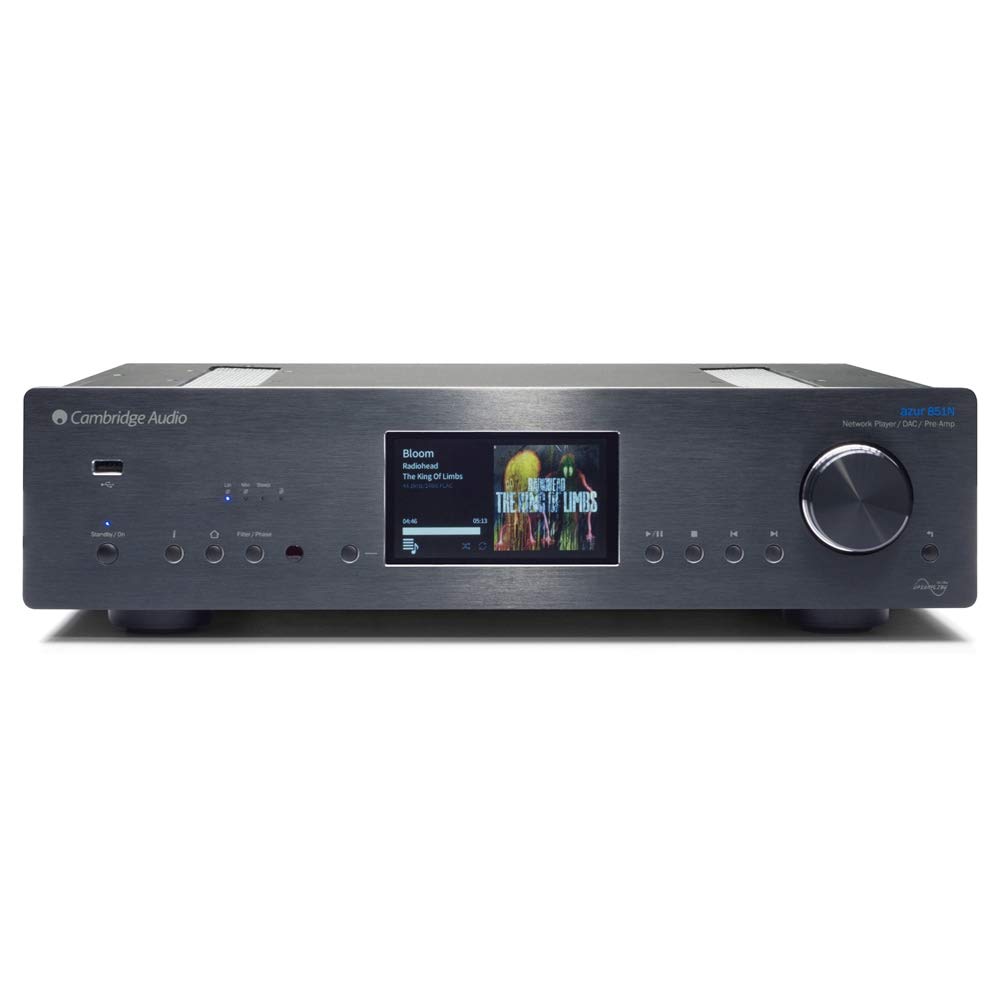
Фронт view of the Cambridge Audio Azur 851N, showing the display, control knob, and various buttons.
Негизги өзгөчөлүктөрү:
- Digital Preampөмүр берүүчү: Connects directly to power ampкөтөргүчтөр же интеграцияланган ampаман калгандар.
- Тармак оюнчусу: Streams audio via wired Ethernet or Wi-Fi.
- Жогорку өндүрүмдүү ЦАП: Features Twin Analog Devices AD1955 24-bit DACs.
- Advanced Upsampлинг: 2-муун ATF2 чейинampling to 24-bit/384kHz with selectable filter modes.
- Кеңири байланыш: Includes AES/EBU, S/PDIF coaxial, TOSLINK optical, USB Type B, Balanced XLR, and Unbalanced RCA outputs.
- Зымсыз агым: Supports UPnP, Internet Radio, Spotify, Tidal, Apple AirPlay, and Bluetooth (via BT100 receiver).
- Башкаруу колдонмосу: Compatible with Cambridge Audio's control app for Apple and Android devices.
Жайгашуу
1. Физикалык жайгаштыруу
Place the Azur 851N on a flat, stable surface away from direct sunlight, heat sources, and excessive moisture. Ensure there is adequate ventilation around the unit to prevent overheating.
2. Байланыштар
Before making any connections, ensure the Azur 851N and all other audio components are powered off.
- Санарип аудио киргизүүлөр: Connect your digital sources (CD players, media servers, etc.) to the 1 x AES/EBU, 2 x S/PDIF coaxial, or 2 x TOSLINK optical inputs.
- USB Audio Input (Type B): Connect your computer to this input for high-resolution audio playback. Select USB Audio profile 1.0 or 2.0 as required.
- Analogue Audio Outputs: Connect the Balanced XLR or Unbalanced RCA analogue audio outputs to your ampкөтөргүч же активдүү спикерлер.
- Ethernet: For the most stable network connection, connect an Ethernet cable from your router to the Ethernet port on the 851N.
- Wi-Fi: Insert the supplied Wi-Fi dongle into an available USB port on the rear panel for wireless network connectivity.
- Control Bus: Use the Control Bus Cable to connect to other compatible Cambridge Audio components for integrated control.
3. Power Connection
Once all audio and network connections are made, connect the supplied power cable to the Azur 851N and then to a suitable wall outlet.
Иштөө нускамалары
1. Күйгүзүү/өчүрүү
Press the power button on the front panel or the remote control to turn the unit on or off. The display will illuminate upon power-up.
2. Тармакты орнотуу
Upon first power-up or after a factory reset, the unit may guide you through network setup. Follow the on-screen prompts to connect to your wired or wireless network. For Wi-Fi, select your network and enter the password using the front panel controls or the remote.
3. Стриминг кызматтары
- UPnP: Музыкага кирүү files stored on your local network via UPnP servers.
- Интернет радиосу: Миңдеген интернет радиостанцияларын карап чыгып, ойнотуңуз.
- Spotify Connect: Stream music directly from the Spotify app on your device.
- Толкун: Access your Tidal subscription for high-fidelity streaming.
- Apple AirPlay: Apple түзмөктөрүнөн зымсыз аудио агымын өткөрүңүз.
- Bluetooth: Pair your Bluetooth device (via BT100 dongle) to stream audio.
4. USB медиа ойнотуу
Connect a USB storage device (thumb drive or external hard drive) to the USB A ports on the front or rear panel. The 851N will scan the device for compatible audio files. Navigate through folders and select tracks using the front panel controls or the remote.
5. Control App Usage
Download the Cambridge Audio StreamMagic app from the Apple App Store or Google Play Store. This app provides a comprehensive interface for controlling the Azur 851N, browsing music libraries, and managing streaming services.
6. Digital Filter Modes
The Azur 851N features 2nd Generation ATF2 up-sampling with selectable digital filter modes: Linear Phase, Minimum Phase, or Steep. Experiment with these settings to find the sound profile that best suits your preferences and audio content.
Техникалык тейлөө
To ensure the longevity and optimal performance of your Azur 851N, follow these maintenance guidelines:
- Тазалоо: Use a soft, dry, lint-free cloth to clean the unit's exterior. Do not use abrasive cleaners, waxes, or solvents.
- Вентиляция: Желдетүү тешиктери чаңдан жана таштандыдан таза экенин дайыма текшерип туруңуз.
- Өчүрүү: Disconnect the unit from the power outlet if it will be unused for an extended period.
Проблемаларды чечүү
If you encounter issues with your Azur 851N, refer to the following common solutions:
| Көйгөй | Мүмкүн болгон себеп / Чечим |
|---|---|
| Күч жок | Ensure the power cable is securely connected to the unit and the wall outlet. Check the power switch. |
| Үн чыгышы жок | Verify correct audio cable connections to your amplifier. Ensure the correct input source is selected on the 851N and your amplifier. Check volume levels. |
| Тармакка туташуу маселелери | For wired connections, check the Ethernet cable. For Wi-Fi, ensure the dongle is inserted, the network is selected, and the password is correct. Restart your router and the 851N. |
| USB media playback problems | Ensure the USB device is formatted correctly (FAT32 or NTFS). Check for compatible audio file formats. Some external hard drives may require external power. |
| Пульт иштебей жатат | Check and replace batteries. Ensure there are no obstructions between the remote and the unit's IR sensor. |
If the problem persists after attempting these solutions, please contact Cambridge Audio customer support.
Техникалык шарттар
| Өзгөчөлүк | Деталь |
|---|---|
| D/A конвертерлери | Twin Analog Devices AD1955 24-бит DACs |
| Санарип Чыпкасы | 2-муун ATF2 чейинampling to 24-bit/384kHz (Linear Phase, Minimum Phase, Steep modes) |
| Аналогдук чыпка | 2-pole differential Bessel with DC servo (XLR and RCA outputs) |
| Санарип аудио киргизүү | 1 x AES/EBU, 2 x S/PDIF coaxial, 2 x TOSLINK optical |
| USB аудио киргизүү | USB Type B (USB Audio profile 1.0 or 2.0 selectable) |
| Аналогдук аудио чыгуулар | Balanced XLR and Unbalanced RCA |
| Compatibility (UPnP, Local USB) | Linear PCM 16-24 bit, 11.025-192kHz |
| Compatibility (USB Audio 1.0) | Linear PCM 16-24 bit, 44.1-96kHz |
| Compatibility (USB Audio 2.0) | Linear PCM 16-24 bit, 44.1-192kHz or DSD x64 |
| Compatibility (TOSLINK, S/PDIF, AES3/EBU) | 16-24 bit, 32-192kHz |
| Bluetooth | BT100 Bluetooth receiver: A2DP plus aptX |
| Интернет радио | 16-24 bit, 11.025-192kHz |
| Аудио форматтары | ALAC, WAV, FLAC, AIFF, DSD (x64), WMA, MP3, AAC, HE AAC, AAC+, OGG Vorbis |
| Ethernet | IEEE 802.3, 10 Base-T же 100 Base-T |
| Wi-Fi | IEEE 802.11 b/g or n (2.4GHz) |
| Күтүү режиминде энергия керектөө | 0.5 Вт |
| Өлчөмдөрү (H x W x D) | х 115mm 430 х 360 (4.5 х 16.9 х 14.7 дюйм) |
| Салмагы | 8.1 кг (17.9 фунт) |
Кепилдик жана колдоо
Cambridge Audio products are designed and built to high standards. For warranty information and technical support, please refer to the documentation included with your product or visit the official Cambridge Audio webсайт. Кепилдик дооматтар үчүн сатып алганыңыздын далилин сактаңыз.


