1. Продукт бүтүп калдыview
The LB-link BL-MP01 is a compact and versatile 150 Mbps Wireless N Pocket Travel Router designed for easy internet access and sharing on the go. It supports multiple operating modes and features for convenient wireless connectivity.

Сүрөт 1: Алдыңкы view of the LB-link BL-MP01 Wireless N Router, showing the WPS/RESET button and indicator lights for WiFi, LAN, and Power.
Негизги өзгөчөлүктөрү:
- Supports random selection of switching between Router, Client, and AP modes.
- WPS (Wi-Fi Protected Setup) support for one-key encryption, eliminating the need for manual password entry.
- Plug and Play functionality for easy wireless access and internet sharing.
- Built-in device for scanning wireless hotspots, remembering SSID names, and automatically bridging/relaying for convenient use.
- Equipped with RJ45 and USB ports for versatile connectivity.
2. Орнотуу колдонмосу
2.1 Баштапкы күйгүзүү
- Connect the LB-link BL-MP01 to a power source using the provided USB cable.
- Wait for the Power indicator light to turn solid, indicating the device is powered on.
2.2 Роутерге туташуу
- Зымсыз туташуу: On your computer or mobile device, search for available Wi-Fi networks. Select the network name (SSID) broadcast by the BL-MP01 (e.g., "LB-link_XXXX"). Enter the default password if prompted (refer to the label on the device or packaging for default credentials).
- Зымдуу туташуу: Connect an Ethernet cable from the RJ45 port of the BL-MP01 to your computer's Ethernet port.
2.3 Basic Configuration (Router Mode)
- ачуу а web браузерди жана демейки IP даректи киргизиңиз (мисалы,
192.168.16.1) дарек тилкесинде. - Log in using the default username and password (e.g.,
admin/admin). - Follow the on-screen setup wizard to configure your internet connection type (e.g., PPPoE, Dynamic IP, Static IP).
- Set a new Wi-Fi network name (SSID) and a strong password for your wireless network.
3. Иштөө режимдери
The BL-MP01 supports multiple operating modes to suit various networking needs:
- Багыттоочу режим: Connects to a modem (DSL/Cable) and creates a private wireless network for multiple devices.
- Кардар режими: Allows a wired device (e.g., a desktop computer) to connect to an existing wireless network.
- AP (кирүү чекити) режими: Transforms a wired network connection into a wireless hotspot, allowing wireless devices to connect.
To switch between modes, access the router's web management interface and navigate to the operating mode settings. Select the desired mode and save the changes. The device may restart to apply the new settings.
4. WPS Функционалдыгы
The Wi-Fi Protected Setup (WPS) feature allows for quick and secure connection to your wireless network without manually entering the password.
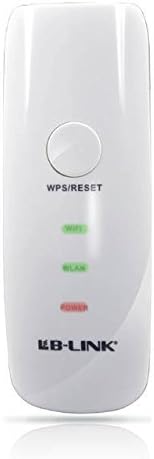
Сүрөт 2: Жакын пландан view of the LB-link BL-MP01 Wireless N Router, highlighting the WPS/RESET button at the top.
WPS колдонуу:
- басыңыз WPS/RESET button on the BL-MP01 for approximately 1-3 seconds. The Wi-Fi indicator light will start blinking.
- Within two minutes, activate the WPS function on your client device (e.g., laptop, smartphone). Refer to your client device's manual for specific instructions on activating WPS.
- The devices will automatically establish a secure connection. The Wi-Fi indicator light on the router will become solid when connected.
5. Wireless Hotspot Scanning and Bridging
The BL-MP01 features a built-in function to scan for available wireless hotspots, remember their SSID names, and automatically bridge or relay the connection. This is particularly useful for extending Wi-Fi coverage or connecting to public hotspots.
Steps for Hotspot Connection:
- Маршрутизаторго кириңиз web башкаруу интерфейси.
- дегенге өтүңүз
Тектеш документтер - BL-MP01

LB-LINK роутерин орнотуу боюнча колдонмо
LB-LINK роутерин орнотуу боюнча кеңири колдонмо, анда жабдыктардын туташуулары, интернетти орнотуу, LED индикаторлору жана интерфейстин сүрөттөмөлөрү камтылган. Түзмөгүңүздү кантип туташтырууну жана тез интернетке туташууну үйрөнүңүз.
BL-M35343XS1 802.11ax 150Mbps WLAN +BLE Combo SDIO модулунун спецификациясы
Бул документ LB-LINK BL-M35343XS1, интеграцияланган 2.4 ГГц WLAN+BLE+SLE Combo модулунун спецификацияларын камсыз кылат. Бул жогорку өндүрүмдүүлүктөгү зымсыз модулдун өзгөчөлүктөрү, электрдик жана жылуулук мүнөздөмөлөрү, RF көрсөткүчтөрү, механикалык өлчөмдөрү жана колдонмо маалыматы.
LB-LINK BL-M8189NS1: 150Mbps WLAN SDIO модулунун спецификациясы
150Mbps 802.11n WLAN SDIO модулу болгон LB-LINK BL-M8189NS1 үчүн толук мүнөздөмөлөр. Функцияларды, пин аныктамаларын, электрдик жана RF өзгөчөлүктөрүн, механикалык өлчөмдөрдү жана колдонуу схемаларын камтыйт.
LB-LINK BL-M8733BS2 802.11n 150Mbps WLAN + BT v5.2 Combo SDIO модулунун спецификациясы
LB-LINK BL-M8733BS2 үчүн техникалык мүнөздөмө документи, 802.11a/b/g/n стандарттарын жана 150 Мбит/сек PHY ылдамдыгын, анын ичинде электрдик, RF, механикалык жана ченемдик маалыматты камтыган жогорку интеграцияланган Dual-band WLAN + Bluetooth v5.2 Combo SDIO модулу.
LB-LINK BL-R8812AF1 Продукциянын мүнөздөмөсү - IEEE 802.11ac WiFi модулу
LB-LINK BL-R8812AF1, WLAN 11ac кош тилкелүү USB 2.0 WiFi модулу үчүн толук продукт мүнөздөмөсү. RFти камтыйт.view, системанын функциялары, электрдик мүнөздөмөлөрү жана шайкештик.
LB-LINK BL-M35343XU1 802.11ax 150Mbps WLAN+BLE Combo USB Module Specification
Technical specification document for the LB-LINK BL-M35343XU1, an 802.11ax 150Mbps WLAN+BLE Combo USB Module. Details features, specifications, pin assignments, electrical characteristics, RF performance, mechanical dimensions, application notes, and compliance information.