1. Продукт бүтүп калдыview
The Jamara Observer AHP is a 2.4 GHz quadcopter equipped with a camera, designed for both beginners and experienced pilots. It features self-stabilizing attitude control and a robust, lightweight EPP frame reinforced with carbon. The quadcopter offers two flight modes and a 360-degree flip stunt function for dynamic aerial maneuvers.

Сүрөт 1.1: Жогорку view of the Jamara Observer AHP Quadcopter, showcasing its four rotors and central body.
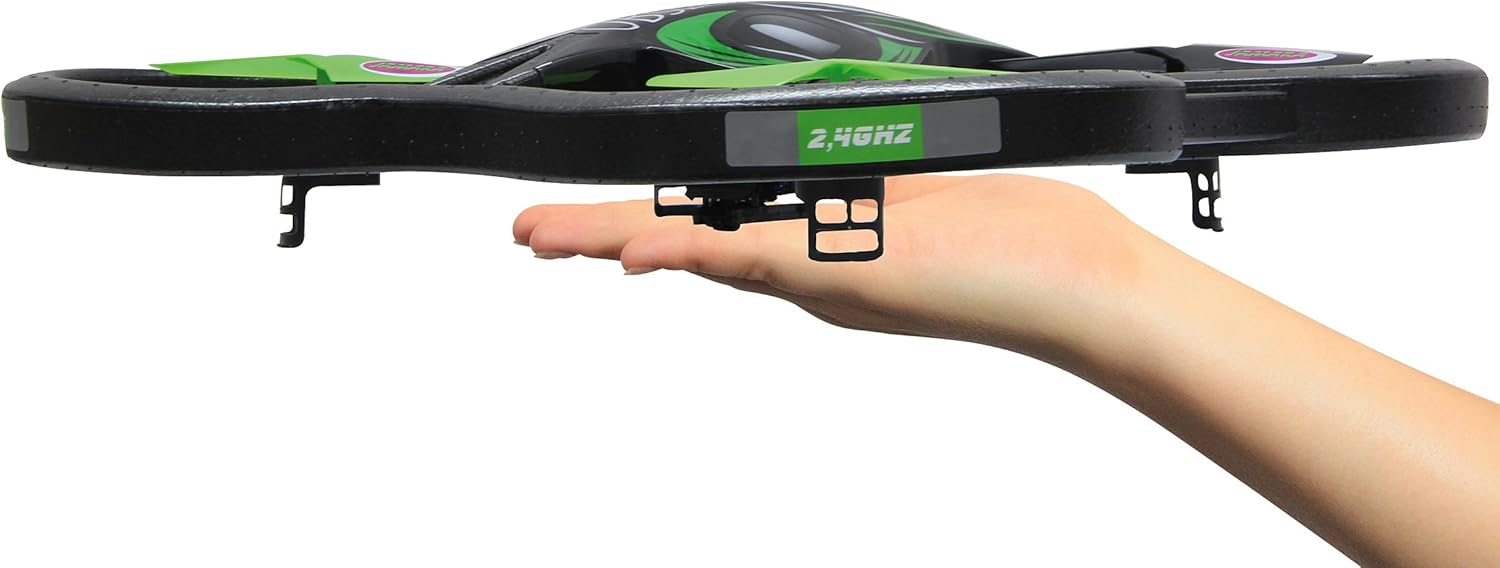
Сүрөт 1.2: The Jamara Observer AHP Quadcopter resting in a hand, illustrating its compact size and lightweight design.
Негизги өзгөчөлүктөрү:
- Self-stabilizing attitude control for stable flight.
- 4-channel 2.4 GHz transmitter for precise control.
- 360-degree flip function for aerial stunts.
- Robust and light EPP frame with carbon reinforcement.
- Two selectable flight modes: beginner and expert.
- Integrated LED lighting for visibility.
- Quick-change battery system.
- Integrated camera with video function and removable 1 GB SD-card.
- Manually adjustable camera angle.
- Turbo function for increased speed.
2. Коопсуздук нускамалары
Read all instructions carefully before operating the quadcopter. Failure to follow these instructions may result in injury or damage to the product.
- Жаш чектөө: This product is not a toy. Recommended for users aged 14 years and up.
- Жоопкерчиликти камсыздандыруу: In some countries, a model aircraft liability insurance may be required for operating model planes. Consult local regulations.
- Литий батареянын коопсуздугу: The quadcopter includes a lithium battery. Follow all instructions regarding charging, handling, and storage of lithium batteries to prevent fire, injury, or property damage. Do not overcharge, puncture, or expose to extreme temperatures.
- Учуу чөйрөсү: Operate the quadcopter in open, clear areas, away from people, animals, buildings, and power lines. Avoid flying in strong winds or adverse weather conditions.
- Учуу алдында текшерүү: Ар бир учуудан мурун бардык компоненттердин бекем бекитилгенин жана туура иштеп жатканын текшериңиз.
- Пропеллердин коопсуздугу: Колдорду, бетти жана кенен кийимдерди айлануучу пропеллерлерден алыс кармаңыз.
- Көзөмөл: Жаш колдонуучулар ар дайым чоңдордун көзөмөлүндө болушу керек.
3. Пакеттин мазмуну
Төмөндө көрсөтүлгөн бардык буюмдар таңгагыңызда бар экенин текшериңиз. Эгерде кандайдыр бир буюмдар жок болсо же бузулуп калса, сатуучуңузга кайрылыңыз.

Сүрөт 3.1: All components included in the Jamara Observer AHP Quadcopter package, including the quadcopter, transmitter, and various accessories.
- Jamara Observer AHP 2.4 GHz Quadcopter
- 2.4 ГГц өткөргүч
- Flight Battery Pack (Lion 7.4 V 650 mAh)
- 230 V заряддагыч
- Spare Rotor Blades (set)
- Screwdriver
- 1 GB SD-card
- USB SD карта окугуч
- Көрсөтмө (бул документ)
4. Орнотуу
4.1 Charging the Flight Battery
- Connect the flight battery to the 230 V charger.
- Заряддагычты стандарттуу розеткага сайыңыз.
- Allow the battery to charge fully. Refer to the charger's indicator light for charging status (e.g., red for charging, green for fully charged).
- Once charged, disconnect the battery from the charger and the outlet.
Эскертүү: Always supervise the charging process and do not leave batteries charging unattended.
4.2 Installing the Flight Battery
- Locate the battery compartment on the underside of the quadcopter.
- Carefully insert the charged flight battery into the compartment.
- Connect the battery's power connector to the quadcopter's power port. Ensure a secure connection.
- Батарея уясынын капкагын жабыңыз.
4.3 Өткөргүч батареяларды орнотуу
- Open the battery cover on the back of the 2.4 GHz transmitter.
- Insert the required number of fresh batteries (e.g., AA batteries, not included) according to the polarity markings.
- Батареянын капкагын бекем жабыңыз.

Сүрөт 4.1: The 2.4 GHz transmitter for the Jamara Observer AHP Quadcopter, showing its control sticks and buttons.
4.4 SD картаны орнотуу
- Locate the SD card slot on the quadcopter's camera module.
- Gently insert the provided 1 GB SD card into the slot until it clicks into place. Ensure correct orientation.
5. Иштөө нускамалары
5.1 Binding the Transmitter to the Quadcopter
- Place the quadcopter on a flat, level surface.
- Turn on the quadcopter's power switch. The LED lights will flash.
- Өткөргүчтү күйгүзүңүз.
- Move the left joystick (throttle) all the way up, then all the way down. The quadcopter's LEDs will stop flashing and remain solid, indicating successful binding.
5.2 Учууну башкаруу
Familiarize yourself with the transmitter controls before attempting flight.

Сүрөт 5.1: Visual representation of the quadcopter's control inputs and the execution of a 360-degree flip maneuver.
- Left Joystick (Throttle/Rudder):
- Өйдө/ылдый: Бийиктикти башкарат (өйдө/ылдый).
- Left/Right: Controls yaw (rotates the quadcopter left/right).
- Right Joystick (Aileron/Elevator):
- Up/Down: Controls pitch (moves quadcopter forward/backward).
- Left/Right: Controls roll (moves quadcopter left/right sideways).
- Кесүү баскычтары: Used to fine-tune the quadcopter's stability if it drifts in any direction during hover. Adjust small increments until stable.
- Ылдамдык баскычы: Toggles between different flight speeds (e.g., 30%, 60%, 100%) for beginner or expert modes.
- Турбо функциясы: Activates a temporary boost in power for enhanced maneuverability.
5.3 Performing a 360-Degree Flip
- Fly the quadcopter to a height of at least 3 meters (10 feet).
- Press the 360-degree flip button (refer to transmitter diagram for exact location).
- Immediately push the right joystick in the desired flip direction (forward, backward, left, or right). The quadcopter will perform a flip.
5.4 Камеранын иштеши
- SD карта туура салынганын текшериңиз.
- To start video recording, press the designated video recording button on the transmitter. The camera's indicator light will change to confirm recording has started.
- To stop recording, press the video recording button again.
- To adjust the camera angle, manually pivot the camera module on the quadcopter before flight.
- After flight, turn off the quadcopter and carefully remove the SD card. Use the provided USB SD card reader to transfer videos to a computer.
6. Техникалык тейлөө
6.1 Тазалоо
- After each flight, gently wipe the quadcopter with a soft, dry cloth to remove dust, dirt, or debris.
- Avoid using water or cleaning solvents, as they may damage electronic components.
6.2 Rotor Blade Replacement
- If a rotor blade is damaged, use the provided screwdriver to carefully remove the retaining screw.
- Replace the damaged blade with a new one from the spare set. Ensure the new blade is oriented correctly (A or B, matching the original).
- Secure the new blade with the screw, but do not overtighten.
6.3 Батареяга кам көрүү жана сактоо
- Always disconnect the battery from the quadcopter when not in use.
- Батареяларды салкын, кургак жерде, түз күндүн нурунан жана экстремалдык температурадан алыс сактаңыз.
- Толук заряддалган же толугу менен түгөнгөн батареяларды узак убакытка сактабаңыз. Узак мөөнөткө сактоо үчүн, батареяларды болжол менен 50% кубаттуулукка чейин заряддаңыз.
7. Кыйынчылыктарды
| Көйгөй | Мүмкүн себеп | Чечим |
|---|---|---|
| Quadcopter does not respond to transmitter. | Not bound, low battery (quadcopter or transmitter), power switch off. | Ensure both devices are powered on. Re-bind the quadcopter and transmitter. Check and replace/charge batteries. |
| Quadcopter drifts during flight. | Improper trim settings, uneven surface during binding, damaged propeller. | Adjust trim buttons on the transmitter. Ensure quadcopter is on a level surface when binding. Inspect and replace damaged propellers. |
| Кыска учуу убактысы. | Батарея толук заряддалган эмес, эски батарея, агрессивдүү учуп жатат. | Ensure battery is fully charged. Consider replacing old batteries. Fly more conservatively. |
| Camera not recording or poor video quality. | SD card full or not inserted correctly, low light conditions. | Check SD card insertion and free space. Format SD card if necessary. Ensure adequate lighting for recording. |
8. Техникалык шарттар
| Өзгөчөлүк | Деталь |
|---|---|
| Модель аты | Observer AHP |
| Модель номери | 038551 |
| Бренд | Jamara |
| Башкаруу түрү | Remote Control (2.4 GHz Radio Frequency) |
| Quadcopter Dimensions (L x W x H) | Болжол менен 510 мм x 510 мм x 120 мм (20.08 x 7.32 x 4.72 дюйм) |
| Ротор диаметри | Болжол менен 186 мм |
| Item Weight (RTF) | Болжол менен 288 г (0.63 фунт) |
| Учуу батареясы | Lion 7.4 V 650 mAh |
| Видео тартуунун резолюциясы | 1080p |
| Видео тартуу форматы | MP4 |
| Included SD Card | 1 ГБ |
| Материал | EPP Frame, Plastic |
| Сунушталган Жаш | 14 жаш жана андан жогору |
9. Кепилдик жана колдоо
Jamara products are manufactured with high-quality materials and undergo strict quality control. For warranty information, technical support, or spare parts, please contact your retailer or visit the official Jamara webсайт.
For further assistance, you may also refer to the manufacturer's product page or support section:


