Introduction
This user manual provides comprehensive instructions for the installation, operation, and maintenance of your Sena 10U-SH-02 Motorcycle Bluetooth Communication System. Designed specifically for the Shoei Neotec helmet, this system offers advanced communication capabilities for motorcyclists, ensuring connectivity and convenience on the road. Please read this manual thoroughly before using the product to ensure proper function and safety.
Продукт бүттүview
The Sena 10U-SH-02 is an integrated Bluetooth communication system engineered to fit seamlessly within the Shoei Neotec helmet. It provides a discreet yet powerful solution for rider-to-rider intercom, phone calls, music streaming, and FM radio reception. The system includes a main unit, speakers, microphone, and a handlebar remote for intuitive control.
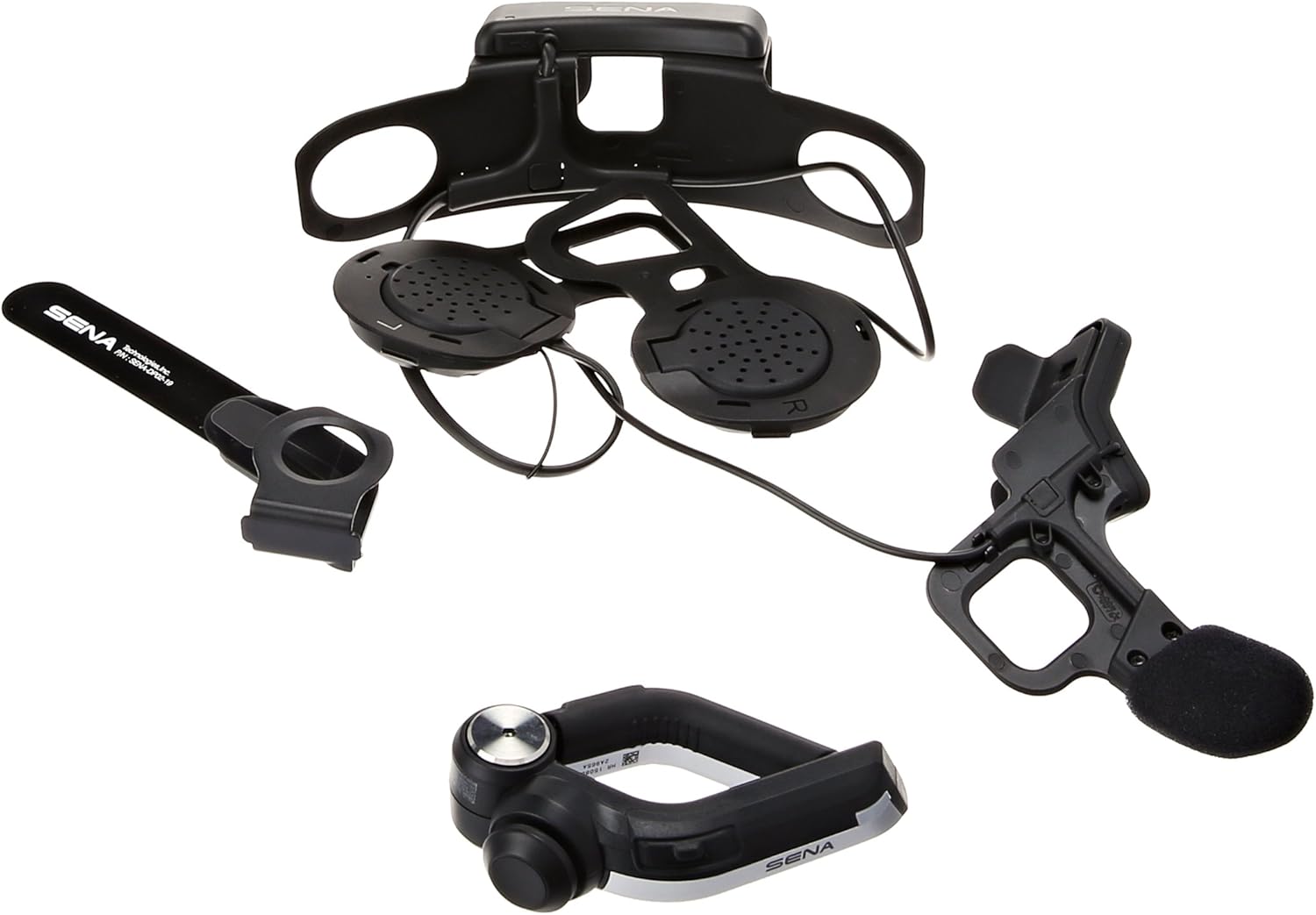
Figure 1: ашыкview of Sena 10U-SH-02 components.
Өзгөчөлүктөрү
- Bluetooth 4.0 технологиясы: Зымсыз байланыштын туруктуу жана натыйжалуу иштешин камсыз кылат.
- Four-Way Intercom: Communicate with up to four riders simultaneously, with a range of up to 1.6 kilometers (1.0 mile).
- Universal Intercom & Group Intercom: Enhanced connectivity options for various riding groups.
- Handlebar Remote: Provides safe and easy operation of system functions without removing hands from the handlebars.
- Музыка бөлүшүү: Share audio with a fellow rider.
- Built-in FM Radio Tuner: Features a station scan and save function.
- Үн кеңештери: Intuitive audio cues for system status and operations.
- Өркүндөтүлгөн ызы-чууну көзөмөлдөө: Так үн үчүн фондук ызы-чууну азайтат.
- Смартфондук колдонмо: Exclusive app for iPhone and Android for configuration and control.
- Узак сүйлөшүү убактысы: Бир кубаттоо менен 10 саатка чейин сүйлөшүү убактысы.
- Жаңыртылган микропрограмма: Ensures the system stays up-to-date with the latest features and improvements.
Кутуда эмне бар
The Sena 10U-SH-02 package includes the following components:
- Sena 10U-SH-02 Main Unit (integrated for Shoei Neotec helmet)
- Рутка
- USB Power & Data Cable
- Колдонуучунун Колдонмосу (бул документ)

Figure 2: Contents of the Sena 10U-SH-02 package.
Жайгашуу
1. Installation into Shoei Neotec Helmet
The Sena 10U-SH-02 is designed for a custom fit within the Shoei Neotec helmet. Follow these steps for proper installation:
- Carefully remove the helmet's interior padding to access the ear pockets and internal shell.
- Position the main unit and speakers within the designated ear pockets. Ensure the speakers are aligned with your ears for optimal audio.
- Route the microphone boom towards the front of the helmet, ensuring it is positioned correctly for clear voice pickup.
- Secure all wires and components within the helmet's internal channels to prevent interference and discomfort.
- Reinstall the helmet's interior padding, ensuring no wires are pinched or exposed.

Figure 3: Internal component placement within the helmet.

4-сүрөт: Арткы view of the integrated system in the helmet.
2. Бирдикти кубаттоо
Before first use, fully charge the Sena 10U-SH-02. The charging time is approximately 3 hours. Use the provided USB power and data cable to connect the unit to a USB power source.
3. Handlebar Remote Installation
Mount the handlebar remote securely on your motorcycle's handlebar in a position that allows for easy and safe access while riding. Ensure it does not interfere with the operation of other controls.
Иштөө нускамалары
1. Күйгүзүү/өчүрүү
- Күйгүзүү: Press and hold the main button on the helmet unit or the handlebar remote until you hear a voice prompt.
- Өчүрүү: Press and hold the main button until you hear a voice prompt indicating power off.
2. Bluetooth Жупташтыруу
To pair your Sena 10U-SH-02 with your smartphone or other Bluetooth devices:
- With the unit off, press and hold the main button for 5 seconds until the LED flashes red and blue, indicating pairing mode.
- Смартфонуңузда Bluetooth иштетип, жаңы түзмөктөрдү издеңиз.
- Select "Sena 10U-SH-02" from the list of available devices.
- Эгер суралса, "0000" PIN кодун киргизиңиз.
- Жупташкандан кийин LED көк түскө айланат.
3. Домофон байланышы
The 10U-SH-02 supports four-way intercom communication. Refer to the detailed instructions in the Sena Smartphone App for setting up group intercoms.
- Домофонду баштоо: Briefly press the Intercom button on the handlebar remote to initiate communication with a paired intercom friend.
- Домофондун аякташы: Briefly press the Intercom button again to end the conversation.
4. Телефон чалуулар
- Чалууга жооп берүү: Briefly press the Phone button on the handlebar remote.
- Чалууну аяктоо: Телефон баскычын кайрадан кыскача басыңыз.
- Үн менен терүү: Press and hold the Phone button to activate your smartphone's voice assistant (e.g., Siri, Google Assistant).
5. Music and FM Radio
- Музыканы ойнотуу/тындыруу: Briefly press the Play/Pause button on the handlebar remote.
- Кийинки / Мурунку трек: Use the joystick or dedicated buttons on the handlebar remote.
- FM радио күйгүзүү/өчүрүү: FM баскычын басыңыз.
- Скандоо станциялары: Use the scan function via the handlebar remote or smartphone app.

Figure 5: Internal control pad for basic functions.
Техникалык тейлөө
- Тазалоо: жумшак колдонуу, damp cloth to clean the exterior of the unit and remote. Do not use harsh chemicals or abrasive cleaners.
- Батареяга кам көрүү: To prolong battery life, avoid storing the unit in extreme temperatures. Charge the unit regularly, even if not in frequent use.
- Программалык камсыздоонун жаңыртуулары: Мезгил-мезгили менен Сенаны текшерүү website or smartphone app for available firmware updates to ensure optimal performance and access to new features.
Проблемаларды чечүү
| Көйгөй | Мүмкүн себеп | Чечим |
|---|---|---|
| Түзмөк күйбөйт. | Батарея аз. | Аппаратты 3 сааттан кем эмес заряддаңыз. |
| Смартфон менен жупташтыруу мүмкүн эмес. | Unit not in pairing mode; Bluetooth off on phone. | Ensure unit is in pairing mode (red/blue flashing LED). Enable Bluetooth on your phone. |
| Домофонго туташуудагы көйгөйлөр. | Аралыктан тышкары; тоскоолдук; туура эмес жупташтыруу. | Move closer to the other rider. Re-pair intercom connections. Avoid strong electromagnetic fields. |
| Аудио сапаты начар. | Microphone/speaker placement; wind noise; low volume. | Adjust microphone and speaker positions. Ensure Advanced Noise Control is active. Increase volume. |
For more detailed troubleshooting, please refer to the Sena webсайтка же кардарларды колдоо менен байланышыңыз.
Техникалык шарттар
| Өзгөчөлүк | Деталь |
|---|---|
| Модел | 10U-SH-02 |
| Bluetooth версиясы | 4.0 |
| Домофон диапазону | Ачык жерде 1.6 кмге (1.0 миля) чейин |
| Talk Time | 10 саатка чейин |
| Заряддоо убактысы | 3 саат |
| Батарея түрү | Литий полимери |
| Аудио өзгөчөлүктөрү | Built-in SBC Codec, Advanced Noise Control, Wide volume control |
| FM радиосу | Built-in FM radio with RDS AF (Radio Data System Alternate Frequencies), Radio region: worldwide, 10 preset station memory with automatic scan function |
| Өлчөмдөр | 6.9 x 11.2 x 4.2 дюйм (Өнүмдүн өлчөмдөрү) |
| Салмагы | 14.4 унция (предметтин салмагы) |
Кепилдик жана колдоо
For warranty information and technical support, please visit the official Sena webсайтка же кардарларды тейлөө бөлүмүнө кайрылыңыз. Кепилдик дооматтар үчүн сатып алганыңыздын далилин сактаңыз.
Онлайн ресурстар:


