Introduction
This manual provides essential instructions for the setup, operation, and maintenance of your Gigaset Handset and Charging Station. This product is compatible with various Gigaset phone systems, including models S2, S44, S200, S440, S445, S645, SX440, and SX445. Please read this manual carefully to ensure proper use and to maximize the lifespan of your device.
1. Орнотуу
1.1 Таңгактан чыгаруу жана алгачкы текшерүү
Carefully unpack all components. Ensure that the handset, charging station, and power adapter are present and undamaged. If any items are missing or damaged, contact your retailer.
1.2 Connecting the Charging Station
- Кубат адаптеринин кабелин кубаттоо станциясына туташтырыңыз.
- Кубат адаптерин стандарттуу электр розеткасына сайыңыз.
- Place the charging station on a flat, stable surface, away from heat sources and direct sunlight.

Сүрөт 1.1: Жогорку view of the Gigaset charging station. This image shows the compact design of the charging station, ready to receive the handset.
1.3 Inserting the Battery and Charging the Handset
- Телефондун артындагы батарея бөлүкчөсүнүн капкагын ачыңыз.
- Туура полярдуулукту камсыз кылуу менен кайра заряддалуучу батареяны салыңыз.
- Батарея уясынын капкагын жабыңыз.
- Place the handset into the charging station. Ensure it is seated correctly and the charging indicator (if present) illuminates.
- Allow the handset to charge for at least 6-8 hours before initial use to ensure full battery capacity.
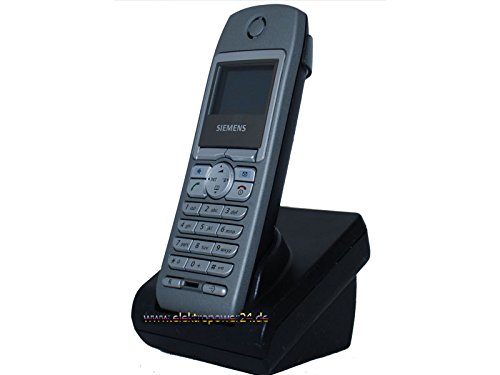
Сүрөт 1.2: Алдыңкы view of the Gigaset handset securely placed in its charging station. The display shows "Wahlvorbereitung" (dialing preparation) and a phone number, indicating it's powered on and ready.
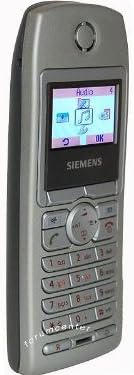
Сүрөт 1.3: Каптал view of the Gigaset handset, highlighting its ergonomic design and button layout. The display shows menu options like "Audio" and "OK".

Сүрөт 1.4: Артка view of the Gigaset handset, showing the smooth casing and the location of the battery compartment cover.
1.4 Registering the Handset to a Base Station
This handset is designed to be compatible with various Gigaset base stations. The registration process may vary slightly depending on your specific base station model. Refer to your base station's manual for detailed instructions. Generally, the steps involve:
- Activate registration mode on your Gigaset base station (usually by pressing and holding a registration button).
- Телефонуңузда "Орнотуулар" же "Каттоо" менюсуна өтүңүз.
- Select "Register Handset" and follow the on-screen prompts. You may need to enter a PIN (default is usually 0000).
- Once registered, the handset display will confirm successful connection to the base station.
2. Иштөө нускамалары
2.1 Негизги функциялар
- Чакыруу: Телефон номерин киргизип, жашыл чалуу баскычын басыңыз.
- Чалууга жооп берүү: Телефон шыңгыраганда жашыл чалуу баскычын басыңыз.
- Чалууну аяктоо: Чакырууну аяктоо кызыл баскычын басыңыз.
- Hands Free Чалуу: During a call, press the dedicated hands-free key (often backlit) to activate the speakerphone.
2.2 Телефон китепчеси (маалымат)
The handset features a directory capable of storing up to 200 phone numbers and names.
- Киргизүүнү кошуу: Navigate to the "Directory" or "Phonebook" menu, select "New Entry," and enter the name and number.
- Каталогдон чалуу: Open the directory, scroll to the desired entry, and press the green call key.
2.3 Дисплей жана индикаторлор
The handset features a 5-line illuminated graphic display. Key indicators include:
- Дата/убакыт дисплейи: Always visible on the idle screen.
- CLIP Function (Call Display): Shows the caller's number or name (if stored in the directory) for incoming calls.
- Батарея көрсөткүчү: Учурдагы батареянын заряд деңгээлин көрсөтөт.
- Сигнал күчү көрсөткүчү: Displays the connection quality to the base station.
3. Техникалык тейлөө
3.1 Тазалоо
- Wipe the handset and charging station with a soft, damp кездеме.
- Абразивдүү тазалагычтарды же эриткичтерди колдонбоңуз.
- түзмөктүн тешиктерине суюктуктун кирбегенин текшериңиз.
3.2 Батареяга кам көрүү
- Always use the original or approved replacement rechargeable batteries.
- Батареяны экстремалдуу температурага тийгизүүдөн сактаңыз.
- Эгерде телефон көпкө чейин колдонулбаса, батарейканы чыгарып салыңыз.
4. Кыйынчылыктарды
| Көйгөй | Мүмкүн себеп | Чечим |
|---|---|---|
| Телефон күйгүзүлбөйт. | Батарея туура салынган эмес же заряды түгөнүп калган. | Check battery insertion. Place handset in charging station for several hours. |
| Терүү үнү жок. | Handset not registered to base station or out of range. | Ensure handset is registered. Move closer to the base station. Check base station power. |
| Чалуу сапаты начар. | Interference or handset too far from base station. | Move away from other electronic devices. Move closer to the base station. |
| Чалууларды кабыл алуу же жасоо мүмкүн эмес. | Line issue or base station problem. | Check your telephone line connection. Restart the base station by unplugging and replugging its power. |
5. Техникалык шарттар
- Бренд: Gigaset
- Шайкеш моделдер: Gigaset S2, S44, S200, S440, S445, S645, SX440, SX445
- Телефон китепчесинин сыйымдуулугу: Up to 200 entries (names and numbers)
- Дисплей: 5-line illuminated graphic display
- Өзгөчөлүктөрү: Backlit hands-free key, Date/Time display, CLIP function (Call Display)
- Өндүрүүчү: Gigaset
- ASIN: B0102FULTW
Note: Information regarding spare parts availability and guaranteed software updates is not provided. This product is currently not listed as discontinued by the manufacturer.
6. Кепилдик жана колдоо
Specific warranty details for this Gigaset Handset and Charging Station are not provided within the available product information. For warranty claims, technical support, or service inquiries, please refer to the documentation included with your original purchase or visit the official Gigaset webсиздин аймак үчүн сайт.
You may also contact your retailer for assistance.


