Introduction
This manual provides essential information for the proper use and maintenance of your Avaya 96XX/96X1 Series CAT5E Ethernet Patch Cable. This cable is designed to provide reliable network connectivity for compatible Avaya devices. Please read this manual thoroughly before installation and use.
Пакеттин мазмуну
Пакетиңизде бардык буюмдар бар экенин текшериңиз:
- 5x Avaya CAT5E 14FT Ethernet Patch Cables (Model: 700383326 / Part: 700451586)
Продукт бүттүview
The Avaya CAT5E Ethernet Patch Cable is a high-quality networking cable designed for connecting Avaya 96XX/96X1 series devices to a network. It features RJ45 connectors on both ends and a durable grey jacket.
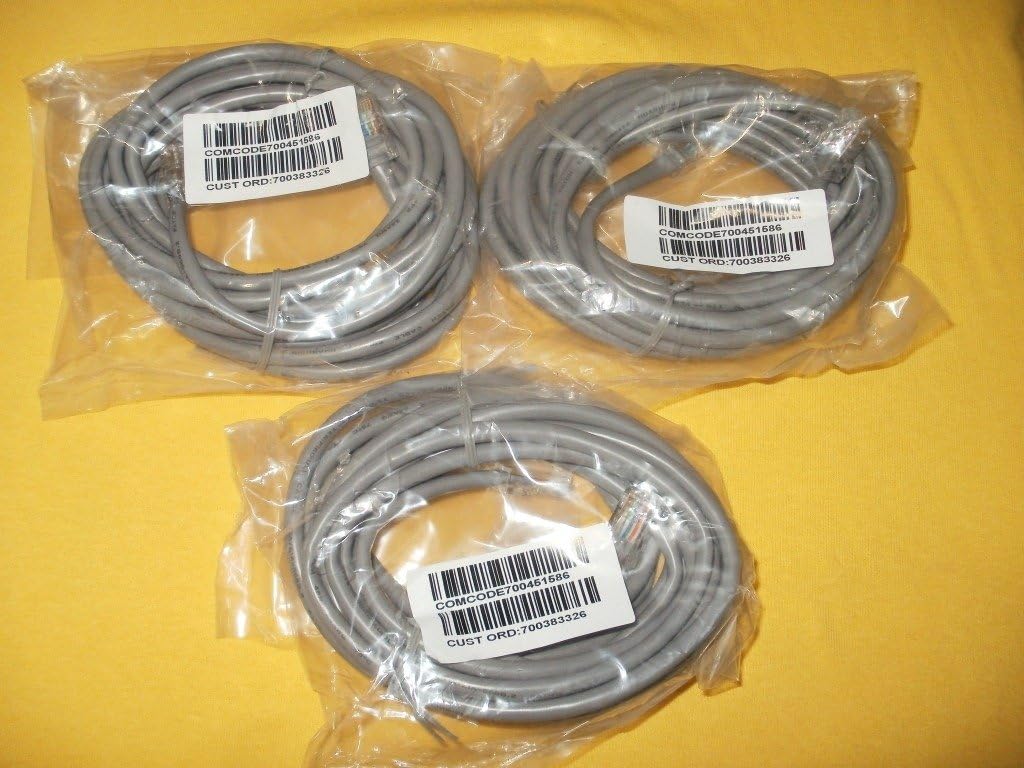
Image: Three Avaya CAT5E Ethernet patch cables, each coiled and sealed in clear plastic packaging. Labels on the packages indicate "COMCODE700451586" and "CUST ORD:700383326", confirming the model and part numbers. The cables are grey and feature standard RJ45 connectors visible through the packaging.
Негизги өзгөчөлүктөр төмөнкүлөрдү камтыйт:
- Category 5e (CAT5E) Standard: Supports Ethernet speeds up to 1 Gigabit per second (Gbps).
- RJ45 туташтыргычтары: Standard connectors for Ethernet networking.
- 14-Фут Узундугу: камсыз кылат ample reach for typical office and home network setups.
- OEM сапаты: Genuine Avaya cable ensures compatibility and performance with Avaya equipment.
Орнотуу жана орнотуу
Follow these steps to properly connect your Avaya CAT5E Ethernet Patch Cable:
- Портторду аныктоо: Locate the Ethernet (RJ45) ports on your Avaya 96XX/96X1 series device and the network device (e.g., router, switch, wall jack) you wish to connect to.
- Биринчи чекти туташтыруу: Gently insert one end of the Avaya CAT5E cable into the Ethernet port of your Avaya device until it clicks into place. Ensure a secure connection.
- Экинчи аягы туташтыруу: Insert the other end of the cable into the Ethernet port of your network device or wall jack until it clicks.
- Байланышты текшерүү: Most network devices have indicator lights that illuminate when a successful connection is established. Check these lights on both connected devices.
- Сыноо функциясы: After connecting, test the network functionality of your Avaya device to ensure proper communication.
Эскертүү: Always handle cables by the connector ends to avoid damaging the cable or connectors.
Колдонуу эрежелери
The Avaya CAT5E Ethernet Patch Cable is designed for reliable data transmission in various networking environments. Once connected, the cable facilitates communication between your Avaya device and the network. No specific operational steps are required for the cable itself beyond proper connection.
- Ensure the cable is not excessively bent or kinked, as this can degrade performance.
- Кабельге оор нерселерди коюудан алыс болуңуз.
- Use the cable within its specified environmental conditions (indoor/outdoor as applicable).
Кароо жана тейлөө
To ensure the longevity and optimal performance of your Avaya CAT5E Ethernet Patch Cable, follow these simple maintenance guidelines:
- Тазалоо: If necessary, gently wipe the cable jacket with a soft, dry cloth. Avoid using harsh chemicals or abrasive cleaners.
- Сактагыч: When not in use, coil the cable loosely. Avoid tight coiling or sharp bends, which can damage the internal wires. Store in a cool, dry place away from direct sunlight and extreme temperatures.
- Текшерүү: Periodically inspect the cable and its connectors for any signs of wear, damage, or corrosion. Replace the cable if any damage is observed.
- Курчап турган чөйрөнү коргоо: While rated for indoor/outdoor use, protect the connectors from moisture and dust when not connected.
Проблемаларды чечүү
If you experience issues with your network connection, consider the following troubleshooting steps:
- Тармак туташуусу жок:
- Кабелдин эки учу тең тиешелүү портторуна бекем сайылганын текшериңиз.
- Check the indicator lights on your network devices (e.g., router, switch, Avaya phone) to confirm link activity.
- Try using a different port on your network device.
- Test the cable with another known working device, or try a different Ethernet cable to rule out the cable as the source of the problem.
- Жай тармак ылдамдыгы:
- Ensure the cable is not damaged (kinks, cuts, frayed connectors).
- Verify that both connected devices support CAT5E speeds.
- Интернет провайдериңиз менен башка тармактык тыгындарды же көйгөйлөрдү текшериңиз.
- Үзгүлтүксүз туташуу:
- Туташтыргычтардын таза жана таштандылардан таза экенин текшериңиз.
- Бош байланыштарды текшериңиз.
- Avoid electromagnetic interference by keeping the cable away from power lines or other electronic devices that emit strong signals.
If issues persist after following these steps, consult the user manual for your Avaya device or contact Avaya technical support.
Техникалык шарттар
| Модель номери | 700383326 |
| Бөлүмдүн номери | 700451586 |
| Кабель түрү | Category 5e (CAT5E) Ethernet Patch Cable |
| Узундук | 14 фут (болжол менен 4.27 метр) |
| Туташтыргычтар | RJ45 Эркектен эркекке |
| Түс | Боз |
| Шайкештик | Avaya 96XX/96X1 Series devices |
| Ички/тышкы колдонуу | Ички, сырткы |
| Өндүрүүчү | Avaya, Inc |
| UPC | 635510933786 |
| Пакет Салмагы | 3.68 ounces (for 5 cables) |
| Пакеттин өлчөмдөрү (LxWxH) | 6 x 5.25 x 1.2 дюйм |
Кепилдик жана колдоо
For information regarding warranty coverage for your Avaya CAT5E Ethernet Patch Cable, please refer to the official Avaya warranty documentation provided with your purchase or visit the official Avaya website. For technical assistance or further support, please contact Avaya customer service directly.
You can typically find support contact information on the official Avaya webсайт: www.avaya.com/support


