Introduction
The VTech CS6509 is an accessory cordless handset designed to expand your existing VTech CS6519, CS6528, or CS6529 series phone system. This handset cannot operate independently and requires one of the compatible base units to function. It enhances your communication experience by providing additional mobility and access to features such as Caller ID, call waiting, and a convenient speakerphone.
With the CS6509, you can monitor calls with a 50-number Caller ID, be aware of incoming calls with call waiting, and know when you have new messages via the voicemail waiting indicator. The handset also offers 14 minutes of answering system recording time and allows for quick redial of the last ten numbers. Its full hearing aid compatibility ensures clear communication for all users. The design includes a convenient wall mount option to help manage desk space.

Figure 1: VTech CS6509 Accessory Cordless Handset in its charging cradle.
Негизги өзгөчөлүктөрү
- Accessory Handset: Designed to work with VTech CS6519, CS6528, or CS6529 series phone systems. It is not a standalone phone.
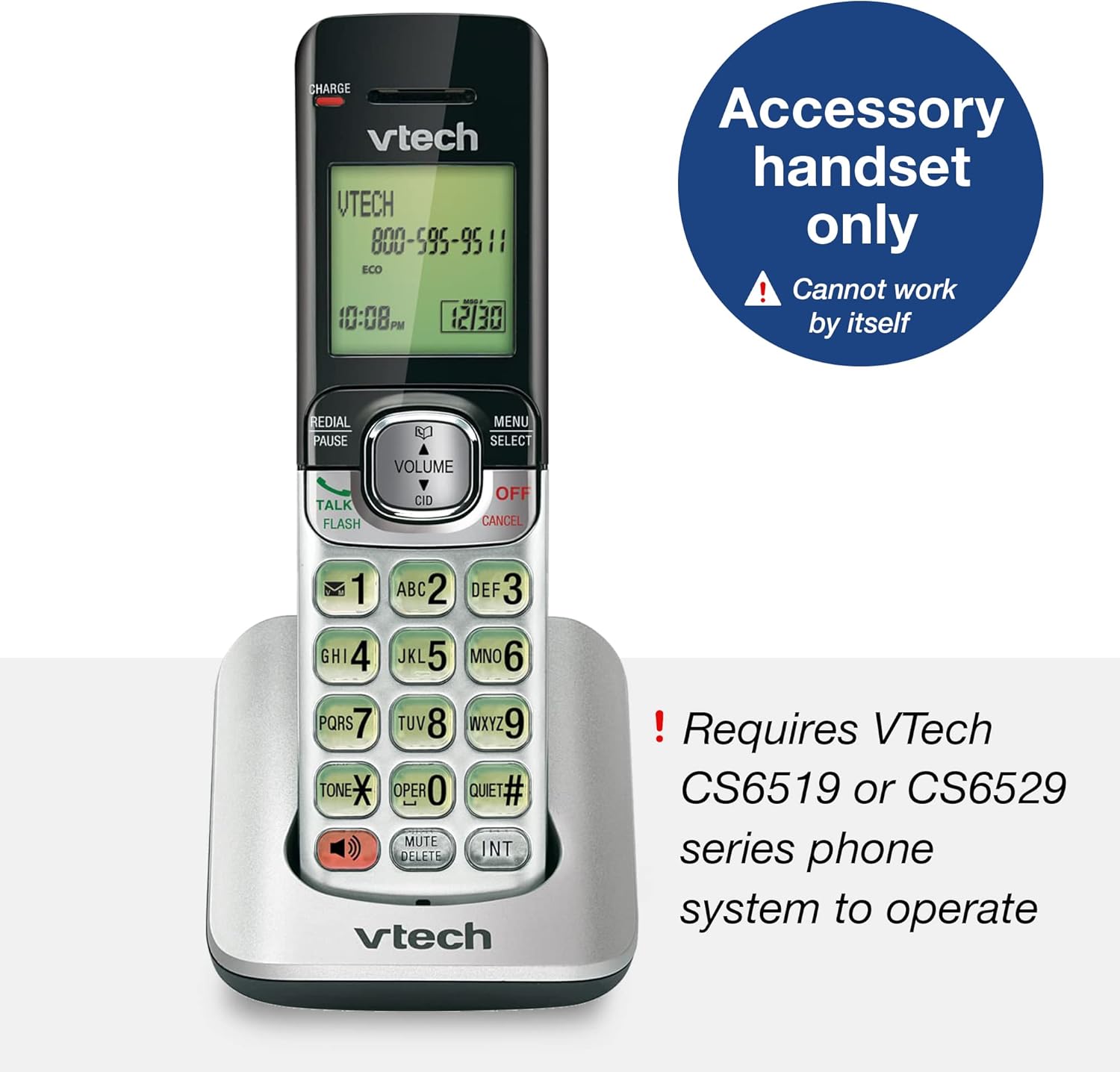
Figure 2: The CS6509 is an accessory handset requiring a compatible VTech base unit.
- Caller ID/Call Waiting & Phonebook: Stores up to 50 calls, displaying the name, number, time, and date of incoming calls. Includes a 50 name and number phonebook directory.

Figure 3: The handset display provides Caller ID and call waiting information, and access to the phonebook.
- Спикер телефон: Enables hands-free conversations with the touch of a button.

Figure 4: The full duplex handset speakerphone allows for convenient hands-free communication.
- Арткы жарык баскычтоп жана дисплей: The entire keypad and LCD screen illuminate for easier viewкүңүрт жарыкта.

Figure 5: The backlit keypad and display ensure visibility in low-light conditions.
- ECO режиминдеги энергияны үнөмдөө технологиясы: Manages power consumption for optimal battery performance.

Figure 6: ECO mode technology helps conserve battery power.
- Last Ten Number Redial: Quickly redial previously called numbers.

Figure 7: The redial function allows quick access to the last ten dialed numbers.
- 9-саны тез терүү: Program frequently called numbers for quick access.

Figure 8: Utilize 9-number speed dial for quick access to important contacts.
- Конференция чалуу мүмкүнчүлүгү: Facilitates conference calls between an outside line and up to two cordless handsets.

Figure 9: Conduct conference calls with ease using multiple handsets.
- Тынч режим: Temporarily silences the ringer on the handset.

Figure 10: Activate Quiet mode to silence the handset ringer.
- Digital Answering System (Base Unit Feature): When connected to a compatible base, the system offers up to 14 minutes of recording time and remote access to messages.

Figure 11: The compatible base unit features a digital answering system with message counter.
- Дубалга орнотулган: The charging cradle can be mounted on a wall to save space.

Figure 12: The handset and base can be conveniently wall-mounted.
Жайгашуу
1. Батареяны орнотуу жана заряддоо
- Телефондун артындагы батарея бөлүкчөсүнүн капкагын ачыңыз.
- Батарея топтомунун туташтыргычын бөлүмдүн ичиндеги домкратка бекем туташтырыңыз.
- Батарея пакетин бөлүмгө салыңыз.
- Батарея уясынын капкагын жабыңыз.
- Place the handset in the charging cradle. The CHARGE light on the handset will illuminate, indicating it is charging.
- Allow the handset to charge for at least 10-12 hours before initial use to ensure full battery capacity.
2. Телефонду каттоо
The CS6509 is an accessory handset and must be registered to a compatible VTech CS6519, CS6528, or CS6529 series base unit to function. Refer to the user manual of your main VTech phone system for detailed instructions on how to register new handsets. Typically, this involves placing the handset in the base unit's charger and initiating a registration process from the base unit or the handset itself.
If you encounter difficulties, ensure the base unit is powered on and within range. You may need to reset the base unit or the handset if registration fails on the first attempt.
Иштөө нускамалары
Чалууларды кабыл алуу жана кабыл алуу
- Чалуу үчүн: Басыңыз TALK / FLASH or СПИКЕР, андан кийин телефон номерин териңиз.
- Чалууга жооп берүү үчүн: Телефон шыңгыраганда, басыңыз TALK / FLASH or СПИКЕР.
- Чалууну аяктоо үчүн: Басыңыз ӨЧҮРҮҮ/ЖОК КЫЛУУ же трубканы кайра заряддоочу уячага салыңыз.
Динамикти колдонуу
Чалуу учурунда, басыңыз СПИКЕР button to switch between handset and speakerphone mode. The speakerphone indicator will light up when active.
Чалуучунун ID жана Чалуу күтүү
- When a new call comes in and you are already on the phone, you will hear a call waiting tone. The caller's information will appear on the display if you subscribe to Caller ID with Call Waiting service.
- To answer the new call, press FLASH. Your current call will be put on hold.
- To switch between calls, press FLASH кайра.
Кайра терүү
Басыңыз КАЙРА ТЕРҮҮ/ТЫНЫГЫ чейин view the last ten numbers dialed. Press TALK / FLASH or СПИКЕР to call the selected number.
Тынч режим
To temporarily silence the ringer, press and hold the ТЫНЧ # button. The handset will not ring for incoming calls until the mode is deactivated or a set time expires (refer to your main system's manual for duration settings).
Домофон жана конференция чалуулары
- Домофон: To call another registered handset, press INT and then the number of the desired handset.
- Конференция чалуу: Сырткы чалуу учурунда, басыңыз INT, then dial the number of the internal handset you wish to add. Once the internal handset answers, press CONF (or a similar button, refer to your main system's manual) to join all parties.
Техникалык тейлөө
Телефонду тазалоо
Wipe the handset and charging cradle with a soft, slightly damp cloth. Do not use cleaning sprays or harsh chemicals, as they may damage the finish or electrical components. Ensure the device is unplugged from power before cleaning.
Батареяга кам көрүү
- Always use the original VTech battery pack provided with the handset.
- Эгерде телефон көпкө колдонулбаса, агып кетпеши үчүн батарейканы алып салыңыз.
- Dispose of old batteries responsibly according to local regulations. Do not dispose of batteries in fire.
Проблемаларды чечүү
| Көйгөй | Мүмкүн себеп | Чечим |
|---|---|---|
| Телефон күйбөйт же кубат жок. | Батарея заряддалган эмес же туура орнотулган эмес. | Ensure the battery is properly connected and charge the handset for at least 10-12 hours. |
| Телефон трубкасы базалык блокко катталбайт. | Handset is out of range, base unit is off, or registration process was not completed correctly. | Move the handset closer to the base unit. Ensure the base unit is powered on. Follow the registration steps in your main system's manual carefully. You may need to reset both the handset and base unit. |
| Терүү үнү жок. | Handset is not registered, or telephone line is disconnected. | Verify handset registration. Check the telephone line connection to the base unit and the wall jack. |
| Үн сапаты начар же статикалык. | Interference from other electronic devices, or handset is too far from the base unit. | Move the handset closer to the base unit. Avoid placing the base unit near other electronic appliances (e.g., microwaves, computers). |
| Caller ID does not display. | Service not subscribed, or call is from an unlisted number. | Чалуучунун ID кызматы активдүү экенин текшерүү үчүн телефон кызмат көрсөтүүчүңүзгө кайрылыңыз. |
For more detailed troubleshooting, please refer to the full user manual for your VTech CS6519, CS6528, or CS6529 series phone system, which can often be found on the VTech support website or via the provided PDF link in the product documentation.
Техникалык шарттар
| Өзгөчөлүк | Деталь |
|---|---|
| Продукциянын өлчөмдөрү (L x W x Y) | 4.41 x 6.77 x 2.28 дюйм |
| Элемент Салмагы | 8 унция (0.5 фунт) |
| Модель номери | CS6509 |
| Батареялар | 3 Продукт үчүн атайын батарейкалар талап кылынат (кошулган) |
| Power Source | Батарея менен иштейт |
| Телефон түрү | Зымсыз |
| Шайкеш түзмөктөр | VTech CS6519, CS6528, CS6529 series phone systems |
| Жооп берүү системасынын түрү | Digital (when connected to compatible base) |
| Жаздыруу мүмкүнчүлүгү | 14 minutes (when connected to compatible base) |
| Түс | Silver/Black |

Figure 13: Physical dimensions of the VTech CS6509 Accessory Handset.
Кепилдик жана колдоо
For warranty information and technical support, please refer to the documentation included with your main VTech CS6519, CS6528, or CS6529 series phone system. You can also visit the official VTech webколдоо булактары, көп берилүүчү суроолор жана байланыш маалыматы үчүн сайт.
A digital version of the user manual for the compatible base units is available:


