1. Продукт бүтүп калдыview
The Plugable USB-C Multi-Card Reader (USBC-FLASH3) is a high-performance, driverless card reader designed to enhance your USB 3.1 Type-C (USB-C) device with fast data transfer capabilities. It supports a wide range of memory card formats, making it a versatile accessory for various computing needs.

Figure 1: Plugable USB-C Multi-Card Reader (USBC-FLASH3)
Негизги өзгөчөлүктөрү:
- Жаркыраган ылдам аткаруу: Supports USB 3.1 Type-C (USB-C) for high-speed data transfer.
- Кеңири шайкештик: Compatible with Late 2016 / 2017 / 2018 MacBook Pro, 12" Retina MacBook, Chromebook Pixel, and most USB-C and Thunderbolt 3 host PCs.
- Multi-Card Support: Easily access Secure Digital (SD), MultiMediaCard (MMC), and Memory Stick (MS) formats, including Micro SD.
- Айдоочусуз иштөө: Functions out of the box with Mac, Linux, and Windows Desktop or Laptop systems without requiring additional driver installation.
- Картанын оптималдуу иштеши: Offers UHS-I mode support for SD, SDHC, and SDXC cards up to 104 MB/sec and accommodates SDXC / MSXC Cards up to 2 TB in size.
2. Орнотуу нускамалары
The Plugable USB-C Multi-Card Reader is designed for simple plug-and-play functionality. Follow these steps to begin using your device:
- Хост түзмөккө туташуу: Plug the USB-C connector of the card reader into an available USB-C or Thunderbolt 3 port on your computer.
- Эстутум картасын салыңыз: Carefully insert your desired memory card (SD, Micro SD, MMC, or MS) into the corresponding slot on the card reader. Ensure the card is inserted correctly and fully seated.

Figure 2: Inserting an SD Card into the Reader
Шайкештик жөнүндө эскертүүлөр:
- Compatible with Windows (11, 10, 8.1/8), Mac OS X (10.10 Yosemite and newer), and Linux (3.x Kernel and newer versions).
- For Mac users, some ports may require extra force for full insertion.
- Mobile platforms, especially most Android devices with USB-C ports, generally DO NOT SUPPORT adding mass storage devices without rooting/jailbreaking. Verify with your device manufacturer before attempting to use the card reader with mobile devices.
3. Иштөө нускамалары
Once connected and a memory card is inserted, your computer should automatically recognize the card reader as an external storage device. You can then access the contents of the memory card as you would with any other drive.
Колдоого алынган карталардын түрлөрү:
- Коопсуз санарип (SD)
- MultiMediaCard (MMC)
- Эстутум картасы (MS)
- Микро SD
Маалыматтарды өткөрүү:
The card reader supports high-speed data transfer, leveraging USB 3.1 Type-C capabilities. Transfer speeds for UHS-I mode SD, SDHC, and SDXC cards can reach up to 104 MB/sec.
Коопсуз алып салуу:
Always safely eject the memory card from your operating system before physically removing it from the card reader or disconnecting the card reader from your computer. This prevents data corruption.
4. Техникалык тейлөө
To ensure the longevity and optimal performance of your Plugable USB-C Multi-Card Reader, follow these simple maintenance guidelines:
- Тазалоо: Use a soft, dry, lint-free cloth to clean the exterior of the device. Avoid using liquid cleaners or solvents.
- Сактагыч: Карта окугучту салкын, кургак жерде, күн нуру түз тийбеген жана өтө жогорку температурадан алыс сактаңыз.
- Колдонуу: Avoid dropping the device or subjecting it to strong impacts. Do not force memory cards into slots.
5. Кыйынчылыктарды
If you encounter issues with your Plugable USB-C Multi-Card Reader, please refer to the following common solutions:
- Түзмөк таанылган жок:
- Ensure the USB-C connector is fully inserted into your computer's port. Mac ports may sometimes require extra force.
- Try connecting the card reader to a different USB-C or Thunderbolt 3 port on your computer.
- Компьютериңизди өчүрүп күйгүзүп, кайра аракет кылыңыз.
- Иштөө тутумуңуз жаңыртылганын текшериңиз.
- Эстутум картасы табылган жок:
- Verify the memory card is inserted correctly and completely into the appropriate slot.
- Test with a different memory card to rule out a card issue.
- Note that the physical write-protect switch on SD cards is not supported by this reader. Ensure your card is not write-protected if you intend to write data.
- Жай өткөрүү ылдамдыгы:
- Ensure your computer's USB-C port supports USB 3.1 (or Thunderbolt 3) for optimal speeds. Connecting to a USB 2.0 port will result in slower speeds.
- The performance of the memory card itself can affect transfer speeds. Use high-speed cards for best results.
- Мобилдик түзмөктүн шайкештиги: As noted in the setup section, most Android devices with USB-C ports do not natively support external mass storage without modifications. If you are experiencing issues on a mobile device, this is likely the cause.
If these steps do not resolve your issue, please contact Plugable Support for further assistance.
6. Техникалык шарттар

Figure 3: Product Packaging with Specifications
| Өзгөчөлүк | Деталь |
|---|---|
| Бренд | Plugable |
| Модель номери | USBC-FLASH3 |
| Байланыш технологиясы | USB Type C (USB 3.1) |
| Колдоого алынган медиа түрлөрү | SD, SDHC, SDXC, Micro SD, MMC, MS, MSXC |
| Max Card Capacity | Up to 2 TB (SDXC / MSXC) |
| Операциялык системалар | Windows, macOS, Linux |
| Элемент Салмагы | 1.6 унция |
| Продукциянын өлчөмдөрү (LxWxH) | 7.28 x 4.53 x 0.79 дюйм |
| Түс | Flash Silver (Product appears green in images) |
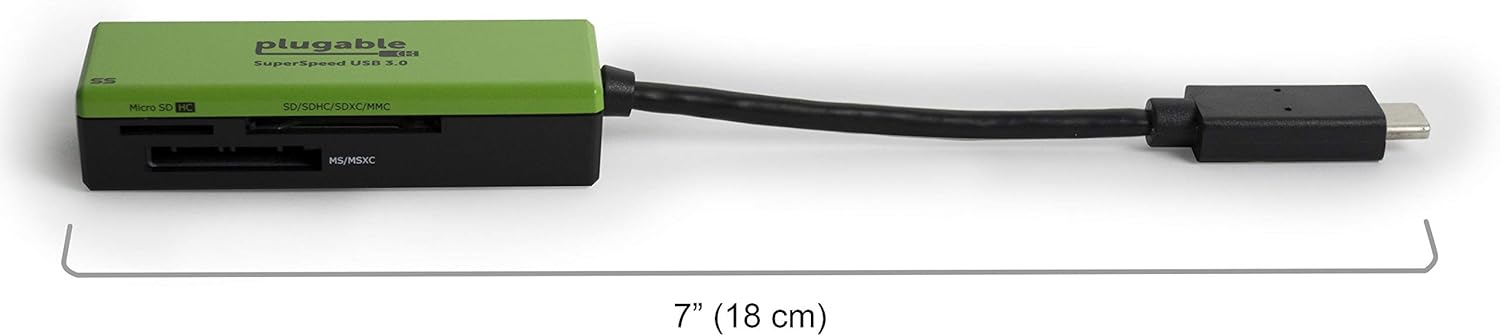
Сүрөт 4: Продукциянын өлчөмдөрү
7. Кепилдик маалыматы
Plugable products typically come with a limited warranty. For detailed information regarding the warranty period, coverage, and terms for your USBC-FLASH3 Multi-Card Reader, please refer to the official Plugable webсайтка же кардарларды тейлөөгө кайрылыңыз.
8. Колдоо
For technical assistance, troubleshooting, or any questions regarding your Plugable USB-C Multi-Card Reader, please contact Plugable Support:
- Электрондук почта колдоо: support@plugable.com
- Продукт Барагы: Visit the official product page for the USBC-FLASH3 on the Plugable website for FAQs, drivers, and additional resources. You can often find this by searching for "Plugable USBC-FLASH3" online.
No relevant instructional videos from the seller were available for direct embedding in this manual.


