1. Продукт бүтүп калдыview
1.1 Сүрөттөмө
The J-Tech Digital JTDAUDIOSW4x1 is a versatile audio converter and switch designed to integrate various digital audio sources with analog audio systems. This device features four audio inputs: two optical audio (TOSLINK) and two coaxial audio inputs. It provides multiple outputs including one optical audio (TOSLINK) output, one analog stereo RCA L/R audio output, and one 3.5mm headphone output.
The unit supports conversion from coaxial audio to TOSLINK audio. The RCA L/R and 3.5mm analog audio outputs are capable of handling incoming digital stereo audio formats up to 192KHz. It is important to note that this device functions as an audio converter and switch, not an audio decoder. It cannot decode and convert multi-channel surround sound formats (such as Dolby Digital 5.1CH/AC3) to stereo. For such functionality, a dedicated audio decoder would be required.
1.2 Негизги өзгөчөлүктөрү
- Input Versatility: Equipped with 4 SPDIF audio inputs, including two TOSLINK and two Coaxial ports.
- Бир нече чыгуулар: Offers 3 distinct outputs: one Optical/TOSLINK, one L/R Stereo, and one 3.5mm Headphone jack.
- Audio Format колдоо: Supports digital audio formats such as Dolby Digital (AC3), DTS, HDCD, and LPCM for SPDIF output. It also supports LPCM digital audio for analog audio output.
- Камтылган DAC: Features a built-in Digital-to-Analog Converter (DAC) that supports stereo audio formats up to 192KHz. For analog audio output, the incoming SPDIF audio must be in Mono or Stereo format.
- Coaxial to TOSLINK Conversion: Capable of converting coaxial audio signals to TOSLINK audio.
- Automatic Signal Identification: Automatically identifies the input digital audio signal format. Analog output will mute if a non-LPCM input is detected.
- Туруктуу курулуш: Housed in a reliable metal case for enhanced durability.
- Интуитивдик башкаруу: Features a dual-functional button for both Power On/Off and Input Switching.
1.3 Пакеттин мазмуну
Пакетте бардык буюмдар бар экенин текшериңиз:
- 1x JTDAUDIOSW4x1 Audio Converter/Switch Unit
- 1x AC кубаттуу адаптер
- 1x Колдонуучунун колдонмосу
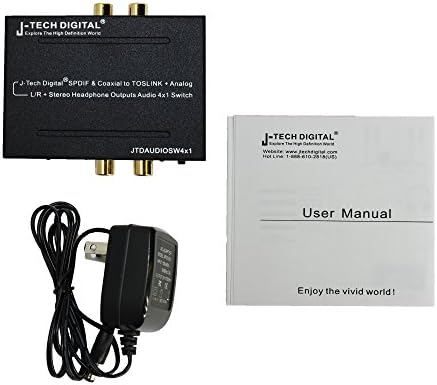
Image: The JTDAUDIOSW4x1 unit shown alongside its AC power adapter and the included user manual.
2. Орнотуу колдонмосу
2.1 Түзмөктүн жайгашуусу

Сүрөт: Жогорку view of the JTDAUDIOSW4x1 unit, highlighting the four digital audio input ports (two optical, two coaxial) and the input switch button.

Сүрөт: алдыңкы жана арткы views of the JTDAUDIOSW4x1, illustrating all input and output ports, including power, analog RCA, 3.5mm headphone, and optical output.
2.2 Өлчөмдөр
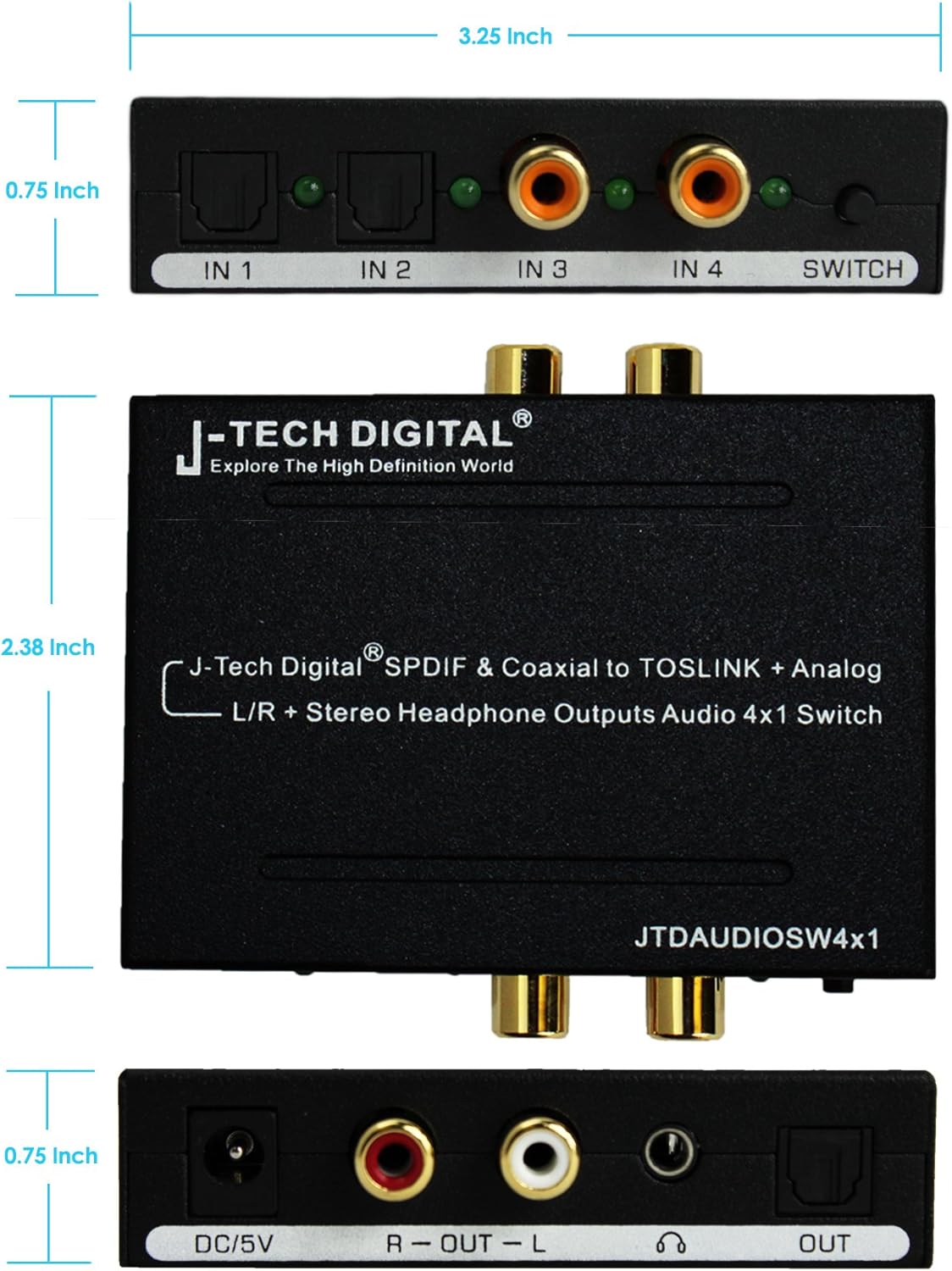
Image: Dimensional drawing of the JTDAUDIOSW4x1, indicating its compact size for easy placement.
2.3 Аспабыңызды туташтыруу
- Connect your digital audio source devices (e.g., DVD player, Blu-Ray player, game console) to the input ports (IN 1, IN 2 for Optical; IN 3, IN 4 for Coaxial) on the JTDAUDIOSW4x1.
- Connect your audio output devices to the corresponding output ports:
- For digital audio output, connect an optical cable from the 'OUT' port on the JTDAUDIOSW4x1 to your receiver or soundbar.
- For analog stereo audio, connect RCA L/R cables from the 'R-OUT-L' ports to your multimedia speakers or analog power ampөмүрлүү.
- For headphone listening, plug your 3.5mm headphones into the dedicated headphone jack.
- Connect the provided AC Power Adapter to the 'DC/5V' input port on the JTDAUDIOSW4x1, then plug the adapter into a standard electrical outlet.

Image: A visual guide demonstrating typical connection scenarios for the JTDAUDIOSW4x1 with various audio sources and output devices.
3. Иштөө нускамалары
3.1 Күйгүзүү/өчүрүү
The JTDAUDIOSW4x1 features a single multi-functional button on the front panel. To power on the device, press and hold this button until the indicator lights illuminate. To power off, press and hold the same button until the lights turn off.
3.2 Input Switching
Once the device is powered on, short press the multi-functional button to cycle through the available input sources (IN 1, IN 2, IN 3, IN 4). An indicator light next to each input port will show which input is currently active.
3.3 Аудио чыгарууну тандоо
The device simultaneously outputs audio to all connected output ports (Optical, RCA L/R, and 3.5mm Headphone) based on the selected input. Ensure your connected audio devices (speakers, headphones, amplifier) are powered on and set to the correct input to receive the audio signal.
4. Техникалык тейлөө
4.1 Тазалоо жана кам көрүү
- Тазалоодон мурун аппараттын өчүрүлгөнүн жана розеткадан ажыратылганын текшериңиз.
- Аппараттын сыртын сүртүү үчүн жумшак, кургак чүпүрөктү колдонуңуз.
- Avoid using harsh chemicals, cleaning solvents, or abrasive materials, as these may damage the finish.
- Keep the device in a cool, dry place, away from direct sunlight, heat sources, and excessive moisture.
- Do not block ventilation openings, if any, to prevent overheating.
5. Кыйынчылыктарды
If you encounter issues with your JTDAUDIOSW4x1, please refer to the following table for common problems and their solutions.
| Көйгөй | Мүмкүн себеп | Чечим |
|---|---|---|
| Аудио чыгышы жок | Incorrect input selected; Loose cable connections; Device not powered on; Source device not outputting audio; Analog output muted due to non-LPCM input. | Ensure the correct input is selected on the JTDAUDIOSW4x1. Check all cable connections (optical, coaxial, RCA, 3.5mm) are secure. Verify the device is powered on. Confirm your source device is outputting audio. Ensure the digital audio input is LPCM for analog outputs. |
| Аудио сапаты начар | Damaged cables; Incorrect audio format from source; Interference. | Replace cables if damaged. Ensure the source audio format is compatible. Keep the device away from other electronic equipment that may cause interference. |
| Түзмөк жооп бербей жатат | Power issue; Device malfunction. | Check power adapter connection and wall outlet. Try unplugging and re-plugging the power adapter. If the issue persists, contact customer support. |
| Analog output (RCA/3.5mm) not working, but Optical output is fine | Input audio format is not LPCM (e.g., Dolby Digital, DTS). | The analog outputs only support LPCM stereo audio. Ensure your source device is set to output LPCM (PCM) stereo audio. This device does not decode multi-channel formats to stereo. |
If the problem persists after attempting these solutions, please contact J-Tech Digital customer support for further assistance.
6. Техникалык шарттар
| Спецификация | Деталь |
|---|---|
| Бренд | J-Tech Digital |
| Модель номери | JTDAUDIOSW4x1 |
| Монтаж түрү | Дубалга орнотуу |
| Interface Type | Coaxial, Optical (TOSLINK) |
| Каналдардын саны | 5 (for SPDIF output compatibility, analog is stereo) |
| Материал | Металл |
| Продукциянын өлчөмдөрү | 6.5 x 4.5 x 2 дюйм |
| Элемент Салмагы | 9.6 унция |
| Supported Digital Audio Formats | Dolby Digital (AC3), DTS, HDCD, LPCM (for SPDIF output) |
| Колдоого алынган аналогдук аудио форматтары | LPCM Stereo (up to 192KHz) |
| Электр камсыздоо | AC Power Adapter (DC/5V) |
7. Кепилдик жана колдоо
J-Tech Digital is committed to providing high-quality products and excellent customer service.
- Өндүрүүчүнүн Кепилдиги: This product comes with a 1-Year Manufacturer Warranty from J-Tech Digital, covering defects in materials and workmanship under normal use.
- Техникалык колдоо: Enjoy free lifetime technical support directly from the manufacturer. Our knowledgeable team is available to assist you with any questions or issues you may encounter during the setup or operation of your device.
For warranty claims or technical assistance, please visit the official J-Tech Digital website or contact their customer support line. Refer to the contact information provided on the product packaging or the J-Tech Digital webакыркы колдоо маалымат үчүн сайт.


