1. Киришүү
Сатып алганыңыз үчүн рахматasing the RCA DEDE-240M4 24-inch HD LED Television. This manual provides essential information for the safe and efficient operation of your new television. Please read this manual thoroughly before using the product and retain it for future reference.
2. Коопсуздук маалыматы
- Электр коопсуздугу: Do not expose the television to rain or moisture to prevent fire or electric shock. Ensure the power cord is not damaged or pinched.
- Вентиляция: Ensure adequate ventilation around the television. Do not block ventilation openings. Avoid placing the TV on soft surfaces like carpets or blankets.
- Жайгашкан жери: Place the television on a stable, level surface. Avoid direct sunlight, heat sources, and excessive dust.
- Тазалоо: Unplug the television before cleaning. Use a soft, dry cloth. Do not use liquid cleaners or aerosol cleaners.
- Батареялар: Dispose of used batteries responsibly. Do not mix old and new batteries or different types of batteries.
3. Пакеттин мазмуну
Пакетте бардык буюмдар бар экенин текшериңиз:
- RCA DEDE-240M4 24-inch HD LED Television
- Алыстан башкаруу
- Электр кабели
- Сыналгы үчүн стенд (негизи жана бурамалары)
- Алыстан башкаруу үчүн AAA батареялары (2).
- Колдонуучунун Колдонмосу (бул документ)
4. Продукт бүтүп калдыview
4.1 Арткы панелдин туташуулары
The rear panel of your television provides various ports for connecting external devices. Refer to the image below for a visual guide.

Image 1: Rear panel connections of the RCA DEDE-240M4 television. From left to right, ports include USB, L/R Audio Input, Video/Y/Pb/Pr Component Input, HDMI/MHL, VGA, PC/Audio Input, Earphone, ANT (Antenna), and Coaxial Digital Audio Out.
- USB: Медияны ойнотуу үчүн USB сактагыч түзмөктөрдү туташтыруу үчүн files (JPEG, MP3, Movie).
- INPUT (L/R, VIDEO/Y/Pb/Pr): Analog audio and video inputs for older devices.
- HDMI/MHL: High-Definition Multimedia Interface inputs for digital audio and video. MHL (Mobile High-Definition Link) support allows connecting compatible mobile devices. There are 3 HDMI inputs.
- VGA (PC INPUT): Компьютерди туташтыруу үчүн.
- PC/AUDIO INPUT: Компьютерге туташуу үчүн аудио киргизүү.
- НАУШник: Наушниктерди туташтыруу үчүн.
- ANT (Антенна): For connecting an external antenna or cable TV signal.
- COAXIAL (DIGITAL AUDIO OUT): For connecting to a digital audio receiver or sound system.
4.2 Алыстан башкаруу
The remote control allows you to operate your television from a distance. Insert the two AAA batteries provided, ensuring correct polarity.
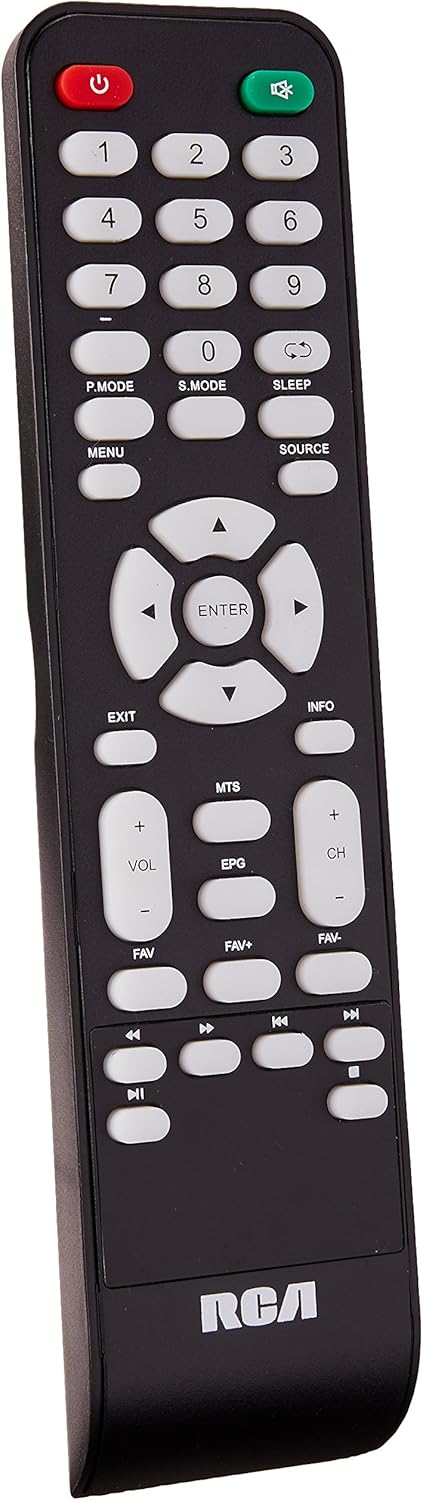
Image 2: Remote control for the RCA DEDE-240M4 television. Key buttons include Power, Number Pad, P.MODE, S.MODE, SLEEP, MENU, SOURCE, EXIT, INFO, directional arrows with ENTER, VOL+/-, CH+/-, MTS, EPG, FAV, FAV+, FAV-, and media playback controls.
- POWER (Red): Телевизорду күйгүзөт же өчүрөт.
- Сан баскычтары (0-9): Түз канал тандоо үчүн.
- P.MODE: Picture Mode selection.
- S.MODE: Sound Mode selection.
- УЙКУ: Уйку таймерин орнотот.
- МЕНЮ: Негизги менюга кирет.
- БУЛАК: Selects the input source (HDMI, AV, USB, TV).
- ЧЫГУУ: Учурдагы менюдан же функциядан чыгат.
- МААЛЫМАТ: Программа жөнүндө маалыматты көрсөтөт.
- Directional Arrows (Up/Down/Left/Right) & ENTER: Менюларды багыттоо жана тандоолорду ырастоо.
- VOL +/-: Үн деңгээлин тууралайт.
- CH +/-: Каналдарды өзгөртөт.
- МТС: Multi-channel Television Sound (SAP/Stereo).
- EPG: Electronic Program Guide (for digital channels).
- FAV / FAV+ / FAV-: Accesses and navigates favorite channels.
- Медиа ойнотууну көзөмөлдөө: Play, Pause, Stop, Fast Forward, Rewind, Next/Previous Track (for USB media).
5. Орнотуу
5.1 Стендди бекитүү
- Экранга зыян келтирбөө үчүн телевизорду кылдаттык менен жумшак, таза бетке ылдый караңыз.
- Стенд негизин телевизордун астындагы монтаждоо тешиктери менен тууралаңыз.
- Берилген бурамалар менен стендди бекитиңиз. Ашыкча кысып албаңыз.
- Телевизорду тик туруп, туруктуу бетке коюңуз.
5.2 Тышкы түзмөктөрдү туташтыруу
Ensure the TV and all devices are powered off before making any connections.
- Антенна/кабель: Connect an RF coaxial cable from your antenna or cable wall outlet to the ANT input on the TV.
- HDMI түзмөктөрү (мисалы, Blu-ray ойноткуч, оюн консолу): Connect an HDMI cable from the device's HDMI output to any of the HDMI inputs on the TV.
- USB түзмөктөрү: Insert a USB flash drive into the USB port for media playback.
- ЖК туташуусу: Connect a VGA cable from your computer's VGA output to the TV's VGA input. Connect an audio cable from your computer's audio output to the TV's PC/AUDIO INPUT.
- Аудио тутум: For digital audio, connect a coaxial digital audio cable from the TV's COAXIAL output to your audio receiver. For headphones, use the EARPHONE jack.
5.3 Күйгүзүү
- Кубат шнурун телевизордун кубат киргизүү булагына туташтырыңыз, андан кийин экинчи учун розеткага сайыңыз.
- Press the POWER button on the remote control or on the TV itself.
- Тил тандоо жана каналды сканерлөө, анын ичинде баштапкы орнотуу үчүн экрандагы нускамаларды аткарыңыз.
6. Иштөө
6.1 Негизги функциялар
- Күйгүзүү/өчүрүү: Press the POWER button on the remote or TV.
- Үндү тууралоо: Use VOL +/- buttons on the remote.
- Канал тандоо: Use CH +/- buttons or the number pad on the remote.
- Киргизүү булагын тандоо: Press the SOURCE button on the remote to cycle through available inputs (TV, HDMI1, HDMI2, HDMI3, AV, PC, USB). Press ENTER to confirm.
6.2 Меню Навигациясы
Press the MENU button to access the main menu. Use the directional arrows to navigate through options and ENTER to select. Use EXIT to close the menu.
6.3 USB медиа ойнотуу
Insert a USB flash drive into the USB port. The TV should automatically detect the device and prompt you to open the media browser. If not, select the USB source using the SOURCE button. You can play JPEG images, MP3 audio, and various video formats.
7. Техникалык тейлөө
- Экранды тазалоо: Экранды жумшак, түксүз чүпүрөк менен акырын сүртүңүз. өжөр белгилери үчүн, бир аз гampчүпүрөккө суу же атайын экран тазалагыч (түз эле экранга эмес, кездемеге сүйкөңүз).
- Кабинетти тазалоо: Телевизордун шкафын жумшак, кургак чүпүрөк менен сүртүңүз.
- Сактагыч: If storing the TV for an extended period, unplug it, remove batteries from the remote, and cover it to protect from dust.
8. Кыйынчылыктарды
| Көйгөй | Мүмкүн чечим |
|---|---|
| Күч жок | Кубат шнуру телевизорго жана розеткага бекем сайылганын текшериңиз. Розетка иштеп жатканын текшериңиз. |
| Сүрөт жок, бирок үн бар | Киргизүү булагынын тандоосун текшериңиз. Тышкы түзмөктөрдүн туура сайылып, туташтырылганын текшериңиз. |
| Үн жок, бирок сүрөт бар | Check the volume level and ensure the TV is not muted. Check audio cable connections for external devices. |
| Пульт иштебей жатат | Replace the batteries with new AAA batteries, ensuring correct polarity. Ensure there are no obstructions between the remote and the TV's IR sensor. |
| "Сигнал жок" билдирүүсү | Verify the correct input source is selected. Check antenna/cable connection or external device connections. Perform a channel scan if using an antenna. |
9. Техникалык шарттар
| Өзгөчөлүк | Спецификация |
|---|---|
| Модел | DEDE-240M4 |
| Screen Size | 24 дюйм |
| Дисплей технологиясы | LED (LCD Type) |
| Резолюция | 720p (Maximum) |
| Аспект катышы | 16:9 |
| Байланыш | 3x HDMI, 1x USB, 1x RF Antenna, 1x PC (VGA), 1x PC Audio In, 1x Component (Video/Y/Pb/Pr), 1x L/R Audio In, 1x Coaxial Digital Audio Out, 1x Earphone Out |
| Монтаж түрү | Стол орнотуу |
| Өлчөмдөрү (стенд менен) | 62.5 x 9.4 x 40 см (болжол менен) |
| Салмагы | 4.6 кг (болжол менен) |
| Батареялар талап кылынат | 2 AAA (кошулган) |
10. Кепилдик жана колдоо
For warranty information and technical support, please refer to the warranty card included with your product or visit the official RCA webсайт. Сатып алуу квитанциясын кепилдик дооматтары үчүн сатып алуунун далили катары сактаңыз.


