1. Киришүү
This manual provides detailed instructions for the setup, operation, and maintenance of your Peavey PV 14 AT 14 Channel Compact Mixer. The PV 14 AT is designed for professional audio applications, featuring 14 channels, integrated Bluetooth connectivity, and Antares Auto-Tune pitch correction technology. Please read this manual thoroughly to ensure proper use and to maximize the performance and longevity of your mixer.
2. Маанилүү коопсуздук нускамалары
- Кубат булагы: Connect the unit only to the type of power supply specified in this manual or on the unit.
- Ным жана суюктуктар: To reduce the risk of fire or electric shock, do not expose this apparatus to rain or moisture. Do not place objects filled with liquids, such as vases, on the apparatus.
- Вентиляция: Туура желдетүүнү камсыз кылыңыз. Эч кандай желдетүүчү тешиктерди жаап албаңыз. Өндүрүүчүнүн көрсөтмөлөрүнө ылайык орнотуу.
- Жылуулук: Радиаторлор, жылуулук регистрлери, мештер же башка аппараттар (анын ичинде) сыяктуу жылуулук булактарынын жанына орнотпоңуз ampкөтөргүчтөр) жылуулукту пайда кылуучу.
- Негиздөө: Поляризацияланган же жерге туташтыруучу сайгычтын коопсуздук максатын жокко чыгарбаңыз. Поляризацияланган сайгычтын эки бычагы бар, бири экинчисинен кенен. Жерге туташтыруучу түрдөгү сайгычтын эки бычак жана үчүнчү жерге туташтыруучу тиштери бар. Кең бычак же үчүнчү тиш сиздин коопсуздугуңуз үчүн берилген. Эгерде берилген сайгыч розеткага туура келбесе, эскирген розеткаңызды алмаштыруу үчүн электрикке кайрылыңыз.
- Электр кабелин коргоо: Электр шнурунун басылып кетүүсүнөн же кысып калуудан сактаңыз, өзгөчө сайгычтарда, розеткаларда жана алар аппараттан чыга турган жеринде.
- Тейлөө: Бардык тейлөөлөрдү квалификациялуу тейлөө кызматкерлерине тапшырыңыз. Аппарат кандайдыр бир зыянга учураганда, мисалы, кубат берүүчү шнур же сайгыч бузулганда, суюктук төгүлгөндө же аппараттын ичине нерселер түшкөндө, аппарат жамгырга же нымдуулукка дуушар болгондо, нормалдуу иштебей калганда тейлөө талап кылынат. , же түшүрүлгөн.
3. Продукт бүтүп калдыview жана өзгөчөлүктөрү
3.1 Алдыңкы панелдин башкаруу элементтери
The front panel of the PV 14 AT mixer provides access to all channel inputs, equalization controls, effects, and master output faders. Each channel features dedicated gain, EQ, and auxiliary send controls for precise audio shaping.

Сүрөт: бурчтуу view of the Peavey PV 14 AT mixer's front panel, showing various knobs, faders, and input jacks.
3.2 Арткы панелдин туташуулары
The rear panel houses essential power and digital audio connections, including the DC power input, power switch, and the Digital Audio Port for USB connectivity to a computer. Bluetooth pairing information is also located here.

Сүрөт: Арткы view of the Peavey PV 14 AT mixer, displaying the DC power input, power switch, Digital Audio Port (USB), and Bluetooth pairing information.
3.3 Өлчөмдөр
The compact design of the PV 14 AT makes it suitable for various setups. Refer to the image below for approximate dimensions.
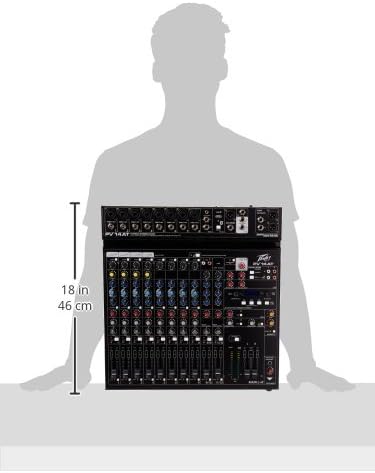
Image: Diagram showing the approximate dimensions of the Peavey PV 14 AT mixer, indicating a height of 18 inches (46 cm).
4. Орнотуу
4.1 Пакеттен чыгаруу
Carefully remove the mixer from its packaging. Retain all packaging materials for future transport or storage. Inspect the unit for any signs of damage incurred during shipping. If damage is found, contact your dealer immediately.
4.2 Кубат туташтыруу
- Миксердин кубат которгучу OFF абалында экенин текшериңиз.
- Connect the provided power adapter to the DC IN port on the rear panel of the mixer.
- Кубат адаптерин ылайыктуу AC розеткага сайыңыз.
4.3 Аудио байланыштар
Connect your microphones, instruments, and other audio sources to the appropriate input channels. Use XLR cables for microphones and 1/4-inch TRS/TS cables for line-level instruments. Connect your main speakers or recording interface to the MAIN L+R outputs using XLR or 1/4-inch cables.
5. Иштөө нускамалары
5.1 Channel Operation
Each input channel features a GAIN control to adjust input sensitivity, a 3-band EQ (High, Mid, Low) for tone shaping, and AUX SEND controls for monitor mixes or external effects. The channel fader controls the individual channel's level in the main mix. The SOLO button allows you to monitor a single channel without affecting the main output.
5.2 Antares Auto-Tune
The PV 14 AT includes Antares Auto-Tune on select channels. To activate Auto-Tune, locate the dedicated Auto-Tune button on the desired channel and press it. Adjust the Auto-Tune parameters (if available) via the mixer's digital display and controls to achieve the desired pitch correction effect.
5.3 Bluetooth байланышы
- Press the Bluetooth button on the mixer to activate Bluetooth pairing mode. The Bluetooth indicator light will flash.
- On your smart device (phone, tablet, computer), search for available Bluetooth devices and select "PV 14 AT" (or similar name).
- Once paired, the Bluetooth indicator light will become solid. You can now stream audio wirelessly to the mixer.
5.4 Санариптик эффекттер
The mixer features built-in digital effects. Use the EFFECTS section controls and LCD display to browse and select various effects such as reverb, delay, and chorus. Adjust the effect send levels on individual channels and the master effect return level to blend effects into your mix.
5.5 USB аудио интерфейси
The Digital Audio Port (USB) on the rear panel allows the PV 14 AT to function as an audio interface for your computer. Connect a USB cable from the mixer to your computer. The mixer will be recognized as an audio input/output device, enabling multi-track recording to a Digital Audio Workstation (DAW) or playback from your computer through the mixer.
6. Техникалык тейлөө
6.1 Тазалоо
To clean the mixer, use a soft, dry cloth. Do not use abrasive cleaners, solvents, or waxes. Ensure the unit is powered off and disconnected from the power source before cleaning.
6.2 Сактоо
When not in use for extended periods, store the mixer in a cool, dry place, away from direct sunlight and extreme temperatures. It is recommended to use the original packaging for protection during storage or transport.
7. Кыйынчылыктарды
7.1 Күч жок
- Check if the power adapter is securely connected to both the mixer and a working power outlet.
- Арткы панелдеги кубат которгучу ON абалында экенин текшериңиз.
- Башка аспапка сайып, розетка иштеп жатканын текшериңиз.
7.2 Үн чыгышы жок
- Confirm that all channel faders and the MAIN L+R faders are raised.
- Бардык аудио кабельдердин коопсуз туташууларын жана туура иштешин текшериңиз.
- Ensure input sources (microphones, instruments) are active and producing sound.
- Verify that the connected speakers or headphones are powered on and functioning correctly.
7.3 Ызы-чуу
- Бардык кабелдердин туура корголгонун жана жакшы абалда экенин текшериңиз.
- Check for ground loops by ensuring all equipment is connected to the same power circuit or using a ground loop isolator.
- Reduce gain levels if input signals are too hot, causing clipping.
7.4 Bluetooth туташуу маселелери
- Ensure the mixer's Bluetooth is in pairing mode.
- Move your smart device closer to the mixer to ensure it is within range.
- Forget the device from your smart device's Bluetooth settings and attempt to re-pair.
8. Техникалык шарттар
| Элемент Салмагы | 12 фунт |
| Продукциянын өлчөмдөрү | 12 x 12 x 12 дюйм |
| Элемент моделинин номери | PV14AT |
| Аппараттык интерфейс | Bluetooth |
| Материалдын түрү | Дат баспаган болот |
| Миксер каналынын саны | 14 |
| Power Source | Электр зымдары |
| Байланыш технологиясы | Bluetooth |
9. Кепилдик жана колдоо
For warranty information and technical support, please refer to the warranty card included with your product or visit the official Peavey website. You can also contact Peavey customer service directly for assistance with product registration, troubleshooting, and service inquiries.


