Introduction
Сатып алганыңыз үчүн рахматasing the Madison FREESOUND-VR40R Vintage Portable Radio. This device combines a classic retro design with modern audio technology, offering versatile listening options. This manual provides detailed instructions on how to set up, operate, and maintain your radio to ensure optimal performance and longevity.
The FREESOUND-VR40R is a portable, USB-rechargeable radio designed for those who appreciate a vintage aesthetic combined with modern audio technologies. It features an analog dial tuner, Bluetooth, USB, AUX, and FM connectivity, bass enhancement, and a convenient dual metal handle for portability.
Коопсуздук нускамалары
Түзмөктү колдонуудан мурун бул коопсуздук көрсөтмөлөрүн кунт коюп окуп чыгыңыз жана аларды келечекте колдонуу үчүн сактап коюңуз. Туура эмес колдонуу электр тогуна урунууга, өрткө же башка коркунучтарга алып келиши мүмкүн.
- Өрт же электр тогуна урунуп калбаш үчүн аппаратты жамгырга же нымдуулукка дуушар кылбаңыз.
- Аппаратты түз күндүн нуруна же экстремалдык температурага калтырбаңыз.
- в ачпагылаasinг. Ичинде колдонуучу тейлей турган бөлүктөр жок. Бардык тейлөөлөрдү квалификациялуу кызматкерлерге тапшырыңыз.
- Use only the specified power adapter/charging cable.
- Аппаратты күчтүү магнит талаасынан алыс кармаңыз.
- Аппаратты кургак, жумшак чүпүрөк менен гана тазалаңыз. Суюк тазалоочу каражаттарды колдонбоңуз.
- Түзмөктүн айланасында жакшы желдетүүнү камсыз кылыңыз. Желдетүү тешиктерин жаппаңыз.
Продукт бүттүview
Familiarize yourself with the components and features of your Madison FREESOUND-VR40R radio.

Сүрөт 1: Алдыңкы View. Shows the analog dial tuner, speaker grille, Madison logo, and control knobs for volume and source selection.
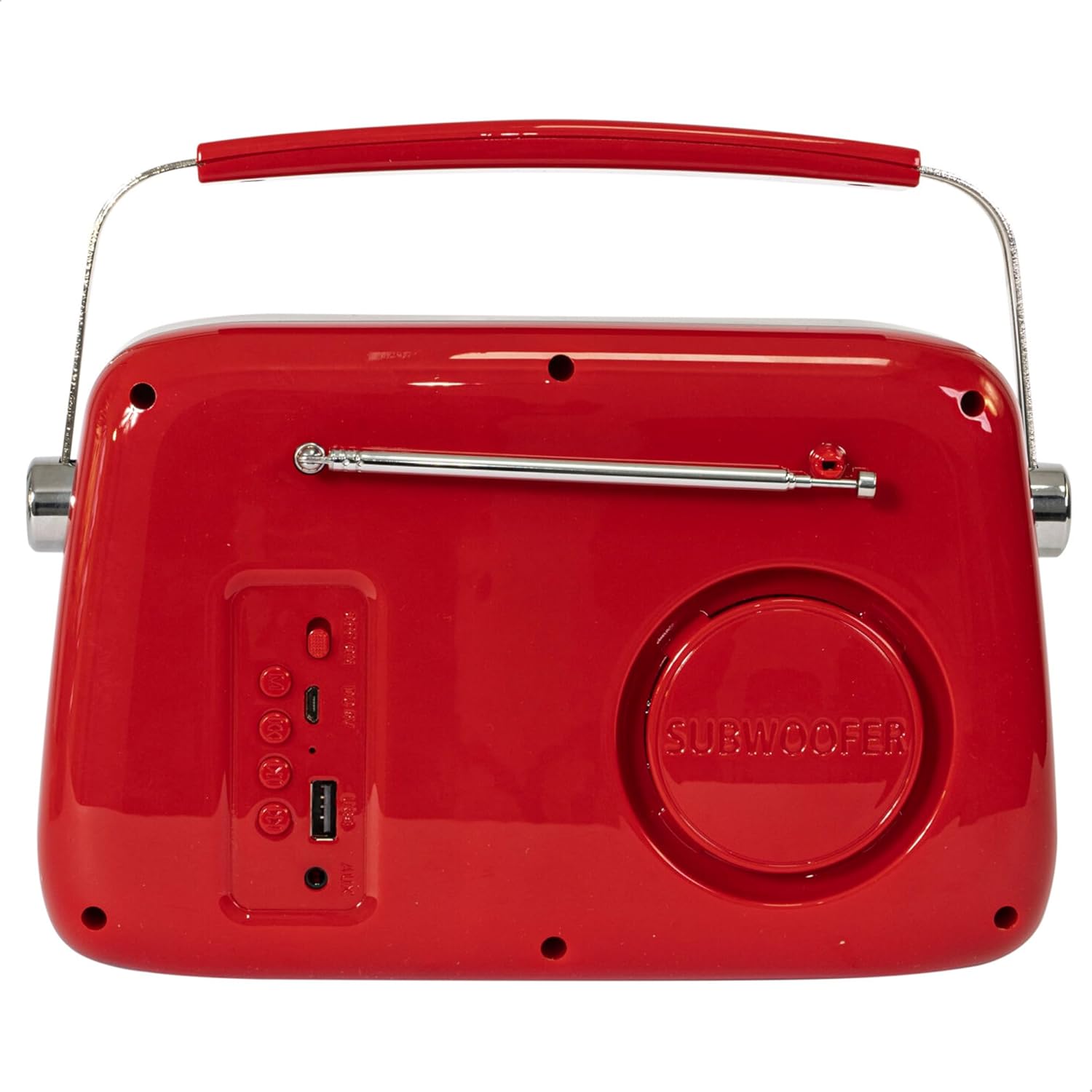
2-сүрөт: Арткы View. Displays the subwoofer, USB port, AUX input, and power/mode buttons.
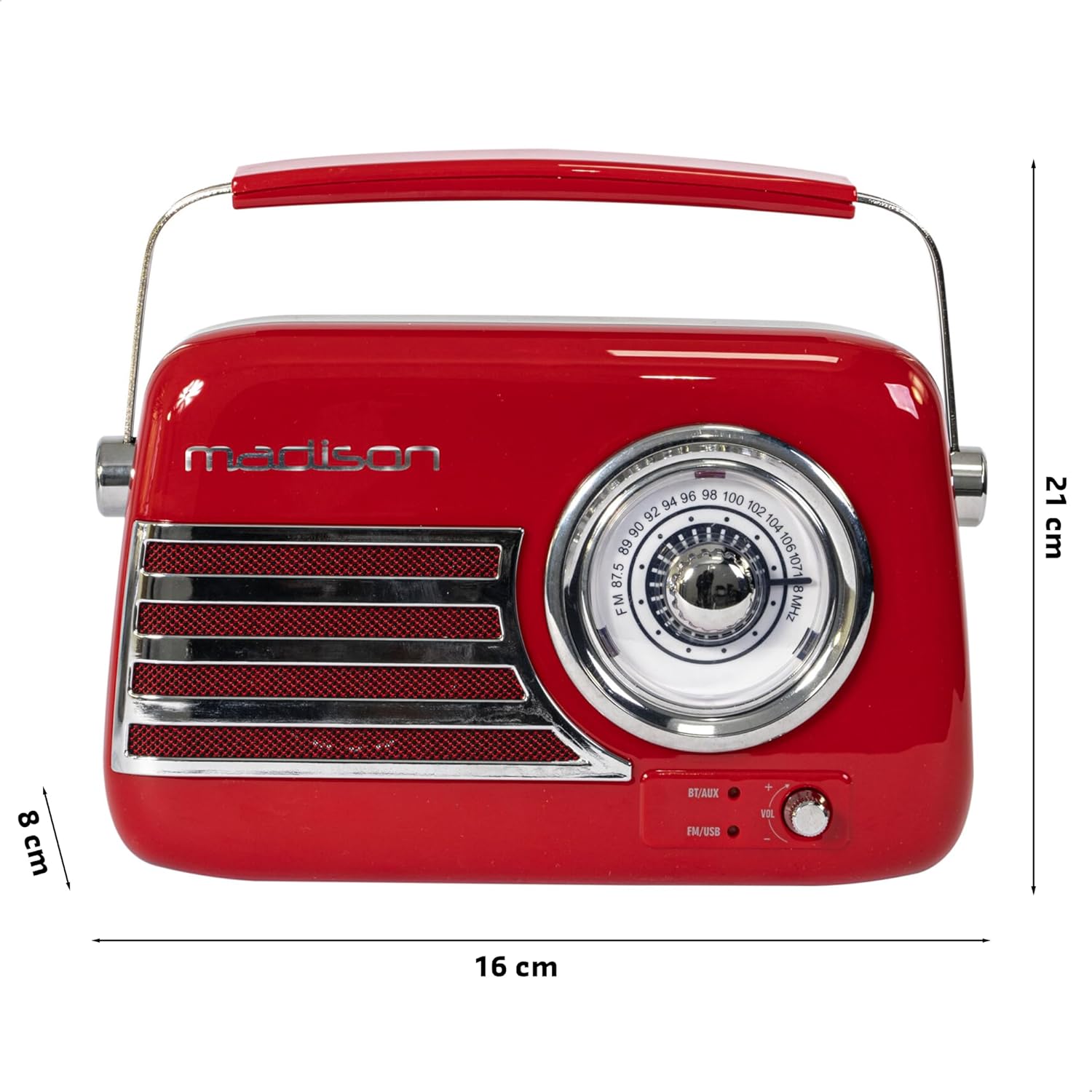
Сүрөт 3: Продукциянын өлчөмдөрү. Illustrates the radio's approximate dimensions: 21 cm length, 8 cm width, and 16 cm height.

4-сүрөт: Арткы View with Antenna Extended. Shows the telescopic antenna fully extended for improved FM reception.
Негизги өзгөчөлүктөрү:
- Analog Dial Tuner: For classic FM radio tuning.
- Bluetooth байланышы: Смартфонуңуздан же планшетиңизден аудиону зымсыз агылтыңыз.
- USB ойнотуу: Play music directly from a USB drive.
- AUX киргизүү: 3.5 мм аудио кабели аркылуу тышкы аудио түзмөктөрдү туташтыруу.
- FM радиосу: Enjoy your favorite FM stations with the retractable antenna.
- Бассты жогорулатуу: Integrated subwoofer for richer bass sound.
- Кайра заряддалуучу батарея: Built-in long-lasting battery for portable use.
- Портативдик дизайн: Lightweight with a dual metal handle for easy carrying.
Жайгашуу
Батареяны заряддоо:
- Locate the USB charging port on the rear of the radio.
- Connect the provided USB charging cable to the radio's USB port.
- USB кабелинин экинчи учун туура келген USB кубат адаптерине (кошумча эмес) же компьютердин USB портуна туташтырыңыз.
- Заряддоо индикаторунун жарыгы күйөт. Толук заряддалгандан кийин жарыктын түсү өзгөрүшү же моделине жараша өчүшү мүмкүн.
- Толук кубаттоо адатта бир нече саатка созулат.
Баштапкы күйгүзүү:
- Ensure the radio is sufficiently charged.
- Press and hold the Power/Mode button (usually located on the rear or front panel) to turn on the radio.
- The front indicator lights will show the currently selected source.
Иштөө нускамалары
Үндү көзөмөлдөө:
айлантыңыз Көлөм knob (VOL) on the front panel to adjust the sound level. Turn clockwise to increase volume, counter-clockwise to decrease.
Selecting a Source:
басыңыз Булак/режим button (often labeled BT/AUX or FM/USB) repeatedly to cycle through the available input modes: Bluetooth, AUX, FM Radio, and USB.
- Bluetooth режими:
- Switch the radio to Bluetooth mode. The Bluetooth indicator light will blink, indicating it's ready for pairing.
- Смартфонуңузда же планшетиңизде Bluetooth'ду иштетиңиз жана жеткиликтүү түзмөктөрдү издеңиз.
- Select "FREESOUND-VR40R" (or similar name) from the list.
- Once paired, the Bluetooth indicator light will become solid, and you can stream audio from your device.
- FM радио режими:
- Switch the radio to FM mode.
- Оптималдуу кабыл алуу үчүн телескопиялык антеннаны толугу менен узартыңыз.
- айлантыңыз Тунинг терүү on the front panel to manually select your desired FM radio station.
- USB ойнотуу режими:
- MP3 аудиосу бар USB флэш-дискти салыңыз fileрадионун арткы жагындагы USB портуна сайыңыз.
- Switch the radio to USB mode. The radio will automatically begin playing the audio files.
- Use the playback controls (if available, usually on the rear panel) to skip tracks or pause/play.
- AUX киргизүү режими:
- Connect one end of a 3.5mm audio cable (not included) to the AUX input port on the rear of the radio.
- Connect the other end of the cable to the headphone jack or audio output of your external device (e.g., MP3 player, CD player).
- Switch the radio to AUX mode. Audio from your external device will now play through the radio.
Техникалык тейлөө
Тазалоо:
Радиоңуздун көрүнүшүн жана функционалдуулугун сактоо үчүн:
- Сырткы беттерди жумшак, кургак, түксүз чүпүрөк менен сүртүңүз.
- Абразивдүү тазалагычтарды, момдорду же эриткичтерди колдонбоңуз, анткени алар финишке зыян келтириши мүмкүн.
- Суюктуктарды түз радиого чачуудан алыс болуңуз.
Сактагыч:
Эгер сиз радиону узак мөөнөткө сактоону пландаштырсаңыз:
- Сактоодон мурун батареяны толук заряддаңыз.
- Радиону салкын, кургак жерде, күн нуру түз тийген жана өтө жогорку температурадан алыс сактаңыз.
- For optimal battery health, recharge the battery every 3-6 months, even if not in use.
Проблемаларды чечүү
| Көйгөй | Мүмкүн себеп | Чечим |
|---|---|---|
| Кубат жок / Радио күйбөйт. | Батарея түгөнүп калды. | Берилген USB кабелин колдонуп, радиону кубаттаңыз. |
| Үн жок. | Үн өтө төмөн же үнсүз. Туура эмес булак тандалды. | Increase the volume. Ensure the correct input source (Bluetooth, FM, USB, AUX) is selected. |
| FM кабыл алуу начар. | Antenna not extended. Weak signal. | Телескопиялык антеннаны толугу менен сунуңуз. Сигнал жакшыраак болушу үчүн радионун ордун өзгөртүп көрүңүз. |
| Bluetooth түзмөгү жупташа албайт. | Radio not in pairing mode. Device too far. Bluetooth disabled on source device. | Ensure radio is in Bluetooth pairing mode (blinking light). Move device closer. Enable Bluetooth on your smartphone/tablet. |
| USB ойнотуу иштебей жатат. | USB drive not inserted correctly. Unsupported file формат. | Ensure USB drive is fully inserted. Check if audio fileлар MP3 форматында. |
Техникалык шарттар
| Модель номери: | 10-5567МА |
| Продукциянын өлчөмдөрү (L x W x Y): | 21 x 8 x 16 см |
| Салмагы: | 635 грамм |
| Түсү: | Кызыл |
| Материал: | Пластик |
| Кубат булагы: | Internal Rechargeable Battery (via USB) |
| Батарея түрү: | 1 Lithium-polymer (included) |
| Байланыш: | Bluetooth, USB, Auxiliary (AUX) |
| Радио топтору: | FM |
| Өзгөчөлүктөр: | Telescopic antenna, Analog dial tuner, Bass enhancement |
| Камтылган компоненттер: | USB заряддоо кабели |
| Өндүрүүчү: | Lotronic S.A. |
| Келип чыккан өлкө: | Кытай |
Кепилдик жана колдоо
For warranty information and customer support, please refer to the warranty card included with your product or visit the official Madison webсайт. Ар кандай кепилдик дооматтары үчүн сатып алганыңыздын далилин сактаңыз.
For technical assistance or troubleshooting beyond this manual, please contact Madison customer service.
Note: Availability of spare parts is not specified in the product information.


