1. Киришүү
This manual provides essential instructions for the safe and efficient operation of your Brother DCP-T700W Color Ink Tank Wi-Fi Multifunction Printer. This device is designed for printing, scanning, and copying, featuring an integrated refillable ink tank system and wireless connectivity. Please read this manual thoroughly before using the printer and keep it for future reference.
2. Коопсуздук маалыматы
Observe the following safety precautions to prevent injury or damage to the printer:
- Принтерди ар дайым жерге туташтырылган розеткага туташтырыңыз.
- Do not place the printer in areas with excessive dust, humidity, or direct sunlight.
- Принтерди суудан же башка суюктуктардан алыс кармаңыз.
- Принтерди өз алдынча тейлөөгө аракет кылбаңыз. Бардык тейлөө иштерин квалификациялуу адистерге тапшырыңыз.
- Use only Brother-recommended ink and paper to ensure optimal performance and prevent damage.
3. Продукт бүтүп калдыview
Familiarize yourself with the main components of your Brother DCP-T700W printer.
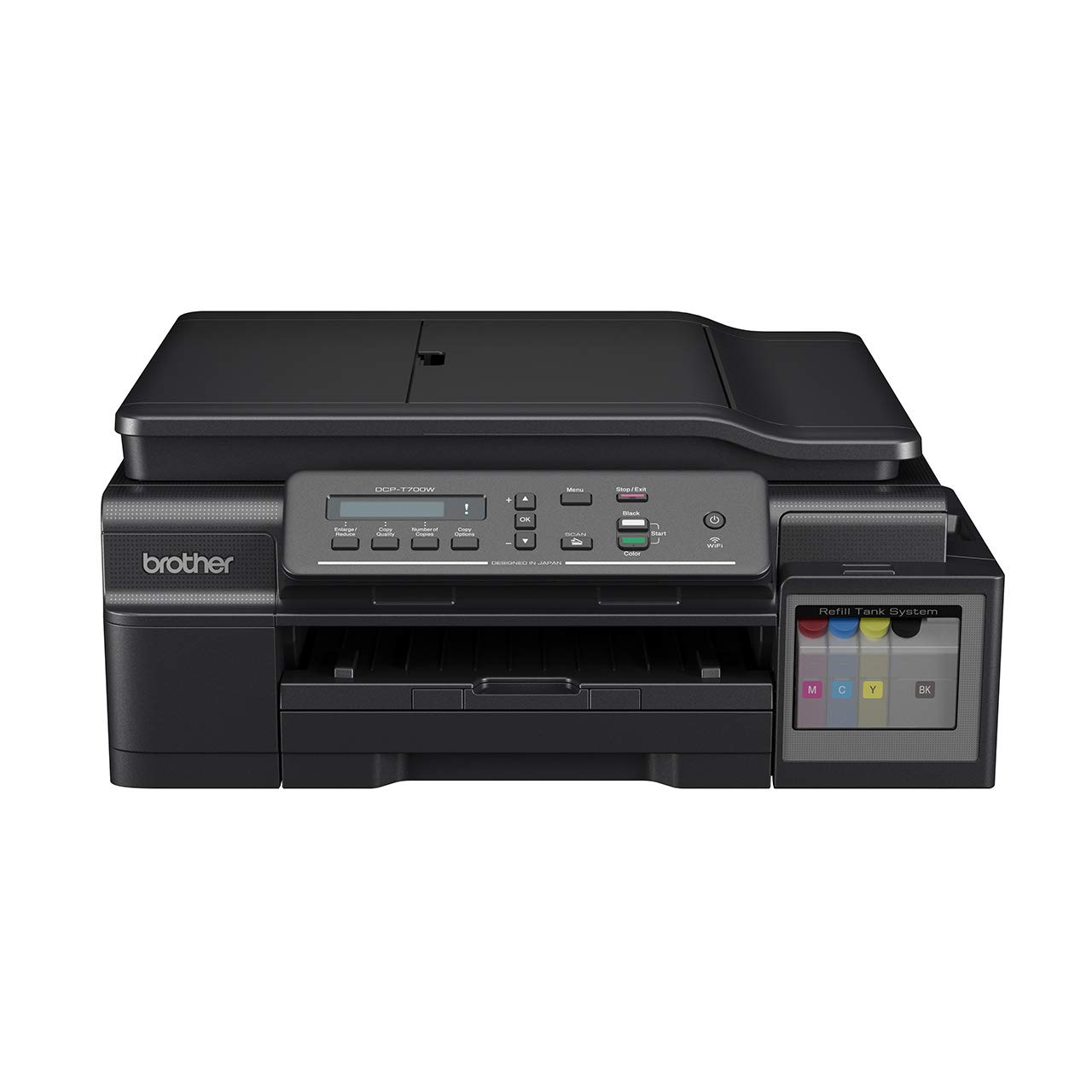
3.1-сүрөт: Фронт view of the Brother DCP-T700W printer, showing the control panel, paper output tray, and integrated ink tank system on the right side.

3.2-сүрөт: Бурчтуу view of the Brother DCP-T700W, highlighting the Automatic Document Feeder (ADF) tray in an open position, ready for scanning or copying multiple documents.
Башкаруу панели
The control panel allows you to operate the printer's functions. It typically includes:
- LCD дисплей: Shows status messages and menu options.
- Меню баскычтары: Жөндөөлөр аркылуу чабыттоо.
- Start Buttons: Initiate print, copy, or scan jobs (Color/Mono).
- Stop/Exit Button: Cancel operations or exit menus.
- Wi-Fi баскычы: Manage wireless network connection.
4. Орнотуу
4.1 Пакеттен чыгаруу жана жайгаштыруу
- Принтерди таңгагынан чыгарып, бардык коргоочу ленталарды жана материалдарды алып салыңыз.
- Принтерди туруктуу, тегиз жана жетиштүү желдетүү бар бетке коюңуз.
- Ensure there is enough space around the printer for paper loading and output.
4.2 Сыя цистерналарын толтуруу
The DCP-T700W features an integrated ink tank system. Follow these steps to fill the tanks:
- Open the ink tank cover located on the right side of the printer.
- Тиешелүү түстү алуу үчүн сыя бөтөлкөсүн ачыңыз (Кара, Көгүлтүр, Кызгылт көк, Сары).
- Carefully pour the ink into the correct tank, ensuring not to overfill.
- Сыя сактагычтын капкагын бекем жабыңыз.
- Perform an initial ink charge as instructed by the printer's display or setup guide.
Эскертүү: Use genuine Brother ink bottles to prevent damage and ensure print quality.
4.3 Программалык камсыздоону жана драйверди орнотуу
- Insert the installation CD-ROM into your computer's drive, or download the latest drivers and software from the official Brother support webсайт.
- Орнотууну аяктоо үчүн экрандагы нускамаларды аткарыңыз.
- During installation, you will be prompted to choose your connection type (USB or Wireless).
4.4 Тармакка туташуу (Wi-Fi)
Принтериңизди зымсыз тармакка туташтыруу үчүн:
- басыңыз Wi-Fi башкаруу панелиндеги баскыч.
- багыттоо Network settings using the menu buttons.
- Тандоо WLAN анан Орнотуу устасы.
- The printer will search for available networks. Select your network (SSID) from the list.
- Enter your network password (network key) using the control panel buttons.
- Confirm the connection. The Wi-Fi indicator light will illuminate when connected.
Alternatively, you can use the WPS (Wi-Fi Protected Setup) method if your router supports it.
5. Иштөө нускамалары
5.1 Кагазды жүктөө
- Open the paper tray and extend it if necessary.
- Load paper print-side down. Adjust the paper guides to fit the paper size.
- Кагаз салгычты жабыңыз.
The printer supports various paper types and sizes, including A4. Refer to specifications for details.
5.2 Документтерди басып чыгаруу
- Компьютериңизден басып чыгаргыңыз келген документти ачыңыз.
- Тандоо Басып чыгаруу колдонмонун менюсунан.
- Choose your Brother DCP-T700W printer.
- Adjust print settings such as paper size, orientation, color/monochrome, and duplex printing (if desired).
- Click Басып чыгаруу.
For mobile printing, use the Brother iPrint&Scan app or other compatible mobile printing services.
5.3 Документтерди сканерлөө
You can scan documents using the flatbed scanner or the Automatic Document Feeder (ADF).
Планшеттик сканерди колдонуу:
- Сканердин капкагын көтөрүңүз.
- Place the document face-down on the scanner glass, aligning it with the guide marks.
- Сканердин капкагын жабыңыз.
- Initiate the scan from your computer using the Brother ControlCenter software or directly from the printer's control panel.
Документти автоматтык түрдө бергичти (ADF) колдонуу:
- Load documents face-up into the ADF tray. Adjust the paper guides.
- Ensure documents are free of staples or clips.
- Initiate the scan from your computer or the printer's control panel.
5.4 Документтерди көчүрүү
- Place the document on the flatbed scanner or in the ADF.
- Принтердин башкаруу панелиндеги баскычты басыңыз Көчүрүү баскычы.
- Use the arrow keys to select the number of copies and adjust settings like quality or zoom.
- басыңыз Баштоо (Color or Mono) button to begin copying.
6. Техникалык тейлөө
6.1 Checking and Refilling Ink Levels
Regularly check the ink levels in the transparent ink tanks. When a tank is low, refill it promptly to avoid print quality issues or damage to the print head. Refer to Section 4.2 for ink refilling instructions.
6.2 Принтерди тазалоо
- Сырткы: Принтердин сыртын жумшак, мамыксыз чүпүрөк менен сүртүңүз. Абразивдүү тазалоочу каражаттарды же эриткичтерди колдонбоңуз.
- Сканер айнек: Сканердин айнегин жумшак, кургак чүпүрөк менен тазалаңыз. Өжөр тактар үчүн, кездемеге сүйкөлгөн аз өлчөмдөгү айнек тазалагычты колдонуңуз (түз айнекке эмес).
- Басма башчысы: If print quality deteriorates (e.g., streaks, missing colors), perform a print head cleaning cycle from the printer's maintenance menu or through the printer driver on your computer.
7. Кыйынчылыктарды
This section addresses common issues you might encounter. For more detailed troubleshooting, refer to the Brother support webсайт.
7.1 Басма сапаты маселелери
- Сызыктар же өчкөн басылмалар: Check ink levels and perform a print head cleaning. Ensure you are using appropriate paper settings.
- Туура эмес түстөр: Verify that the correct ink colors are in their respective tanks. Perform a print head alignment.
- Бош барактар: Check ink levels. Ensure the print head is not clogged.
7.2 Кагаз тыгындары
- Принтерди өчүрүп, розеткадан ажыратыңыз.
- Бардык капкактарды этияттык менен ачып, тыгылып калган кагазды алып салыңыз, кагаз жолунун багыты боюнча акырын тартыңыз.
- Ичинде кичинекей кагаз бөлүктөрү калбаганын текшериңиз.
- Close all covers, plug in, and turn on the printer.
7.3 Байланыш көйгөйлөрү
- Wi-Fi ажыратуу: Check your router and printer's Wi-Fi status. Re-establish the connection using the setup wizard. Ensure the printer is within range of your wireless router.
- USB туташуусу аныкталган жок: USB кабелинин принтерге да, компьютерге да бекем туташтырылганын текшериңиз. Башка USB портун же кабелин колдонуп көрүңүз.
7.4 Automatic Document Feeder (ADF) Issues
- Paper Misfeeds/Jams: Ensure documents are loaded correctly, face-up, and within the paper guides. Remove any staples or clips.
- Skewed Scans: Clean the ADF rollers. Ensure documents are not wrinkled or damaged.
8. Техникалык шарттар
| Өзгөчөлүк | Деталь |
|---|---|
| Модел | DCP-T700W |
| Функциялар | Басып чыгаруу, сканерлөө, көчүрүү |
| Басма технологиясы | Inkjet |
| Байланыш | USB 2.0, Wi-Fi (802.11a) |
| Басып чыгаруунун максималдуу чечилиши (түстүү) | 1200 dpi |
| Максималдуу басып чыгаруу чечилиши (кара жана ак) | 1200 dpi |
| Макс басып чыгаруу ылдамдыгы (монохромдуу) | 27 промилле |
| Макс басып чыгаруу ылдамдыгы (түстүү) | 10 промилле |
| Дуплекстүү басып чыгаруу | Автоматтык |
| Сканер түрү | Барак менен капталган (ADF) |
| Максималдуу медиа өлчөмү | A4 |
| Ink Түстөр | Кара, көгүш, кызгылт, сары |
| Элементтин өлчөмдөрү (LxWxH) | 38 x 43.5 x 19.5 см |
| Элемент Салмагы | 9.84 кг |
| Энергияны керектөө | 700 Ватт (макс) |
| Өзгөчө өзгөчөлүк | Energy Star сертификацияланган |
9. Кепилдик жана колдоо
9.1 Кепилдик маалыматы
The Brother DCP-T700W printer comes with a 1 жылдык өндүрүүчүнүн кепилдиги. This warranty covers defects in materials and workmanship under normal use. Please retain your proof of purchase for warranty claims. The warranty is applicable as per the manufacturer's terms and conditions.
9.2 Кардарларды колдоо
For technical assistance, driver downloads, FAQs, or to locate a service center, please visit the official Brother support webсайт. Сиз ошондой эле сиздин аймакта кардарларды тейлөө үчүн байланыш маалыматын таба аласыз webсайт.
Бир тууган Колдоо Webсайт: www.brother.com/support


