1. Киришүү
Thank you for choosing the Kaiser MCS-9950 Digital AM/FM Car Stereo. This unit features a detachable faceplate, multiple media playback options including USB, SD, and MMC, an AUX input, and Bluetooth connectivity. This manual provides comprehensive instructions for the proper installation, operation, and maintenance of your new car stereo. Please read this manual thoroughly before use and keep it for future reference.
2. Пакеттин мазмуну
Сураныч, бардык буюмдар бар экенине ынануу үчүн пакетиңиздин мазмунун текшериңиз:
- Kaiser MCS-9950 Car Stereo Unit
- Алынуучу беттик пластина
- Алыстан башкаруу
- Installation Accessories (wiring harness, mounting sleeve, removal keys)
- Колдонуучунун Колдонмосу (бул документ)
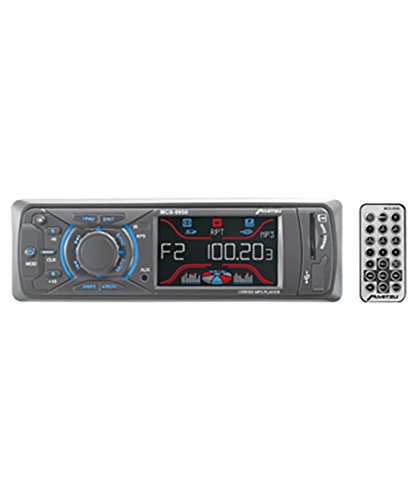
1-сүрөт: Kaiser MCS-9950 Car Stereo unit with its detachable faceplate and remote control. The image shows the main unit, the separate faceplate, and a remote control, illustrating the primary components included in the package.
3. Продукциянын өзгөчөлүктөрү
- Digital AM/FM Tuner: High-sensitivity tuner for clear radio reception with automatic station search and storage.
- Алынып турган бет: For enhanced security and convenience.
- Multi-Media Playback: Supports USB drives, SD cards, and MMC cards.
- AUX киргизүү: 3.5mm front auxiliary input for connecting external audio devices.
- Bluetooth байланышы: Integrated Bluetooth for wireless audio streaming and hands-free calling.
- Electronic Equalizer: Pre-set equalizer modes to optimize sound output.
- Anti-Shock Function: Ensures smooth playback even on bumpy roads.
- Саат дисплей: Integrated digital clock.
- LCD дисплей: Blue and red LCD with equalizer effect for clear visibility.
- Жогорку кубаттуулугу: 900 W PMPO (Peak Music Power Output), 4x25 W maximum audio output.
- Трек навигациясы: +10 / -10 track reader for quick song selection.
- Алыстан башкаруу: Ыңгайлуу иштөө үчүн толук функциялуу пульт.
4. Орнотуу жана орнотуу
Маанилүү: Professional installation is recommended. Disconnect the vehicle's negative battery terminal before starting installation to prevent electrical shorts.
4.1 Wiring Diagram (General Guidance)
While a specific wiring diagram is not provided in this manual, typical car stereo installations involve the following connections:
- Сары зым: Туруктуу 12V (батарея оң)
- Кызыл зым: 12V которулган (тутандыруу/ACC)
- Кара зым: Жер (Шасси жери)
- Көк жип: Күч антеннасы / Ampкөтөргүчтү алыстан күйгүзүү
- Динамиктердин зымдары: Typically color-coded (e.g., White/White-Black for Front Left, Gray/Gray-Black for Front Right, Green/Green-Black for Rear Left, Purple/Purple-Black for Rear Right). Ensure correct polarity.
Refer to your vehicle's wiring diagram and the included wiring harness for precise connections. Insulate all connections properly.
4.2 Агрегатты монтаждоо
- Install the mounting sleeve into the dashboard opening. Bend the tabs outward to secure it.
- Connect all necessary wiring to the car stereo's harness.
- Slide the car stereo unit into the mounting sleeve until it locks into place.
- Алынуучу беттик пластинаны бекитиңиз.
- Унаанын терс батарея терминалын кайра туташтырыңыз.
5. Иштөө нускамалары
5.1 Негизги операция
- Күйгүзүү/өчүрүү: басыңыз КҮЧ button (usually marked with ⏻ or SRC) аппаратты күйгүзүү же өчүрүү.
- Үндү көзөмөлдөө: айлантыңыз VOLUME баскычын колдонуңуз же VOL + / VOL- пульттагы баскычтар.
- Булак тандоо: басыңыз SRC or РЕЖИМ button to cycle through available sources (FM, AM, USB, SD, AUX, Bluetooth).
5.2 Радио операциясы (AM/FM)
- Топтун тандоосу: басыңыз БАНД button to switch between FM1, FM2, FM3, and AM1, AM2.
- Автоматтык жөндөө: басып, кармап туруңуз Издөө or КОНУН buttons (usually << / >>) to automatically search for the next strong station.
- Кол менен жөндөө: баскычын кыскача басыңыз Издөө or КОНУН жыштыгын тактоо үчүн баскычтар.
- Store/Recall Presets: To store a station, tune to the desired frequency, then press and hold one of the numeric preset buttons (1-6) until you hear a beep. To recall, simply press the corresponding preset button.
- Automatic Store: басып, кармап туруңуз AMS button (if available) to automatically scan and store strong stations into presets.
5.3 USB/SD/MMC Playback
- Insert a USB drive into the USB port or an SD/MMC card into the card slot. The unit will automatically switch to USB/SD mode and begin playback.
- Ойнотуу/тындыруу: басыңыз ОЙНОО/ТЫНЫТТЫРУ баскычы.
- Кийинки / Мурунку трек: басыңыз КИЙИНКИ (>>) же МУРУНКУ (<<) баскычтары.
- Тез алдыга/артка түрдүрүү: басып, кармап туруңуз КИЙИНКИ or МУРУНКУ баскычтар.
- +10 / -10 Track: арналганын колдонуңуз +10 or -10 buttons for quick track navigation.
5.4 AUX киргизүү операциясы
- Connect your external audio device (e.g., smartphone, MP3 player) to the 3.5mm AUX input jack on the front panel using an audio cable.
- басыңыз SRC or РЕЖИМ баскычын "AUX" көрсөтүлгөнгө чейин басыңыз.
- Control playback from your external device. Adjust volume using the car stereo's volume control.
5.5 Bluetooth операциясы
The Kaiser MCS-9950 features integrated Bluetooth for wireless audio and hands-free calling.
- Жупташтыруу:
- Ensure Bluetooth is enabled on your mobile device (e.g., smartphone).
- Select "BT" or "Bluetooth" as the source on the car stereo. The unit will enter pairing mode.
- On your mobile device, search for available Bluetooth devices. Select "MCS-9950" or a similar name.
- If prompted for a PIN, enter "0000" (default). Once paired, the display will confirm connection.
- Аудио агымы (A2DP):
- Once paired, you can stream audio from your mobile device to the car stereo.
- Use the car stereo's КИЙИНКИ/МУРУНКУ buttons to skip tracks or control playback from your device.
- Үнсүз чалуу (HFP):
- When a call comes in, the car stereo display will show the caller ID (if supported).
- басыңыз ЖООП button (usually ☎) on the faceplate or remote to answer.
- басыңыз ЧАКЫРУУ button (usually ☏) чалууну бүтүрүү үчүн.
5.6 Detachable Faceplate
- Алып салуу: басыңыз ЧЫГАРУУ button (usually on the top left of the faceplate). Gently pull the faceplate towards you.
- Тиркөө: Align the faceplate with the main unit's slots on the right side, then push the left side until it clicks into place.
- Store the faceplate in a protective case when removed to prevent damage.
6. Техникалык тейлөө
- Беттик панелди тазалоо: Use a soft, dry cloth to wipe the faceplate. Do not use abrasive cleaners or solvents.
- Агрегатты тазалоо: Ensure the unit is off and cool. Use a soft, dry cloth. Avoid spraying liquids directly onto the unit.
- USB/SD карта уячалары: Keep these slots free from dust and debris.
- Сактагычты алмаштыруу: If the unit does not power on, check the fuse located at the rear of the unit. Replace with a fuse of the same ampэра рейтинги гана.
7. Кыйынчылыктарды
| Көйгөй | Мүмкүн себеп | Чечим |
|---|---|---|
| Күч жок | Туура эмес зымдар; күйгүзүлгөн сактагыч; Бошоң байланыш. | Check power and ground connections. Verify fuse. Ensure ignition wire is connected. |
| Үн жок | Үнү өтө төмөн; Үнсүз режим иштетилген; Динамиктин зымдары туура эмес; Динамиктердин бузуктары. | Increase volume. Deactivate mute. Check speaker connections and polarity. Test with known good speakers. |
| Радио кабыл алуу начар | Антенна туташкан эмес; бузулган антенна; Алсыз сигнал аймагы. | Ensure antenna is securely connected. Check antenna for damage. Try tuning in a different location. |
| USB/SD карта ойнотулбай жатат | Колдоого алынбайт file формат; Бузулган files; Card not inserted correctly; Maximum capacity exceeded. | камсыз кылуу files are in supported format (e.g., MP3). Reinsert card. Try a different card/USB drive. |
| Bluetooth жупташтыруу ишке ашпай калды | Bluetooth not enabled on device; Incorrect pairing procedure; Device too far. | Ensure Bluetooth is on and discoverable on your device. Follow pairing steps. Keep devices close. |
| Detachable faceplate not attaching | Misalignment; Debris in connectors. | Ensure correct alignment. Check for any obstructions in the connectors. |
8. Техникалык шарттар
| Модель номери | MCS-9950 |
| Продукциянын өлчөмдөрү | 45 x 41.5 x 24.5 см |
| Продукт Салмагы | 900 г |
| Байланыш технологиясы | MMC card, Bluetooth |
| Өзгөчөлүктөр | Bluetooth integrated, Detachable Faceplate, USB/SD/MMC Reader, AUX Input, AM/FM Tuner, Preset Electronic Equalizer, Anti-shock, Clock, LCD Display (Blue/Red with EQ effect), Auto Search/Store Radio Stations, Remote Control |
| Дисплей технологиясы | LCD |
| Башка дисплей функциялары | Зымсыз |
| Максималдуу кубаттуулук | 900 W PMPO, 4x25 W |
| Шайкеш түзмөктөр | Смартфон |
9. Кепилдик жана колдоо
Kaiser products are manufactured to high-quality standards. For warranty information, please refer to the warranty card included with your product or contact your local dealer. Keep your purchase receipt as proof of purchase.
For technical support or service inquiries, please contact Kaiser customer service through their official webсайт же продукт документациясында берилген байланыш маалыматы.


