1. Баштоо
1.1 Пакеттин мазмуну
Verify that all items are present in your Ultimate Ears Boom 2 package:
- Ultimate Ears Boom 2 Bluetooth Speaker
- Micro-USB заряддоо кабели
- Кубат адаптери (аймакка жараша өзгөрүшү мүмкүн)
1.2 Динамикиңизди заряддоо
Before initial use, fully charge your Ultimate Ears Boom 2 speaker. Connect the micro-USB cable to the charging port on the speaker and the other end to the power adapter, then plug into a wall outlet. The LED indicator will show charging status.

The Ultimate Ears Boom 2 speaker, ready for charging.
1.3 Bluetooth жупташтыруу
Динамикиңизди Bluetooth иштетилген түзмөккө туташтыруу үчүн:
- Press and hold the Power button on the top of the speaker until you hear a tone and the LED flashes white.
- Мобилдик түзмөгүңүздө Bluetooth жөндөөлөрүнө өтүңүз.
- Select 'UE Boom 2' from the list of available devices.
- Once connected, you will hear a confirmation tone from the speaker.

Жогорку view of the speaker, highlighting the power and Bluetooth pairing buttons.
1.4 Ultimate Ears App
For enhanced control and additional features, download the Ultimate Ears app from your device's app store (iOS 9.0 or later required for Apple devices, Android compatible). The app allows for remote power control, equalizer adjustments, and PartyUp mode.
2. Speaker Operation
2.1 Күйгүзүү/өчүрүү
Press the Power button located on the top of the speaker to turn it on or off. A distinct sound will indicate the power status.
2.2 Үндү башкаруу
Adjust the volume using the large '+' and '-' buttons located on the side of the speaker. You can also control the volume from your connected Bluetooth device.
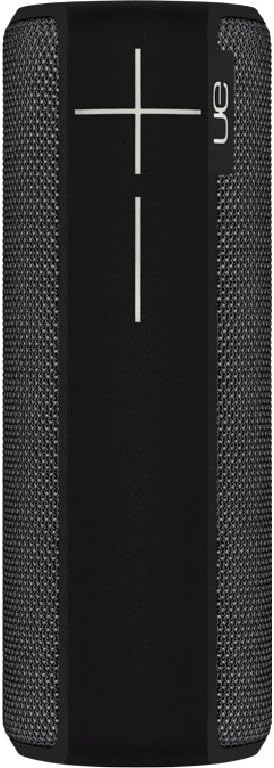
Side view of the speaker, featuring the prominent volume control buttons.
2.3 Music Control (Tap Gestures)
The Boom 2 features tap controls for music playback:
- Бир жолу таптоо: Tap the top of the speaker once to play or pause the current track.
- Эки жолу таптоо: Tap the top of the speaker twice to skip to the next track.
2.4 Батареянын абалы
To check the battery level, press both the '+' and '-' volume buttons simultaneously. The speaker will announce the remaining battery percentage.
2.5 Waterproof and Durability Features
The Ultimate Ears Boom 2 is designed to be waterproof (IPX7 rated) and shockproof. It can be immersed in water up to 1 meter for 30 minutes. Ensure the charging port cover is securely closed before exposing the speaker to water.

The speaker's waterproof design allows for use in various environments.

The Ultimate Ears Boom 2 demonstrating its water resistance.
2.6 PartyUp Mode (Connecting Multiple Speakers)
Use the Ultimate Ears app to connect multiple Boom speakers together for a more expansive sound experience. Follow the instructions within the app to activate PartyUp mode.
3. Кароо жана тейлөө
3.1 Тазалоо боюнча нускамалар
Динамикти тазалоо үчүн жумшак, damp cloth. Avoid using harsh chemicals or abrasive cleaners, as these can damage the speaker's finish or waterproof seals. Ensure the charging port is dry before charging.
3.2 Батареянын узак иштөө мөөнөтү
To maximize battery life, avoid fully discharging the speaker frequently. Charge the speaker regularly, and if storing for an extended period, ensure it has at least a 50% charge.
3.3 Сактоо
Store the speaker in a cool, dry place away from direct sunlight and extreme temperatures. Ensure the charging port cover is closed to prevent dust and debris from entering.
4. Көйгөйлөрдү чечүү боюнча колдонмо
4.1 Күч жок
- Ensure the speaker is charged. Connect it to the power adapter and allow it to charge for at least 15 minutes before attempting to power on.
- Press and hold the Power button firmly for a few seconds.
4.2 Bluetooth туташуу маселелери
- Ensure the speaker is in pairing mode (flashing white LED).
- Turn off and on Bluetooth on your mobile device.
- Forget 'UE Boom 2' from your device's Bluetooth list and attempt to re-pair.
- Move the speaker closer to your device; the maximum range is approximately 33 meters (100 feet).
4.3 Үн жок же үнү төмөн
- Динамиктин жана туташкан түзмөгүңүздүн үнүн жогорулатыңыз.
- Динамик Bluetooth аркылуу туура туташканын текшериңиз.
- Check if the audio source on your device is playing correctly.
4.4 Sound Distortion
- Lower the volume on both the speaker and your connected device.
- аудиону камсыз кылуу file or streaming quality is not low.
- Move away from potential sources of interference (e.g., Wi-Fi routers, other Bluetooth devices).
4.5 Колдонмо туташуу маселелери
- Ensure your mobile device's operating system meets the app's requirements (iOS 9.0+).
- Колдонмону өчүрүп күйгүзүңүз же кайра орнотуңуз.
- Ensure the speaker's firmware is up to date via the app.
5. Техникалык шарттар
| Өзгөчөлүк | Спецификация |
|---|---|
| Модель аты | Бум 2 |
| Модель номери | 984-000557 |
| ASIN | B0141208EA |
| Байланыш технологиясы | Bluetooth, USB |
| Зымсыз байланыш технологиясы | Bluetooth |
| Шайкеш түзмөктөр | Компьютерлер, смартфондор (Android, iOS) |
| Батареянын иштөө мөөнөтү | 15 саатка чейин |
| Суу өткөрбөйт рейтинги | IPX7 (up to 1 meter for 30 minutes) |
| Максималдуу диапазон | 33 метр (100 фут) |
| Динамик чыгаруу күчү | 25 Ватт |
| Продукциянын өлчөмдөрү | 6.7D x 6.7W x 18H cm (approx. 15 x 5 x 5 cm; 0.54 grams) |
| Аудио чыгаруу режими | Курчап |
| Power Source | Батарея менен иштейт (1 литий полимердик батарейка камтылган) |
6. Кепилдик жана Кардарларды колдоо
6.1 Чектелген Кепилдик
The Ultimate Ears Boom 2 comes with a Limited Warranty. For specific details regarding warranty coverage, terms, and conditions, please refer to the warranty documentation included with your product or visit the official Ultimate Ears webсайт.
6.2 Кардарларды колдоо
If you encounter any issues not covered in this manual or require further assistance, please contact Ultimate Ears customer support through their official website. For return policies or issues related to your purchase, consult the retailer's (e.g., Amazon.it) help pages.


