1. Киришүү
This manual provides essential instructions for the proper installation, operation, and maintenance of your Lexmark 12B0090 High Yield Toner Cartridge. This genuine Lexmark product is designed to deliver consistent, high-quality print output for Lexmark Optra W820 and X820 Series printers. Please read this manual thoroughly before installing or using the cartridge.
2. Коопсуздук маалыматы
- Keep the toner cartridge out of reach of children.
- Do not incinerate used toner cartridges. Toner dust can ignite when exposed to an open flame.
- Avoid inhaling toner dust. If toner is spilled, use a damp cloth to wipe it up. Do not use a vacuum cleaner, as the fine toner particles may cause an explosion or damage the vacuum.
- Тонер картриджин бөлүктөргө ажыратууга аракет кылбаңыз.
- Store the cartridge in its original packaging until ready for use, in a cool, dry place away from direct sunlight.
3. Орнотуу жана орнотуу
Follow these steps to install the Lexmark 12B0090 toner cartridge into your compatible Lexmark Optra W820 or X820 Series printer:
- Картриджди таңгактан чыгаруу: Carefully remove the new toner cartridge from its packaging. Retain the packaging for proper disposal of the old cartridge.
- Gently Shake the Cartridge: Картриджди туурасынан кармап, тонерди ичине тегиз бөлүштүрүү үчүн аны 5-6 жолу бир тараптан экинчи тарапка акырын силкиңиз.
- Коргоочу материалдарды алып салуу: Remove any protective tape, seals, or covers from the cartridge as indicated by the instructions on the cartridge itself. Be careful not to touch the green imaging drum.
- Принтерге кирүү эшигин ачуу: Open the front cover or access door of your Lexmark Optra W820 or X820 Series printer. Refer to your printer's user manual for specific instructions on accessing the toner compartment.
- Эски картриджди алып салуу: Grasp the handle of the old toner cartridge and pull it straight out of the printer. Place the old cartridge into the packaging from the new cartridge for recycling.
- Жаңы картридж салыңыз: Align the new Lexmark 12B0090 toner cartridge with the guides inside the printer and slide it firmly into the slot until it clicks into place. Ensure it is seated securely.
- Принтерге кирүү эшигин жабуу: Принтердин алдыңкы капкагын же кирүү эшигин жабыңыз. Принтер, адатта, кыска калибрлөө циклин аткарат.
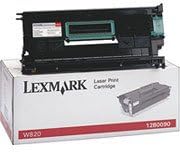
Image: The Lexmark 12B0090 High Yield Toner Cartridge shown in its retail packaging, ready for installation.
4. Иштөө
Once the Lexmark 12B0090 toner cartridge is correctly installed, your Lexmark Optra W820 or X820 Series printer will automatically detect it and manage toner usage. The printer's control panel or software will indicate toner levels and alert you when the cartridge is nearing depletion. This high-yield cartridge is designed for approximately 30,000 pages at 5% coverage, providing extended printing before replacement is needed.
5. Техникалык тейлөө
- Сактагыч: Store unused toner cartridges in their sealed original packaging in a cool, dry environment, away from direct sunlight and extreme temperatures.
- Колдонуу: Always handle the toner cartridge by its designated handles or edges. Avoid touching the imaging drum surface, as oils from your skin can affect print quality.
- Жоюу: When the cartridge is empty, dispose of it responsibly. Lexmark offers recycling programs for used toner cartridges. Visit the official Lexmark website for information on their recycling initiatives.
6. Кыйынчылыктарды
6.1. Басып чыгаруунун сапатынын начардыгы
- Өчүрүлгөн же Ачык Басмалар: Gently remove the toner cartridge and rock it from side to side to redistribute the toner. Reinstall and try printing again. If the issue persists, the cartridge may be low on toner.
- Чыгымдар же тактар: Ensure the cartridge is properly seated. Check for any protective seals or tape that may not have been fully removed during installation. If the issue continues, the printer's internal components may require cleaning (refer to your printer's manual).
- Бош барактар: Verify that all protective packaging materials, including any sealing strips, have been completely removed from the cartridge. Reinstall the cartridge firmly.
6.2. Cartridge Not Recognized
- Reinstall Cartridge: Remove the cartridge and reinstall it, ensuring it clicks securely into place.
- Тоскоолдуктарды текшерүү: Ensure no packaging material or foreign objects are preventing proper contact between the cartridge and the printer.
- Таза байланыштар: With the printer powered off and unplugged, gently wipe the metal contacts on the cartridge and inside the printer with a lint-free cloth.
- Принтерди кайра иштетүү: Turn the printer off, wait a few seconds, and then turn it back on.
7. Техникалык шарттар
| Өзгөчөлүк | Деталь |
|---|---|
| Модель номери | 12B0090 |
| Продукт түрү | Тонер картридж |
| Басып чыгаруунун кирешелүүлүгү | Болжол менен 10 000 бет (5% камтууда) |
| Шайкештик | Lexmark Optra W820, X820 Series Printers |
| Продукциянын өлчөмдөрү | 19.21 x 9.69 x 7.4 дюйм |
| Элемент Салмагы | 2.23 фунт |
| UPC | 734646210430 |
8. Кепилдик маалыматы
For specific warranty details regarding your Lexmark 12B0090 toner cartridge, please refer to the documentation included with your purchase or visit the official Lexmark webсайт. Кепилдик шарттары, адатта, өндүрүштөгү кемчиликтерди камтыйт жана аймакка жана чекене сатуучуга жараша өзгөрүп турат.
9. Колдоо
If you require further assistance or have questions not covered in this manual, please contact Lexmark customer support or visit their official support website. You can typically find contact information and support resources on the Lexmark website or through your product's original purchase documentation.
Lexmark Official Webсайт: www.lexmark.com


