1. Киришүү
The Alpine IVA-W520E is a full-featured 2DIN DVD player solution designed for in-car entertainment and media. It integrates advanced video and audio technologies, including a 7-inch LED touchscreen and a Burr-Brown 24-bit DAC, to deliver high-quality sound and clear images. This manual provides essential information for the proper installation, operation, and maintenance of your IVA-W520E unit.
2. Коопсуздук маалыматы
Түзмөктү орнотуудан же иштетүүдөн мурун бардык коопсуздук көрсөтмөлөрүн кунт коюп окуп чыгыңыз. Бул көрсөтмөлөрдү аткарбоо жаракат алууга же түзмөккө же унаага зыян келтирүүгө алып келиши мүмкүн.
- Кесиптик орнотуу сунушталат: Due to the complexity of car audio-visual systems, professional installation is highly recommended to ensure proper wiring and functionality.
- Кубат булагы: Агрегатты 12V DC терс жердеги электр булагына гана туташтырыңыз.
- алаксытуулардан качуу: Түзмөктүн башкаруу элементтерин иштетпеңиз же view video content while driving, as this can lead to accidents. Always pull over to a safe location before making adjustments.
- Вентиляция: Ашыкча ысып кетүүнүн алдын алуу үчүн аппараттын айланасында жетиштүү желдетүүнү камсыз кылыңыз. Вентиляция тешиктерин жаап албаңыз.
- Ным жана суюктуктар: Keep the unit away from moisture and liquids. Do not expose it to rain or water.
- Тазалоо: Тазалоо үчүн жумшак, кургак чүпүрөктү колдонуңуз. Абразивдүү тазалагычтардан же эриткичтерден качыңыз.
3. Пакеттин мазмуну
Орнотууну улантуудан мурун пакетте бардык элементтер бар экенин текшериңиз:
- Alpine IVA-W520E Head Unit
- Кубат/Спикер
- Монтаждоочу жабдыктар (буроолор, кашаалар)
- Кесүү шакек
- Колдонуучунун Колдонмосу (бул документ)
- Кепилдик маалымат
4. Орнотуу жана орнотуу
4.1. Орнотуу боюнча көрсөтмөлөр
Туура орнотуу оптималдуу аткаруу жана коопсуздук үчүн өтө маанилүү болуп саналат. Агрегатты квалификациялуу адис орнотушу сунушталат.
- Батареяны ажыратыңыз: Кандайдыр бир электрдик иштерди баштоодон мурун, кыска туташуунун алдын алуу үчүн унаанын терс батарея терминалын ажыратыңыз.
- Монтаждоо: Securely mount the unit in the vehicle's double-DIN opening using the provided mounting brackets and screws. Ensure it is stable and does not obstruct any vehicle controls.
- Зымдар: Connect the power harness, speaker wires, and other input/output cables according to the wiring diagram provided in the separate installation guide. Pay close attention to ground connections.
- Antenna and External Devices: Connect the radio antenna and any external devices such as a reverse camera or external ampаман калгандар.
4.2. Баштапкы орнотуу
After installation, reconnect the battery and power on the unit for the first time.
- Тил тандоо: Каалаган тилиңизди тандоо үчүн экрандагы көрсөтмөлөрдү аткарыңыз.
- Убакыт жана дата: Set the correct time and date for accurate display.
- Аудио жөндөөлөрү: Adjust basic audio settings such as volume, balance, and fader.
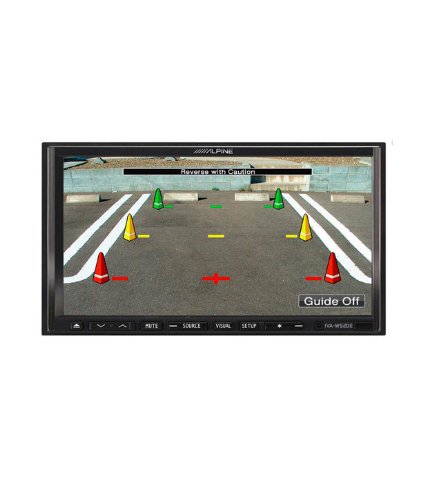
4.1-сүрөт: Мисample of the IVA-W520E displaying a reverse camera feed, showing parking guidelines. This feature aids in safe vehicle maneuvering.
5. Агрегатты иштетүү
5.1. Сенсордук экран жана баскычтарды башкаруу элементтери
The IVA-W520E features a responsive 7-inch LED touchscreen for primary control, supplemented by physical buttons for quick access to common functions.
- Сенсордук экран: Navigate menus, select sources, and control playback by touching the screen.
- Үндү көзөмөлдөө: Use the dedicated volume buttons or on-screen controls to adjust audio levels.
- Булак баскычы: Press to cycle through available audio/video sources (Radio, DVD, USB, iPod, AUX, Bluetooth).
- Үнсүз баскычы: Temporarily mutes the audio output.
- Орнотуу баскычы: Системанын орнотуулары менюсуна кириңиз.
5.2. Аудио ойнотуу
The unit supports various audio formats and sources, enhanced by its Burr-Brown 24-bit DAC for superior sound quality.
- USB аудио: Аудио камтылган USB түзмөгүн туташтырыңыз files. The unit will display track information and allow navigation through folders.
- iPod/iPhone Connectivity: Connect your iPod or iPhone for direct audio playback and control.
- DVD/CD ойнотуу: Insert a DVD or CD into the disc slot for audio or video playback.
- Радио тюнер: Access AM/FM radio stations.
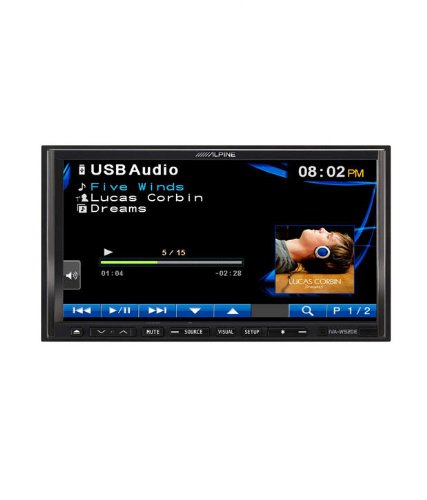
Figure 5.1: The IVA-W520E displaying the USB Audio interface, showing current track, artist, and playback controls. This allows for easy navigation of digital music files.
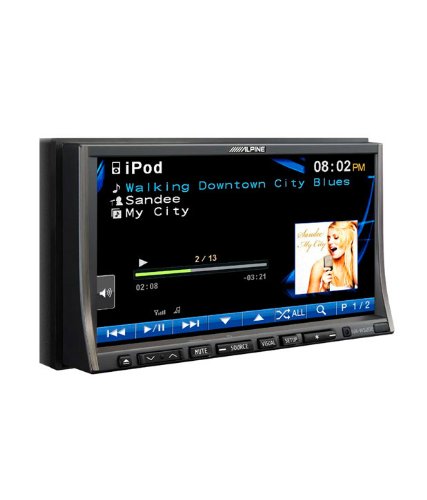
Figure 5.2: The IVA-W520E displaying the iPod interface, showing a list of songs and album art. This demonstrates seamless integration with Apple devices for music playback.
5.3. Видеону ойнотуу
The 7-inch LED screen provides enhanced image quality with higher resolution, better contrast, and improved color reproduction compared to standard LCD screens.
- DVD Video: Insert a video DVD for playback. Ensure the parking brake safety wire is correctly connected for video to display while the vehicle is stationary.
- External Video Input: The unit supports external video sources, such as a reverse camera or other video devices.
5.4. Bluetooth байланышы
The IVA-W520E is upgradable for Bluetooth hands-free system functionality, allowing for safe and convenient communication while driving.
- Жупташтыруу: Refer to the separate Bluetooth module manual (if applicable) for pairing instructions with your mobile phone.
- Hands Free Чалуу: Түздөн-түз аппарат аркылуу чалууларды жасоо жана кабыл алуу.
- Аудио агым: Bluetooth иштетилген түзмөгүңүздөн аудиону агылтыңыз.
5.5. Navigation System (Upgradable)
The unit is designed to be upgradable with a navigation system. Consult your Alpine dealer for compatible navigation modules and installation.
6. Техникалык тейлөө
Regular maintenance helps ensure the longevity and optimal performance of your Alpine IVA-W520E.
- Экранды тазалоо: Gently wipe the touchscreen with a soft, lint-free cloth. For stubborn smudges, slightly dampen the cloth with water or a screen-specific cleaner. Do not spray cleaner directly onto the screen.
- Диск тешиги: Keep the disc slot free of dust and debris. Avoid inserting bent, scratched, or irregular discs.
- Жалпы тазалоо: Use a soft, dry cloth to wipe the unit's exterior. Avoid harsh chemicals or abrasive materials.
7. Кыйынчылыктарды
If you encounter issues with your IVA-W520E, refer to the following common problems and solutions:
| Көйгөй | Мүмкүн себеп | Чечим |
|---|---|---|
| Күч жок | Күйгүзүүчү күйгүзүлгөн, зымдар туура эмес, туташуу бош. | Check vehicle fuses and unit's fuse. Verify power and ground wiring connections. Ensure battery is connected. |
| Үн жок | Үнү өтө төмөн, үнсүз режим иштетилген, динамиктин зымдарында көйгөй бар, туура эмес булак тандалып алынган. | Increase volume. Deactivate mute. Check speaker connections. Select correct audio source. |
| Диск катасы | Кир, чийилген же шайкеш келбеген диск. | Clean the disc. Try a different, known-good disc. Ensure disc format is supported. |
| Видео көрсөтүлбөй жатат (айдап бара жатканда) | Parking brake safety wire not connected or incorrectly connected. | This is a safety feature. Video playback is disabled while the vehicle is in motion. Ensure the parking brake wire is correctly connected to the vehicle's parking brake circuit. |
| Bluetooth жупташуу маселелери | Bluetooth module not connected, phone not in pairing mode, interference. | Ensure optional Bluetooth module is correctly installed. Put phone in pairing mode. Move closer to the unit. |
If the problem persists after trying these solutions, please contact your authorized Alpine dealer or customer support.
8. Техникалык шарттар
Key technical specifications for the Alpine IVA-W520E:
- Модел: IVA-W520E
- Дисплей өлчөмү: 7 дюйм (18 см)
- Дисплей түрү: LED LCD Touchscreen
- Чечим: 480 x 272 пиксель
- Аудио DAC: Burr-Brown 24-bit
- Шайкеш түзмөктөр: Smartphone (via USB/iPod, Bluetooth upgradable)
- Өзгөчөлүктөр: Touchscreen, Bluetooth (upgradable)
- Аудио чыгаруу режими: Баяндамачы
- Өндүрүүчү: Альп
- Биринчи жеткиликтүү: 20 август 2015 жыл
9. Кепилдик жана колдоо
For detailed warranty information, please refer to the warranty card included with your product package or visit the official Alpine webсайт. Сатып алганыңыздын далили катары сатып алуу дүмүрчөгүңүздү сактаңыз.
For technical support, service, or inquiries about compatible accessories and upgrades (such as navigation modules or Bluetooth kits), please contact your authorized Alpine dealer or visit the Alpine customer support portal online.
Alpine Official Webсайт: www.alpine.com


