1. Киришүү
This manual provides essential instructions for the safe and efficient use of your Epson LQ-310 24-Pin Narrow Carriage Impact Printer. Please read this manual thoroughly before operating the printer and keep it for future reference.
The Epson LQ-310 is a compact and reliable dot matrix printer designed for fast and efficient printing of various documents, including multi-part forms, invoices, and reports. It features versatile connectivity options including USB, Serial, and Parallel ports.
2. Коопсуздук маалыматы
Observe the following safety precautions to ensure safe operation and to prevent damage to the printer or injury to yourself.
- Always place the printer on a stable, flat surface.
- Принтердеги желдетүү тешиктерин жаппаңыз же жаап койбоңуз.
- Принтер менен берилген кубат шнурын гана колдонуңуз.
- Do not expose the printer to water, moisture, or excessive heat.
- Тазалоодон же техникалык тейлөөдөн мурун принтерди розеткадан сууруп коюңуз.
- Балдар жетпеген жерде сактаңыз.
3. Пакеттин мазмуну
Пакетте бардык буюмдар бар экенин текшериңиз:
- Epson LQ-310 Printer Unit
- Электр кабели
- Тасма картриджи
- Колдонуучунун Колдонмосу (бул документ)
- Driver CD (may vary by region)
4. Орнотуу
4.1 Пакеттен чыгаруу жана жайгаштыруу
- Принтерди таңгагынан алып салыңыз.
- Бардык коргоочу ленталарды жана таңгактоочу материалдарды алып салыңыз.
- Place the printer on a flat, stable surface with adequate ventilation.
4.2 Электр кабелин туташтыруу
Кубат кабелин принтерге, андан кийин жерге туташтырылган электр розеткасына туташтырыңыз.
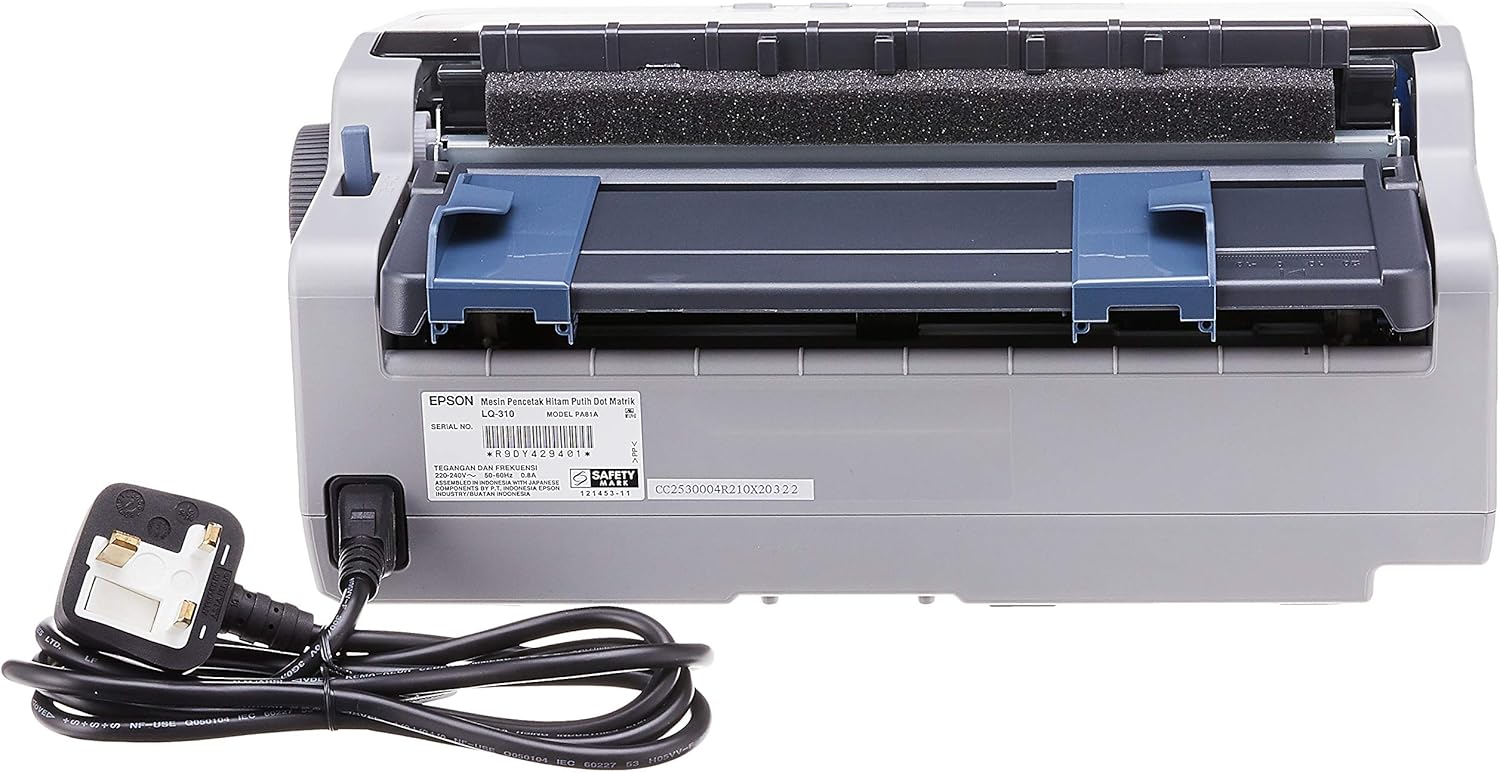
4.2.1-сүрөт: Арткы view of the Epson LQ-310 printer, highlighting the power input and various data ports (USB, Serial, Parallel) for connection to a computer.
4.3 Компьютерге туташуу
The LQ-310 supports USB, Serial, and Parallel connections. Choose the appropriate cable for your computer and connect it to the corresponding port on the printer.
- USB туташуу: Use a standard USB A-B cable.
- Сериялык туташуу: Use a serial cable (RS-232C).
- Параллель туташуу: Use a parallel cable (Centronics).
4.4 Тасма картриджин орнотуу
- Принтер өчүрүлгөнүн текшериңиз.
- Принтердин капкагын ачыңыз.
- Unpack the new ribbon cartridge.
- Align the ribbon cartridge with the guides inside the printer and press down firmly until it clicks into place.
- Turn the ribbon feed knob on the cartridge to ensure the ribbon is taut and not twisted.
- Принтердин капкагын жабыңыз.

4.4.1-сүрөт: The ribbon cartridge for the Epson LQ-310 printer, which needs to be installed correctly for printing.
4.5 Кагазды жүктөө
The LQ-310 can handle various paper types, including continuous forms and single sheets.
- For Continuous Forms: Place the forms on the tractor feed mechanism at the rear of the printer. Adjust the tractor guides to match the paper width and engage the pins.
- For Single Sheets: Insert a single sheet into the front paper slot, ensuring it is straight.
4.6 Драйверди орнотуу
After connecting the printer, install the necessary drivers on your computer. You can typically find these on the included CD or download them from the official Epson support webсайт.
5. Иштөө нускамалары
5.1 Башкаруу панелинин үстүнөview
The control panel on the front of the printer allows you to manage basic functions.

5.1.1-сүрөт: Фронт view of the Epson LQ-310 printer, showing the control panel with buttons for Tear Off, LF/FF, Load/Eject, Paper Out, Pause, Lock, Font, Item, Micro Adjust, and Set.
- Кубат баскычы: Принтерди күйгүзөт же өчүрөт.
- Кагаздын түгөнүп калгандыгынын көрсөткүчү: Lights up when the printer is out of paper.
- Тыныгуу баскычы: Басып чыгаруу убактылуу токтотулат. Улантуу үчүн кайра басыңыз.
- LF/FF (Line Feed/Form Feed) Button: Advances paper by one line or one page.
- Load/Eject Button: Бир баракты жүктөйт же учурдагы баракты чыгарат.
- Tear Off Button: Үзгүлтүксүз кагазды үзүлүүчү абалга жылдырат.
- Font Button: Selects different fonts.
- Item/Set Buttons: Used for menu navigation and setting options.
5.2 Негизги басып чыгаруу
- Принтер күйгүзүлүп, компьютериңизге туташып турганын текшериңиз.
- Load paper according to the instructions in Section 4.5.
- Компьютериңизде басып чыгаргыңыз келген документти ачыңыз.
- Select the Epson LQ-310 as your printer in the print dialog.
- Керек болсо, басып чыгаруу жөндөөлөрүн (мисалы, кагаздын өлчөмү, басып чыгаруу сапаты) тууралаңыз.
- "Басып чыгаруу" баскычын чыкылдатыңыз.
6. Техникалык тейлөө
6.1 Лента картриджин алмаштыруу
Replace the ribbon cartridge when print quality deteriorates or the ribbon is visibly worn.
- Принтерди өчүрүп, электр шнурын сууруп алыңыз.
- Принтердин капкагын ачыңыз.
- Эски лента картриджин көтөрүп, этияттык менен алып салыңыз.
- Install a new ribbon cartridge as described in Section 4.4.
- Close the printer cover and reconnect the power.
6.2 Принтерди тазалоо
Regular cleaning helps maintain printer performance.
- Принтерди өчүрүп, электр шнурын сууруп алыңыз.
- Принтердин сыртын жумшак менен сүртүңүз, damp кездеме. Абразивдүү тазалагычтарды же эриткичтерди колдонбоңуз.
- Gently clean the print head area with a soft, lint-free cloth if necessary, being careful not to touch the pins.
- Кагаз жолундагы бардык кагаз чаңын же калдыктарын алып салыңыз.
7. Кыйынчылыктарды
This section addresses common issues you might encounter with your LQ-310 printer.
7.1 Printer Does Not Turn On
- Кубат кабелинин принтерге жана иштеп жаткан электр розеткасына бекем туташтырылганын текшериңиз.
- Башка аспапка туташтыруу менен электр розеткасынын иштешин текшериңиз.
7.2 "Paper Out" Indicator is On
- Load paper correctly as described in Section 4.5.
- Ensure the paper sensor is not obstructed.
7.3 Басып чыгаруу жок
- Verify the printer is powered on and connected to the computer.
- Check if the correct printer driver is installed and selected in your application.
- Ensure the ribbon cartridge is installed correctly and has ink.
- Check the printer's status on your computer; clear any pending print jobs.
7.4 Басып чыгаруу сапатынын начардыгы
- The ribbon cartridge may be old or running out of ink. Replace it if necessary.
- Ensure the paper type is suitable for impact printing.
- Clean the print head area if there is visible debris.
8. Техникалык шарттар
| Өзгөчөлүк | Спецификация |
|---|---|
| Басма технологиясы | 24-пиндүү тар арабанын таасирдүү чекиттүү матрицасы |
| Басып чыгаруу ылдамдыгы | Up to 347 / 416 cps (10 / 12 cpi) |
| Байланыш | 1 Full-Speed USB 2.0, Serial Port, Parallel Port |
| Принтердин чыгышы | Colour (Ink Color: Black) |
| Резолюция | 240 x 170 dpi (Max Print Resolution Black and White: 240 dpi) |
| Элемент Салмагы | 4.1 килограмм |
| Продукциянын өлчөмдөрү (D x W x Y) | 27.5D x 36.2W x 15.4H сантиметр |
| Максималдуу медиа өлчөмү | Letter/A4 |
| Басма маалымат каражаттары | Кагаз (жөнөкөй) |
| Модель аты | LQ 310 |
| Модель номери | LQ-310 |
9. Кепилдик жана колдоо
The Epson LQ-310 printer comes with a limited warranty. For detailed warranty information, please refer to the warranty card included with your product or visit the official Epson webсайт.
For technical support, driver downloads, or further assistance, please visit the Epson support website or contact your local Epson customer service center. Have your printer model number (LQ-310) and serial number ready when contacting support.