Introduction
This manual provides essential information for the proper installation, operation, and maintenance of your AUO M170ETN01.1 LCD Panel. Please read this manual thoroughly before use to ensure optimal performance and longevity of the product.
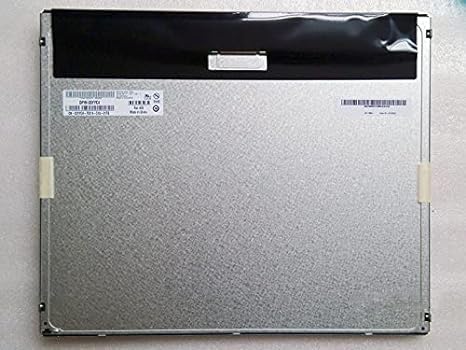
1-сүрөт: Арткы view of the AUO M170ETN01.1 LCD Panel. This image displays the metallic back panel, which houses the internal components and connection interfaces. The top section is covered by a black protective material, and a label with product information is visible on the left side.
Продукт өзгөчөлүктөрү
- Дисплей өлчөмү: 17 дюйм
- Чечим: High resolution 1280x1024 (SXGA)
- Жарыктык: 250 Nits
- Viewбурч: Wide viewing angle 85/85/80/80 (Typ.)(CR≥10)
- Контраст катышы: High contrast 1000:1
- Түс тереңдиги: 16.7 миллион түстөр
- Бети: Anti-glare, Glossy screen surface
- Интерфейс: LVDS интерфейси
- Includes LED driver
- Top Grade A+, brand new, 100% original panel
Орнотуу жана орнотуу
This section outlines the steps for safely setting up and installing the AUO M170ETN01.1 LCD Panel into a compatible desktop monitor system.
- Даярдоо: Ensure the power to the host system (e.g., desktop monitor housing) is disconnected. Work on a clean, static-free surface.
- Этияттык менен мамиле кылуу: The LCD panel is a delicate component. Avoid touching the display surface directly. Hold the panel by its edges.
- Монтаждоо: Carefully align the AUO M170ETN01.1 panel with the mounting points within the monitor casing. Secure it using the appropriate screws, ensuring not to overtighten.
- Connect LVDS Cable: Locate the LVDS (Low-Voltage Differential Signaling) connector on the back of the LCD panel. Gently connect the LVDS cable from the monitor's main board to this connector, ensuring it is fully seated and latched if applicable.
- Connect LED Driver/Backlight Cable: Connect the backlight cable from the monitor's power supply or inverter board to the LED driver input on the LCD panel. Verify the correct polarity if not keyed.
- Коопсуз байланыштар: Double-check all cable connections to ensure they are firm and properly aligned.
- Кайра чогултуу: Carefully reassemble the monitor casing, ensuring no cables are pinched.
Эскертүү: Professional installation is recommended for users unfamiliar with monitor component replacement.
Иштөө нускамалары
Once installed, the AUO M170ETN01.1 LCD Panel operates as part of your desktop monitor system. Its functionality is primarily controlled by the monitor's internal electronics and the connected computer's display settings.
- Күйгүзүү: Connect the monitor's power cable and turn on the monitor using its power button.
- Дисплей чыгаруу: Ensure your computer is connected to the monitor via a compatible video cable (e.g., VGA, DVI, HDMI, DisplayPort, depending on your monitor's inputs).
- Резолюция орнотуулары: For optimal display quality, set your computer's display resolution to 1280 x 1024 пиксель. This is the native resolution of the M170ETN01.1 panel.
- Brightness/Contrast Adjustment: Use the monitor's on-screen display (OSD) menu to adjust brightness, contrast, and other image settings to your preference.
- Viewбурч: The panel offers wide viewing angles. Adjust your seating position for the best visual experience.
Техникалык тейлөө
Proper maintenance helps extend the lifespan and maintain the performance of your LCD panel.
- Экранды тазалоо:
- Тазалоодон мурун мониторду өчүрүп, розеткадан сууруп алыңыз.
- Жумшак, түксүз кездемени (мисалы, микрофибра кездеме) бир аз колдонуңузampened with water or a specialized LCD screen cleaner.
- Экрандын бетин акырын сүртүңүз. Ашыкча басым жасоодон алыс болуңуз.
- Do not use harsh chemicals, alcohol, ammonia-based cleaners, or abrasive materials, as these can damage the anti-glare coating.
- Чаңды тазалоо: Regularly dust the monitor casing and vents to prevent dust buildup, which can affect cooling.
- Түздөн-түз күндүн нурунан качуу: Do not expose the monitor to direct sunlight or excessive heat, as this can degrade the LCD panel over time.
- Энергияны башкаруу: Utilize your computer's power management settings to put the monitor into sleep mode when not in use, conserving energy and extending backlight life.
Проблемаларды чечүү
This section addresses common issues you might encounter with the AUO M170ETN01.1 LCD Panel.
| Көйгөй | Мүмкүн себеп | Чечим |
|---|---|---|
| Экранда сүрөт жок |
|
|
| Сүрөт бүдөмүк же бурмаланган |
|
|
| Dead pixels or stuck pixels |
|
|
If the problem persists after attempting these solutions, please refer to the Support section or consult a qualified technician.
Техникалык шарттар
| Модель номери | M170ETN01.1 |
| Бренд | AUO |
| Screen Size | 17 дюйм |
| Резолюция | 1280 x 1024 Pixels (SXGA) |
| Аспект катышы | 5:4 |
| Сүрөттүн жарыктыгы | 250 lm (Nits) |
| Контраст катышы | 1000:1 |
| Түс тереңдиги | 16.7 млн |
| Viewбурч | 85/85/80/80 (Typ.)(CR≥10) |
| Screen Surface | Anti-glare, Glossy |
| Интерфейс | LVDS |
| Продукциянын өлчөмдөрү | 14.11 x 11.67 x 0.41 дюйм |
| Элемент Салмагы | 2.79 фунт |
Кепилдик жана колдоо
The AUO M170ETN01.1 LCD Panel is provided as a component. Warranty coverage typically depends on the seller or the final product (e.g., desktop monitor) into which it is integrated.
- Кепилдик маалыматы: Please refer to the warranty policy provided by your point of purchase or the manufacturer of the complete monitor system. The product is described as "Top Grade A+, brand new, 100% original."
- Техникалык колдоо: For technical assistance regarding the integration or performance of this LCD panel, it is recommended to contact the manufacturer of the device it is installed in, or a qualified computer hardware technician.
- Продукт ASIN: B014IUWX7K (for reference when contacting seller/support)


