1. Киришүү
The Ultimate Ears BOOM 2 is a 360-degree wireless speaker engineered to blast loud, insanely great sound with deep, powerful bass in every direction. It is designed to be waterproof (IPX7 rated, up to 30 minutes and a depth of 1 meter) and shockproof, making it highly durable for various environments. The PartyUp feature allows you to wirelessly connect up to 50 Ultimate Ears speakers, and it supports Siri + Google Now voice integration for hands-free control.

Сүрөт: алдыңкы view of the Ultimate Ears BOOM 2 speaker, highlighting its cylindrical design and prominent volume controls.
2. Орнотуу
2.1. Кутудан чыгаруу жана баштапкы төлөм
Upon unboxing, ensure all components are present: the Ultimate Ears BOOM 2 speaker, a charging cable, and a wall plug. Before first use, fully charge the speaker. The charging port is located at the bottom of the speaker, protected by a weather door.

Сүрөт: Төмөнкү view of the BOOM 2, showing the charging port and the integrated D-ring for portability.
2.2. Күйгүзүү жана Bluetooth жупташтыруу
To power on the speaker, press the power button located on the top. The power button will illuminate. To pair with a Bluetooth device:
- Press and hold the Bluetooth button on the speaker until you hear an audible tone and the Bluetooth indicator light flashes rapidly.
- Мобилдик түзмөгүңүздө (смартфон, планшет ж.б.) Bluetooth жөндөөлөрүнө өтүңүз.
- Select "UE BOOM 2" from the list of available devices.
- Once connected, the speaker will confirm with an audible tone, and the Bluetooth indicator light will turn solid.
Сүрөт: Жогорку view of the BOOM 2, showing the circular power button and the smaller Bluetooth pairing button.
2.3. NFC жупташтыруу (Жакынкы талаа байланышы)
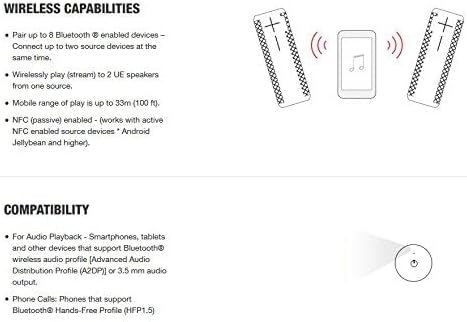
For devices supporting NFC, simply tap your NFC-enabled device to the top of the BOOM 2 speaker to initiate pairing. Ensure NFC is enabled on your device.

Image: Diagram showing how to pair devices via Bluetooth and NFC, and the ability to connect multiple speakers.
3. Иштөө нускамалары
3.1. Үндү башкаруу
Adjust the volume directly on the speaker using the large '+' and '-' buttons located on the side. You can also control the volume from your connected Bluetooth device.
Image: The large '+' and '-' symbols on the side of the speaker indicate the volume controls.
3.2. Ойноону башкаруу
To play or pause music, pick up the speaker and give it a firm tap on the top. This "tap control" feature allows for quick playback management without reaching for your device.
3.3. Үн жардамчысын интеграциялоо
The BOOM 2 supports Siri and Google Now voice integration. Once connected to your smartphone, you can activate your device's voice assistant directly through the speaker by pressing the Bluetooth button.
3.4. PartyUp Feature
The PartyUp feature allows you to wirelessly connect up to 50 Ultimate Ears speakers for an expanded audio experience. This feature requires the Ultimate Ears app, available for iOS and Android devices. Follow the in-app instructions to enable PartyUp mode.
For a visual demonstration of the UE BOOM 2's features, including its waterproof and shockproof design, please watch the official product video below:
Video: Official product video demonstrating the waterproof and shockproof capabilities of the UE BOOM 2 speaker.
4. Техникалык тейлөө
4.1. Тазалоо
The Ultimate Ears BOOM 2 is IPX7 rated waterproof, allowing it to be submerged in water up to 1 meter for 30 minutes. This means you can safely rinse it with water and mild soap to clean off dirt, mud, or sand. Ensure the weather door covering the charging port is securely closed before cleaning.
4.2. Батареяга кам көрүү
To maximize battery lifespan, avoid fully discharging the speaker frequently. Charge the speaker regularly, especially if it will be stored for an extended period. The speaker has a battery life of up to 15 hours on a full charge.
5. Кыйынчылыктарды
5.1. Күч жок
- Ensure the speaker is fully charged. Connect it to the power adapter and charging cable.
- Press and hold the power button for a few seconds to ensure it's not just in standby mode.
5.2. Жупташтыруу маселелери
- Make sure the speaker is in Bluetooth pairing mode (flashing blue light).
- Ensure your device's Bluetooth is enabled and within the 10-meter (33 ft) range.
- Forget "UE BOOM 2" from your device's Bluetooth settings and attempt to re-pair.
- Try restarting both the speaker and your Bluetooth device.
5.3. Poor Sound Quality or No Sound
- Динамиктин жана туташкан түзмөгүңүздүн үнүнүн деңгээлин текшериңиз.
- Динамик менен түзмөгүңүздүн ортосунда Bluetooth сигналына тоскоол боло турган эч кандай тоскоолдуктар жок экенин текшериңиз.
- Динамикти түзмөгүңүзгө жакыныраак жылдырыңыз.
- If using the PartyUp feature, ensure all speakers are properly connected and within range of each other.
5.4. Speaker Not Responding
If the speaker becomes unresponsive, perform a soft reset by holding down the power button and the volume down (-) button simultaneously for about 10 seconds until the speaker restarts.
6. Техникалык шарттар
| Өзгөчөлүк | Деталь |
|---|---|
| Бренд | Ultimate Ears |
| Модель аты | BOOM 2 |
| Модель номери | 984-000551 |
| Байланыш технологиясы | Bluetooth, Wireless, NFC |
| Зымсыз диапазон | 10 метрге чейин (33 фут) |
| Сууга туруктуулук деңгээли | IPX7 (1 метрге чейин 30 мүнөт суу өткөрбөйт) |
| Такталбайт | Ооба |
| Батареянын иштөө мөөнөтү | 15 саатка чейин |
| Power Source | Батарея менен иштейт |
| Өлчөмдөр (D x W x H) | 2.5" x 2.5" x 7" |
| Элемент Салмагы | 1.2 фунт |
| Материал | Пластмасса, резина |
| Камтылган компоненттер | Speaker, Charging Cable, Wall Plug |
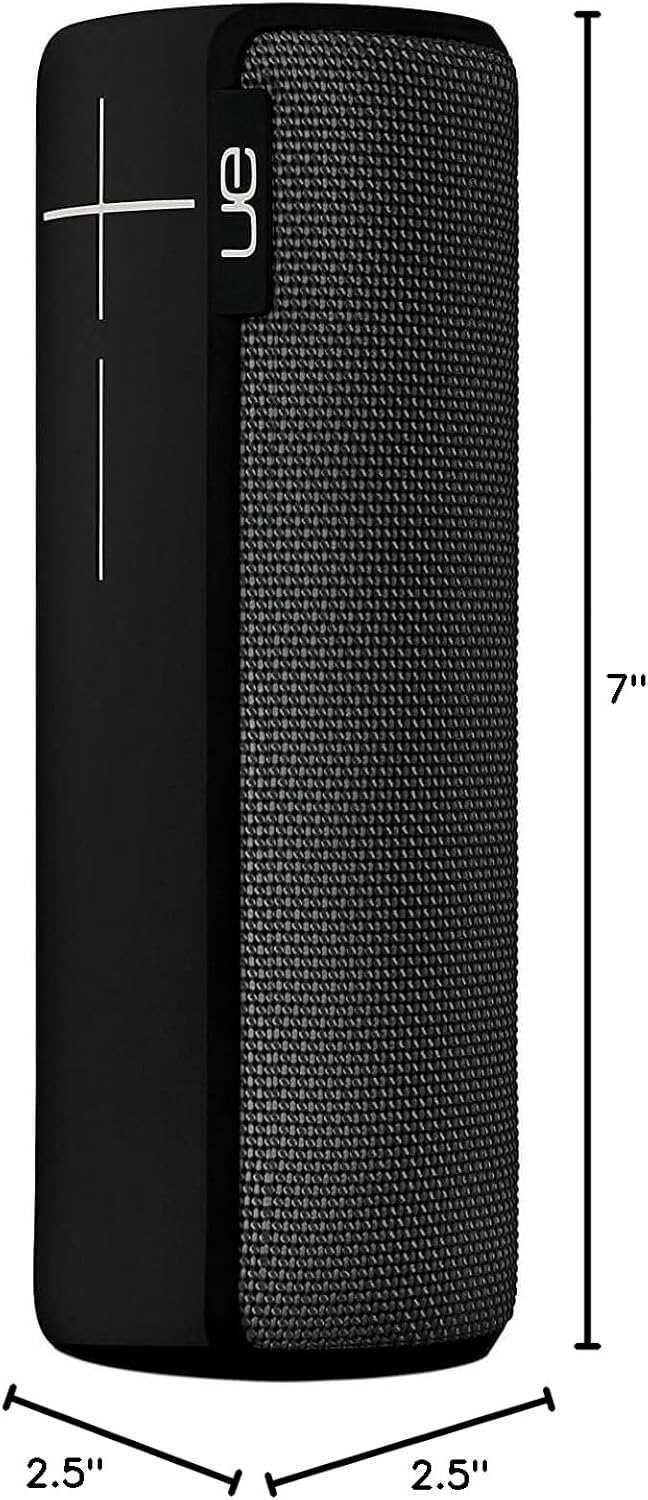
Image: Visual representation of the BOOM 2 speaker's dimensions.
7. Кепилдик жана колдоо
The Ultimate Ears BOOM 2 comes with a limited warranty. For detailed warranty information, product support, or to access the latest firmware and software updates, please visit the official Ultimate Ears webсайтка же кардарларды тейлөөгө кайрылыңыз.
Official Ultimate Ears Store: Ultimate Ears Store on Amazon


