Introduction
This manual provides comprehensive instructions for the installation, operation, and maintenance of the Intermatic EP100C 24-Hour 1 Circuit Electronic Control. This device is designed for precise control of electrical circuits, offering reliable scheduling for various applications.
Маанилүү коопсуздук маалыматы
ЭСКЕРТҮҮ: ЭЛЕКТР ТОКУКТУУ КОРКУНУЧУ. More than one disconnect switch may be required to de-energize the equipment before servicing. Use 10-18 gauge copper conductors rated for at least 75°C (167°F) for all connections.
САКТАНУУ: RIESGO DE DESCARGA ELECTRICA. La instalación de varios interruptores de desconexión podría ser necesaria a fin de desactivar el equipo antes de llevar a cabo la reparación. Utilice conductores de cobre tamaño 10-18 conducidos con una especificación de al menos 75°C (167°F) para todas las conexiones.
Always disconnect power at the circuit breaker or fuse box before installing or servicing the control. Ensure all wiring is performed by a qualified electrician and complies with local and national electrical codes.
Орнотуу жана орнотуу
The Intermatic EP100C is designed for indoor/outdoor use and comes in a plastic enclosure. Follow these steps for proper installation:
1. Монтаждоо
Securely mount the enclosure in a suitable location, ensuring it is protected from direct impact and excessive vibration. Use appropriate fasteners for the mounting surface.
2. Электр зымдары
Before wiring, ensure all power to the circuit is disconnected. The unit features terminals for Timer Power, Line 1, and Load 1. Refer to the internal diagram for correct connections.
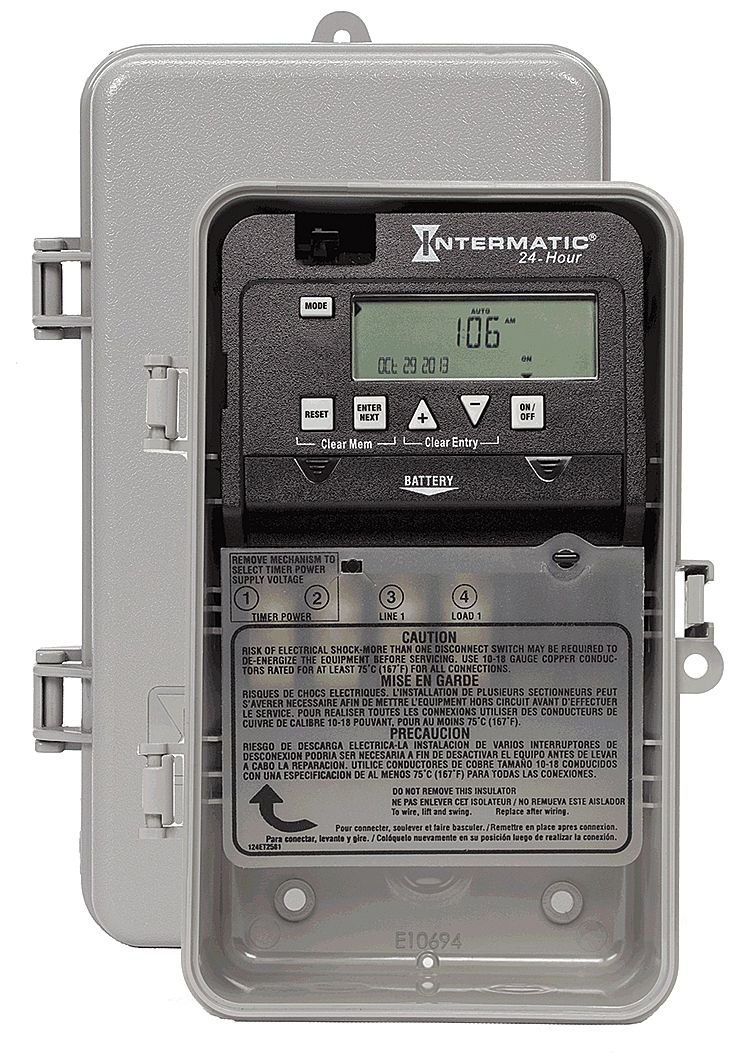
1-сүрөт: Ички View of Intermatic EP100C. This image shows the internal components of the EP100C electronic control, including the digital display, control buttons (MODE, RESET, ENTER NEXT, ON/OFF), and the wiring terminals labeled TIMER POWER, LINE 1, and LOAD 1. A battery compartment is also visible. Important safety warnings regarding electrical shock and conductor specifications are printed on the internal cover.
- Timer Power (1, 2): Connect the incoming power supply to these terminals.
- Line 1 (3): Connect the incoming hot wire for the controlled circuit.
- Load 1 (4): Connect the wire leading to the device being controlled.
DO NOT REMOVE THIS INSULATOR: To wire, lift and swing the insulator. Replace it after wiring to ensure proper insulation and safety.
3. Power Supply Voltage Тандоо
The unit supports 120-277 VAC. There is a mechanism inside to select the timer power supply voltage. Ensure this is set correctly for your application before applying power.
4. Батареяны орнотуу
Install the backup battery (type not specified, typically coin cell or AA/AAA) into the designated battery compartment. This battery maintains program settings during power outages.
Иштөө нускамалары
The EP100C features a digital display and several control buttons for programming and manual operation.
1. Initial Setup and Time/Date Setting
- басыңыз РЕЖИМ орнотуу менюсуна кирүү үчүн баскычты басыңыз.
- колдонуу ENTER NEXT button to navigate through time, date, and other settings.
- колдонуу + жана - buttons (up/down arrows) to adjust values.
- Confirm each setting by pressing ENTER NEXT.
2. Programming ON/OFF Events
- Басыңыз РЕЖИМ until you reach the program setting mode.
- Колдонуу ENTER NEXT to select a program slot (e.g., P1 ON, P1 OFF).
- Set the desired ON time using the + жана - баскычтар.
- Басыңыз ENTER NEXT to save and move to the OFF time.
- Repeat for the OFF time.
- Continue for additional programs as needed.
3. Кол менен өзгөртүү
басыңыз КҮЙГҮЗҮҮ/ӨЧҮРҮҮ button to manually switch the controlled circuit ON or OFF, overriding the current program until the next scheduled event.
4. Resetting and Clearing Memory
- Басыңыз RESET to perform a full system reset, clearing all settings and programs.
- Басыңыз Clear Mem (Clear Memory) to erase programmed events without resetting the time/date.
- Басыңыз Киргизүүнү тазалоо to clear the current input during programming.
Техникалык тейлөө
Батареяны алмаштыруу
The internal battery should be replaced periodically to ensure program retention during power outages. When the battery is low, an indicator may appear on the display. Disconnect power before replacing the battery.
Проблемаларды чечүү
| Көйгөй | Мүмкүн себеп | Чечим |
|---|---|---|
| Дисплей бош | No power to the unit; dead backup battery. | Check circuit breaker. Ensure wiring is correct. Replace backup battery. |
| Load does not turn ON/OFF as programmed | Incorrect program settings; manual override engaged; wiring issue. | Verify program times. Check if manual override is active. Inspect load wiring. |
| Unit resets unexpectedly | Power fluctuation; faulty battery. | Ensure stable power supply. Replace backup battery. |
Техникалык шарттар
- Модел: EP100C
- Түрү: 24-Hour 1 Circuit Electronic Control
- Тtage: 120-277 VAC
- Жыштыгы: 60 Гц
- Которуу түрү: SPST (бир уюлдук бир ыргытуу)
- Корпусу: Indoor/Outdoor Plastic Enclosure
- Өлчөмдөрү: 9.5 x 5.75 x 3.75 дюйм
- Салмагы: 4 унция
Колдоо
For further assistance or technical support, please contact Intermatic customer service. Refer to the official Intermatic webбайланыш маалыматы жана кепилдик маалыматы үчүн сайт.


