1. Киришүү
The EMOS Digital Timer Socket Model P5521 is designed to automatically switch electrical appliances ON and OFF at pre-set times. This device features 8 programmable settings per day, a battery backup to retain settings during power outages, and enhanced child protection. It is ideal for managing power consumption and automating household or office devices.

1.1-сүрөт: EMOS Digital Timer Socket in use with a water cooler, demonstrating a practical application for automated power control.
2. Коопсуздук нускамалары
- Ensure the timer is correctly plugged into a suitable wall socket.
- Do not exceed the maximum load of 230V~/16A (3680W).
- This device is rated IP20, meaning it is protected against solid objects larger than 12.5mm but has no protection against water. Do not use in wet or damp шарттар.
- Аппаратты ажыратпаңыз же оңдоого аракет кылбаңыз. Бардык тейлөөлөрдү квалификациялуу кызматкерлерге тапшырыңыз.
- Keep out of reach of children. The socket features enhanced child protection.
- Unplug the timer from the wall socket before cleaning. Clean only with a dry cloth.
3. Продукт бүтүп калдыview

3.1-сүрөт: Фронт view of the EMOS Digital Timer Socket, highlighting the display and control buttons.
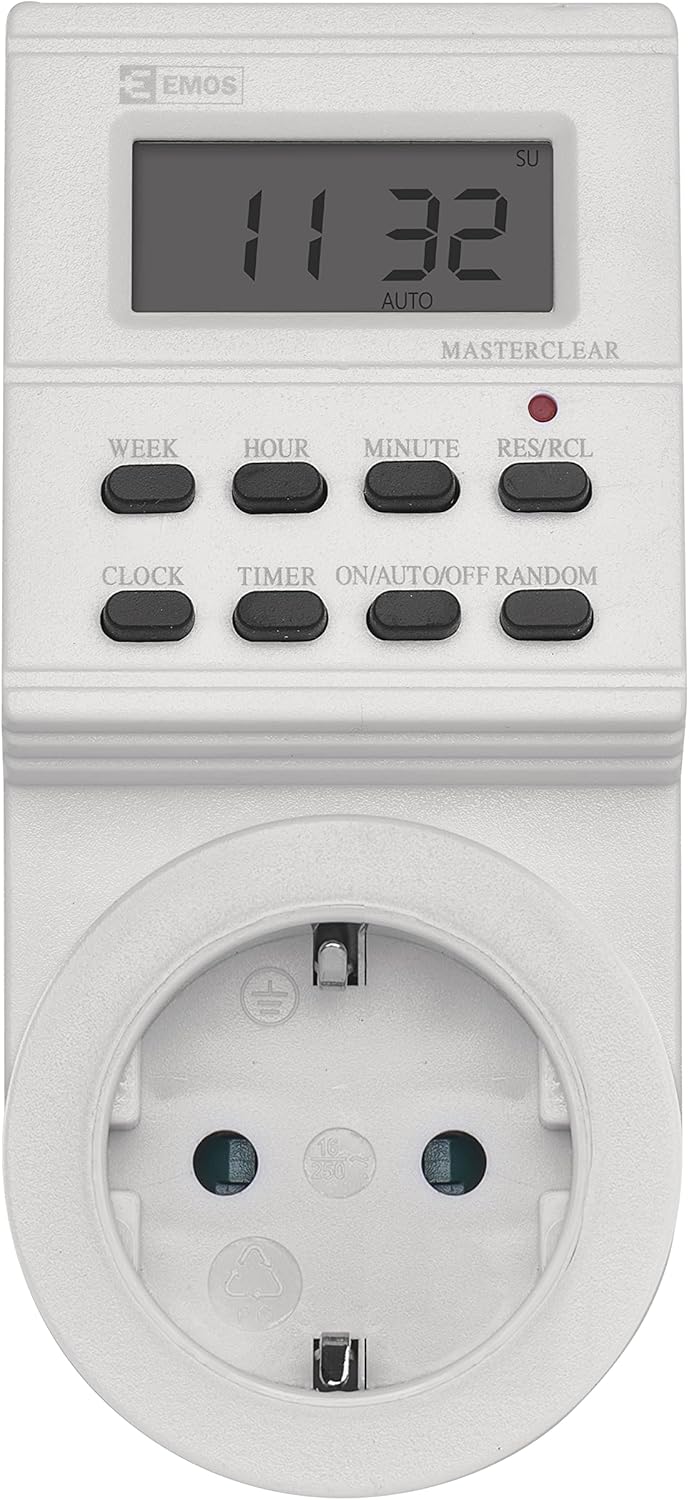
3.2-сүрөт: Close-up of the timer's display and control panel, showing button labels and screen indicators.
3.1. Buttons and Display
- ЖУМА: Sets the day of the week.
- HOUR: Sets the hour.
- МИНУТ: Sets the minute.
- RES/RCL (Reset/Recall): Resets the device or recalls programmed settings.
- СААТ: Used to set the current time and day, and to exit programming mode.
- ТАЙМЕР: Enters and exits timer programming mode.
- КҮЙГҮЗҮҮ/АВТО/ӨЧҮРҮҮ: Cycles through Manual ON, Automatic, and Manual OFF modes.
- КОКУС: Activates or deactivates the random switching function.
The LCD display shows the current time, day of the week, and operational mode (MANUAL ON, AUTO, MANUAL OFF, RANDOM).
4. Орнотуу
4.1. Initial Use and Reset
Before first use, plug the timer into a wall socket for approximately 10-15 minutes to charge the internal battery backup. This ensures that settings are retained even if the timer is unplugged. After charging, press the RES/RCL button with a pointed object (e.g., a pen tip) to clear all previous settings and reset the device.
4.2. Учурдагы убакытты жана күндү коюу
- басып, кармап туруңуз СААТ баскычы.
- Кармап жатканда СААТ, басыңыз ЖУМА button repeatedly until the correct day of the week is displayed.
- Кармап жатканда СААТ, басыңыз HOUR button repeatedly until the correct hour is displayed.
- Кармап жатканда СААТ, басыңыз MINUTE button repeatedly until the correct minute is displayed.
- бошотуңуз СААТ button. The current time and day are now set.
5. Иштөө
5.1. КҮЙГҮЗҮҮ/ӨЧҮРҮҮ Убакыттарын программалоо
The timer allows for up to 8 ON/OFF programs. Each program can be set for specific days or groups of days.
- басыңыз ТАЙМЕР button once. The display will show '1 ON'.
- басыңыз ЖУМА button to select the desired day(s) for this program. Options include individual days, weekdays, weekends, or all days.
- басыңыз HOUR button to set the desired ON hour.
- басыңыз MINUTE button to set the desired ON minute.
- басыңыз ТАЙМЕР button again. The display will show '1 OFF'.
- Repeat steps 2-4 to set the desired OFF time for program 1.
- Басууну улантыңыз ТАЙМЕР to cycle through programs 2 ON, 2 OFF, up to 8 ON, 8 OFF, setting each as required.
- Бардык керектүү программаларды орноткондон кийин, баскычын басыңыз СААТ button to exit programming mode and return to the current time display.
Эскертүү: If an ON time is set to occur before 0:00 and end after 0:00, it may require two separate programs (e.g., one ending at 23:59 and another starting at 0:00).
5.2. Кол менен күйгүзүү/автоматикалык/өчүрүү режими
басыңыз ON/AUTO/OFF иштөө режимдерин которуу үчүн баскычты басыңыз:
- MANUAL ON: The connected appliance will remain ON continuously, overriding all programmed settings.
- АВТО: The timer will operate according to the programmed ON/OFF times. This is the standard operating mode for automated control.
- КОЛ менен ӨЧҮРҮҮ: The connected appliance will remain OFF continuously, overriding all programmed settings.
5.3. Random Function
The random function is designed to simulate occupancy by switching the connected appliance ON and OFF at irregular intervals within a specific time window (e.g., 6 PM to 6 AM). This can be useful for security purposes when you are away.
- Таймердин күйүп турганын текшериңиз АВТО режими.
- басыңыз RANDOM button. The 'RANDOM' indicator will appear on the display.
- To deactivate the random function, press the RANDOM button again. The 'RANDOM' indicator will disappear.
6. Техникалык тейлөө
6.1. Батарейканын камдык көчүрмөсү
The EMOS Digital Timer Socket includes an integrated 40 mAh NiMH button cell battery (1.2V) for backup. This battery charges when the timer is plugged into a live socket and ensures that your programmed settings are retained during power outages or when the timer is unplugged. No user maintenance is required for the battery.
6.2. Тазалоо
To clean the timer, unplug it from the wall socket. Use a soft, dry cloth to wipe the exterior. Do not use liquid cleaners, abrasive materials, or immerse the device in water.
7. Кыйынчылыктарды
- Дисплей бош же жооп бербей жатат: Ensure the timer is plugged into a live socket. If it's a new unit or has been unplugged for a long time, allow it to charge for 10-15 minutes, then perform a reset using the RES/RCL баскычы.
- Appliance does not switch ON/OFF as programmed:
- Check if the timer is in АВТО mode. If it's in MANUAL ON or MANUAL OFF, it will override programs.
- Verify that the programmed ON/OFF times and days are correct.
- Ensure the connected appliance is working correctly and is switched ON.
- Confirm the load does not exceed the maximum rating (3680W).
- Programming seems complicated: Refer to Section 5.1. Programming ON/OFF Times. It may take a few attempts to become familiar with the sequence. Some complex schedules (e.g., spanning midnight) may require splitting into two programs.
- Timer resets unexpectedly: Ensure the internal battery is sufficiently charged. If the issue persists, the internal battery may be faulty, and the device might require replacement.
8. Техникалык шарттар
| Өзгөчөлүк | Спецификация |
|---|---|
| Модель номери | P5521 |
| Тtage | 230 V~ |
| Макс. Учурдагы | 16 А |
| Макс. Күч | 3680 Вт |
| IP рейтинги | IP20 |
| Программалар | 8 ON/OFF programs per day |
| Батареянын камдык көчүрмөсү | 40 mAh NiMH (1.2 V) |
| Материал | Поликарбонат |
| Өлчөмдөрү (H x W x D) | 21 x 9 x 9 см |
| Салмагы | 180 г |

8.1-сүрөт: Physical dimensions of the EMOS Digital Timer Socket.
9. Кепилдик жана колдоо
EMOS products are manufactured to high-quality standards. For warranty information, please refer to the terms and conditions provided at the point of purchase or contact EMOS customer support directly. Keep your proof of purchase for any warranty claims.
For further assistance or technical support, please visit the official EMOS webсайтка же кардарларды тейлөө бөлүмүнө кайрылыңыз.


