Introduction
Сатып алганыңыз үчүн рахматasing the SENTRY HPXBT150 Bluetooth Flat Cord Earbuds. This manual provides detailed instructions on how to set up, operate, and maintain your new wireless earbuds. Please read this manual thoroughly before use to ensure optimal performance and longevity of your device.
Пакеттин мазмуну
- SENTRY HPXBT150 Bluetooth Flat Cord Earbuds
- Коргоочу кап
- USB кубаттоочу кабели (Micro-USB)
- Removable Ear Hooks
- User Manual
Продукт бүттүview
The SENTRY HPXBT150 earbuds feature Bluetooth wireless technology, allowing for a cord-free listening experience. They include an in-line microphone for hands-free calls and media control buttons for easy operation. Removable ear hooks provide a secure fit, especially during physical activity.
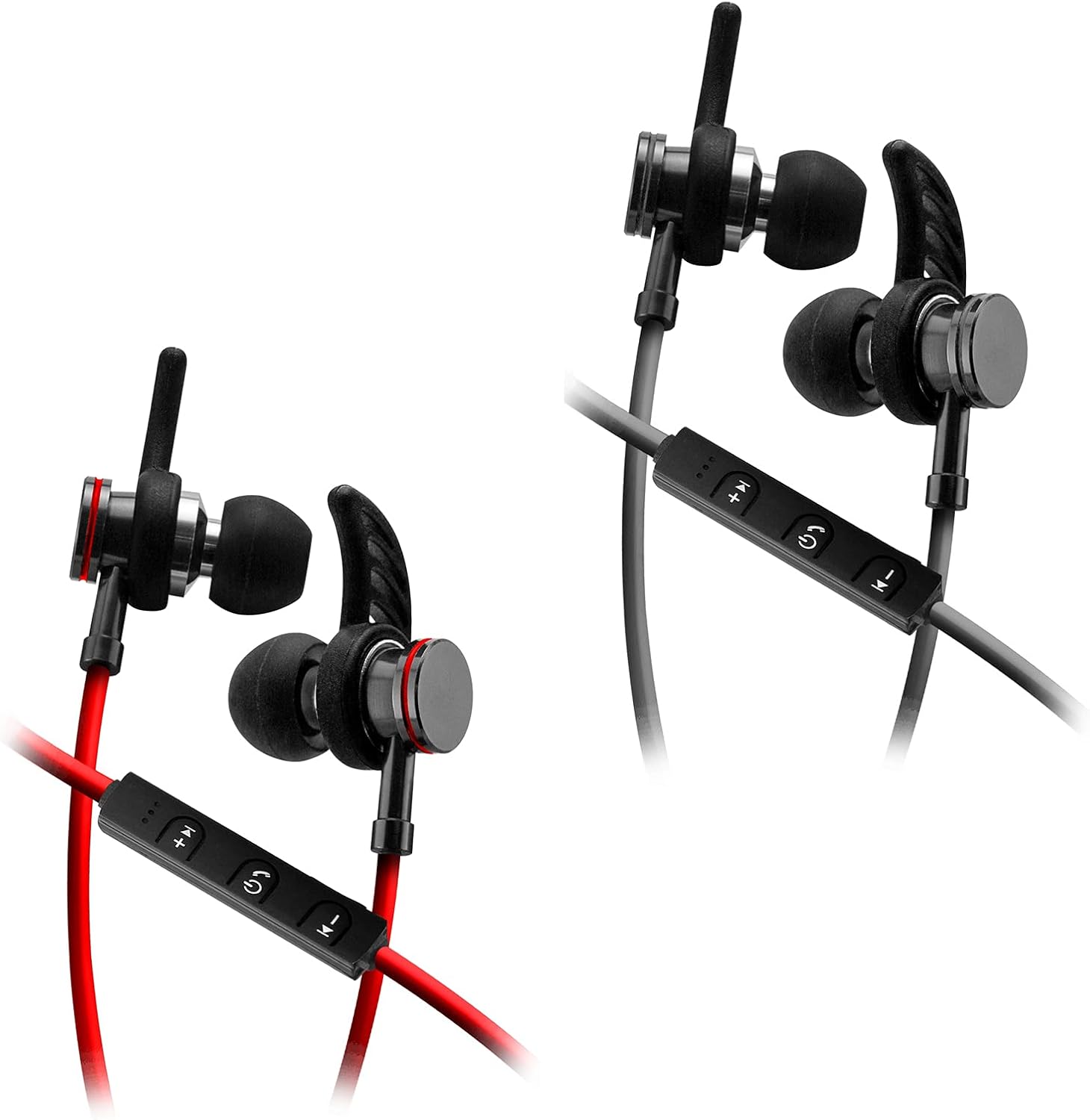
Image: SENTRY HPXBT150 Bluetooth Earbuds showing the in-line control panel and ear hooks. The control panel features volume up/next track, power/multifunction, and volume down/previous track buttons.
Жайгашуу
1. Кулакчындарды заряддоо
- Locate the Micro-USB charging port on the in-line control unit.
- Connect the provided USB charging cable to the earbuds' charging port.
- USB кабелинин экинчи учун шайкеш келген USB кубат булагына (мисалы, компьютердин USB портуна, USB дубал адаптерине) сайыңыз.
- The LED indicator light will illuminate during charging. It will change color or turn off once charging is complete. A full charge typically takes approximately 1-2 hours.
2. Bluetooth Жупташтыруу
- Баштапкы жупташтыруудан мурун кулакчындар толук заряддалганын текшериңиз.
- Press and hold the multi-function button (usually the center button on the in-line control) for approximately 5-7 seconds until the LED indicator light flashes red and blue alternately. This indicates the earbuds are in pairing mode.
- Bluetooth иштетилген түзмөгүңүздө (смартфон, планшет, компьютер) Bluetooth жөндөөлөрү менюсуна өтүңүз.
- Bluetooth'ду иштетиңиз жана жеткиликтүү түзмөктөрдү издеңиз.
- Select "HPXBT150" or a similar name from the list of found devices.
- Once successfully paired, the LED indicator on the earbuds will typically flash blue slowly or turn off, and you will hear an audible confirmation.
- Эгер сырсөз суралса, "0000" киргизиңиз.
Иштөө нускамалары
Күйгүзүү/өчүрүү
- Күйгүзүү: Press and hold the multi-function button for approximately 3 seconds until the LED indicator flashes blue and you hear a power-on tone.
- Өчүрүү: Press and hold the multi-function button for approximately 3-5 seconds until the LED indicator flashes red and you hear a power-off tone.
Музыканы ойнотуу
- Ойнотуу/тындыруу: Көп функциялуу баскычты бир жолу басыңыз.
- Көлөмү: '+' баскычын басыңыз.
- Үнүн азайтуу: '-' баскычын басыңыз.
- Кийинки трек: '+' баскычын басып, кармап туруңуз.
- Мурунку трек: '-' баскычын басып, кармап туруңуз.
Чалууларды башкаруу
- Чалууга жооп берүү/аяктоо: Көп функциялуу баскычты бир жолу басыңыз.
- Чакырууну четке кагуу: Көп функциялуу баскычты болжол менен 2 секунд басып туруңуз.
- Акыркы номерди кайра терүү: Көп функциялуу баскычты эки жолу басыңыз.
Техникалык тейлөө
- Тазалоо: Кулакчындарды тазалоо үчүн жумшак, кургак чүпүрөктү колдонуңуз. Катуу химиялык заттарды же абразивдүү материалдарды колдонбоңуз.
- Сактагыч: When not in use, store the earbuds in the provided protective case to prevent damage.
- Батареяга кам көрүү: Батареянын кубатын үнөмдөө үчүн, кулакчындардын тез-тез толук зарядын түгөтпөңүз. Аларды көпкө колдонулбаса дагы, үзгүлтүксүз кубаттап туруңуз.
- Нымдуулуктан качыңыз: Keep the earbuds away from water and excessive moisture.
Проблемаларды чечүү
| Көйгөй | Мүмкүн чечим |
|---|---|
| Кулакчындар күйбөйт. | Ensure the earbuds are fully charged. Connect to a power source and allow time to charge. |
| Түзмөк менен жупташтыруу мүмкүн эмес. | Ensure earbuds are in pairing mode (flashing red/blue). Turn off and on Bluetooth on your device. Move earbuds closer to your device. Forget previous pairings on your device and try again. |
| Үн жок же үнү төмөн. | Check volume levels on both the earbuds and your connected device. Ensure earbuds are properly paired. Try re-pairing the earbuds. |
| үзгүлтүктүү байланыш. | Ensure there are no obstructions between the earbuds and your device. Move closer to your device. Avoid environments with strong Wi-Fi or other wireless interference. |
Техникалык шарттар
- Модел: HPXBT150
- Байланыш технологиясы: Зымсыз (Bluetooth)
- Айдоочу бирдиги: 10мм
- Импеданс: 32+/-3 Ohms
- Сезимталдуулук: 103дБ+/-3дБ
- Жыштык жообу: 20Гц - 20кГц
- Шайкеш түзмөктөр: Phones, Tablets, MP3 Players, Computers, Gaming Consoles
- Башкаруу түрү: Медиа көзөмөл
- Өзгөчөлүктөр: Microphone Included, USB Connectivity, Removable Ear Hooks
- Элемент Салмагы: 2.08 унция
Коопсуздук маалыматы
- Do not expose the earbuds to extreme temperatures, direct sunlight, or fire.
- Do not disassemble or modify the earbuds. This may void the warranty and cause damage.
- Угуу жөндөмүнө зыян келтирбөө үчүн узак убакыт бою жогорку үн деңгээлинде угуудан качыңыз.
- Балдар жана үй жаныбарлары жетпеген жерде сактаңыз.
- Продукцияны жергиликтүү эрежелерге ылайык таштаңыз.
Кепилдик жана колдоо
For warranty information and technical support, please refer to the documentation included with your purchase or contact SENTRY customer service directly. Keep your proof of purchase for warranty claims.


