Introduction
The Master Lock No. X055ML large digital combination safe is designed for protecting valuable items such as laptops, jewelry, documents, money, and other electronics within a home environment. Its internal dimensions are suitable for A4-sized documents. This safe features a programmable electronic lock, allowing users to set their own combination, and includes an override key for access in case of a forgotten code. The interior is carpeted to prevent scratching of stored items. For enhanced security, the safe can be bolted down using the included hardware, preventing unauthorized removal. The robust steel construction and pry-resistant door with two live-locking bolts provide a high level of security for your belongings.
Коопсуздук маалыматы
- Always keep the override keys in a secure location away from the safe. Do not store them inside the safe.
- Ensure the safe is securely bolted down to a floor or wall to prevent unauthorized removal, if applicable.
- Сейфтин ичинде тез күйүүчү материалдарды же суюктуктар салынган ачык идиштерди сактабаңыз.
- Keep the keypad clean and dry to ensure proper operation.
- Батареянын заряды аз калганын көрсөткөн индикатор пайда болгондо, кулпуланып калбашы үчүн, батареяларды тез арада алмаштырыңыз.
Пакеттин мазмуну
- 1 x Master Lock Security Safe (Model X055ML)
- 2 x Override Keys
- 1 x Bolt Down Kit (for securing the safe)
- Колдонуучунун Колдонмосу (бул документ)
Жайгашуу
1. Батареяны орнотуу
The safe requires 4 AA batteries (not included) for the electronic lock to function. The battery compartment is located on the inside of the safe door. Open the safe using the override key if it is currently locked.
- Батарея бөлүмүнүн капкагын сейфтин эшигинин ички жагынан табыңыз.
- Дизайнга жараша капкакты жылдырып же бурап чыгарып алыңыз.
- Туура полярдуулукту (+/-) камсыз кылып, 4 жаңы AA батарейкасын салыңыз.
- Батарея бөлүкчөсүнүн капкагын бекем орнотуңуз.
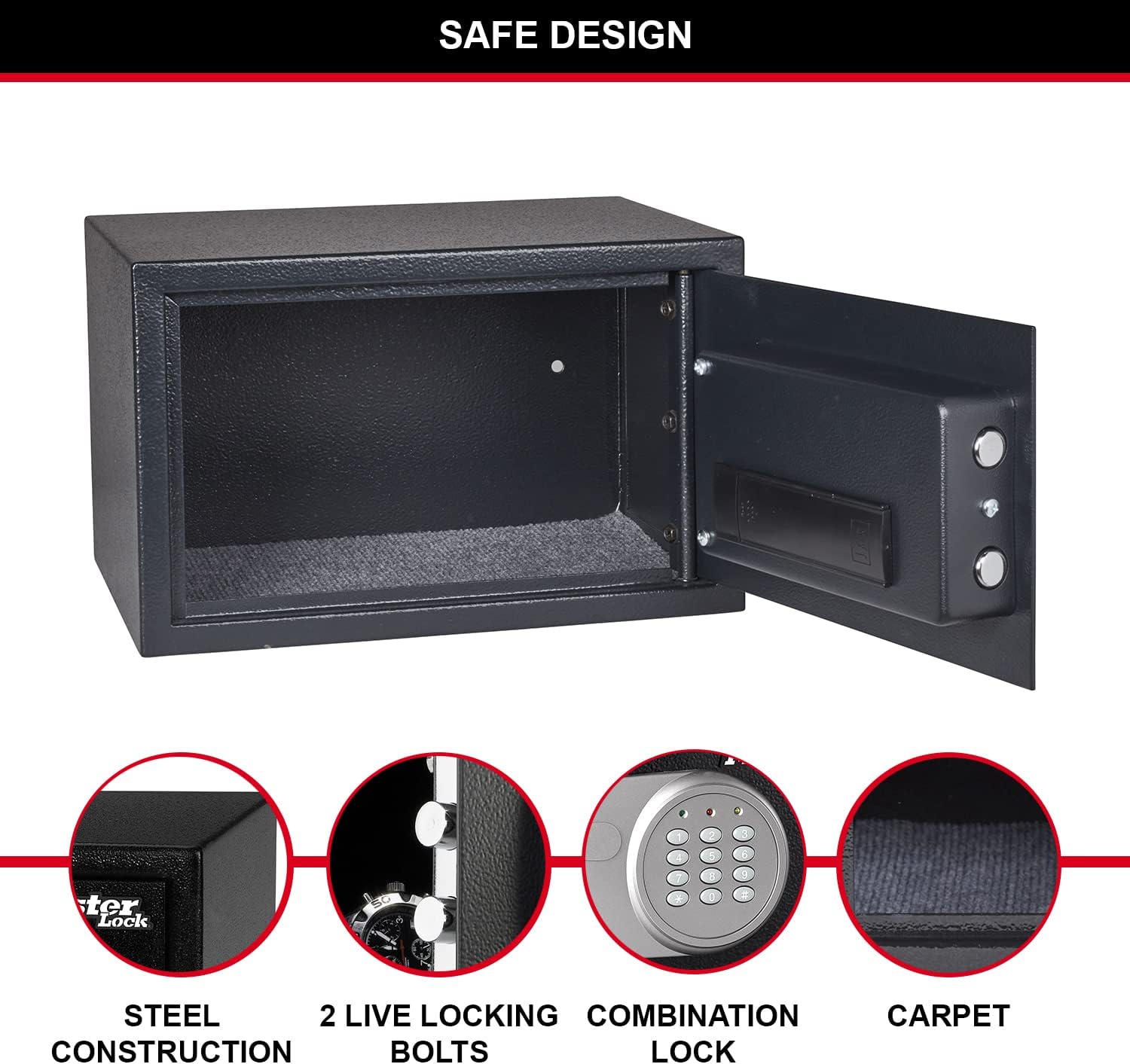
Figure 1: Inside of the safe door, highlighting the battery compartment and live-locking bolts.
2. Жеке айкалышыңызды орнотуу
Upon first use, or after battery replacement, you will need to set your personal combination. The factory default code is typically 1-2-3-4, but it is highly recommended to change it immediately.
- With the safe door open, locate the red reset button on the inside of the door, near the battery compartment.
- Press the red reset button. The yellow light on the keypad will illuminate.
- Enter your new 3 to 8 digit combination on the keypad.
- Press the "A" or "B" button (or "#" or "*" depending on model) to confirm. The yellow light will turn off, indicating the new code is set.
- Test your new combination with the door open to ensure it works correctly before closing the safe.
3. Securing the Safe (Optional)
For maximum security, the safe can be bolted to a floor or wall using the included bolt-down kit. This prevents unauthorized removal of the safe.
- Choose a suitable location for the safe, such as inside a wardrobe or cabinet.
- Сейфтин түбүндөгү же артындагы алдын ала бургуланган тешиктер аркылуу бургулоочу жерлерди белгилеңиз.
- Тиешелүү бургулоочу учту колдонуп, орнотуу бетине тешиктерди бургулаңыз.
- Align the safe with the drilled holes and secure it using the provided bolts and washers.

2-сүрөт: Мисample of safe placement within a cabinet for secure storage.
Иштөө нускамалары
1. Opening the Safe with Digital Combination
- Enter your personal 3 to 8 digit combination on the keypad.
- Press the "A" or "B" button (or "#" or "*" depending on model) to confirm.
- If the code is correct, the green light will illuminate. Within 5 seconds, turn the knob clockwise to open the safe door.
- If an incorrect code is entered, the yellow light will flash. After three incorrect attempts, the safe will enter a lockout period.

Сүрөт 3: Алдыңкы view of the safe with the digital combination lock.
2. Сейфти өзгөртүү ачкычы менен ачуу
The override key provides emergency access to the safe, useful if batteries are depleted or the combination is forgotten.
- Адатта баскычтоп панелиндеги кичинекей капкактын артында жашырылган ачкыч тешигин табыңыз.
- Insert one of the provided override keys into the keyhole.
- Turn the key clockwise while simultaneously turning the knob clockwise to open the safe door.
- Remove the key once the safe is open.
3. Сейфти жабуу жана кулпулоо
To lock the safe, simply close the door and turn the knob counter-clockwise until the bolts engage. The electronic lock will automatically secure the safe.
Техникалык тейлөө
1. Батареяны алмаштыруу
When the batteries are low, the red light on the keypad may flash or the safe may not respond to combination entries. Replace all 4 AA batteries as described in the "Battery Installation" section under Setup.
2. Тазалоо
Сейфтин сыртын жумшак, d менен сүртүңүзamp cloth. Do not use abrasive cleaners or solvents. Keep the keypad and internal components dry.
Проблемаларды чечүү
| Көйгөй | Мүмкүн себеп | Чечим |
|---|---|---|
| Сейф айкалышы менен ачылбайт. | Incorrect combination entered; low batteries. | Re-enter combination carefully. Replace batteries. Use override key. |
| Клавиатуранын жарыктары күйбөйт. | Өлүк же туура эмес орнотулган батарейкалар. | Туура полярдуулукту камсыз кылып, бардык 4 AA батарейкасын алмаштырыңыз. |
| Сейф эшик туура жабылбайт. | Obstruction in the door frame; bolts not fully retracted. | Check for obstructions. Ensure the knob is fully turned to retract bolts before closing. |
| Унутулган айкалыш. | Combination lost or forgotten. | Use the override key to open the safe, then reset the combination. |
Техникалык шарттар
| Өзгөчөлүк | Деталь |
|---|---|
| Модель номери | X055ML |
| Сырткы өлчөмдөрү (HxWxD) | 13.78" H x 8.66" W x 10.63" D (22 x 35 x 27 cm) |
| Ички өлчөмдөрү (HxWxD) | 21.6 см H x 34.6 см W x 22 см D |
| Кубаттуулугу | 16 литр |
| Салмагы | 14.11 фунт (6400 грамм) |
| Кулпу түрү | Digital Combination with Key Override |
| Материал | Эритме болот |
| Power Source | Батарея менен иштейт (4 AA батарейка керек, камтылган эмес) |
| Өзгөчөлүктөр | Pry-resistant door, two live-locking bolts, carpeted floor, bolt-down hardware included. |

4-сүрөт: Сейфтин толук өлчөмдөрү.
Кепилдик жана колдоо
This Master Lock product is covered by a 1-year spare part availability duration in the EU. For specific warranty details, technical support, or to inquire about replacement parts, please refer to the official Master Lock webсайтка же түздөн-түз кардарларды тейлөөгө кайрылыңыз. Кепилдик дооматтар үчүн сатып алуу дүмүрчөгүңүздү сактаңыз.
Кошумча жардам алуу үчүн, баш багыңыз Master Lock Store on Amazon.


