1. Киришүү
Сатып алганыңыз үчүн рахматasing the Craig Electronics CMA3594-OD Stereo Portable Speaker. This speaker features Bluetooth wireless technology, hands-free phone answering, and decorative color-changing lights. This manual provides essential information for setting up, operating, and maintaining your speaker.
Камтылган аксессуарлар:
- 3.5mm Jack Aux-in Cable
- USB заряддоо кабели
2. Коопсуздук маалыматы
Please read these safety instructions carefully before using your speaker and retain them for future reference. Incorrect use may result in reduced performance, damage to the speaker, or hazards.
- Динамикти экстремалдык температурага, түз күндүн нуруна же жогорку нымдуулукка дуушар кылбаңыз.
- Бул продукт болуп саналат суу өткөрбөйт. Avoid contact with water or other liquids.
- Динамикти бөлүктөргө бөлбөңүз же өзгөртпөңүз. Бул кепилдикти жокко чыгарат.
- Кубаттоо үчүн берилген USB кубаттоо кабелин гана колдонуңуз.
- Динамикти күчтүү магниттик талаалардан алыс кармаңыз.
- Спикерди түшүрүүдөн же катуу таасирлерге дуушар кылуудан качыңыз.
3. Продукт бүтүп калдыview
Спикердин компоненттери жана башкаруу элементтери менен таанышыңыз.

Сүрөт 1: Алдыңкы view of the Craig CMA3594-OD Stereo Portable Speaker, showcasing its cylindrical design and illuminated mesh with color-changing lights.
Жогорку панелдин башкаруу элементтери

Figure 2: Top panel of the speaker showing touch-sensitive controls for power, volume, light modes, and playback.
- Кубат баскычы (⏻): Динамикти күйгүзүү/өчүрүү үчүн басып кармап туруңуз.
- Play/Pause/Call Button (▶/‖/📞): Музыканы ойнотуу же тындыруу үчүн басыңыз. Телефон чалууга жооп берүү же бүтүрүү үчүн басыңыз.
- Volume Down / Previous Track (-): Үндү азайтуу үчүн басыңыз. Мурунку трекке өтүү үчүн басып кармап туруңуз.
- Volume Up / Next Track (+): Үндү катуулатуу үчүн басыңыз. Кийинки трекке өтүү үчүн басып кармап туруңуз.
- Жарык режиминин баскычы (💡): Press to cycle through different color-changing light modes.
Арткы панелдин порттору
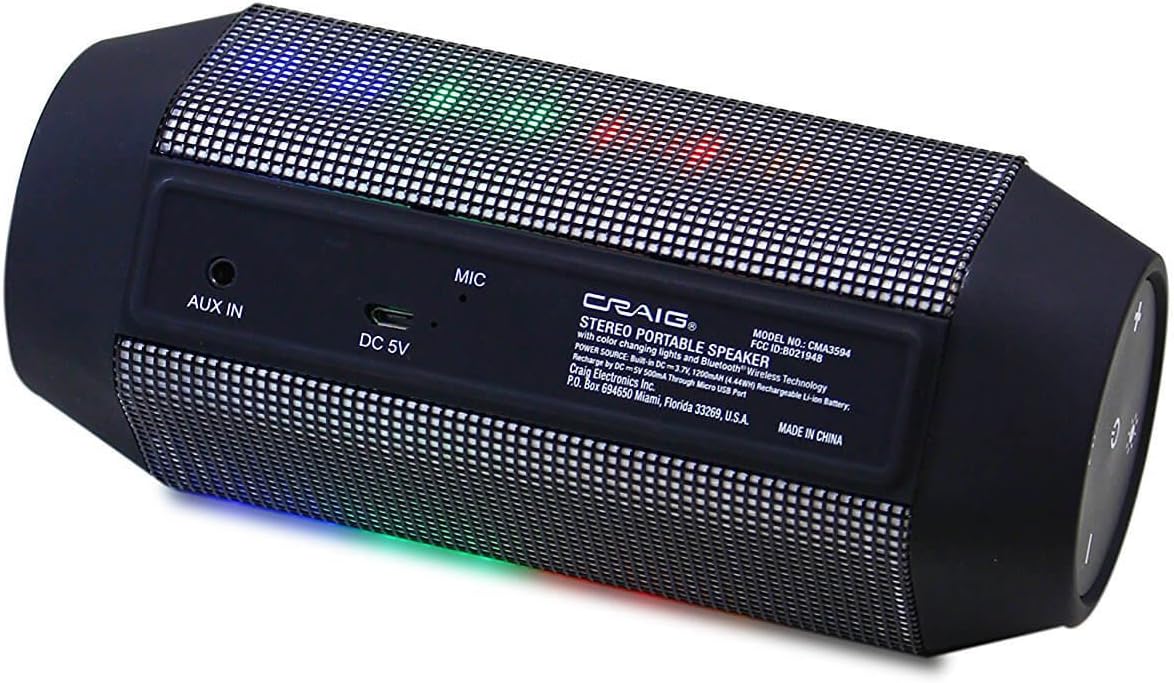
Figure 3: Rear panel of the speaker displaying the AUX IN port, DC 5V charging port, and microphone.
- AUX IN: 3.5mm audio input for connecting external audio devices.
- DC 5V: Динамикти кубаттоо үчүн Micro USB порту.
- MIC: Handsfree чалуу үчүн орнотулган микрофон.
4. Орнотуу
4.1 Динамикти заряддоо
- Connect the small end of the provided USB charging cable to the DC 5V port on the rear of the speaker.
- USB заряддоо кабелинин чоң учун USB кубат адаптерине (кошумча эмес) же компьютердин USB портуна туташтырыңыз.
- The charging indicator light (usually red) will illuminate to show that the speaker is charging.
- Once fully charged, the indicator light will turn off or change color (refer to specific product behavior if different).
The speaker has a built-in rechargeable battery. A full charge typically takes 2-3 hours.
4.2 Күйгүзүү/өчүрүү
- Күйгүзүү үчүн: Кубат баскычын басып, кармап туруңуз (⏻) for approximately 3 seconds. You will hear an audible prompt, and the lights will activate.
- Өчүрүү үчүн: Кубат баскычын басып, кармап туруңуз (⏻) for approximately 3 seconds. You will hear an audible prompt, and the lights will turn off.
5. Иштөө нускамалары
5.1 Bluetooth жупташтыруу
Динамик биринчи жолу күйгүзүлгөндө же эч кандай аспап туташкан эмес болсо, автоматтык түрдө Bluetooth жупташтыруу режимине кирет.

Figure 4: The portable speaker shown wirelessly connected to a smartphone, indicating active Bluetooth pairing.
- Ensure the speaker is powered on and in pairing mode (a blue LED indicator may flash, and you might hear an audible prompt).
- On your Bluetooth-enabled device (smartphone, tablet, laptop, etc.), go to the Bluetooth settings menu.
- Издөө available devices. The speaker will appear as "CMA3594-OD" or similar.
- Жупташтыруу үчүн тизмеден динамикти тандаңыз.
- Once successfully paired, you will hear a confirmation tone, and the blue LED indicator will become solid.
- Эми сиз түзмөгүңүздөн аудиону динамик аркылуу ойной аласыз.
Note: The speaker will attempt to reconnect to the last paired device automatically when powered on.
5.2 Aux-in Connection
To play audio from devices without Bluetooth capability:
- Connect one end of the provided 3.5mm Aux-in cable to the AUX IN port on the speaker.
- Connect the other end of the 3.5mm Aux-in cable to the headphone jack or audio output of your external audio device.
- Динамик автоматтык түрдө Aux-in режимине өтөт.
- Туташкан түзмөгүңүздөн ойнотууну жана үндү башкаруу.
5.3 Hands-free Phone Answering
Bluetooth аркылуу смартфонго туташканда:
- Чалууга жооп берүү үчүн: Press the Play/Pause/Call Button (📞) бир жолу.
- Чалууну аяктоо үчүн: Press the Play/Pause/Call Button (📞) чалуу учурунда бир жолу.
- Чалууну четке кагуу үчүн: Press and hold the Play/Pause/Call Button (📞) 2 секундга.
Камтылган микрофон так баарлашууга мүмкүндүк берет.
5.4 Жарык режим
The speaker features decorative color-changing lights.
- Press the Light Mode Button (💡) to cycle through various light patterns and colors.
- Continue pressing to find your preferred light display or to turn the lights off.
5.5 Үндү башкаруу
- Press the Volume Up Button (+) көлөмүн көбөйтүү үчүн.
- Press the Volume Down Button (-) үндү азайтуу үчүн.
6. Техникалык тейлөө
Proper care ensures the longevity of your speaker.
- Тазалоо: Динамиктин сыртын сүртүү үчүн жумшак, кургак чүпүрөктү колдонуңуз. Суюк тазалоочу каражаттарды же абразивдүү материалдарды колдонбоңуз.
- Сактагыч: Узак мөөнөткө колдонулбаганда, динамикти салкын, кургак жерде, тике күн нурунан жана экстремалдык температурадан алыс сактаңыз.
- Батареяга кам көрүү: To maintain battery life, fully charge the speaker before storing it for long periods and recharge it every few months if not in regular use.
7. Кыйынчылыктарды
Динамикиңизде көйгөйлөргө туш болсоңуз, төмөнкү жалпы көйгөйлөрдү жана чечимдерди караңыз:
| Көйгөй | Чечим |
|---|---|
| Динамик күйбөйт. | Батарея заряддалганын текшериңиз. USB заряддоо кабелин туташтырыңыз жана аны кайра күйгүзүү аракетинен мурун кеминде 30 мүнөт кубаттоого уруксат бериңиз. |
| Bluetooth аркылуу жупташтыруу мүмкүн эмес. | Make sure the speaker is in pairing mode (flashing LED). Ensure Bluetooth is enabled on your device and it is within 32 feet of the speaker. Forget the device from your phone's Bluetooth list and try pairing again. |
| Динамиктен үн жок. | Check the volume level on both the speaker and your connected device. Ensure the correct input mode (Bluetooth or Aux-in) is selected. If using Aux-in, ensure the cable is fully inserted. |
| Үн бурмаланган. | Reduce the volume on both the speaker and your connected device. Ensure the speaker is not too far from the Bluetooth device or that there are no obstructions. |
| Жарыктар иштебей жатат. | Press the Light Mode Button (💡) to cycle through modes or turn them on. Ensure the speaker has sufficient battery charge. |
8. Техникалык шарттар
| Өзгөчөлүк | Спецификация |
|---|---|
| Модель номери | CMA3594-OD |
| Байланыш технологиясы | Bluetooth, Көмөкчү (3.5 мм уяча) |
| Зымсыз диапазон | 32 Фут (10 метр) чейин |
| Аудио чыгаруу режими | Стерео (2.0 канал) |
| Power Source | Battery Powered (Built-in Rechargeable Battery) |
| Башкаруу ыкмасы | Touch Buttons |
| Өзгөчөлүктөр | Portable, Hands-free Phone Answering, Color Changing Lights |
| Шайкеш түзмөктөр | Компьютер, ноутбук, MP3 ойноткуч, смартфон, планшет |
| Импеданс | 4 Ом |
| Продукциянын өлчөмдөрү | 2.5 x 2.5 x 7 дюйм (болжол менен) |
| Элемент Салмагы | 1.05 фунт (болжол менен) |
| Суу өткөрбөйт | Жок |
9. Кепилдик жана колдоо
For warranty information and technical support, please refer to the documentation included with your purchase or visit the official Craig Electronics webсайт. Кепилдик дооматтар үчүн сатып алганыңыздын далилин сактаңыз.


