Introduction
The Yamaha YSP-5600BL is a 7.1.2-channel Dolby Atmos MusicCast Sound Bar designed to elevate your home audio experience. It utilizes advanced Digital Sound Projector technology with 46 speaker drivers to deliver immersive multi-dimensional sound, including overhead effects for Dolby Atmos and DTS:X content. This sound bar also integrates with the MusicCast wireless multiroom audio system, allowing for flexible audio distribution throughout your home.
Негизги өзгөчөлүктөр төмөнкүлөрдү камтыйт:
- World's first sound bar with 7.1.2 channel multi-dimensional sound.
- HDMI inputs with 4K Ultra HD pass-through and HDCP 2.2 for high-quality video.
- MusicCast wireless multiroom audio system for whole-home audio.
- Access to popular music streaming services like Pandora, Spotify, and Rhapsody.
- Versatile connectivity options including Wi-Fi, Bluetooth, AirPlay, and Spotify Connect.
- Works with Alexa for convenient voice control (Alexa device sold separately).

Фронт view of the Yamaha YSP-5600BL Sound Bar, showcasing its sleek black design and speaker grille.
Жайгашуу
Setting up your YSP-5600BL involves connecting it to your television and power, and then configuring its network and audio settings. For optimal performance, ensure the sound bar is placed in an open area, ideally below your TV, to allow sound beams to reflect effectively off walls and the ceiling.
Баштапкы байланыштар
- Connect your TV to the sound bar's HDMI ARC/eARC port using a high-speed HDMI cable.
- Connect your media devices (Blu-ray player, game console, etc.) to the sound bar's HDMI input ports.
- Plug the sound bar into a power outlet.
Network and Audio Configuration
The YSP-5600BL features Wi-Fi connectivity for MusicCast and streaming services. Download the Yamaha MusicCast Controller app on your smartphone or tablet to guide you through the network setup and YPAO (Yamaha Parametric Acoustic Optimizer) sound calibration. YPAO automatically adjusts sound parameters to suit your room's acoustics, ensuring the best possible surround sound experience.
For enhanced bass, you can wirelessly connect an optional powered subwoofer using the SWK-W16 Wireless Subwoofer Kit (sold separately).

The Yamaha YSP-5600BL Sound Bar positioned beneath a television in a modern living room, demonstrating typical placement.
Продукт бүттүview Video
Бул видеодо толук маалымат берилетview of the Yamaha YSP-5600BL Sound Bar, highlighting its 3D surround sound capabilities, MusicCast features, and design.
Иштеп жатат
The YSP-5600BL offers various ways to control your audio experience, from the included remote control to the intuitive MusicCast app.
Негизги операция
- Күйгүзүү/өчүрүү: Use the power button on the sound bar or the remote control.
- Үндү көзөмөлдөө: Adjust volume using the remote or the MusicCast app. The sound bar can also be configured to respond to your TV remote's volume control via HDMI CEC.
- Киргизүүнү тандоо: Switch between HDMI inputs, optical, coaxial, or network sources using the remote or app.
MusicCast App Control
The MusicCast app provides comprehensive control over your YSP-5600BL and other MusicCast devices. Through the app, you can:
- Browse and play music from connected streaming services (Pandora, Spotify, Rhapsody, SiriusXM, etc.).
- Access music stored on your network-attached storage (NAS) or computer.
- Link multiple MusicCast devices for synchronized multiroom audio playback.
- Adjust detailed sound settings, including sound programs and beam modes.
Sound Beam Technology
The YSP-5600BL uses a sophisticated array of speakers to project sound beams that reflect off your room's walls and ceiling, creating a true surround sound field without the need for multiple physical speakers. Different sound programs are available to optimize the audio for various content types (e.g., Movie, Music, Sports) and room configurations.
Техникалык тейлөө
Proper maintenance ensures the longevity and optimal performance of your Yamaha YSP-5600BL Sound Bar.
Тазалоо
- Wipe the exterior of the sound bar with a soft, dry cloth.
- Do not use liquid cleaners, abrasive cleaners, or chemical solvents, as these can damage the finish.
- Keep the speaker grilles free of dust and debris to maintain sound quality.
Программалык камсыздоо жаңыртуулары
Periodically check for firmware updates via the MusicCast app or Yamaha's official website. Updates can provide new features, performance improvements, and bug fixes. Follow the instructions provided with the update carefully to avoid any issues.
Проблемаларды чечүү
If you encounter issues with your YSP-5600BL, refer to the following common troubleshooting steps. For more detailed solutions, consult the full user manual available online.
Үн жок
- Ensure the sound bar is powered on and the correct input source is selected.
- Check volume levels on both the sound bar and your TV/source device.
- Verify all cables (HDMI, optical) are securely connected.
- If using HDMI ARC, ensure ARC is enabled on your TV and the sound bar.
Network/MusicCast Connectivity Issues
- Confirm your Wi-Fi router is functioning correctly and the sound bar is within range.
- Restart your router, the sound bar, and your control device (smartphone/tablet).
- Ensure the MusicCast app is updated to the latest version.
Пульт иштебейт
- Пульттун батареяларын текшерип, алмаштырыңыз.
- Ensure there are no obstructions between the remote and the sound bar's IR receiver.
Техникалык шарттар
Below are the key specifications for the Yamaha YSP-5600BL Sound Bar:
| Модель аты | YSP-5600 |
| Динамик түрү | Саундбар |
| Көлөмдүү үн каналынын конфигурациясы | 7.1.2 (with height channels) |
| Динамик айдоочулар | 44 beam drivers, 2 woofers |
| Динамиктин максималдуу чыгаруу күчү | 256 Ватт |
| Байланыш технологиясы | Bluetooth, Wi-Fi, HDMI |
| Зымсыз байланыш технологиясы | Bluetooth, AirPlay, Wi-Fi |
| Башкаруу ыкмасы | Voice (Alexa), Remote, App |
| Продукциянын өлчөмдөрү (D x W x Y) | 3.7" x 43.3" x 8.4" |
| Элемент Салмагы | 25.8 фунт |
| Камтылган компоненттер | [Optional SWK-W16 Wireless Subwoofer Kit] |
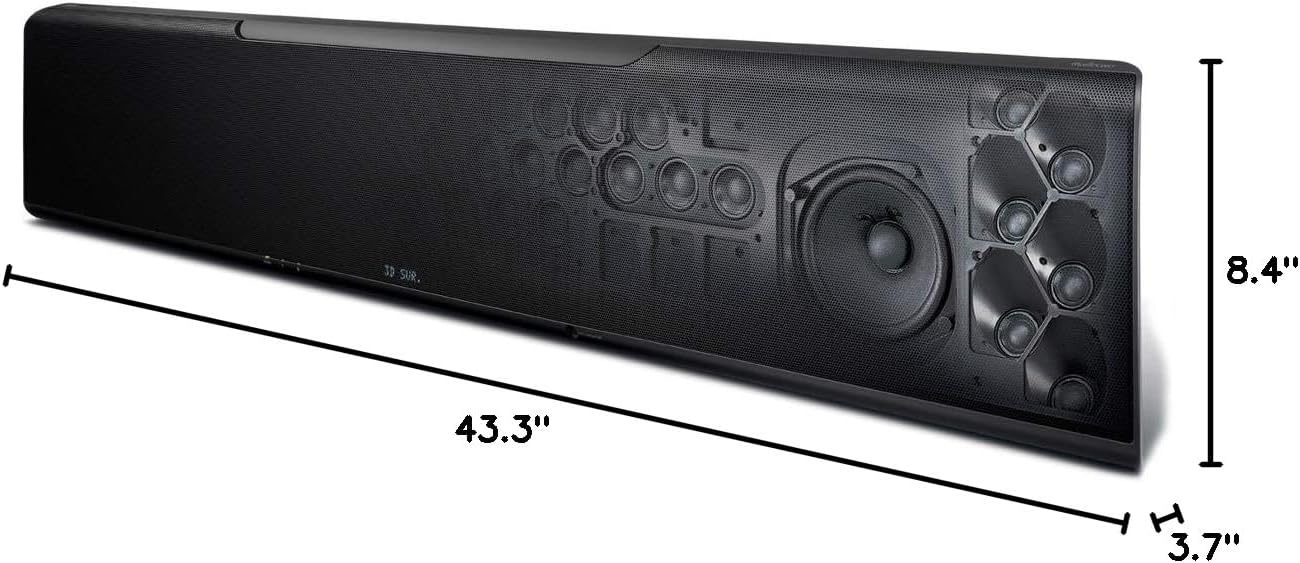
Diagram showing the dimensions of the Yamaha YSP-5600BL Sound Bar: 43.3 inches wide, 8.4 inches high, and 3.7 inches deep.
Кепилдик жана колдоо
For detailed warranty information, please refer to the warranty card included with your product or visit the official Yamaha Audio website. Yamaha provides customer support for product inquiries, technical assistance, and service needs.
A comprehensive user manual in PDF format is available online for further reference and detailed instructions. You can typically find this on the Yamaha Audio support page for the YSP-5600BL model.
For direct support, please contact Yamaha Audio customer service through their official channels.


