Introduction
Thank you for choosing the Spider Waterproof Bluetooth Speaker. This manual provides detailed instructions for the proper use, maintenance, and troubleshooting of your new speaker. Please read this manual thoroughly before operating the device to ensure optimal performance and longevity.
Коопсуздук маалыматы
- Динамикти экстремалдык температурага же түз күн нуруна узак убакытка калтырбаңыз.
- Спикерди түшүрүүдөн же катуу таасирлерге дуушар кылуудан качыңыз.
- Динамикти ажыратууга же өзгөртүүгө аракет кылбаңыз. Бул кепилдикти жокко чыгарат.
- Динамикти медициналык шаймандардан алыс кармаңыз.
- Динамикти сууга жакын жерде колдонуп жатканда, анын суу өткөрбөйт рейтингин сактоо үчүн бардык порттор бекем жабылганын текшериңиз.
Пакеттин мазмуну
Сураныч, пакетте төмөнкү нерселерди текшериңиз:
- Spider Waterproof Bluetooth Speaker (M-BTSP-L802)
- USB Charging Cable (USB-A to 3.5mm/USB-B)
- Карабин клип
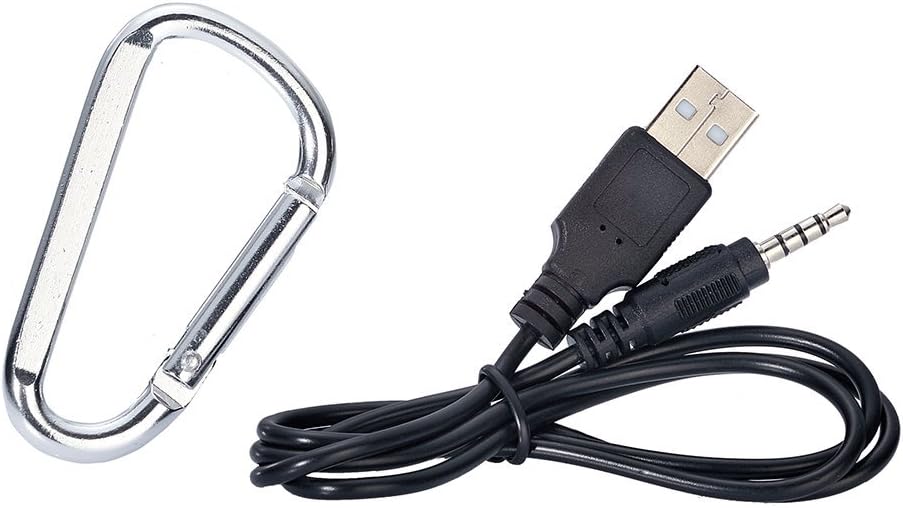
Image: Included USB charging cable and carabiner clip.
Продукт бүттүview
Динамиктин ар кандай бөлүктөрүн жана башкаруу элементтерин билип алыңыз.
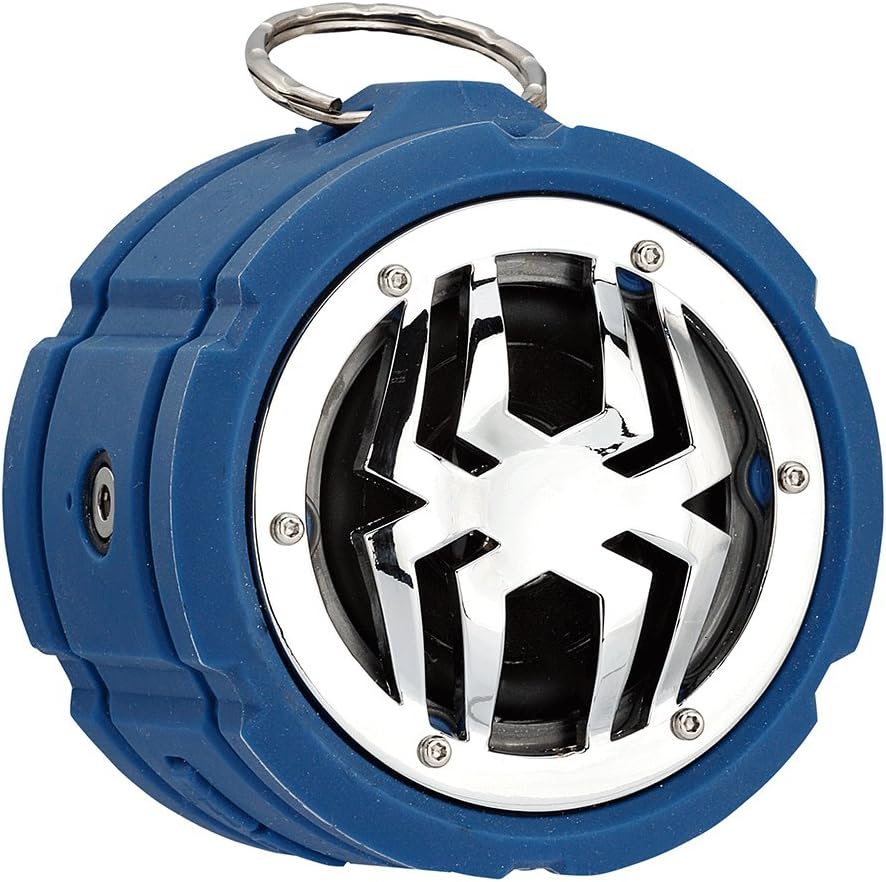
Сүрөт: алдыңкы view of the Spider Waterproof Bluetooth Speaker, showing the speaker grille with spider design and the top ring for the carabiner.
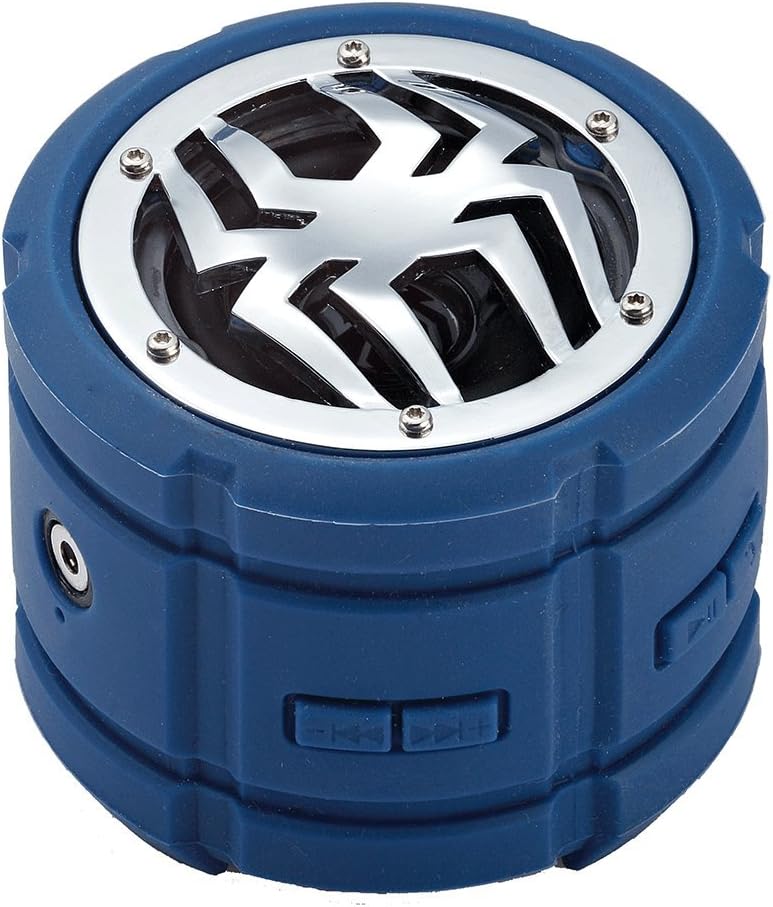
Сүрөт: каптал view of the speaker, highlighting the control buttons for power, volume, and track navigation.

Сүрөт: Арткы view of the speaker, showing the covered charging port and audio input jack.
Жайгашуу
1. Динамикти кубаттоо
Before first use, fully charge the speaker. Connect the small end of the USB charging cable to the speaker's charging port (located under the protective flap) and the USB-A end to a USB power adapter (not included) or a computer's USB port. The charging indicator light will illuminate during charging and turn off when fully charged.
2. Күйгүзүү / Өчүрүү
- Күйгүзүү үчүн: Press and hold the Power button (usually indicated by a power symbol) for approximately 3 seconds until you hear an audible prompt or see an indicator light.
- Өчүрүү үчүн: Үн чыккан сигнал чыкканга чейин же индикатор жарыгы өчкөнгө чейин Кубат баскычын болжол менен 3 секунд басып туруңуз.
3. Bluetooth Жупташтыруу
- Ensure the speaker is powered on and in Bluetooth pairing mode (indicated by a flashing LED light). If not, briefly press the Bluetooth button (if available) or power cycle the device.
- Мобилдик түзмөгүңүздө (смартфон, планшет, ноутбук) Bluetooth иштетиңиз жана жеткиликтүү түзмөктөрдү издеңиз.
- Select "Spider BT802" or similar name from the list of found devices.
- Once paired, the speaker will provide an audible confirmation, and the LED indicator will stop flashing and remain solid.
4. Connecting via Audio Jack (AUX)
For devices without Bluetooth, you can use the 3.5mm audio jack. Connect one end of a 3.5mm audio cable (not included) to the speaker's AUX-in port and the other end to your audio source's headphone jack. The speaker will automatically switch to AUX mode.
Иштеп жатат
Музыканы ойнотуу
- Ойнотуу/тындыруу: Press the Play/Pause button (usually a triangle or two vertical bars).
- Кийинки трек: Press the 'Next Track' button (usually a double arrow pointing right).
- Мурунку трек: Press the 'Previous Track' button (usually a double arrow pointing left).
- Көлөмү: Press the 'Volume Up' button (usually '+').
- Үнүн азайтуу: Press the 'Volume Down' button (usually '-').
Call Functions (Built-in Microphone)
The speaker features a built-in microphone, allowing you to answer calls hands-free when connected via Bluetooth.
- Чакырууга жооп берүү: Чалуу келгенде ойнотуу/тындыруу баскычын бир жолу басыңыз.
- Чакырууну аяктоо: Чалуу учурунда Play/Pause баскычын бир жолу басыңыз.
- Чакырууну четке кагуу: Чакыруу келгенде Ойнотуу/Тыныгуу баскычын 2 секунд басып туруңуз.
Техникалык тейлөө
- Тазалоо: Use a soft, dry cloth to clean the speaker. For stubborn dirt, a slightly damp кездеме колдонсо болот. Катуу химиялык заттарды же абразивдүү тазалагычтарды колдонбоңуз.
- Сактагыч: Динамикти узак убакыт бою колдонбогондо, түз күн тийбеген, кургак, салкын жерде сактаңыз.
- Батареяга кам көрүү: Батареянын иштөө мөөнөтүн узартуу үчүн, динамикти тез-тез толук зарядсыздандырбаңыз. Колдонулбаса дагы, аны үзгүлтүксүз кубаттап туруңуз.
Проблемаларды чечүү
| Көйгөй | Мүмкүн себеп | Чечим |
|---|---|---|
| Динамик күйбөйт. | Батарея аз. | Динамикти толук заряддаңыз. |
| Bluetooth аркылуу жупташтыруу мүмкүн эмес. | Динамик жупташтыруу режиминде эмес; Түзмөктүн Bluetooth функциясы өчүк; Түзмөктөн өтө алыс. | Динамик жупташтыруу режиминде экенин текшериңиз; Түзмөгүңүздө Bluetooth'ду күйгүзүңүз; Динамикти түзмөккө жакыныраак жылдырыңыз (10 метр аралыкта). |
| Үн жок. | Үнү өтө төмөн; Туура эмес киргизүү режими; Түзмөк ойнотулбай жатат. | Increase speaker and device volume; Ensure correct mode (Bluetooth/AUX); Check if audio is playing on your device. |
| Үн сапаты начар. | Interference; Low battery. | Move away from other electronic devices; Charge the speaker. |
Техникалык шарттар
| Өзгөчөлүк | Деталь |
|---|---|
| Модель номери | M-BTSP-L802 |
| Байланыш технологиясы | Bluetooth, 3.5 мм аудио уяча |
| Өзгөчөлүктөр | Waterproof, Built-in Microphone, Multi-room Audio (if supported by source) |
| Аудио чыгаруу режими | Стерео |
| Динамиктин максималдуу кубаттуулугу | 80 Ватт |
| Күтүү убактысы | 120 саат |
| Өлчөмдөрү (болжол менен) | 11.68 x 9.4 x 7.62 см |
| Салмагы (болжол менен) | 362.87 г |
| Түс | Көк |
Кепилдик жана колдоо
This Spider Waterproof Bluetooth Speaker (Model M-BTSP-L802) comes with a 1 жылдык Өндүрүүчүнүн Кепилдиги сатып алынган күндөн тартып. Бул кепилдик нормалдуу колдонуудагы материалдардагы жана жасалгадагы кемчиликтерди камтыйт.
Кепилдик төмөнкүлөрдү камтыбайт:
- Кырсыктан, кыянаттыктан, туура эмес пайдалануудан, суу ташкынынан, өрттөн, жер титирөөдөн же башка тышкы себептерден келип чыккан зыян.
- Damage caused by operating the product outside the permitted or intended uses described by Spider.
- Damage caused by service performed by anyone who is not a representative of Spider or an authorized Spider Service Provider.
For warranty claims or technical support, please contact your retailer or the manufacturer directly. Please retain your proof of purchase for warranty validation.