1. Киришүү
Thank you for choosing the Aetertek AT-919C-1 Remote Dog Training Collar. This manual provides essential information for the safe and effective use of your new training system. This system is designed to assist in training and behavior modification for medium to large dogs, offering remote control over sound, vibration, and static correction modes, along with an automatic anti-bark function. Please read this manual thoroughly before operating the device.

Image 1.1: Aetertek AT-919C-1 Remote Dog Training Collar components.
2. Пакеттин мазмуну
Төмөндө тизмеленген нерселердин баары пакетиңизге камтылганын текшериңиз:
- 1 x Remote Transmitter
- 1 x Receiver Collar (for 1-Dog Kit)
- 1 x Adjustable Collar Strap
- 1 x Dual-Head Charging Cable
- 1 x Set of Long Contact Points
- 1 x Set of Short Contact Points
- 1 x Сыноочу жарык куралы
- 1 х Колдонуучунун колдонмосу (бул документ)

Image 2.1: All components included in the 1-Dog Kit.
3. Продукт бүтүп калдыview
3.1 Remote Transmitter
- LCD дисплей: Shows battery level, intensity level, and selected dog.
- Режим баскычтары: Separate buttons for Sound, Vibration, and Static Correction.
- Интенсивдүүлүктү жөндөө: Buttons to increase or decrease correction levels.
- Dog Selection Button: Switch between Dog 1 and Dog 2 (if using a 2-dog system).
- Magnetic Induction Power Switch: For turning the remote on/off.
- Кур клип: Ыңгайлуу алып жүрүү үчүн.

Image 3.1: Remote Transmitter layout.
3.2 Receiver Collar
- Байланыш пункттары: Deliver static correction and vibration. Choose long or short based on dog's coat.
- Magnetic Induction Power Switch: For turning the receiver on/off.
- Заряддоо порту: Ресивердин батареясын кайра заряддоо үчүн.
- Суу өткөрбөйт дизайн: 100% waterproof and submersible.
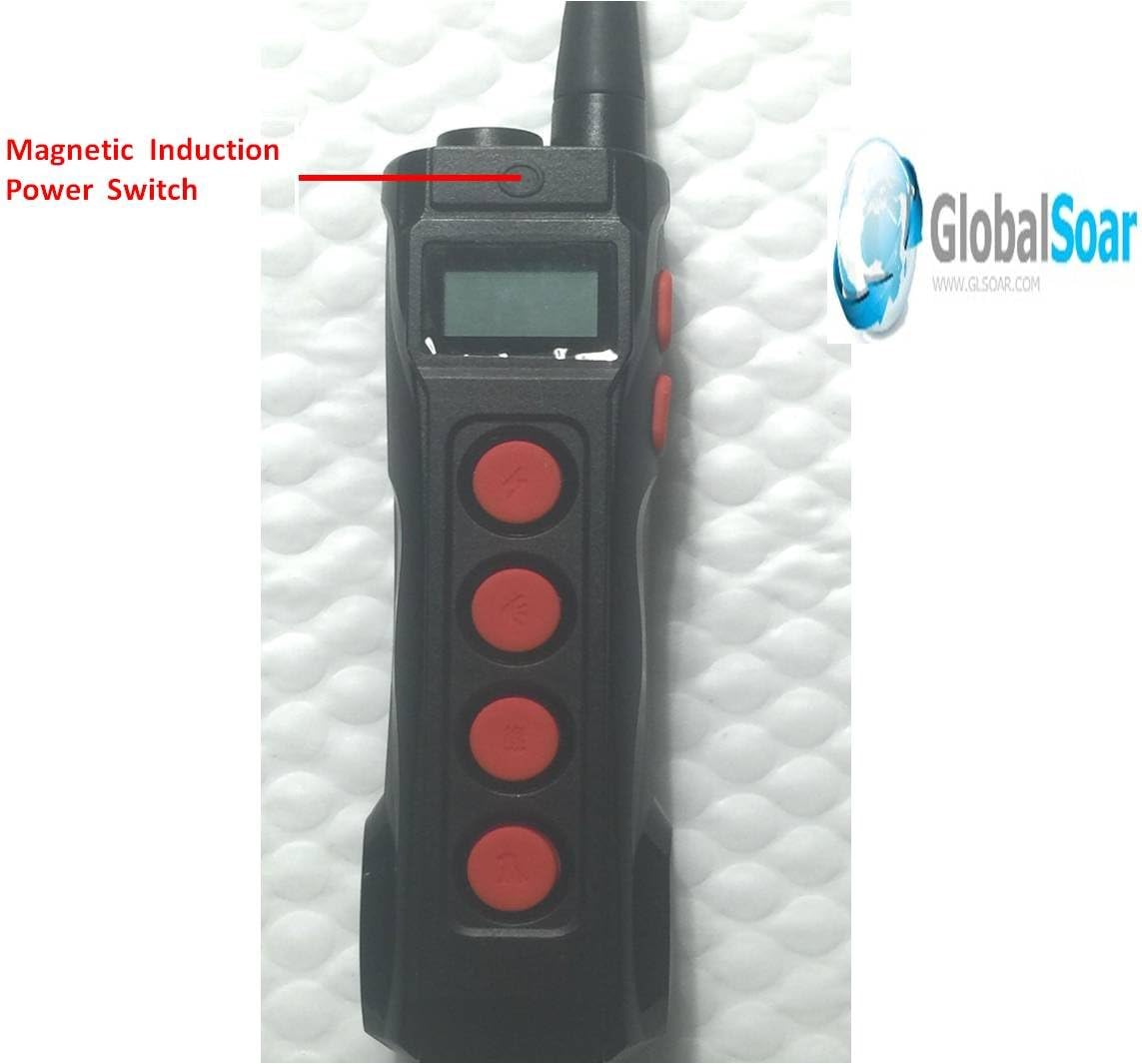
Image 3.2: Receiver Collar with magnetic induction power switch.

Image 3.3: Remote and Receiver Collar connection points.
4. Орнотуу
4.1 Аппараттарды заряддоо
- Connect the dual-head charging cable to both the Remote Transmitter and the Receiver Collar.
- Кабелдин USB учунун стандарттуу USB кубат адаптерине (кошумча эмес) же компьютердин USB портуна сайыңыз.
- Allow both devices to charge fully before first use. The indicator lights will change to show charging status (refer to specific light indicators in the full manual for details).

Image 4.1: Receiver Collar charging port.
4.2 Attaching Contact Points
Select the appropriate length of contact points (long or short) based on your dog's coat thickness. The contact points must make direct contact with your dog's skin for effective correction.
- For dogs with short coats, use the shorter contact points.
- For dogs with thick or long coats, use the longer contact points.
4.3 Powering On/Off and Pairing
- To power on the Remote Transmitter and Receiver Collar, hold the magnetic induction power switch on each device until the indicator light illuminates.
- To power off, repeat the process until the indicator light turns off.
- The devices are typically pre-paired. If re-pairing is needed (e.g., after a full discharge or adding a second collar), follow the specific pairing instructions in the full manual. Generally, this involves holding a button on the receiver while the remote is in pairing mode.
5. Иштөө режимдери
The Aetertek AT-919C-1 offers three distinct training modes: Sound, Vibration, and Static Correction. These can be used independently or in combination to achieve desired training outcomes.
5.1 Sound (Beep) Mode
- Use the dedicated Sound button on the remote.
- There are 10 adjustable beep sound levels. Start with a low level and increase as needed.
- Ideal for issuing warnings, calling your dog, or reinforcing positive behavior.
5.2 Vibration Mode
- Activate using the dedicated Vibration button on the remote.
- This mode offers 1 strong and humane vibration level.
- Effective for gaining your dog's attention or as a stronger warning than the sound mode.
5.3 Static Correction (Shock) Mode
- Engage with the dedicated Static Correction button on the remote.
- Features 10 levels of progressive static correction, adjusting both intensity and duration.
- Always start at the lowest level and gradually increase only if necessary. Use this mode for serious behavior issues that other modes have not corrected.
5.4 Automatic Anti-Bark Function
- The receiver collar includes an automatic anti-bark feature.
- This function can be switched ON or OFF as desired. Refer to the full manual for specific instructions on activating/deactivating this feature.
5.5 Dog Selection
If you have purchased a 2-Dog Kit or an additional receiver collar, you can switch between controlling Dog 1 and Dog 2 using the dedicated dog selection button on the remote transmitter.
6. Жаканы орнотуу
Proper fit of the receiver collar is crucial for its effectiveness and your dog's comfort and safety.
- Position the receiver on the center of your dog's neck, directly under the chin.
- Ensure the contact points are touching your dog's skin. You may need to part thick fur to ensure good contact.
- The collar should be snug, but not too tight. You should be able to fit two fingers snugly between the collar strap and your dog's neck.
- Avoid leaving the collar on for more than 12 hours a day to prevent skin irritation.
7. Тренинг боюнча кеңештер
Effective training requires consistency, patience, and positive reinforcement. The Aetertek training collar is a tool to aid in this process, not a substitute for proper training techniques.
- Негизги буйруктар менен баштаңыз: Ensure your dog understands basic commands like 'sit', 'stay', and 'come' before introducing the collar for correction.
- Оң бекемдөө: Always reward desired behaviors with praise, treats, or affection.
- ырааттуулугу негизги болуп саналат: Use the collar consistently for specific behaviors you want to correct.
- Low Levels First: Always begin with the lowest effective correction level and only increase if necessary.
- Кыска тренинг сессиялары: Итиңиздин кызыгуусун сактоо үчүн машыгуу сессияларын кыска жана позитивдүү өткөрүңүз.

Сүрөт 7.1: Мисamples of well-behaved dogs after training.
Video 7.1: Dog Training Collar with 3 Training Modes. This video demonstrates the use of a dog training collar with sound, vibration, and static correction modes, showing how to adjust levels and apply corrections for effective training.
8. Техникалык тейлөө
- Тазалоо: Ресивердин жакасын жана байланыш жерлерин жарнама менен дайыма тазалап туруңузamp cloth. Ensure all components are dry before storage or next use.
- Skin Check: Inspect your dog's neck daily for any signs of irritation or sores from the contact points. If irritation occurs, discontinue use until the skin heals.
- Батареяга кам көрүү: Fully charge the devices when not in use for extended periods to prolong battery life.
9. Кыйынчылыктарды
- Кубат жок: Ensure both the remote and receiver are fully charged. Check the charging cable and adapter.
- No Correction: Verify the receiver is powered on and the contact points are making proper skin contact. Increase the intensity level gradually.
- Remote Not Controlling Receiver: Re-pair the remote and receiver according to the full manual's instructions. Ensure they are within the specified range.
- Dog Not Responding: Check the collar fit and ensure the correction level is appropriate for your dog's temperament and the situation. Re-evaluate training methods.
10. Техникалык шарттар
- Модель номери: AT-919C-1
- Бренд: Аэтертек
- Элемент Салмагы: 1.06 фунт
- Диапазон: 1100 ярдга чейин (болжол менен 1000 метр)
- Суу өткөрбөйт: 100% Waterproof and Submersible Receiver Collar
- Батарея түрү: Литий полимери (кошулган)
- Машыгуу режимдери: Sound (Beep), Vibration, Static Correction
- Шок деңгээли: 10 progressive levels (intensity and duration adjustable)
- Дирилдөө деңгээли: 1 level (strong and humane)
- Beep Levels: 10 жөнгө салынуучу деңгээл
- Auto Anti-Bark: Yes (ON/OFF switchable)
- Материал: Metal, Polyurethane
- Максаттуу аудитория: Орточо жана чоң иттер
11. Кепилдик жана колдоо
For warranty information, technical support, or any questions regarding your Aetertek AT-919C-1 Remote Dog Training Collar, please refer to the contact information provided in your product packaging or visit the official Aetertek webсайт. Сатып алуу квитанциясын кепилдик дооматтары үчүн сатып алуунун далили катары сактаңыз.


