1. Киришүү
тандаганыңыз үчүн рахмат AmpliVox S1695 Wireless Hand Microphone. This manual provides essential information for the proper setup, operation, and maintenance of your device. Please read this manual thoroughly before using the microphone to ensure optimal performance and safety.
The AmpliVox S1695 is a wireless handheld microphone with a built-in transmitter, offering 16 UHF channels for clear and reliable audio transmission. It is designed to work seamlessly with compatible AmpliVox sound systems, such as the Executive Sound Column, Presidential Plus, or Elite lectern SW models.
2. Коопсуздук боюнча маанилүү маалымат
- Батареянын коопсуздугу: Use only the specified type and number of batteries. Ensure correct polarity (+/-). Do not mix old and new batteries, or different types of batteries. Remove batteries if the device will not be used for an extended period.
- Интерференция: Wireless devices are susceptible to interference. To minimize this, ensure no other transmitters are broadcasting on the same frequency. UHF frequencies are generally less prone to environmental noise.
- Экологиялык шарттар: Do not expose the microphone to extreme temperatures, humidity, water, or direct sunlight. Avoid dropping or subjecting the device to strong impacts.
- Тазалоо: Микрофонду жумшак, кургак чүпүрөк менен тазалаңыз. Суюк тазалоочу каражаттарды же аэрозольдорду колдонбоңуз.
- Тейлөө: Do not attempt to open or service the microphone yourself. Refer all servicing to qualified AmpliVox personnel.
3. Пакеттин мазмуну
Пакетти ачкандан кийин, бардык буюмдар бар экенин жана жакшы абалда экендигин текшериңиз:
- AmpliVox S1695 Wireless Hand Microphone (1)
- Колдонуучунун колдонмосу (бул документ)
- Note: Batteries are required and sold separately.
4. Бөлүктөрдү идентификациялоо
Familiarize yourself with the components of your AmpliVox S1695 Wireless Hand Microphone:
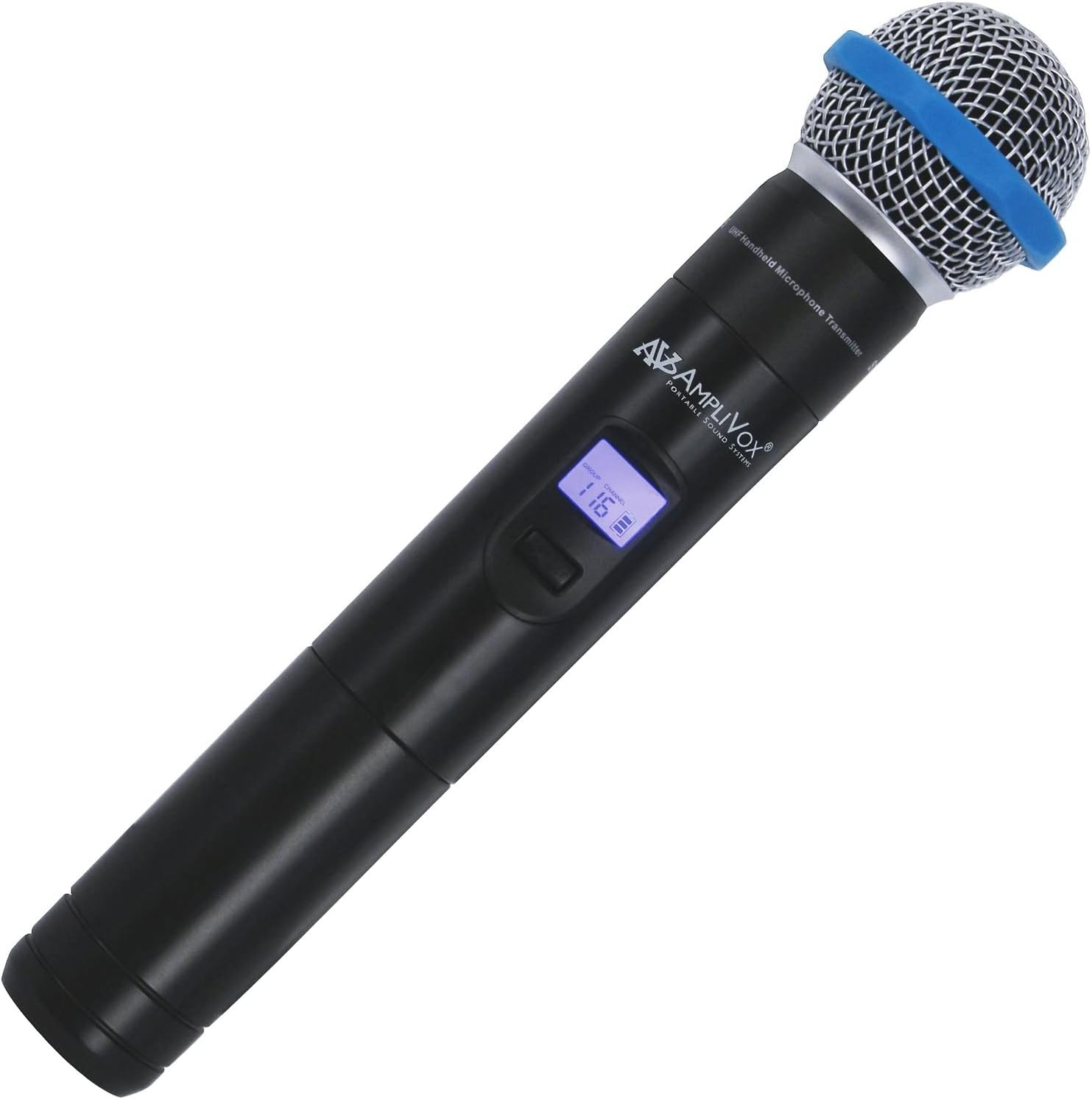
1-сүрөт: AmpliVox S1695 Wireless Hand Microphone. This image shows the black handheld microphone with a silver mesh grille and a blue ring near the top. A small digital display is visible on the body, showing "GROUP" and "CHANNEL" with the number "116". The AmpliVox logo is also visible.
- Микрофон торлору: Protects the microphone capsule and helps reduce plosive sounds.
- Дисплей экраны: Shows current group, channel, and battery status.
- Кубат/Үнсүз баскычы: Күйгүзүү/өчүрүү үчүн басып кармап туруңуз. Үнсүз/үнсүз кылуу үчүн кыска басыңыз.
- Channel/Group Selection Buttons: Used to change frequency channels or groups.
- Батарея бөлүмү: Located at the bottom, houses the required batteries.
5. Орнотуу
5.1. Батареяны орнотуу
The AmpliVox S1695 requires two batteries (not included). Ensure you use the correct type and insert them with the proper polarity.
- Батарея бөлүмүнө жетүү үчүн микрофондун астыңкы капкагын бурап чыгарыңыз.
- Insert two fresh batteries, observing the polarity markings (+ and -) inside the compartment.
- Астыңкы капкакты микрофонго бекем бурап бекитиңиз.
5.2. Кабыл алгыч менен жупташуу
This microphone is designed for use with compatible AmpliVox wireless receivers (e.g., those found in Executive Sound Column, Presidential Plus, or Elite lectern SW models). Refer to your receiver's manual for specific pairing instructions. Generally, the process involves:
- Ensure both the microphone and the receiver are powered on.
- Select a clear channel on the microphone using the channel/group selection buttons.
- Tune your AmpliVox receiver to the same frequency channel as the microphone.
- Confirm successful pairing by checking the receiver's indicator lights or display.
Note: The microphone offers 16 UHF channels with a frequency range from 584 MHz to 602.45 MHz. Choose a channel that is free from local interference.
6. Иштөө нускамалары
6.1. Күйгүзүү / Өчүрүү
- үчүн күйгүзүү the microphone, press and hold the Power/Mute button until the display illuminates.
- үчүн өчүрүү the microphone, press and hold the Power/Mute button until the display turns off.
6.2. Үнсүз функция
- While the microphone is powered on, a short press of the Power/Mute button will toggle the mute function.
- When muted, the microphone will not transmit audio, but it will remain powered on.
6.3. Канал тандоо
Use the Channel/Group Selection buttons (usually up/down arrows) to cycle through the available 16 UHF channels. Ensure the selected channel matches that of your AmpliVox receiver to avoid interference and ensure proper audio transmission.
6.4. Колдонуу боюнча кеңештер
- Үндүн сапатын оптималдаштыруу үчүн микрофонду оозуңуздан болжол менен 2-6 дюйм алыстыкта кармаңыз.
- Avoid covering the microphone grille with your hand, as this can affect sound pickup.
- Monitor the battery indicator on the microphone's display and replace batteries promptly when low.
7. Техникалык тейлөө
- Тазалоо: Wipe the exterior of the microphone with a soft, dry, lint-free cloth. Do not use abrasive cleaners, solvents, or chemical sprays.
- Сактагыч: When not in use, store the microphone in a cool, dry place, away from direct sunlight and extreme temperatures. Remove batteries if storing for an extended period to prevent leakage.
- Батареяны алмаштыруу: Replace batteries as soon as the low battery indicator appears on the display to ensure uninterrupted performance.
8. Кыйынчылыктарды
| Көйгөй | Мүмкүн себеп | Чечим |
|---|---|---|
| Микрофондон үн чыкпайт. |
|
|
| Distortion or static. |
|
|
| Кыска иштөө диапазону. |
|
|
9. Техникалык шарттар
| Өзгөчөлүк | Деталь |
|---|---|
| Модель номери | Ampli-S1695 |
| Байланыш технологиясы | Зымсыз (UHF) |
| Жыштык диапазону | 584 МГцден 602.45 МГцке чейин |
| Каналдардын саны | 16 |
| Микрофон форма фактору | Колдук |
| Полярдык үлгү | Бир багыттуу |
| Power Source | Battery Powered (Requires two batteries) |
| Түс | Кара |
| Элемент Салмагы | 1.03 фунт (болжол менен 0.47 кг) |
| Пакеттин өлчөмдөрү | 10 x 8 x 4 дюйм (болжол менен 25.4 x 20.3 x 10.2 см) |
| UPC | 800188018107 |
| Өндүрүүчү | AmpliVox Sound Systems |
10. Кепилдик жана колдоо
For information regarding warranty coverage, technical support, or service inquiries for your AmpliVox S1695 Wireless Hand Microphone, please refer to the warranty card included with your purchase or visit the official AmpliVox website. You may also contact AmpliVox customer service directly for assistance.
AmpliVox Sound Systems
www.amplivox.com


