1. Киришүү
This manual provides comprehensive instructions for the installation, operation, and maintenance of your Viper 5305V 2-Way LCD Vehicle Security and Remote Start System. Please read this manual thoroughly before attempting any installation or operation to ensure proper functionality and safety.
The Viper 5305V system offers advanced vehicle security, keyless entry, and remote start capabilities, providing convenience and protection for your vehicle.
2. Пакеттин мазмуну
Сиздин пакетте бардык компоненттер бар экенин текшериңиз:
- Viper 5305V Control Module
- 2-Way LCD Remote Control (P/N 5305V)
- 1-Way 4-Button Remote Control
- Сирена
- Электр өткөргүчтөрү
- Шок сенсору
- Ойготкуч антенна
- LED көрсөткүч
- Кайра орнотуу
- Engine Cut-Off Relay
- Колдонуучунун Колдонмосу (бул документ)
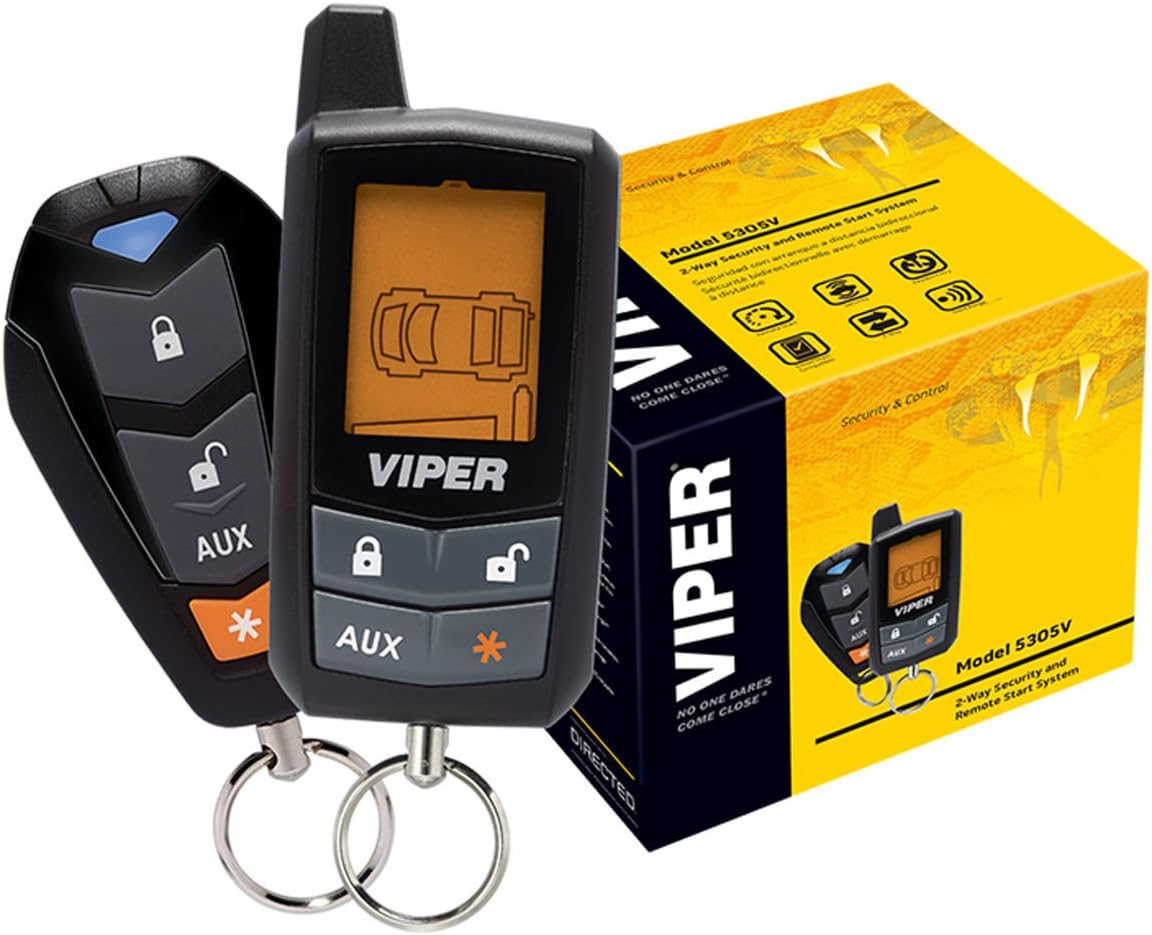
Figure 1: Viper 5305V 2-Way LCD Remote and 1-Way Remote with product box. The 2-way remote features an LCD screen displaying vehicle status, while the 1-way remote offers basic functions. The product box is yellow with Viper branding.

Figure 2: Viper 5305V Control Module and various wiring harnesses. The central black module is the main control unit, surrounded by multiple colored wires for different connections within the vehicle's electrical system.

Figure 3: Viper 5305V Siren. This black siren unit is designed to produce loud audible alerts when the alarm is triggered, featuring a red speaker cone and attached wiring.
3. Орнотуу жана орнотуу
Кесиптик орнотуу сунушталат: Due to the complexity of vehicle electrical systems, professional installation by a certified technician is highly recommended for the Viper 5305V system. Incorrect installation can lead to vehicle damage or system malfunction.
3.1. Алыстан башкаруунун батареясын орнотуу
- 2 тараптуу LCD пультунун арткы бетиндеги батарея бөлүмүн табыңыз.
- Бөлүмдүн капкагын ачыңыз.
- Туура полярдуулукту (+/-) текшерип, бир AAA батарейкасын салыңыз.
- Бөлүмдүн капкагын бекем жабыңыз.
Video 1: EASYGUARD 2-Way Car Alarm with Remote Start EC201-M9. This video demonstrates the unboxing and battery installation for a similar 2-way remote control, showing the components included in a typical car alarm system. Note: While the video shows a different brand, the battery installation process for 2-way LCD remotes is generally similar.
3.2. Module Flashing and Configuration (for installers)
For installers, the Blade module and Compustar controller may require flashing and configuration. This process typically involves connecting the module to a computer and using specialized software.
Video 2: Idatalink BLADE Remote Start/Security Bypass Module Flashing. This video provides a step-by-step guide for flashing and updating a Blade module and Compustar controller, demonstrating the necessary hardware and software interface for configuration.
4. Иштөө нускамалары
The Viper 5305V system utilizes a 2-Way LCD remote for command confirmation and vehicle status updates, and a 1-Way remote for basic functions.
4.1. Remote Control Functions (2-Way LCD Remote)
- Кулпу: Press the lock button once to arm the security system and lock the doors. The remote will confirm the command.
- Кулпуну ачуу: Press the unlock button once to disarm the security system and unlock the doors. The remote will confirm the command.
- Алыстан баштоо: Press and hold the remote start button (often indicated by a star or specific icon) for approximately 3 seconds to start the vehicle remotely. The remote will confirm the engine start.
- Магистралдык релиз: Press and hold the trunk release button (often indicated by a trunk icon) for approximately 3 seconds to open the vehicle's trunk.
- Паника/Унаа жайгашкан жерди аныктоочу: Press the panic button (often indicated by a siren icon) to activate the siren and flash the parking lights, helping to locate your vehicle or deter potential threats.
- Жардамчы функциялары: The AUX button can be programmed for various additional functions, such as controlling power windows or other accessories. Refer to your installer for specific programming.

Сүрөт 4: Алдыңкы view of the Viper 5305V 2-Way LCD Remote Control. The remote features an LCD screen displaying vehicle status, along with lock, unlock, and auxiliary function buttons.

Figure 5: Viper 5305V 1-Way 4-Button Remote Control. This remote provides basic functions such as lock, unlock, and auxiliary controls without an LCD display.
Video 3: Viper 5305V Remote Control Demonstration. This video shows a user demonstrating the lock, unlock, trunk release, and remote start functions of the Viper 5305V 2-Way LCD remote control on a vehicle. The remote's screen updates with the status of each command.
4.2. Driving Away After Remote Start
After remotely starting your vehicle, follow these steps to drive away:
- Unlock the vehicle using the remote control.
- Унааны киргизиңиз.
- Insert the key into the ignition and turn it to the "ON" or "RUN" position (do not turn to "START").
- Press the brake pedal. The remote start system will disengage, and the vehicle will remain running under key control.
Note: If the brake pedal is pressed before the key is turned to "ON" or "RUN", the vehicle may shut off. Simply restart the vehicle with the key.
Video 4: Compustar Prime T9 Basic Operation. This video demonstrates the basic operation of a Compustar remote start system, including locking, unlocking, trunk release, and the procedure for driving away after a remote start. The principles shown are applicable to the Viper 5305V system.
5. Техникалык тейлөө
5.1. Алыстан башкаруунун батареясын алмаштыруу
When the battery icon on your 2-Way LCD remote indicates low power, replace the AAA battery to ensure optimal performance and range.
5.2. System Care
- Пульттарды кургак жана өтө жогорку температурадан алыс кармаңыз.
- Avoid dropping or subjecting remote controls to severe impact.
- Periodically check all wiring connections for security (professional inspection recommended).
6. Кыйынчылыктарды
| Көйгөй | Мүмкүн себеп | Чечим |
|---|---|---|
| Алыстан башкаруу жооп бербей жатат. | Low or dead battery in remote. | Алыстан башкаруунун батареясын алмаштырыңыз. |
| Vehicle not remote starting. | Vehicle in Valet Mode; Hood pin switch open; Low battery voltage. | Exit Valet Mode; Ensure hood is closed; Check vehicle battery. |
| Ойготкуч күтүүсүздөн иштеп баштайт. | Shock sensor sensitivity too high; Faulty door/hood/trunk pin switch. | Adjust shock sensor sensitivity; Inspect and repair pin switches. |
| Азайтылган алыскы аралык. | Low remote battery; Environmental interference; Antenna obstruction. | Replace remote battery; Move away from interference sources; Check antenna placement. |
7. Техникалык шарттар
- Модел: Viper 5305V
- Алыстан башкаруу түрү: 2-Way LCD, 1-Way 4-Button
- Максималдуу диапазон: Up to 0.4 Miles (approximately 700 yards)
- Siren Noise Level: 125 децибел
- Алыскы батарея: 1 AAA battery required (for 2-Way LCD remote)
- Продукциянын өлчөмдөрү: 6 x 6 x 6 дюйм
- Элемент Салмагы: 2 фунт
- Шайкеш түзмөктөр: Viper SmartStart (optional module required)
8. Кепилдик жана колдоо
8.1. Чектелген Өмүр бою кепилдик
The Viper 5305V system comes with a Limited Lifetime Warranty. Please retain your proof of purchase for warranty claims. For full warranty details, refer to the documentation provided with your product or visit the official Viper webсайт.
8.2. Техникалык колдоо
For technical assistance, troubleshooting, or professional installation inquiries, please contact your authorized Viper dealer or visit the official Viper webсайт: www.viper.com
Тектеш документтер - 5305V
 |
Viper 4105V колдонуучусунун колдонмосу: Алыстан иштетүү жана ачкычсыз кирүү системасы Бул колдонуучу үчүн колдонмо Viper 4105V алыстан иштетүү жана ачкычсыз кирүү системасын иштетүү, орнотуу жана техникалык тейлөө боюнча кеңири маалымат берет. Анда функциялар, коопсуздук чаралары, мүчүлүштүктөрдү оңдоо жана кепилдиктин чоо-жайы камтылган. |
 |
Viper 5101 Ачкычсыз кирүү үчүн алыстан иштетүүчү түзмөктүн колдонуучуга арналган колдонмосу Directed Electronics компаниясынын Viper 5101 алыстан иштетүү жана ачкычсыз кирүү системасы боюнча толук колдонмо. Унааңыздын коопсуздугу жана ыңгайлуулугу үчүн орнотуу, иштетүү, өркүндөтүлгөн функциялар, коопсуздук чаралары жана мүчүлүштүктөрдү оңдоо жөнүндө билип алыңыз. |
 |
VIPER D9657V Owner's Guide: Features, Commands, and Operation Comprehensive owner's guide for the VIPER D9657V car alarm and remote start system. Learn about features, remote control commands, installation, warranty, and system operation. |
 |
VIPER Model 2103V ээсинин колдонмосу VIPER Model 2103V тутумунун ээсинин колдонмосу, анын өзгөчөлүктөрү, иштеши жана кепилдик маалыматы. Алыстан башкаруу каражаттары жана коопсуздук чаралары боюнча нускамаларды камтыйт. |
 |
Viper 3105V колдонуучусунун колдонмосу: Коопсуздук системасынын функциялары жана иштеши Viper 3105V коопсуздук системасы боюнча толук ээсинин колдонмосу. Алыстан башкаруу функциялары, системаны тейлөө, мамлекеттик эрежелер жана кепилдик жөнүндө маалымат алыңыз. |
 |
Viper 3606V колдонуучусунун колдонмосу: Унаанын коопсуздук системасынын иштеши жана функциялары Viper 3606V унаасынын коопсуздук жана ачкычсыз кирүү системасы үчүн колдонуучунун колдонмосу. Directed сайтынан алыстан башкаруу функциялары, системанын буйруктары, коопсуздук жана кепилдик жөнүндө билип алыңыз. |