Introduction
The Cree Connected LED bulb is designed to provide an easy-to-use and cost-effective solution for customizing lighting in your home. This smart bulb can be controlled from anywhere, offering convenience and flexibility. It integrates with compatible home automation systems, allowing you to manage your lighting settings via an app on your iOS or Android device.

The Cree Connected LED bulb offers convenient control from anywhere, enhancing your home lighting experience.
Коопсуздук маалыматы
Сураныч, бул өнүмдү орнотуудан же колдонуудан мурун бардык коопсуздук нускамаларын окуп, түшүнүңүз. Бул нускамаларды аткарбоо электр шокуна, өрткө же башка коркунучтарга алып келиши мүмкүн.
- Үй ичинде гана колдонуу: Бул лампа кургак жерлерде имараттын ичинде колдонуу үчүн иштелип чыккан. Нымдуу же кургак жерлерде колдонбоңуз.amp чөйрөлөр.
- Тиркелген жабдуулар үчүн эмес: Do not use this bulb in fully enclosed luminaires or fixtures, as this can trap heat and shorten the bulb's lifespan.
- Өнүгүү LED: This bulb is dimmable, but it is not recommended for use with traditional wall dimmers. Control dimming via a compatible smart hub and app.
- Орнотуудан мурун өчүрүү: Always turn off the power to the fixture at the circuit breaker before installing or removing the bulb.
- Тtage Шайкештик: Аппараттын көлөмүн камсыз кылыңызtage (120 Volts) matches the bulb's requirements.
- Этияттык менен мамиле кылуу: Avoid dropping the bulb or subjecting it to excessive force.
Пакеттин мазмуну
The package for your Cree Connected LED Smart Bulb typically includes:
- 1 x Cree Connected LED Smart Bulb

The product packaging for the Cree Connected LED Smart Bulb.
Жайгашуу
To set up your Cree Connected LED Smart Bulb, you will need a compatible ZigBee certified hub (e.g., Wink, SmartThings, WeMo, or Alexa devices with built-in ZigBee hub like Echo Plus, Echo Studio, Echo Show 2nd Gen).
- Лампаны орнотуу: Screw the Cree Connected LED bulb into a standard E26 light socket. Ensure the power to the fixture is off before installation.
- Prepare Your Hub: Place your compatible ZigBee hub into device discovery mode. Refer to your hub's specific instructions for this step. It is often recommended to initiate discovery mode on the hub мурун turning on the bulb.
- Power On the Bulb: Turn on the power to the light fixture. The bulb should light up. Your hub should detect and pair with the bulb automatically. A successful pairing is often indicated by the bulb blinking twice.
- Download and Launch App: Download the applicable app for your chosen hub (e.g., Wink app, SmartThings app, Alexa app) on your iOS or Android device. Launch the app and follow the on-screen instructions to add and configure your new bulb.
- Сиздин лампаңызды атаңыз: Once paired, you can name your bulb within the app for easy identification and control (e.g., "Living Room Lamp," "Kitchen Light").
Resetting the Bulb to Factory Defaults
If you experience difficulty pairing the bulb or need to reset it, follow this sequence:
- 1. Turn the bulb ӨЧҮРҮҮ 2 секундга.
- 2. Turn the bulb ON 1 секундга.
- 3. Turn the bulb ӨЧҮРҮҮ 2 секундга.
- 4. Turn the bulb ON 1 секундга.
- 5. Turn the bulb ӨЧҮРҮҮ 2 секундга.
- 6. Turn the bulb ON 1 секундга.
- 7. Turn the bulb ӨЧҮРҮҮ 2 секундга.
- 8. Turn the bulb ON.
After the fourth ON cycle, the light will blink twice, indicating a successful reset. You can then attempt to pair the bulb again.

Cree Lighting offers a variety of smart lighting solutions.
Иштөө нускамалары
Once your Cree Connected LED Smart Bulb is successfully paired with your hub, you can control it using the associated mobile application or voice commands through compatible smart assistants.
- Күйгүзүү/өчүрүү башкаруу: Use the app to turn the bulb on or off instantly.
- алсыздатуу: Adjust the brightness of the bulb to your desired level using the dimming controls within the app. The bulb offers a full range of dimming.
- Пландаштыруу: Set schedules for your lights to turn on or off automatically at specific times, or to simulate occupancy when you are away from home.
- Топтоо: Group multiple Cree Connected bulbs together to control them simultaneously as a single unit.
- Үн менен башкаруу: If connected to a voice assistant (e.g., Alexa), use voice commands to control your lights (e.g., "Alexa, turn on Living Room Light," "Alexa, dim Kitchen to 50%").
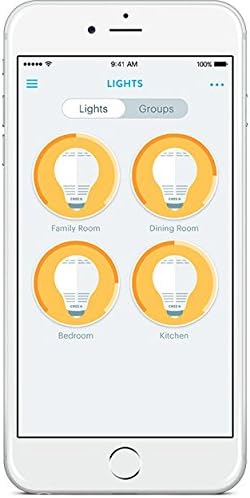
Control your smart bulbs easily through the mobile application.

Control your lights remotely for convenience and security.
Техникалык тейлөө
The Cree Connected LED Smart Bulb requires minimal maintenance. Follow these guidelines to ensure optimal performance and longevity:
- Тазалоо: Тазалоодон мурун лампочка муздак жана электр кубаты өчүрүлгөн экенин текшериңиз. Лампаны жумшак, кургак чүпүрөк менен сүртүңүз. Суюк же абразивдүү тазалоочу каражаттарды колдонбоңуз.
- Сактагыч: Эгерде лампаны узак убакытка сактасаңыз, аны баштапкы таңгагында же коргоочу идиште салкын, кургак жерде сактаңыз.
- Ашыкча ысып кетүүдөн сактаныңыз: Do not install the bulb in enclosed fixtures or areas with poor ventilation, as this can lead to overheating and reduce its lifespan.
Проблемаларды чечүү
If you encounter issues with your Cree Connected LED Smart Bulb, refer to the following common problems and solutions:
| Көйгөй | Мүмкүн болгон себеп / Чечим |
|---|---|
| Лампочка күйбөйт. |
|
| Bulb does not pair with the hub. |
|
| Bulb does not turn off completely (faint glow). |
|
| Bulb comes on at full brightness after being manually switched off and on. |
|
| Bulb loses connection or is unresponsive. |
|
Техникалык шарттар

Dimensions of the Cree Connected LED Smart Bulb.
| Өзгөчөлүк | Деталь |
|---|---|
| Бренд | Cree Lighting |
| Модель аты | Cree Connected LED |
| Бөлүмдүн номери | BA19-08027OMF-12CE26-1C100 |
| UPC | 849665009542 |
| Жарык түрү | LED |
| Ватtage | 11 ватт |
| Кызытуу эквиваленти Ватtage | 60 Ватт |
| Жарыктык | 815 Lumens |
| Ачык түс | жумшак ак |
| Түс температурасы | 2700 Келвин |
| Лампанын формасынын өлчөмү | A19 |
| Лампанын базасы | E26 |
| Тtage | 120 вольт |
| Байланыш технологиясы | ZigBee |
| Connectivity Protocol | Zigbee |
| Ички/тышкы колдонуу | Үй ичинде гана колдонуу |
| Орточо жашоо | 22 Years (25,000 hours rated life) |
| Продукциянын өлчөмдөрү | 2.4"W x 4.4"H |
| Материал | Айнек |
| Color Rendering Index | 80 |
Кепилдик жана колдоо
Кепилдик: The Cree Connected LED Smart Bulb comes with a 3-year limited warranty. Please refer to the product packaging for complete details regarding warranty coverage and terms.
Колдоо: For additional support, frequently asked questions, or to access the latest user guides and installation manuals, please visit the official Cree Lighting website. You may also find helpful resources in the PDF documents provided by the manufacturer:


