1. Киришүү
This manual provides comprehensive instructions for the proper setup, operation, and maintenance of your Manhattan 13-Port USB 2.0 Hub with Power Adapter, Model 162463. Please read this manual thoroughly before using the device to ensure optimal performance and safety.
The Manhattan 13-Port USB 2.0 Hub is designed to expand the USB connectivity of your computer, offering multiple ports for connecting various USB devices and dedicated high-power ports for charging. Its powered design ensures stable performance for all connected peripherals.

Сүрөт 1.1: Бурчтуу view of the Manhattan 13-Port USB 2.0 Hub, highlighting its compact design and multiple USB ports.
2. Пакеттин мазмуну
Verify that all items listed below are present in your product packaging. If any items are missing or damaged, please contact your retailer or Manhattan customer support.
- Manhattan 13-Port USB 2.0 Hub (Model 162463)
- Кубат адаптери (5V, 4A)
- USB 2.0 Type-A to Type-B Cable
- Колдонуучунун Колдонмосу (бул документ)

Image 2.1: The Manhattan 13-Port USB 2.0 Hub and its accessories as typically found in the retail box.
3. Продукциянын өзгөчөлүктөрү
The Manhattan 13-Port USB 2.0 Hub offers a robust solution for expanding your computer's USB capabilities:
- Thirteen (13) USB 2.0 Ports: камсыз кылат ample connectivity for multiple peripherals.
- Nine (9) Standard USB 2.0 Ports: For data transfer and standard charging of devices.
- Four (4) High-Power Charging Ports: Delivers up to 2.4A per port for faster charging of smartphones, tablets, and other power-hungry devices. These ports are activated by a dedicated button.
- Кубаттуу операция: Includes an external power adapter to ensure stable power delivery to all connected devices, preventing power-related issues.
- Жалпы шайкештик: Works with Windows and macOS operating systems.
- Маалыматтарды өткөрүү ылдамдыгы: Supports USB 2.0 speeds up to 480 Mbps.

Сүрөт 3.1: Жогорку view of the hub, illustrating its overall layout and the central power button for high-power charging ports.
4. Орнотуу нускамалары
Follow these steps to set up your Manhattan 13-Port USB 2.0 Hub:
- Кубат адаптерин туташтыруу: Insert the barrel connector of the included power adapter into the DC IN port on the back of the USB hub. Plug the power adapter into a standard electrical outlet. The hub requires external power for full functionality.
- Компьютериңизге туташуу: Use the provided USB 2.0 Type-A to Type-B cable. Connect the Type-B end to the upstream USB port on the hub and the Type-A end to an available USB port on your computer.
- Драйверди орнотуу (Автоматтык түрдө): Your operating system (Windows or macOS) should automatically detect and install the necessary drivers for the USB hub. No manual driver installation is typically required.
- USB түзмөктөрүн туташтыруу: Once the hub is recognized, you can connect your USB devices (e.g., keyboards, mice, external hard drives, flash drives) to any of the available USB ports on the hub.
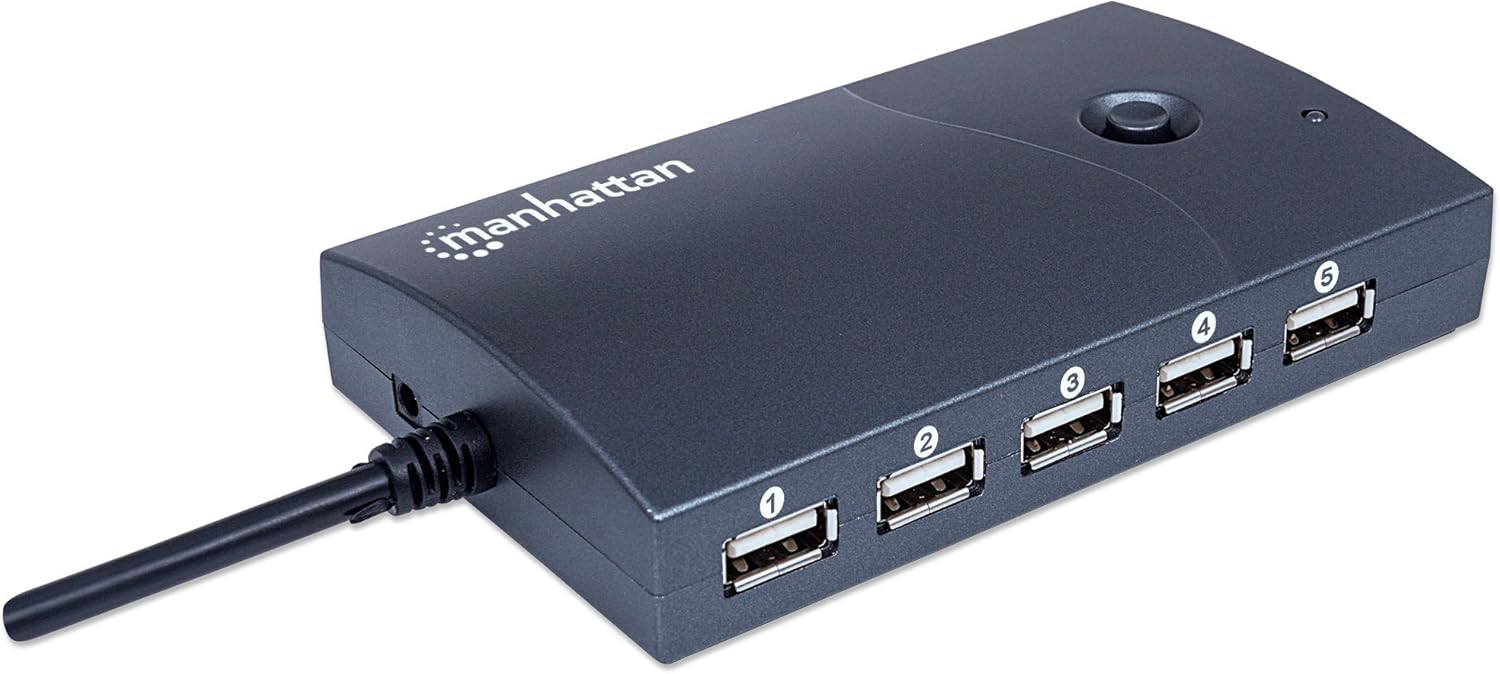
Сүрөт 4.1: Арткы view of the hub, indicating the power input port.

Image 4.2: The hub connected to a computer using the supplied USB cable.
5. Иштөө нускамалары
Using your Manhattan 13-Port USB 2.0 Hub is straightforward:
- Standard USB Ports (1-9): These ports are suitable for connecting most USB peripherals that require data transfer and standard power. Simply plug your device into an available port.
- High-Power Charging Ports (10-13): These four ports are designed for faster charging of mobile devices. They are identifiable by a lightning bolt icon next to the port. To activate these high-power charging ports, press the dedicated button located on the top of the hub. An indicator light will illuminate when these ports are active.
- Энергияны башкаруу: The external power adapter ensures that all connected devices receive sufficient power. Avoid connecting devices that collectively exceed the hub's total power output (20W / 4A at 5V) to prevent instability.
- Маалыматтарды өткөрүү: The hub operates at USB 2.0 speeds (up to 480 Mbps). While suitable for most peripherals, for maximum speed with USB 3.0 or higher devices, connect them directly to your computer's native USB 3.0+ ports if available.

Image 5.1: Detail of the high-power charging ports, indicated by the lightning bolt symbol.
6. Техникалык тейлөө
To ensure the longevity and proper functioning of your USB hub, follow these maintenance guidelines:
- Тазалоо: Disconnect the hub from power and your computer before cleaning. Use a soft, dry, lint-free cloth to wipe the exterior. Do not use liquid cleaners, aerosols, or abrasive materials.
- Сактагыч: Узак мөөнөткө пайдаланылбаганда, хабды түз күн нурунан жана өтө температурадан алыс салкын, кургак жерде сактаңыз.
- Экологиялык шарттар: Avoid exposing the hub to moisture, dust, or corrosive environments.
- Кабелдик башкаруу: Ensure cables are not kinked, pinched, or under excessive strain to prevent damage to the cables and ports.
7. Кыйынчылыктарды
If you encounter issues with your Manhattan 13-Port USB 2.0 Hub, refer to the following common problems and solutions:
| Көйгөй | Мүмкүн себеп | Чечим |
|---|---|---|
| Hub or connected device not recognized. |
|
|
| Devices are charging slowly or not at all. |
|
|
| Жай маалымат берүү ылдамдыгы. |
|
|
If the problem persists after trying these solutions, please contact Manhattan customer support for further assistance.
8. Техникалык шарттар
| Модель номери | 162463 |
| Бренд | Манхэттен |
| USB стандарты | USB 2.0 |
| Порттардын саны | 13 (9 standard, 4 high-power charging) |
| Маалыматтарды өткөрүү ылдамдыгы | 480 Мбит/сек чейин |
| Power Input | 5V DC, 4A (via included power adapter) |
| High-Power Charging Output | Up to 2.4A per port (for dedicated charging ports) |
| Өлчөмдөрү (L x W x Y) | 12.1 x 2.5 x 7.1 см (4.76 x 0.98 x 2.8 дюйм) |
| Салмагы | 147.42 г (0.32 фунт) |
| Түс | Кара |
| Операциялык системанын шайкештиги | Windows, macOS |
9. Кепилдик жана колдоо
Manhattan products are designed to meet high-quality standards. For information regarding warranty coverage, technical support, or to register your product, please visit the official Manhattan webсайтына кириңиз же жергиликтүү сатуучуңузга кайрылыңыз. Сатып алуунун далили катары сатып алуу дүмүрчөгүңүздү сактап коюңуз.
Онлайн колдоо: For the latest product information, drivers, and support, please visit www.manhattanproducts.com/support (Бул орун толтуруучу URL, please refer to your product packaging for the actual support webсайт).


