Introduction
Thank you for choosing the Acctim Auric 12340 LCD Alarm Clock. This manual provides detailed instructions on how to set up, operate, and maintain your new alarm clock. Please read this manual thoroughly before use to ensure proper functionality and longevity of your device.
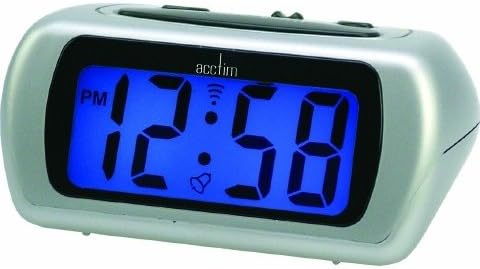
This image shows the Acctim Auric 12340 LCD Alarm Clock. It features a silver casing and a prominent blue digital display. The display currently shows '12:58 PM' with an AM/PM indicator, a bell icon for the alarm, and a signal icon. The clock has a sleek, rectangular design with rounded edges.
Жайгашуу
1. Батареяны орнотуу
- Locate the battery compartment cover on the back or bottom of the alarm clock.
- Бөлүктү ачуу үчүн капкакты жылдырыңыз же ачыңыз.
- Insert the required batteries (typically 2x AAA or AA, please check the compartment for markings) according to the polarity indicators (+ and -) inside the compartment.
- Батарея бөлүкчөсүнүн капкагын бекем орнотуңуз.
2. Баштапкы убакытты орнотуу
Upon inserting batteries, the display may flash or show a default time. You will need to set the current time.
- Identify the "TIME SET" or "SET" button, usually located on the back or side of the clock.
- Press and hold the "TIME SET" button until the hour digits begin to flash.
- Use the "HOUR" or "+" / "-" buttons to adjust the hour. Pay attention to the AM/PM indicator.
- Press the "TIME SET" button again to move to the minute digits.
- Use the "MINUTE" or "+" / "-" buttons to adjust the minutes.
- Press "TIME SET" one last time to confirm and exit time setting mode.
Иштөө нускамалары
1. Ойготкучту орнотуу
- Locate the "ALARM SET" or "ALARM" button.
- Press and hold the "ALARM SET" button until the alarm hour digits begin to flash.
- Use the "HOUR" or "+" / "-" buttons to adjust the alarm hour, observing the AM/PM indicator.
- Press the "ALARM SET" button again to move to the alarm minute digits.
- Use the "MINUTE" or "+" / "-" buttons to adjust the alarm minutes.
- Press "ALARM SET" to confirm the alarm time.
- To activate or deactivate the alarm, locate the "ALARM ON/OFF" switch or button. When activated, an alarm icon (typically a bell) will appear on the display.
2. Тындырма функциясы
When the alarm sounds, press the large "SNOOZE" button (usually located on top of the clock). The alarm will temporarily stop and sound again after a few minutes (typically 5-9 minutes, specific duration not provided). To turn off the alarm completely, press any other button or the "ALARM ON/OFF" switch.
3. Blue Backlight
The Acctim Auric 12340 features a super bright blue backlight for easy viewing in low light conditions. To activate the backlight, press the "LIGHT" or "SNOOZE/LIGHT" button. The backlight will illuminate for a few seconds and then turn off automatically to conserve battery life.
4. Crescendo Alarm
The crescendo alarm feature means the alarm sound starts softly and gradually increases in volume, providing a more gentle wake-up experience. This feature is automatic and does not require special settings.
5. AM / PM индикатору
The LCD display includes an AM/PM indicator to clearly distinguish between morning and afternoon hours when using the 12-hour format. Ensure you set the correct AM or PM when setting both the current time and the alarm time.
Техникалык тейлөө
1. Тазалоо
- Сааттын бетин жумшак, кургак чүпүрөк менен сүртүңүз.
- өжөр белгилери үчүн, бир аз гampen the cloth with water. Do not use abrasive cleaners or solvents, as they may damage the finish or display.
- Ар кандай тешиктерге ным кирүүдөн сактаңыз.
2. Батареяны алмаштыруу
When the display becomes dim or the alarm function weakens, it is time to replace the batteries. Follow the battery installation steps outlined in the "Setup" section. Always replace all batteries at the same time with new ones of the same type.
Проблемаларды чечүү
| Көйгөй | Мүмкүн себеп | Чечим |
|---|---|---|
| Дисплей бош же күңүрт. | Батареялар өлүп калган же туура эмес салынган. | Туура полярдуулукту камсыз кылуу менен батарейкаларды жаңысына алмаштырыңыз. |
| Ойготкуч угулбайт. | Ойготкуч иштетилген эмес же туура эмес орнотулган. | Ensure the alarm is turned ON (bell icon visible). Verify the alarm time is set correctly (AM/PM). |
| Убакыт туура эмес. | Time was not set properly or batteries were removed. | "Баштапкы убакытты коюу" көрсөтмөлөрүнө ылайык, учурдагы убакытты кайра орнотуңуз. |
| Тындыруу функциясы иштебей жатат. | Alarm was turned off instead of snoozed. | Ensure you press the dedicated "SNOOZE" button when the alarm sounds. |
Техникалык шарттар
| Өзгөчөлүк | Деталь |
|---|---|
| Бренд | Acctim |
| Модель номери | 12340 |
| Дисплей түрү | Санарип LCD |
| Өзгөчөлүктөр | Alarm, Snooze, Crescendo Alarm, Blue Backlight, AM/PM Indicator |
| Power Source | Батарея менен иштейт |
| Форма | Төрт бурчтуу |
| Өлчөмдөрү (H x W x D) | 52 x 105 x 75 мм (болжол менен) |
| Батареялар камтылган | Yes (Type not specified, typically AA or AAA) |


