Introduction
The RCA DTA880 is a versatile device designed to convert free digital broadcasts for viewing on analog televisions. It also features DVR recording capabilities when an external USB drive is connected. This manual provides detailed instructions for setting up, operating, and maintaining your converter box, along with troubleshooting tips and product specifications.
Пакеттин мазмуну
- RCA DTA880 Digital TV Converter and Recorder Unit
- Алыстан башкаруу
- Кубаттуу адаптер
- A/V Cables (RCA composite)
- Колдонуучунун Колдонмосу (бул документ)
Note: An HDMI cable and external USB drive are not included and must be purchased separately for full functionality.
Жайгашуу
Follow these steps to connect your RCA DTA880 converter box to your television and antenna.
1. Identify Ports
Familiarize yourself with the input and output ports on the rear panel of the converter box.
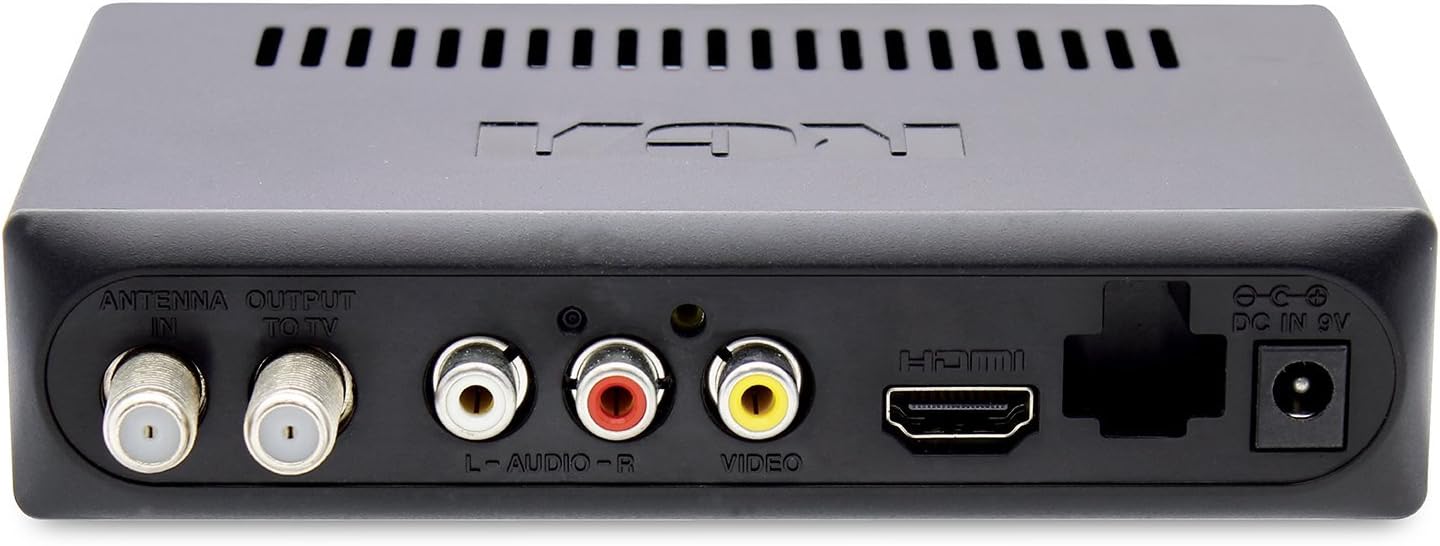
Сүрөт 1: Арткы панелдик байланыштар. This image displays the back of the RCA DTA880 unit, highlighting the 'ANTENNA IN', 'OUTPUT TO TV', 'L-AUDIO-R', 'VIDEO', 'HDMI', and 'DC IN 9V' ports. The USB port is visible on the side.
2. Connect Antenna
- Connect your digital antenna's coaxial cable to the АНТЕННА ИН port on the RCA DTA880.
3. Сыналгыга туташыңыз
Choose one of the following connection methods based on your television's available inputs:
- For Analog TVs (RCA Composite): Connect the included A/V cables (red, white, yellow) from the L-AUDIO-R жана ВИДЕО ports on the converter box to the corresponding input ports on your analog TV.
- Санариптик телевизорлор (HDMI) үчүн: HDMI кабелин (кошумча эмес) туташтырыңыз HDMI port on the converter box to an available HDMI input on your digital TV.
- RF Output (Coaxial): Коаксиалдык кабелди төмөнкүдөн туташтырыңыз OUTPUT TO TV port on the converter box to the antenna input on your TV. This method is generally for older TVs without composite or HDMI inputs.
4. Кубатты туташтырыңыз
- Кубат адаптерин розеткага сайыңыз DC IN 9V port on the converter box.
- Кубат адаптеринин экинчи учун стандарттуу электр розеткасына сайыңыз.
5. Initial Scan
- Turn on your TV and select the correct input source (e.g., HDMI 1, Video 1, TV/Antenna).
- Power on the RCA DTA880 using the remote control or the power button on the unit.
- Follow the on-screen prompts to perform an initial channel scan. This will detect available digital channels in your area.
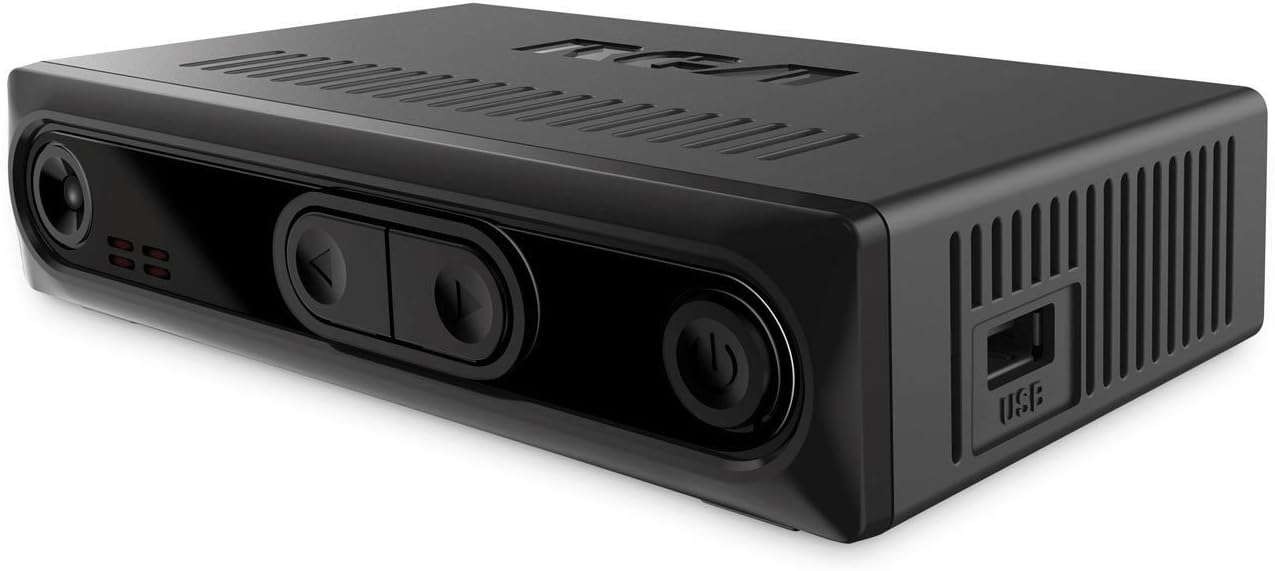
Image 2: Front and Side View. This image shows the front panel with control buttons and the side panel featuring the USB port for external storage.
Иштөө нускамалары
Негизги телевизор Viewing
- колдонуу КАНАЛ +/- каналдарды алмаштыруу үчүн алыстан башкаруу пультундагы баскычтарды басыңыз.
- Үнүн колдонуп, үнүн жөндөңүз VOL +/- пульттагы баскычтар.
- басыңыз INFO button to display current program information.
DVR Recording (with external USB drive)
To utilize the DVR functionality, an external USB storage device (e.g., USB flash drive or hard drive) must be connected to the USB port on the side of the converter box.
- USB дискти туташтыруу: Insert a compatible USB drive into the USB port.
- Format USB Drive: Access the system settings menu to format the USB drive if prompted or if it's a new drive. Formatting will erase all data on the drive.
- Record Instantly: Программаны көрүп жатканда, баскычын басыңыз ЖАЗУУ button on the remote to begin recording. Press ТОКТОТ жазууну бүтүрүү үчүн.
- Жаздыруу графиги: колдонуу EPG (Электрондук программалык колдонмо) баскычына view program listings. Select a program and follow the on-screen instructions to schedule a recording.
- Ойнотуу жазуулары: басыңыз МЕДИА or ОЙНОО button (refer to your remote for exact labeling) to access your recorded programs.
Note: The recording quality and performance may vary depending on the speed and capacity of the connected USB drive. A USB 3.0 drive is recommended for optimal performance.
Ата-энелик көзөмөл
The converter box includes a parental control function to restrict access to certain programs based on ratings. Access this feature through the main menu settings. A PIN will be required to set up and modify parental control settings.
Техникалык тейлөө
- Тазалоо: Конвертер кутучасынын сыртын тазалоо үчүн жумшак, кургак чүпүрөктү колдонуңуз. Суюк тазалоочу каражаттарды же абразивдүү материалдарды колдонбоңуз.
- Вентиляция: Ensure the unit has adequate ventilation. Do not block the ventilation slots on the top and sides of the device.
- Сактагыч: Эгерде түзмөк көпкө колдонулбаса, аны кубат адаптеринен сууруп, салкын, кургак жерде сактаңыз.
Проблемаларды чечүү
| Көйгөй | Мүмкүн себеп | Чечим |
|---|---|---|
| Сүрөт же үн жок | Incorrect TV input selected; Loose cable connections; Power not connected. | Verify TV input matches converter box connection (e.g., HDMI 1, Video 1). Check all cable connections (antenna, A/V, HDMI, power). Ensure power adapter is securely plugged in. |
| No digital channels found | Antenna not connected or positioned correctly; Channel scan not performed. | Ensure antenna is properly connected and positioned for optimal reception. Perform a channel scan through the setup menu. |
| Пульт иштебей жатат | Dead batteries; Obstruction between remote and unit; Remote sensor blocked. | Replace remote batteries. Ensure no objects are blocking the line of sight between the remote and the converter box's IR sensor. |
| Recording issues (stuttering, failure) | Slow or incompatible USB drive; USB drive not formatted. | Use a high-speed USB 3.0 drive. Ensure the USB drive is properly formatted via the converter box's menu. Check available storage space. |
| Volume resets to high after power cycle | Демейки жөндөө. | This may be a default behavior. Adjust volume manually after powering on. Check settings for a persistent volume option if available. |
Техникалык шарттар
| Өзгөчөлүк | Деталь |
|---|---|
| Бренд | RCA |
| Модель номери | DTA880 |
| Interface Type | HDMI, USB |
| Монтаж түрү | Surface Mount, Plug Mount |
| Каналдардын саны | 4 |
| Продукциянын өлчөмдөрү | 6 x 5 x 2 дюйм |
| Элемент Салмагы | 12.8 унция |
| UPC | 062118488002 |
Кепилдик маалымат
This product is covered by a limited manufacturer's warranty. Please refer to the warranty card included in the product packaging or visit the official RCA website for detailed terms and conditions, including warranty period and claim procedures.
Колдоо
For technical assistance, troubleshooting not covered in this manual, or general inquiries, please contact RCA customer support:
- Онлайн колдоо: Расмий RCA колдоо бөлүмүнө кайрылыңыз webсайт (өнүмдүн таңгагын караңыз URL).
- Телефондук колдоо: Consult your product packaging or the RCA webкардарларды тейлөө телефон номерлери үчүн сайт.
When contacting support, please have your product model number (DTA880) and purchase information ready.


