1. Киришүү
This manual provides comprehensive instructions for the safe and efficient use of your Onkyo TX-SR252 5.1 Channel AV Receiver. Please read this manual thoroughly before operating the unit and retain it for future reference. This receiver is designed to deliver high-quality audio and video performance for your home entertainment system.
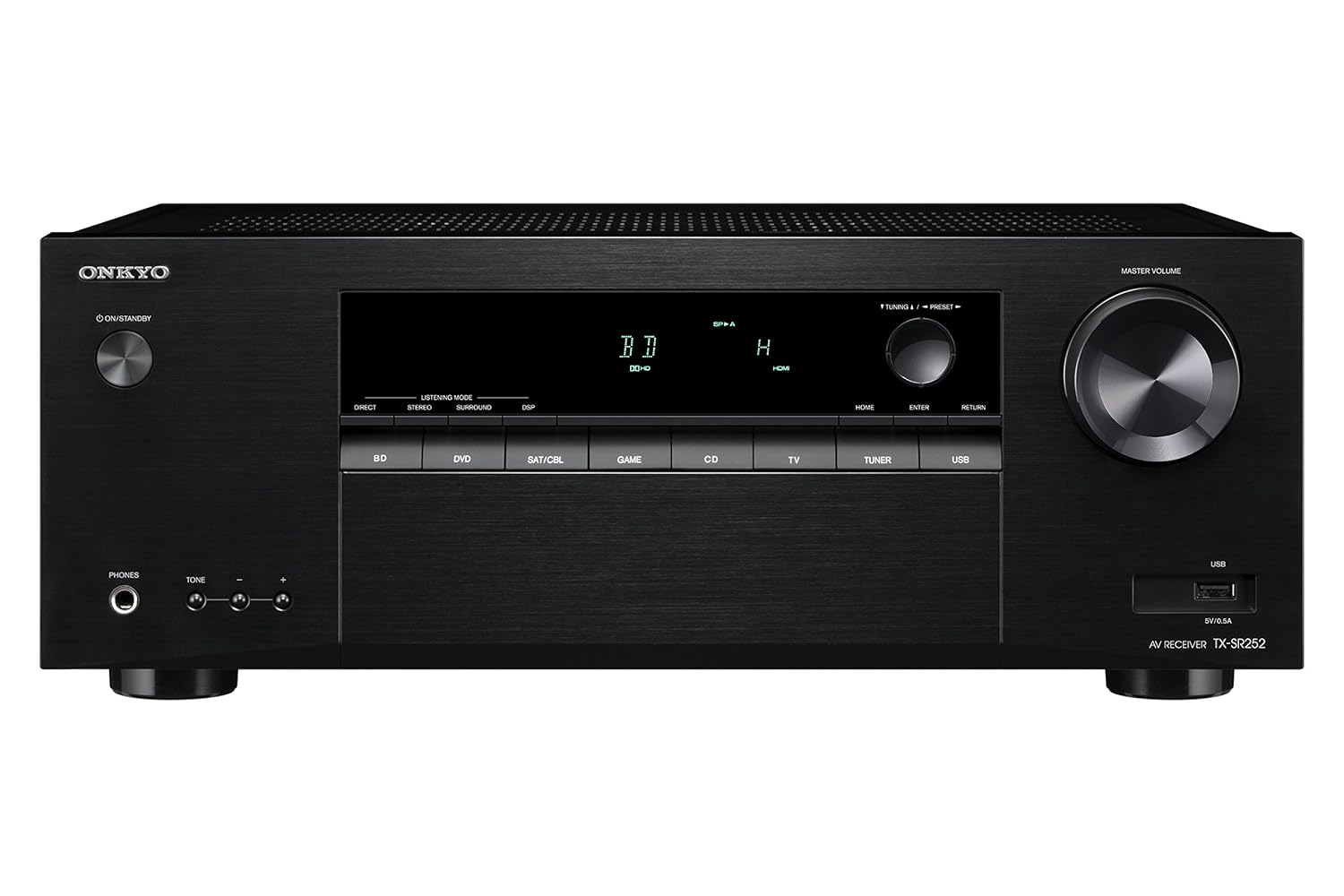
Сүрөт 1.1: Алдыңкы view of the Onkyo TX-SR252 AV Receiver, showcasing its sleek black finish, central display, input selection buttons, and large master volume knob.
2. Коопсуздук маалыматы
Коопсуз иштөөнү камсыз кылуу жана зыян келтирбөө үчүн төмөнкү сактык чараларын аткарыңыз:
- Кубат булагы: Connect the receiver only to an AC power outlet with the specified voltage.
- Вентиляция: Ensure adequate ventilation. Do not block ventilation openings. Maintain a minimum distance of 20 cm (8 inches) from the top and 10 cm (4 inches) from the sides.
- Суу жана ным: Do not expose the receiver to rain, moisture, or excessive humidity.
- Чет өлкөлүк объекттер: Do not insert any objects into the receiver's openings.
- Тейлөө: Бардык тейлөөлөрдү квалификациялуу тейлөө кызматкерлерине тапшырыңыз. Агрегатты өзүңүз ачууга же оңдоого аракет кылбаңыз.
- Тазалоо: Disconnect the power cord before cleaning. Use a dry, soft cloth.
3. Пакеттин мазмуну
Пакетте бардык буюмдар бар экенин текшериңиз:
- Onkyo TX-SR252 AV кабыл алгычы
- Remote Control (RC-909R)
- AA Batteries (x2) for remote control
- FM ички антенна
- AM цикл антеннасы
- Электр кабели
- Ыкчам баштоо колдонмосу (бул санариптик колдонмодо камтылган эмес)
4. Орнотуу
4.1. Компоненттериңизди туташтыруу
Before making any connections, ensure the receiver is powered off and unplugged from the wall outlet. Connect all cables firmly.

Figure 4.1: Rear panel of the Onkyo TX-SR252 AV Receiver, showing various input and output terminals including HDMI, speaker terminals, and digital audio inputs.
HDMI туташуулары
Connect your HDMI-compatible devices (e.g., Blu-ray player, game console, set-top box) to the HDMI IN 1-4 ports. Connect your TV or projector to the HDMI OUT (ARC) port. This receiver supports 4K Ultra HD and HDCP 2.2.
- HDMI IN: 4 ports for source devices.
- HDMI OUT (ARC): 1 port for display. Audio Return Channel (ARC) allows audio from your TV to be sent back to the receiver via the HDMI cable.
Speaker Connections
Connect your 5.1 channel speakers to the corresponding terminals on the rear panel. Ensure correct polarity (+ to + and - to -) for each speaker. The receiver supports 6-ohm impedance speakers.
- FRONT L/R: For your main left and right speakers.
- БОРБОР: For the center channel speaker.
- SURROUND L/R: For your left and right surround speakers.
- SUBWOOFER PRE-OUT: Connect an active subwoofer using an RCA cable.
Санарип аудио киргизүү
For devices without HDMI, use the digital audio inputs.
- ОПТИКАЛЫК САНАРИПТИК ИН: 1 порт.
- COAXIAL DIGITAL IN: 1 порт.
USB порту
A USB port is located on the front panel for playing MP3, WMA, and AAC audio fileфлеш-дисктен.
Антенна байланыштары
Радио кабыл алуу үчүн берилген FM жана AM антенналарын туташтырыңыз.
4.2. Баштапкы конфигурация
After connecting all components and powering on the receiver, follow these general steps:
- Киргизүүнү тандоо: Use the input selector buttons on the front panel or remote control to choose the desired source (e.g., BD/DVD, SAT/CBL, GAME, TV).
- Динамик орнотуу: Access the receiver's on-screen menu (if available) or front panel display to configure speaker settings, including size, distance, and level for optimal sound.
- Аудио режими: Select the appropriate listening mode (e.g., Direct, Stereo, Surround, DSP) based on your content and preference.
5. Иштөө нускамалары
5.1. Негизги операция
- Күйгүзүү/Күтүү: Press the ON/STANDBY button on the front panel or remote control.
- Үндү көзөмөлдөө: Use the MASTER VOLUME knob on the front panel or VOL +/- buttons on the remote control.
- Киргизүүнү тандоо: Press the corresponding input selector button (e.g., BD/DVD, TV, USB) on the front panel or remote.
- Үнсүз: Press the MUTE button on the remote control to temporarily silence the audio.
5.2. Пультту колдонуу

Figure 5.1: The Onkyo RC-909R remote control, featuring buttons for input selection, volume, menu navigation, and audio adjustments.
The supplied remote control (RC-909R) provides full functionality for your receiver. Insert the two AA batteries as indicated in the battery compartment.
- Киргизүү тандоочулары: Dedicated buttons for BD, DVD, SAT/CBL, GAME, CD, TV, TUNER, USB.
- Навигация: Arrow buttons and ENTER for menu navigation.
- Аудио жөндөөлөрү: Buttons for DIRECT, STEREO, SURR (Surround), DSP, BASS +/-, TREBLE +/-.
- Tuner Functions: PRESET +/-, TUNING +/-, BAND.
5.3. Өркүндөтүлгөн функциялар
- Dolby TrueHD and DTS-HD Master Audio: The receiver automatically decodes these high-resolution audio formats when available from your source.
- USB ойнотуу: Connect a USB flash drive to the front USB port. Select 'USB' as the input source and use the remote control to navigate and play audio files (MP3, WMA, AAC).
- FM/AM тюнер: Use the TUNER input. Press BAND to switch between FM and AM. Use TUNING +/- to manually tune or PRESET +/- to select stored stations. The receiver supports 30 FM/AM random presets.
- RI (Remote Interactive) Control: If you have other Onkyo components with RI compatibility, you can control them using the TX-SR252's remote control.
6. Техникалык тейлөө
- Тазалоо: Disconnect the power cord. Use a soft, dry cloth to wipe the exterior surfaces. Do not use abrasive cleaners or solvents.
- Вентиляция: Periodically check that the ventilation openings are clear of dust and obstructions.
- Батареяны алмаштыруу: Replace the remote control batteries when its operating range decreases. Use two new AA batteries.
7. Кыйынчылыктарды
If you experience issues with your receiver, consult the following table before contacting service personnel.
| Көйгөй | Мүмкүн себеп | Чечим |
|---|---|---|
| Күч жок | Электр зымы ажыратылды. | Ensure power cord is securely plugged into the receiver and wall outlet. |
| Үн жок | Incorrect input selected; speakers not connected; Mute is active; volume too low. | Select correct input; check speaker connections; deactivate Mute; increase volume. |
| No picture via HDMI | HDMI cable not connected properly; incorrect input selected on TV/receiver. | Check HDMI cable connections; ensure correct input is selected on both receiver and TV. |
| Пульт иштебей жатат | Batteries are depleted or inserted incorrectly; obstruction between remote and receiver. | Replace batteries; ensure correct polarity; remove obstructions; point remote directly at receiver. |
8. Техникалык шарттар
| Өзгөчөлүк | Деталь |
|---|---|
| Модел | TX-SR252 |
| Power Output | 100 W/channel (6 ohms, 1 kHz, 0.7% THD, 1 channel driven, IEC) |
| Динамик импедансы | 6 Ом |
| HDMI кириш/чыгыштары | 4 In / 1 Out (4K Ultra HD / HDCP 2.2 / 4:4:4 Color Space) |
| Санарип аудио киргизүү | 1 Optical, 1 Coaxial |
| USB порту | 1 (Front, for MP3/WMA/AAC playback) |
| DAC | 192 kHz/24-bit for all channels |
| Түнер алдын ала орнотуулары | 30 FM / AM кокустук алдын-ала орнотуулар |
| Surround Sound | Dolby TrueHD, DTS-HD Master Audio |
| Өлчөмдөрү (W x Y x D) | 44 x 17 x 33 см (болжол менен 17.3 x 6.7 x 13 дюйм) |
| Салмагы | 7.3 кг (болжол менен 16.1 фунт) |
| Power Source | AC |
9. Кепилдик жана колдоо
Your Onkyo TX-SR252 AV Receiver comes with a 1 жылдык кепилдик сатып алынган күндөн тартып. Кепилдик дооматтары үчүн сатып алганыңыздын далилин сактап коюңуз.
For technical support, service, or further inquiries, please contact your authorized Onkyo dealer or visit the official Onkyo webаймактык колдоо маалымат сайты.


